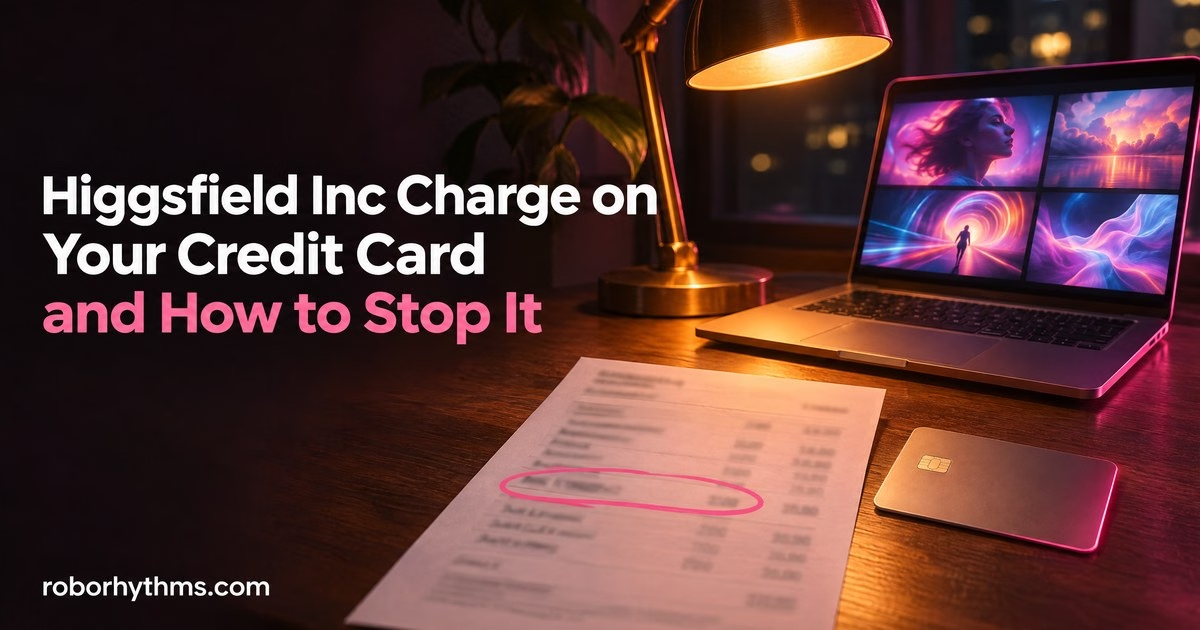
What’s Changed: A Higgsfield Inc charge is a payment taken through higgsfield.ai, usually a plan renewal on the date you first paid, a credit pack or an upgrade. Higgsfield refunds only a first purchase within 7 days with zero credits used, and it has no phone app, so an Apple or Google charge for “Higgsfield” came from a copy.
A Higgsfield Inc charge on your credit card is a payment taken by Higgsfield Inc., the San Francisco company behind the higgsfield.ai video and image generator.
Most of these charges are a plan that renewed, a credit pack bought on top of a plan, or an upgrade that billed the difference on the spot.
The charge confuses people because the company bills in more than one way.
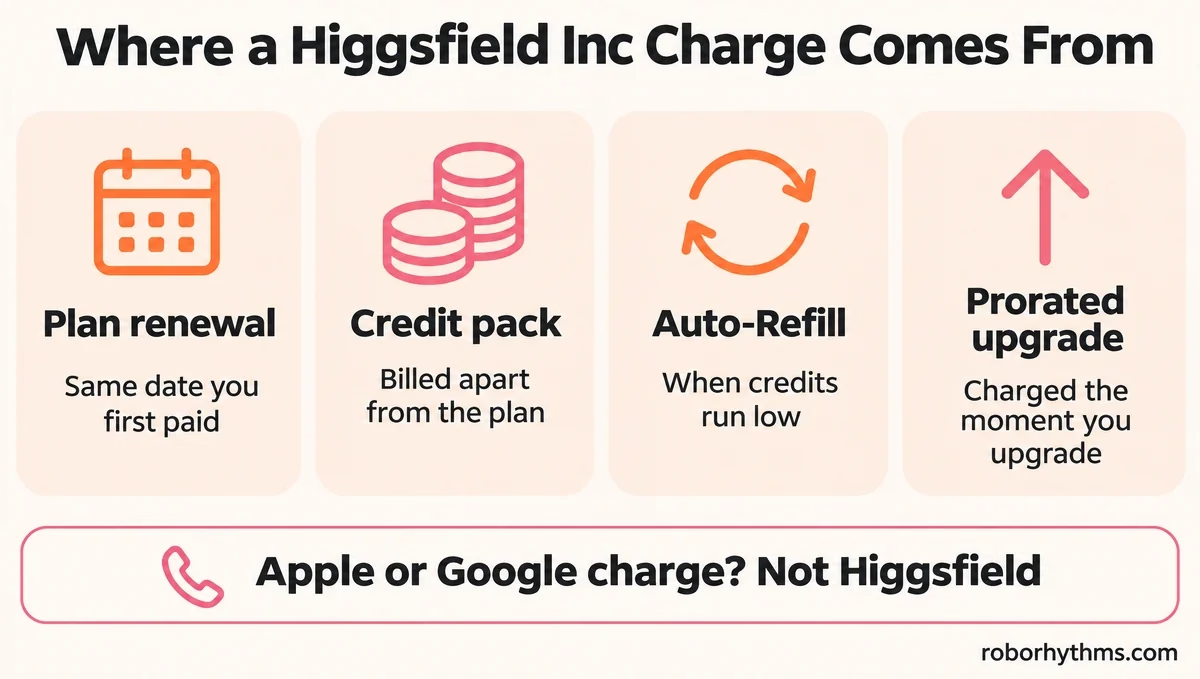
Higgsfield charges a plan on the same calendar date every month or year, and its help center lists credit packs and Auto-Refill top-ups as separate charges from the plan.
I pay for a Higgsfield Pro plan myself, and my own billing history mixes those line types in a single month.
This guide matches each kind of charge to what you see on your statement, then covers how to cancel, when a refund is possible and when a bank dispute makes sense.
Every policy quote below was read on Higgsfield’s own pages on November 26, 2026, with the date of each page noted.
What Is the Higgsfield Inc Charge on Your Credit Card?
The Higgsfield Inc charge on your credit card is a payment for something on a higgsfield.ai account, usually a plan renewal, a first payment, a credit pack, Auto-Refill or a prorated upgrade.
Higgsfield’s billing help (updated August 28, 2026) also names local tax, the end of a promo price and a second account on the same card.
What is Stripe: The payment company that runs Higgsfield’s checkout, so Higgsfield’s own staff have no access to your card details and no way to charge your card by hand.
Higgsfield Inc. is the legal name on its Terms of Use (updated October 23, 2026), at 535 Mission St., 14th Floor, San Francisco.
Payments go through Stripe Checkout only, and the accepted methods are Visa, Mastercard, Amex, JCB, Apple Pay and bank payments. PayPal and crypto are not accepted, so a “Higgsfield” charge on PayPal is worth a closer look.
| Kind of charge | When it lands | How to spot it | Refundable? |
|---|---|---|---|
| Plan renewal | Same calendar date as your first payment, monthly or yearly | Your plan’s list price plus tax | No, renewals are never refunded |
| First payment | The day you subscribe, or the day a $0 trial converts | Often a lower first-month price | Within 7 days, if zero credits were used |
| Credit pack | The moment it is bought | A separate charge from the plan | Within 7 days, if none of its credits were used |
| Auto-Refill | Whenever credits drop below your threshold | Repeats in the amount you picked | Within 7 days, if unused |
| Prorated upgrade | The moment you upgrade mid-cycle | The price difference, charged at once | At Higgsfield’s discretion within 7 days, if the new credits are unused |
| Temporary hold | Beside a real charge | Shows as pending, then vanishes | Not a real charge, it drops off by itself |
Rules checked against Higgsfield’s Terms of Use (October 23, 2026) and its billing and refund help articles, November 26, 2026.
My own account shows how these mix in one month. The ledger has a “Subscription Credits” grant of 600 on November 9, 2026, the day the Pro plan was bought, and a separate “Credit Package” of 1,000 credits on November 23. Those are two charges on the card, two weeks apart, from one account.
To match a charge you don’t recognise, sign in and open Manage Account, then Subscription, then Upcoming Invoice, then All invoices.
Higgsfield generates an invoice for every payment, so the amount on your statement should match one of them. Plan names and sale prices change often, so check the invoice first and the Higgsfield pricing breakdown second.
What If Apple or Google Charged You for a Higgsfield App?
An Apple or Google Play charge for a “Higgsfield” app did not come from Higgsfield Inc., because Higgsfield has no mobile app.
Its help page on official platforms (updated September 24, 2026) says “Higgsfield has no mobile apps and no desktop app” and calls any downloadable Higgsfield app “a copy, no matter where it’s listed”.
The copies are live right now. On November 26, 2026, the US App Store listed “Higgsfield: AI Video Maker” from a developer named Felix Lindner, released November 22, with in-app purchases from $5.99 up to $99.99.
A second app, “Prompts for HiggsfieldAl Video” from Maksym Bytko, sells Premium at $9.99 to $59.99 and a $24.99 monthly credit booster.
Cancelling on higgsfield.ai will not touch those charges. Cancel them in your phone’s subscription settings, using Apple’s cancel steps or Google Play’s subscription page, and request any refund from Apple or Google rather than Higgsfield.
Is Higgsfield Legit or a Scam?
Higgsfield is a legitimate company, and a Higgsfield Inc charge is real if you or someone using your card signed up.
The complaints about it are mostly about renewals and refund refusals.
The company is large and funded. TechCrunch reported in August 2026 that Higgsfield raised $400 million at a $5.4 billion valuation.
Its Trustpilot page showed a 4.0 TrustScore from 5,675 reviews on November 26, 2026, with 62% of them five stars and 19% one star.
I still pay for Pro, because the video models are good, and my complaint is with the refund rules. That 19% of one-star reviews is where the billing anger lives.
Higgsfield’s own pages disagree on its address. Its article “Is Higgsfield Legit or a Scam?” (updated November 5, 2026) gives 550 Montgomery St, 3rd Floor, while the Terms and the Privacy Policy (October 31, 2026) say 535 Mission St., 14th Floor. If you ever send a written notice, use the Terms address, since that is the one the contract names.
The scam talk comes from a real pattern. People get renewed after forgetting a plan, find out refunds stop at 7 days, and lose the money.
A strict policy explains it, and the sections below show how to avoid getting caught by it.
How Do You Cancel a Higgsfield Subscription?
You cancel a Higgsfield subscription in Manage Account, under Subscription, and it stops future charges without refunding the current one.
Your plan stays active until the paid period ends, then the account drops to the free plan.
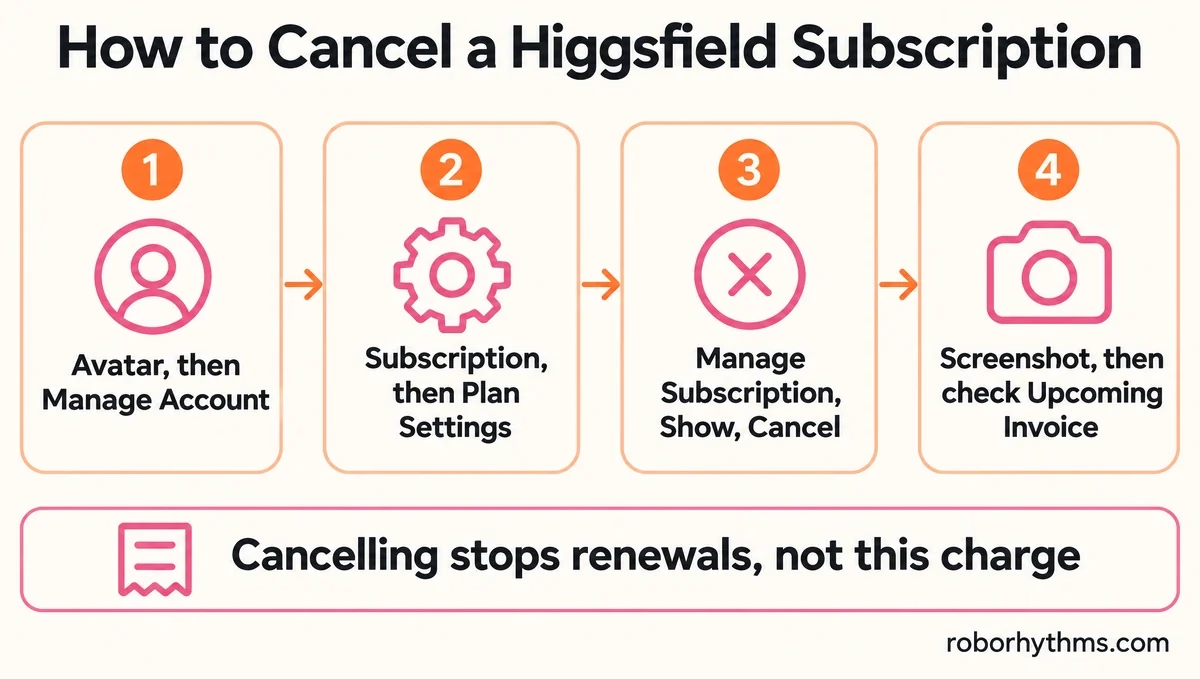
I cancel any plan I am trying out on the day I buy it, and Higgsfield is the service where that habit pays off most. These are the steps from Higgsfield’s cancel help article (updated November 11, 2026):
- Click your avatar on higgsfield.ai and select Manage Account.
- Open Subscription and scroll to Plan Settings at the bottom.
- Open Manage Subscription, select Show, then Cancel Subscription.
- Take a screenshot of the confirmation screen and the date.
- Reopen Upcoming Invoice and check that no next charge is listed.
Team, Scale and Enterprise plans are different. Only the workspace Owner can cancel them, from the Organization settings, so nobody else on the team can stop that bill.
Watch the clock as well as the date. A subscriber whose page said credits were good “through November 24” lost them at 19:57 UTC that day, because the cycle ends at the minute you first subscribed, in UTC. The exact time sits behind a small info icon under Manage Account, then Subscription.
Here is what survives a cancel, per Higgsfield’s cancel help article:
- Subscription credits stay usable until the paid period ends, then expire.
- Credit pack, Auto-Refill and Boost credits stay on the free plan until their 90-day validity runs out.
- Your account stays open on the free plan.
- No money comes back, because “Cancellation does not include a refund.”
If you would rather keep Higgsfield on a cheaper plan, downgrade instead of cancelling. A downgrade waits until your next billing date, so you keep what you paid for this cycle.
If the charge followed a trial started inside Claude or ChatGPT, the trial’s own cancel steps are in Higgsfield’s free plan guide and the Claude connector guide.
Does Deleting Your Higgsfield Account Stop the Charges?
Deleting your Higgsfield account is not the same as cancelling the subscription, so cancel first and delete second.
One subscriber wrote that Higgsfield still charged over $200 after they had cancelled and closed their account.
A cancel with no proof is hard to argue later. A Danish subscriber who believed they had cancelled was billed four more months, 1,670.67 DKK in total, and wrote that they “never received a cancellation confirmation email”.
Support’s records showed the cancel after the last renewal, and that is why the screenshot step above matters.
Can You Get a Higgsfield Refund?
A Higgsfield refund is possible only on a first purchase, within 7 days, with zero credits used, and renewals are never refunded.
Section 9.3 of the Terms sets that rule, and the help center adds a fee of up to 6% on any approved refund.
The rule I’d hold Higgsfield to is a grace window for renewals nobody has touched, and it does not offer one. One subscriber asked for a refund five minutes after a renewal and was still refused, losing 70 EUR.
Here is the full rule set from the refund help articles (updated August 31 and October 24, 2026):
- Eligible: an initial purchase, within 7 days or what your local law allows, with zero credits used.
- Never eligible: automatic renewals, and add-ons that unlock features rather than credits.
- Usage means credits: logging in or browsing does not count, and free or Unlimited model generations don’t spend credits, so they don’t void a refund.
- One credit ends it: “Refund eligibility is binary”, so a single paid image closes the door no matter how many credits remain.
- Annual plans: within 7 days and unused, you choose a full refund or a switch to monthly with the 11 unused months refunded.
- EEA and UK: a 14-day right of withdrawal applies, though it ends early once you start using what you bought.
- Timing: the money returns to your card in 5 to 10 business days, and the plan ends the moment the refund is processed.
The trial is the trap that catches people out. A subscriber charged $49 when a $0 three-day Plus trial converted was told by support that it was “the renewal that followed your trial”, according to their post, so the refund was refused.
The same post says a reminder email arrived before the charge, which is the one thing Higgsfield did right in that case.
Accidental purchases count as ordinary purchases. Higgsfield’s accidental-charge article names an upgrade by mistake, annual instead of monthly, a credit pack by mistake and a duplicate charge, all handled by the standard 7-day rule.
A mistaken annual Team plan shows the catch: its buyer had already made a couple of generations, which under the rule above is enough to void a refund.
How Do You Ask Higgsfield for a Refund?
You ask for a Higgsfield refund by emailing support@higgsfield.ai, or using the contact page, from the email on your account. Include the purchase date, the amount and a line saying no credits were used, because the help center says that note speeds up checking.
Expect the first answer to be automatic. A Higgsfield team member replied in the annual plan thread that “The first reply is automated” and that the wait for a human “can vary”. Do not read that first email as a final no.
Before: “I want a refund for Higgsfield. Please help.”
After: “Hi, I am requesting a refund under your 7-day policy for account name@example.com, for the $49.00 charge on November 24, 2026 listed in All invoices. No credits from this purchase have been used. Please also confirm in writing that auto-renewal is off.”
The second version gives support everything the help article asks for in one message. It also asks for written proof that auto-renewal is off, the proof the Danish subscriber lacked when their renewals were refused.
Why Did Higgsfield Charge You Twice?
Higgsfield usually charges twice because two accounts share one card, or because a credit pack, Auto-Refill or an upgrade billed separately from the plan.
Its billing help lists “Second account” as a cause in plain words: if two accounts are registered to the same card, both are charged.
The second-account rule is the one that surprised me most, because it is so easy to trigger. Signing in once with Google and once with an email address can create two accounts, each with its own plan on the same card.
Use this table to match what you see:
| Symptom | Likely cause | Fix |
|---|---|---|
| Two plan charges on the same day | Two Higgsfield accounts on one card | Sign in with every email you use and cancel the extra plan |
| The second month costs more than the first | The first payment was a promo price | Normal renewal at list price, so downgrade or cancel before the next date |
| A charge in the middle of the month | A credit pack, Auto-Refill or an upgrade | Check All invoices and turn off Auto-Refill |
| A charge right after a $0 trial | The trial converted into a paid plan | Cancel now and ask support straight away |
| The amount moves a little each month | Tax, or currency conversion on a non-dollar card | Compare the invoice in dollars, not the bank’s converted figure |
| A pending charge that disappears | A temporary authorization hold | Wait, it drops off by itself |
Promo prices explain a lot of “higher than expected” charges. During its late-November 2026 sale, Higgsfield sold Plus with a cheaper first month that renews at the full list price, so the second charge is the real price arriving.
Small moves on a foreign card are normal too. The Danish subscriber’s charges for the same plan ran from 410.11 to 423.69 DKK across four months, the kind of drift currency conversion and tax produce.
Should You Dispute a Higgsfield Charge With Your Bank?
You should dispute a Higgsfield charge with your bank only after support refuses a valid request, or when nobody on your card ever signed up.
Higgsfield’s billing help warns that “a chargeback can result in permanent account restrictions”, so try support first if you want to keep the account.
What is a chargeback: A request to your card issuer to reverse a payment, which the issuer then investigates with the merchant.
My advice is to treat a chargeback as the last step, and to describe the charge honestly when you file it.
If you signed up and forgot to cancel, say that the renewal was cancelled or refused for a refund, and attach your screenshots and support emails. Calling an authorized purchase fraud tends to fail, because the merchant can show the original checkout.
Check these before you call a charge unauthorized:
- Search every email address you own for a Higgsfield receipt or welcome message.
- Ask anyone who shares the card, including a work team, whether they signed up.
- Check whether a trial was started through Claude or ChatGPT.
- Look at your phone’s App Store or Google Play subscriptions for a copycat app.
Disputes have deadlines. The Consumer Financial Protection Bureau says to send a written billing error notice to the card company within 60 calendar days after the charge appeared on your statement. A slow support ticket can cost you that option.
If nobody on the card signed up at all, report it to your bank as unauthorized and ask for a replacement card.
Why Did Your Bank Decline a Higgsfield Payment?
A Higgsfield payment usually fails for one of five reasons, which are low funds, a bank decline such as a fraud flag, an expired card, wrong card details or an unfinished 3D Secure check.
Higgsfield’s failed-payment help lists those causes and says Stripe retries a failed renewal automatically.
A failed renewal limits generations and Unlimited access until the payment goes through, and an unpaid plan is eventually cancelled.
If your bank flagged a payment you did mean to make, approve it in the bank’s app and pay the open invoice, which is the fix I reach for first.
Quick Takeaways
- A Higgsfield Inc charge comes from higgsfield.ai, almost always a renewal on the date you first paid, a credit pack, Auto-Refill or an upgrade.
- An Apple or Google charge for a “Higgsfield” app came from a copycat, because Higgsfield has no mobile app.
- Cancel in Manage Account, under Subscription, screenshot the result and check that no upcoming invoice remains.
- Refunds cover only a first purchase within 7 days with zero credits used, and renewals are never refunded.
- Two accounts on one card are both charged, so check every email you might have signed up with before disputing.
