
What’s Changed: Grok now runs one shared weekly usage pool across Chat, Imagine, Voice, and Build, sitting on top of a rolling short window. Most “not resetting” reports are people watching the wrong meter, though a real frozen 0% bug exists too. Here is how to tell which one you have and get access back.
A Grok weekly limit not resetting is one of the most common complaints in the Grok community right now, and if the meter reads 0% used while every generation still gets blocked, you are not imagining it.
This confusion has spread since xAI reworked its limits, and the tricky part is that two completely different things wear the same “you hit your limit” mask.
One is a design choice that feels like a bug. The other is a genuine glitch. Telling them apart is the whole game, because the fix for one does nothing for the other.
Here is what I want you to walk away with: how Grok’s reset really works now, when your access returns, the quickest ways to unstick a frozen meter, and when the smarter move is to stop feeding a shared pool and use something built for the kind of chatting you do.
I will keep the pricing and the fixes concrete so you can act in the next five minutes.
Why Is My Grok Weekly Limit Not Resetting?
A Grok weekly limit not resetting is usually a clock mismatch, not a broken account.
Grok runs two limits at once now: a rolling short window that refills gradually and a fixed weekly compute pool that refills on a set date. If you expect a clean midnight reset, both will look stuck.
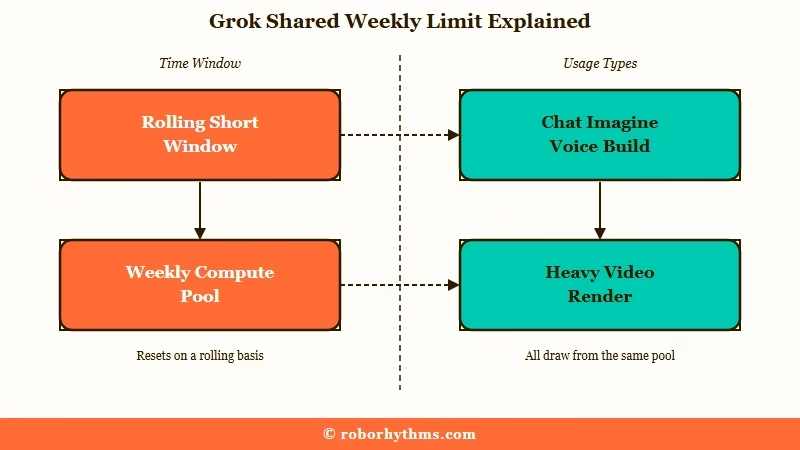
In June 2026 xAI merged Chat, Imagine, Voice, and Build into a single shared weekly usage pool. That was a real shift, and it is why the old “wait until tomorrow” habit stopped working.
The way I see it, the platform changed the rules faster than it changed the way it explains them, so users are left guessing which meter they are even looking at.
What is the weekly usage pool: One combined allowance across all Grok products, where a heavy video render and a quick chat both draw from the same weekly balance.
There is a bigger backdrop here too. xAI is now a subsidiary of SpaceX after the largest private merger on record, and the whole plan leans on moving compute into orbit because ground-based data centers are running short on power.
When compute is the bottleneck, tightening usage limits is the lever that gets pulled first. That is the pressure sitting behind every shrinking quota.
If you mostly use Grok for companion chat, Candy AI meters chat separately: text is unlimited on its paid plan, and images and voice run on tokens.
Does Grok Reset on a Fixed Time or a Rolling Window?
Grok resets on both a fixed weekly schedule and a rolling short window at the same time.
The official docs say the weekly pool resets on a set weekly date shown in Settings. Independent rate-limit guides and daily users describe a rolling window of roughly two hours for short-term caps. Both are right, which is why it feels contradictory.
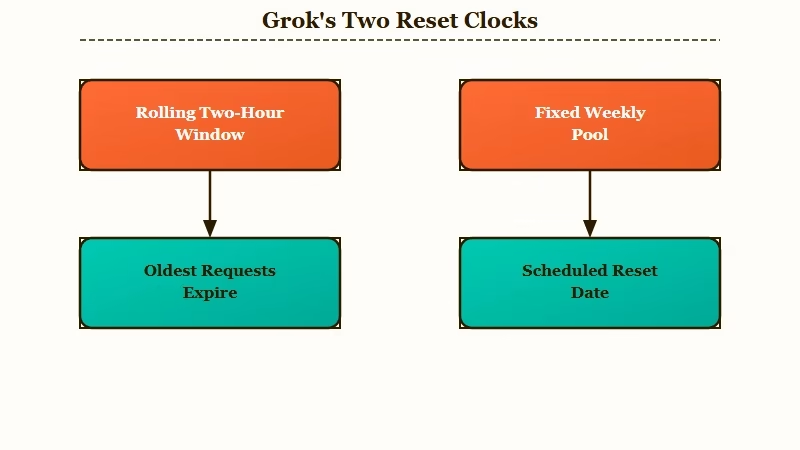
This is the part almost no guide reconciles, and it is where I would start any diagnosis. Your per-session prompt cap behaves like a conveyor belt: as each old request ages past the window, its slot reopens. Your weekly compute pool behaves like a monthly phone plan: it sits until the billing-style reset date arrives.
What is a rolling window: A limit that refills gradually as your oldest requests expire, rather than dumping your full allowance back at a single fixed time.
So when someone says their weekly limit will not reset, they are often staring at the rolling window and expecting weekly behavior, or staring at the weekly pool and expecting a two-hour refill.
I have found that naming which meter you are on removes about half the panic instantly. Our full breakdown of Grok’s weekly usage limits walks through where each number lives if you want the deeper map.
When Will My Grok Usage Come Back After Hitting the Limit?
Your short-window usage returns within a couple of hours, while the weekly pool waits for its scheduled reset date.
For the rolling cap, capacity trickles back as your oldest requests pass the window, not all at once. For the weekly pool, the exact return time sits in Settings under Usage.
Open Settings, then Usage. You will see a progress bar, a percentage breakdown by product across API, Build, Chat, Imagine, and Voice, your weekly reset date and time, and any extra usage credits. That screen is the single source of truth, and I check it before trying any fix.
Example scenario: Say you burn through your image cap at 3:00 PM. The rolling window does not hand your full allowance back at midnight. The oldest requests start aging out around 5:00 PM, so a few slots reopen first and the rest trickle back over the following hours.
What surprised me most is how many people never open that Usage tab and just assume the reset failed. More often than not, the reset date is sitting right there, days away, doing exactly what it is supposed to do.
Is a Grok Weekly Limit Stuck at 0% a Bug or Not?
A meter showing 0% used while you are still blocked is usually a display glitch, not a spent quota.
This is the genuine bug people report: the counter reads empty, sometimes frozen for a day or two, and a “buy more” button appears where generation used to be. It is a front-end sync problem more than a billing one.
I would separate this cleanly from the clock mismatch above. If your Usage tab shows real consumption climbing, that is the system working as designed and you hit a normal cap. If it shows 0% and still refuses you, that is the one worth actively unsticking or reporting.
The reason this matters is trust. When the number and the behavior disagree, people assume they got charged for nothing, and sometimes they upgrade in frustration when a refresh would have fixed it. Before you spend a cent, confirm which situation you are in.
How Do I Fix a Grok Weekly Limit That Will Not Reset?
Most stuck-meter cases clear with a session refresh, and the rest need the right clock or a support ticket.
A frozen 0% display almost always responds to clearing your session. A genuinely maxed weekly pool needs the free-tier fallback or a wait. A passed reset date that never refilled needs xAI support.
A stale session causes the visible-bug version more often than any genuine server fault, so I would run this sequence in order before doing anything drastic:
- Hard refresh the page with Ctrl+Shift+R, or pull to refresh on mobile.
- Log out of Grok and back in to clear a stale session token.
- Open Settings, then Usage, and read the real reset date and per-product breakdown.
- If the meter shows 0% but you are still blocked, try a private window or a different browser.
- If the weekly pool is genuinely maxed, drop to free-tier Chat or Voice, which reset on their own separate schedule.
- If the reset date has already passed and nothing came back, contact xAI support with a screenshot of your Usage tab.
That free-tier fallback in step five is the trick almost nobody mentions. Even when your paid weekly pool reads 100 percent used, the free-tier limits on Chat and Voice are separate and keep working on their own timer, so you are rarely fully locked out.
| Symptom | Likely cause | Fix |
|---|---|---|
| Meter shows 0% used but you are blocked | Display or caching glitch | Hard refresh, log out and back in, open a new tab |
| Hit the limit hours ago, still nothing back | Rolling window has not aged out yet | Wait for oldest requests to pass the window, check reset time in Settings |
| Weekly pool at 100%, everything locked | Shared pool exhausted across features | Use free-tier Chat and Voice, or wait for the weekly reset date |
| Reset date passed, pool still full | Genuine account-level bug | Contact xAI support with a Usage tab screenshot |
| Generations vanish and quota keeps dropping | Failed mid-process jobs still count | Stop retrying stuck prompts, cancel frozen jobs fast |
Do Failed or Blocked Grok Generations Still Use My Quota?
Some failed generations burn quota and some do not, and knowing which saves you real usage.
Prompts blocked before processing generally do not cost you anything. Generations that start and then fail typically do count. Requests that queue and time out sit in a gray area that may or may not deduct.
This nuance matters because the common advice, that everything you touch drains your pool, is only half true and it makes people afraid to use what they paid for. What I would avoid is hammering retry on a job that keeps stalling mid-process, since each real attempt can chip away at the balance.
If you want the image and video side of this, our piece on why Grok Imagine stops working covers the quota-drain traps in detail.
Worth flagging too, the fair-use enforcement now spans text, image, voice, and code together rather than per feature, so a heavy coding session can eat into your image allowance later that week. I plan the week’s compute the way I would plan a data cap.
Should You Upgrade to SuperGrok or Switch Platforms?
Upgrading buys you a bigger pool, not a different system, so switching makes sense if the pool itself is the problem.
SuperGrok at 30 dollars raises your caps but still shares one weekly compute meter and still changes without much notice. If your main use is companion or creative roleplay chat, a purpose-built app with its own memory sidesteps the shared-pool math entirely.
Here is how I would think about the tiers before paying more:
| Tier | Price | Weekly pool reality | Best for |
|---|---|---|---|
| Free | 0 dollars | Roughly 10 prompts per 2 hours, text only, no image or video since March 2026 | Light text chats and the lockout fallback |
| SuperGrok | 30 dollars per month or 300 per year | Around 100 prompts per 2 hours, the full Grok model lineup, still one shared weekly pool | Regular users who keep hitting free caps |
| X Premium Plus | 40 dollars per month | The same Grok model access as SuperGrok, with X platform perks bundled in | People who also want ad-free X |
| SuperGrok Heavy | 300 dollars per month | Highest caps and peak-time priority, but quotas have still been cut mid-plan | Power users who need real volume |
The honest catch with the top tier is that even it is not fixed. xAI has trimmed SuperGrok Heavy video caps through a support email while the pricing page still advertised the highest limits, so the plan you bought is not always the plan you have.
If you want the fuller value read, our take on whether SuperGrok is worth it lays out the math.
For companion and roleplay users specifically, this is where I would stop fighting the meter. A dedicated app like Candy AI keeps its own memory and does not put your conversation behind a shared compute pool that a coding session can drain.
If you lean toward anime-style characters, Nectar AI covers that lane without the reset roulette. Both give you the kind of steady access that Grok’s weekly system keeps taking away, and neither asks you to check a Usage tab before you can talk.
Frequently Asked Questions
Why does my Grok say 0% used but I still cannot generate?
That gap usually points to a display or caching glitch, not a spent quota. Hard refresh, log out and back in, or open a private window. If the Usage tab still disagrees with the behavior after that, send xAI support a screenshot.
How long until my Grok weekly limit resets?
The short-window cap refills gradually over about two hours as old requests age out. The weekly pool refills on the fixed date shown in Settings under Usage. Check that date before assuming anything is broken.
Did xAI secretly cut Grok limits in 2026?
Yes, limits have been reduced more than once. SuperGrok voice dropped from 90 to 60 minutes a day, a 33 percent cut, and Heavy video caps were trimmed by email. The pricing pages did not always update to match.
Does hitting my weekly pool also block the free tier?
No. Free-tier Chat and Voice run on a separate allowance that resets on its own schedule. Even at 100 percent on your paid pool, you can usually still send basic messages through the free lane.
What is the best Grok alternative for roleplay chats?
For companion and creative roleplay, an app with its own memory like Candy AI avoids the shared weekly pool entirely. It gives steadier access than Grok’s merged quota, which was built for mixed compute rather than long conversations.
Quick Takeaways
- A Grok weekly limit not resetting is usually a clock mismatch: a rolling two-hour window and a fixed weekly pool running at once.
- A meter stuck at 0% while blocked is typically a display bug, so clear your session before you pay for anything.
- Open Settings then Usage to read your real reset date and per-product breakdown before trying any fix.
- Free-tier Chat and Voice reset separately, so you are rarely fully locked out even at 100 percent.
- If you mainly chat for companionship or roleplay, a dedicated app sidesteps the shared pool and the reset roulette for good.
