
What’s Changed: Grok Imagine moderation now blocks clean, no-banned-word prompts because it predicts what your video might look like before it renders, not just what you typed. Every blocked attempt still counts against your daily quota. You can lower the false blocks by restyling prompts and abstracting real identities, but you cannot switch the safety filter off.
If Grok Imagine moderation keeps refusing prompts that broke no rules yesterday, you are not imagining it and you did nothing wrong. The filter changed underneath you. It stopped grading only the words you typed and started grading the video it thinks those words will produce.
That shift is why a plain request with zero flagged terms now comes back as “content moderated, try a different idea.” And here is the part that stings: every one of those blocked attempts still eats into your daily quota, so you can burn through your limit just hunting for a phrasing that slips through.
I will walk through why the blocks happen, what the filter is really reacting to, the difference between a hard block and a quiet quality throttle, and the exact prompt changes that cut false positives.
If the guessing game is not worth it to you, I will also point to where creators go when they want fewer content restrictions without the metered penalty.
Why Does Grok Imagine Moderation Block Safe Prompts?
Grok Imagine moderation blocks safe prompts because it stopped reading only your text and started predicting your output. A second filter simulates the likely frames and scores them for risk before anything renders, so a prompt with no banned words can still be refused.
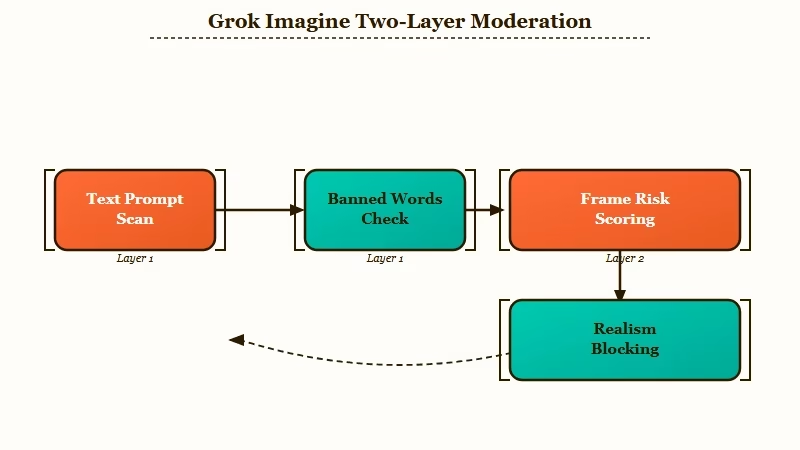
What is predictive moderation: A safety system that simulates what your image or video will probably look like and scores that predicted output for risk before it renders, instead of only scanning your text.
The way I read it, Grok now runs two layers. Layer one is the old-style text scan that catches flagged keywords, named real people, and brands.
Layer two is the new part: it previews the likely frames in latent space, scores them for realism and identity risk, and kills the request before rendering if the predicted result looks too close to a real-world violation.
This is exactly why the old advice stopped working. One camp of guides still tells you to swap out banned words, while other write-ups say plainly that this is not a keyword filter anymore, it is a prediction system deciding whether your future output is risky before it exists.
Both describe real behavior, and the fix follows from it. Word-swapping alone fails now because the block is aimed at the picture Grok predicts, not the sentence you wrote.
None of this came out of nowhere. Regulators worldwide pushed X to restrict Grok’s image tools after they were misused to create illegal, non-consensual images, a crackdown TechCrunch documented in January 2026.
The rules behind those blocks are public, and the document itself moved recently. The policy governing Grok is now published under the SpaceXAI name after the July 2026 rebrand, and the version currently in force is dated effective August 14, 2026. That is worth knowing if you are trying to work out whether the goalposts moved or your prompts did.
The aggressive false-positive filter you are hitting is the blunt instrument built to stop genuinely illegal content, and clean prompts get caught in the same net. If the tighter caps are also biting, the weekly Grok usage limit changes are a separate squeeze worth understanding.
Why Do Blocked Generations Still Use Up Your Quota?
Blocked and moderated generations still consume your Grok quota because the system charges you for the compute it spent evaluating and starting the request. There is no automatic per-generation refund when a prompt is rejected.
This is the detail that turns moderation from an annoyance into a real cost. A policy block or a failed render still deducts from your rolling daily limits, so you do not get a free retry. Sit there rewording a stubborn prompt ten times and you can watch a chunk of your day’s allowance vanish without a single finished clip.
What I would flag here is that paying more does not buy you out of it. A SuperGrok or Heavy plan unlocks features and higher ceilings, but blocked attempts on those tiers still burn credits the same way. That is a different problem from the Grok Imagine limit structure itself, which controls how much you get before the meter runs dry.
Some users have talked their way into subscription-level refunds through support after a rough stretch of moderation, but there is no built-in button that reclaims the quota a single false block ate. Treat every generation like it costs you, because it does.
What Triggers the Filter When Your Prompt Has No Banned Words?
The filter triggers on predicted realism and identity risk, not just vocabulary. Cues that signal photoreal output, named real people, trademarked brands, and kinetic action verbs all spike the risk score even inside an otherwise clean prompt.
The realism signals catch the most people off guard. Terms like “8K photorealistic,” “raw footage,” “CCTV style,” or “documentary realism” tell the system you want something that looks real, and that is precisely what the identity and deepfake guardrails are tuned to stop.
From what I have seen in the community, dropping those four phrases alone clears a huge share of mystery blocks.
Named people and brands are the other big one. Any recognizable public figure or trademarked logo trips high-sensitivity identity protection, because that is the exact misuse the crackdown targeted.
Even benign-sounding prompts get snagged through what users call the red-box loop, where “a woman in a red dress at a gala” gets flagged because the classifier associates that combination with revealing formalwear.
Here is how the common triggers map to a safer rephrase.
| Trigger in your prompt | Why Grok flags it | Safer rephrase |
|---|---|---|
| Photoreal cues (8K, raw footage, CCTV) | Signals the output should look real, which trips deepfake guardrails | Ask for cinematic, illustration, or concept art instead |
| A named real person or celebrity | High-sensitivity likeness and identity protection | Describe a generic figure, like a woman in a red coat |
| Trademarked brands or logos | Copyright and brand-identity filters | Use a generic, unbranded object |
| Kinetic verbs (crash, explosion, attack) | Read as real-world violence or a public-safety hazard | Swap for neutral phrasing like impact sequence |
Why Does My Grok Video Fail at 99 Percent or After I Click Upscale?
A Grok video can pass the early checks and still fail at 99 percent or on upscale because moderation runs again on the finished frames. Adding detail through upscaling can push the output past the realism threshold and trigger a late block.
This one feels the most unfair, because the clip finished rendering and then got yanked at the finish line. What is happening is a final-frame review: the higher-resolution output crosses the realism line the lower-res draft stayed under. The extra sharpness is what tips it over.
I have noticed the same trap with image-to-video. A static image can generate or upload fine, but feeding that exact image into motion mode often trips a separate, stricter video filter that judges movement, camera angles, and physics.
The picture was acceptable frozen and unacceptable in motion, which catches a lot of people who assume a safe still guarantees a safe clip.
The practical takeaway is to stop treating upscale as a free enhancement. If a base clip barely squeaked through, upscaling it is the most likely place the whole thing dies.
What Is the Difference Between a Soft Refusal and a Hard Block?
A hard block is a red policy error that stops the generation outright. A soft refusal is a quality throttle, where the system quietly drops you from 720p to 480p or caps clip length under heavy load, which is server management rather than censorship.
Telling these two apart saves you from chasing the wrong fix. A hard block is the classic red “content moderated” message, sometimes with a cooldown timer, and it means a policy layer stopped you.
A soft refusal looks like degraded output, not an error, and it usually means the servers are slammed and quietly rationing quality.
The way I see it, people waste hours rewording prompts when the real issue was a soft throttle they mistook for a content flag. Below is a quick map of what each failure state means and what to do about it.
| Symptom | Likely cause | Fix |
|---|---|---|
| Red “content moderated” error before rendering | Layer one text filter caught a flagged word or name | Remove named people and high-risk words, then restyle the prompt |
| Generation fails silently around 5 to 10 percent | Layer two frame prediction scored the preview as risky | Lower the realism, add a stylized or fictional tag |
| Video dies at 99 percent or on upscale | Final-frame moderation on the higher-detail output | Keep the base clip modest, avoid upscaling borderline clips |
| Output drops to 480p or a short clip cap | Soft refusal, a server-load throttle, not a policy block | Retry off-peak, this one is not a content flag |
How Do You Reduce Grok Imagine Moderation Blocks?
You reduce Grok Imagine blocks by lowering the predicted realism and identity risk. Stylize the prompt, turn real people into generic figures, swap high-risk action words for neutral ones, and start a fresh session to clear a heightened-sensitivity state.
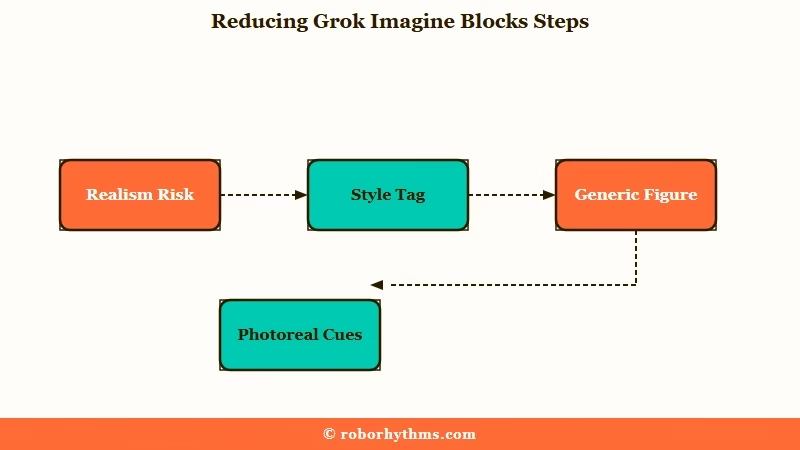
From what I have seen, the single biggest lever is killing the realism signal. Once the system stops predicting a photoreal human, most false positives disappear. Here is the sequence I would run through:
- Add a strong style tag up front, like “cinematic illustration,” “concept art,” or “painterly,” so the predicted output reads as art, not footage.
- Abstract any real identity into a generic description, for example “a pop singer” instead of a named celebrity.
- Strip photoreal cues such as “8K,” “raw footage,” “CCTV,” and “documentary.”
- Replace kinetic or violent verbs with neutral ones, like “impact sequence” for “crash.”
- If blocks keep stacking in one session, start a fresh session, since repeated flags can raise your sensitivity for the rest of that sitting.
The rewrite below shows the whole approach in one move.
Before: “8K photorealistic raw footage of Taylor Swift walking through a crowd, CCTV style, documentary realism”
After: “cinematic concept-art illustration of a pop singer walking through a stylized crowd, painterly lighting, fictional style”
The second version keeps the scene you wanted but drops the named person, the photoreal cues, and the surveillance framing, so the predicted frames score low enough to render.
If you would rather not fight the filter at all, the Grok Imagine alternatives roundup covers tools that block far less.
And if the blocks have you questioning the bill rather than the prompts, whether SuperGrok still earns its $30 a month works through the value side.
What Should You Use if the Blocks Are the Dealbreaker?
If constant false-positive blocks and wasted quota are the dealbreaker, a managed companion app with built-in generation and fewer content restrictions removes the guesswork, because you are not burning a metered quota on prompts that never render.
What I would recommend depends on why you are frustrated. If the sting is losing quota to blocks that never produced anything, Candy AI runs image generation inside a managed companion platform with fewer creative limits, so there is no separate moderation meter draining every time a prompt gets refused. You are not paying, in credits, to be told no.
If you want a bigger library of characters and a generous free tier to test the waters, Crushon AI is the one I would reach for as a backup. Both skip the predict-and-block loop that makes Grok Imagine feel like a slot machine.
For a head-to-head on where Grok’s companion side lands, the Candy AI versus Grok breakdown covers the tradeoffs in detail.
None of this means Grok Imagine is useless. It still produces strong video when a prompt clears. The question is whether the hit rate is worth the quota you spend getting there.
Frequently Asked Questions
What does the “content moderated try a different idea” error mean?
It means Grok’s safety filter predicted your prompt would produce a policy violation and stopped the generation before rendering. It is often a false positive on a safe prompt, triggered by realism cues, a named real person, or a flagged action word rather than anything you intended.
Does paying for SuperGrok remove Grok Imagine moderation?
No. Paid tiers like SuperGrok and Heavy raise your limits and unlock features, but the content policy applies to every tier. Blocked prompts on a paid plan still get refused and still consume your quota.
Do blocked Grok generations refund my quota?
No. Failed and moderated generations still deduct from your rolling daily limits with no automatic refund. You can exhaust your allowance just testing prompts that never render, so treat each attempt as a real cost.
Why do safe prompts get moderated on Grok Imagine?
Because the filter predicts your visual output and scores it for risk, not just your words. Photoreal cues, real names, brands, and violent verbs spike that score, so a clean prompt with none of the obvious red flags can still be blocked.
Why is Grok Imagine stricter in some countries?
Grok applies IP-based geoblocking to comply with local law. After the 2026 controversies, certain outputs are blocked outright in parts of the EU, UK, and Southeast Asia, so the same prompt can pass in one country and fail in another.
Why has Grok moderation suddenly gotten stricter on my account?
Two things drive it. The policy is versioned and the current one took effect August 14, 2026, so the line can move without any announcement inside the app. Separately, repeated flags within a single session can raise your sensitivity for the rest of that sitting, which is why a run of blocks often eases after you start fresh.
Can you turn Grok moderation off?
There is no user-facing switch. The sensitive-media setting on X only governs what you are shown on the platform and has no effect on what Grok will generate for you.
The acceptable use policy also lists jailbreaking, adversarial prompting and circumventing safeguards among its prohibited uses, naming account suspension or termination as a possible consequence.
Does Grok moderate chat replies too, or only images and video?
Both, though they behave differently. The predictive frame-scoring described above is specific to Grok Imagine, while the same acceptable use policy covers text, and users report refusals and clipped answers on the chat side as well.
Shorter replies are a separate complaint with their own causes, covered in Grok chat nerfed with shorter replies. The restrictions specific to Grok spicy mode are their own case again.
What does Grok's policy never allow, no matter how you phrase it?
The acceptable use policy names these outright: nudifying real people or altering a real person's likeness into an intimate or sexual context, depicting real people in a pornographic manner, deceptive impersonation, defamatory or false-light depictions, and sexualizing children. No prompt rewrite gets around that list.
Quick Takeaways
- Grok Imagine moderation now predicts your output and blocks the likely frames, which is why clean, no-banned-word prompts get refused.
- Every blocked or failed generation still burns your daily quota, and paying for a higher tier does not change that.
- Realism cues like “8K” and “raw footage,” named real people, and violent verbs are the most common silent triggers.
- Restyle prompts as illustration or concept art, abstract real identities, and avoid upscaling borderline clips to cut false blocks.
- If losing quota to false positives is the dealbreaker, a managed app like Candy AI generates without a separate moderation meter.
