
On March 17, 2026, Google flipped a switch that most users completely missed. Gemini Personal Intelligence, a feature that lets Google’s AI read your Gmail, dig through your Photos, and pull from your YouTube history, went free for all US users. No subscription required.
Until last week, Personal Intelligence was behind a paid Gemini Advanced paywall. The expansion to free-tier accounts happened with a short blog post and a privacy disclosure that most people won’t read past the first paragraph.
What it means in practice is that the AI you’ve been using for search and quick answers can now draw on everything you’ve ever emailed, photographed, or watched on YouTube, but only if you opt in.
That’s the part worth sitting with. The feature is opt-in and Google is being careful to say it’s off by default. What they’re less eager to highlight is that once enabled, your prompts and Gemini’s responses become fair game for model training.
Before you tap that “Connect” button, there are three things worth understanding.

What Actually Happened
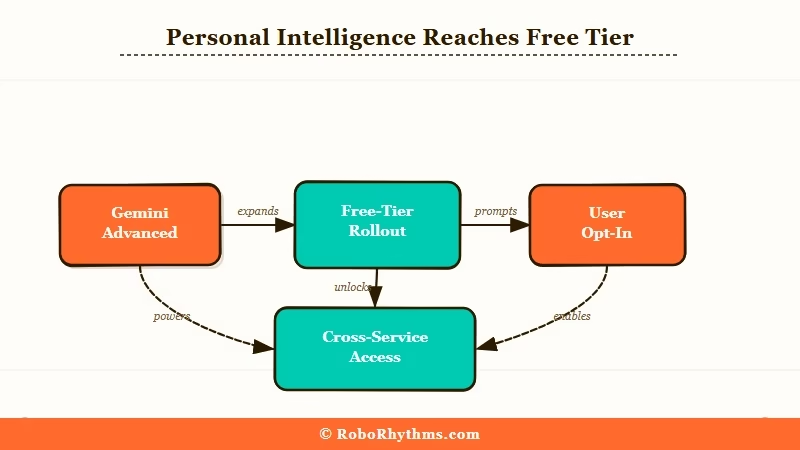
Google’s Gemini Personal Intelligence feature went free for all US users on March 17, 2026, expanding from paid Gemini Advanced to the free tier and giving Gemini access to Gmail, Photos, Docs, and YouTube history.
The rollout covers the Gemini app, Gemini in Chrome, and AI Mode in Google Search.
Google confirmed the expansion in a blog post on March 17, framing it as a “deeper, more personal Google experience.” TechCrunch reported the same day that the feature had been in limited paid testing since late 2025.
Once connected, Gemini can pull from your data to answer personal questions. Ask it to find a flight confirmation buried three weeks deep in your inbox, or locate a photo from a specific trip, or remind you what was agreed to in a thread from three months ago.
The practical use case is real.
The timing is worth noting. Google is in a direct race with OpenAI’s memory features in ChatGPT and Anthropic’s Projects feature in Claude.
Giving free-tier users access to a premium-tier personalization feature is less a gift and more a competitive move designed to accelerate adoption at scale.
If you’ve got a Google account (roughly 3 billion people do), you’re now part of that race whether you asked to be or not.
| Service Connected | What Gemini Can Access |
|---|---|
| Gmail | Full email history, attachments, contact threads |
| Google Photos | Image library, location metadata, dates |
| YouTube | Watch history, liked videos, subscriptions |
| Google Docs | Documents and their content |
| Google Search | Search history and past queries |
Why This Is a Bigger Deal Than It Sounds
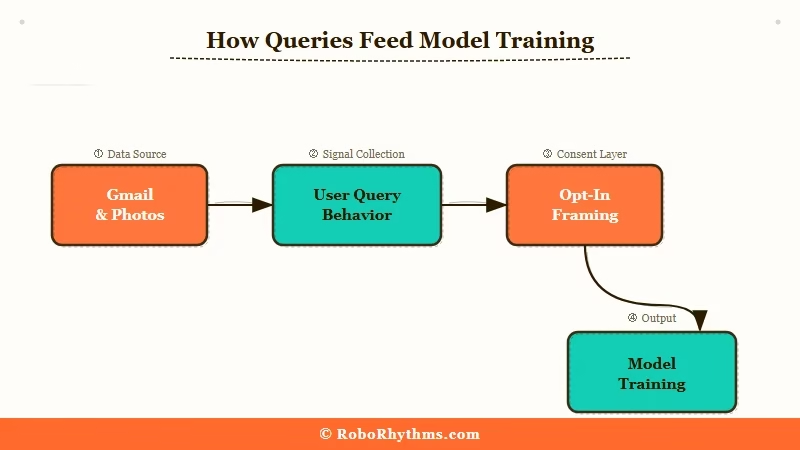
Personal Intelligence is opt-in, but the privacy trade-off is larger than the opt-in screen implies, because your prompts and Gemini’s responses, not just your raw data, can be used to improve Google’s models.
Google says Gemini doesn’t train directly on your Gmail inbox or Photos library. What they acknowledge less prominently is a different mechanism: when you ask Gemini about your emails or documents, the question itself and the model’s answer can be used for training purposes.
You haven’t handed Google your inbox wholesale. What you’ve handed them is a curated stream of your most sensitive questions, framed against your most sensitive documents.
That’s a distinction that gets lost in the fine print. The Washington Post covered these privacy questions in January when the feature was still paid-only, noting that Google’s retention policies for Personal Intelligence prompts don’t clearly separate innocuous productivity queries from deeply personal ones.
Reddit users in r/privacy have been blunter: “The option to opt out is there to provide a placebo sense of privacy” is one of the more upvoted takes since the free rollout announcement.
The other thing to understand is what “opt-in” delivers in terms of control. Google determines which apps are available to connect, how long session context persists, and what gets logged. Users get a toggle. What they don’t get is meaningful oversight into how their query behavior shapes the model.
That’s not unique to Google. OpenAI and Anthropic operate similarly, but the scale is different. Google already holds more personal data on the average user than any other company on earth. Adding AI inference on top of that is a qualitative change, not just a quantitative one.
Worked example of the trade-off:
What you type: “What did I agree to in the NDA I signed last January?”
>
What happens: Gemini accesses your Gmail or Docs to find the document, analyzes it, and answers your question. That exchange, your question plus the AI’s answer, can be retained and used for model improvement. The NDA itself isn’t “uploaded,” but the AI’s interpretation of its most sensitive terms is now part of a training loop.
What This Means for You
Personal Intelligence is genuinely useful for some workflows and a real privacy exposure for others. The decision comes down to what lives in your Gmail.
From what I’ve seen, the users who get the most from this feature are those who live inside Google’s ecosystem already: Gmail as primary inbox, Drive for documents, Photos as their main camera roll.
For those users, Gemini becomes a genuinely capable personal assistant. The productivity lift is real when the use case is finding a confirmation email or tracking a project thread.
The calculation shifts when your Gmail contains financial records, medical correspondence, legal documents, or anything you’d hand over reluctantly if someone asked. Not because Google has malicious intent, but because the risk surface expands.
More prompts containing sensitive context means more potential exposure if systems are ever compromised, and less clarity around government or legal data requests.
Here’s how I’d think through the decision:
- Turn it on if your Gmail is mostly newsletters and work coordination, you already accept Google’s standard data terms, and you want the productivity benefit without paying for Gemini Advanced.
- Leave it off if you use Gmail for sensitive personal or financial conversations, you’ve been moving toward privacy-first tools, or the training-data ambiguity isn’t something you’re willing to accept.
- Check your settings regardless. Go to myaccount.google.com, then Data & Privacy, then “More Google features.” Review which apps are already connected and revoke any you didn’t intend to authorize.
The Android Authority coverage confirmed the feature is US-only for now, with no international rollout timeline. If you’re outside the US, the feature isn’t available yet.
For a broader look at which AI subscriptions still justify their monthly cost in 2026, this breakdown of the best paid AI tools worth keeping is worth checking before you consider upgrading to Gemini Advanced for expanded Personal Intelligence access.
Worth knowing that much of what Gemini Advanced offered is now free.
What Comes Next
Google’s free rollout of Personal Intelligence signals that persistent, personalized AI context will become the default free-tier baseline across all major AI platforms within 12 months. The privacy decisions you make now will be harder to reverse as these systems accumulate more data.
OpenAI has been expanding memory features in ChatGPT for over a year. Anthropic’s approach to AI safety takes a more cautious line on data access by design. Google just closed the gap between its paid and free tiers faster than most expected.
The direction from all three is identical: every major AI will have persistent, personalized context as a free feature, and opting out will feel increasingly friction-filled as the tools become more useful.
What I’d watch for in the coming months: whether Google extends Personal Intelligence beyond the US on a similar fast-track timeline, and whether EU regulators under the AI Act push back on the training-data ambiguity that’s currently the least-scrutinized part of Google’s privacy disclosure.
That ambiguity was manageable when the feature was paid and limited. At free-tier scale and 3 billion accounts, it becomes a materially different story.
For now, the choice is still yours. The question is how long that stays true, and what other AI tools in your stack are making similar moves while you’re focused elsewhere.
