
TL;DR: The agent system prompt that consistently produces sane tool calls has four sections in this order: role and scope, tools with strict schemas, decision rules, and output format. Pair it with a validation layer that runs before the tool executes. This catches roughly 95% of the hallucinated parameter calls a freeform “you are an agent, do the thing” prompt produces.
A working agent in May 2026 is not a model with tools attached. It is a model with tools attached and a structure for deciding which tool to call with which parameters. The structure is the thing that fails in production, and it is the thing most “build an agent in 10 minutes” tutorials gloss over.
A lot of indie builders are rebuilding their agent prompts right now for the same reason: the demo works, the demo gets shipped, the demo writes the wrong contact to a CRM and embarrasses the client. The fix is not a smarter model. The fix is a structured prompt with a validation layer underneath.
This post lays out the four-section prompt structure that closes most of the gap, the validation pattern that catches what slips through, and the “no-tool” test the ICLR 2026 reliability research recommends for verifying the whole thing holds up under real model upgrades.
Why the Reasoning Trap Makes This Worse
The smarter your model, the more likely it is to invent tool calls when it should refuse to act.
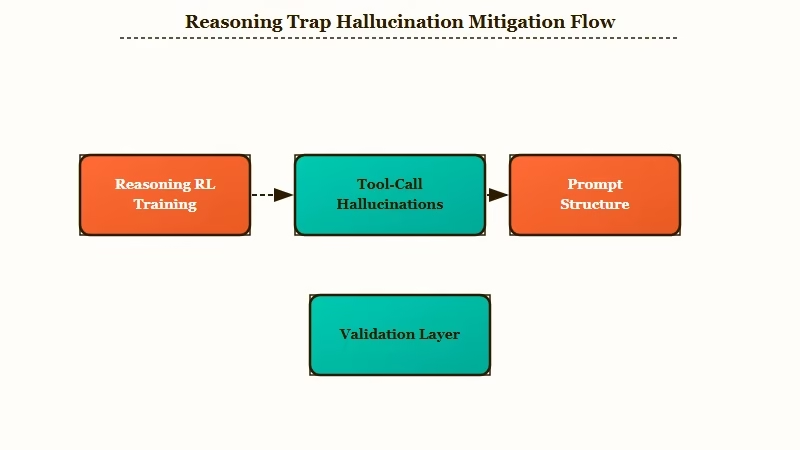
This is the counterintuitive finding from the ICLR 2026 work on agent reliability: training a model for stronger reasoning through reinforcement learning increases its rate of hallucinated tool calls in lockstep with task accuracy.
The researchers describe it as the model’s “tool-reliability-related representations” being trained away as reasoning chains get longer. The part of the network that should restrain a bad tool call is the part that the reasoning RL collapses first.
What this means at the practical level is that if you upgraded from GPT-4o to a thinking-tier model and your agent started doing weirder things in production, that is not a bug in the model. That is the model behaving exactly as the new training pressure shaped it. Smarter at the task, less restrained about tools.
The implication for indie builders is the inverse of the usual advice: do not assume a bigger or thinkier model will paper over a sloppy prompt. The model trends suggest the opposite. The structure you give the agent is doing more work, not less, on every model generation.
There is also a real cost story underneath. Gartner expects over 40% of agentic AI projects to be canceled by 2027 specifically because of reliability concerns.
A survey reported in Asanify’s coverage of the same research put 47% of enterprise AI users at “made at least one major business decision based on hallucinated content.” The cancellation rate is not a model problem; it is a wiring problem, and the prompt is the contract that holds the wiring together.
The Four-Section System Prompt
Every agent system prompt that runs in my client work has these four sections in this exact order: role and scope, tools with strict schemas, decision rules, output format.
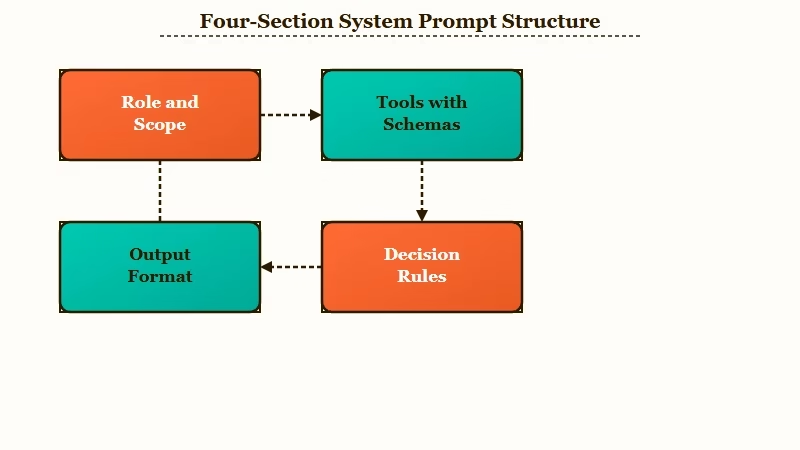
The order matters because the LLM reads top-down and the role section primes everything below it. If the role is vague, the schemas read as suggestions. If the role is tight, the schemas read as constraints.
Here is the structure laid out with worked examples for a research-brief agent that pulls company data, no email-sending, no CRM writes.
Section 1: Role and Scope
One paragraph that names what the agent does and explicitly what it does not do. The “does not do” half is the half most prompts skip and the half that pays the biggest dividend.
Vague: You are a research agent. Help the user.
Specific: You are an agent that researches one prospect at a time and produces a research brief. You do NOT send emails. You do NOT update the CRM. You do NOT make any external calls beyond the tools listed in Section 2 below.
The negative scoping is what stops the LLM from getting creative when the user asks “while you are at it, can you also…” mid-conversation. The role section is the agent’s job description and it is allowed to be narrow.
Section 2: Tools With Strict Schemas
For every tool, list five things in this order: name, purpose, exact input schema, exact output schema, and a “do not use when” clause. The do-not-use clause is the second half of the negative-constraint trick from Section 1.
Tool: fetch_company_data
Purpose: Fetch public firmographic data for a company.
Input schema: { "domain": "string (required, format: 'example.com', no protocol prefix)" }
Output schema: { "company_name": "string", "industry": "string|null", "employee_count": "int|null", "founded_year": "int|null" }
Use when: You need company-level context for the brief.
Do NOT use when: You only need contact-level data, use fetch_contact_data instead.
Two reasons this format works better than the standard “here are your tools” dump:
- The input and output schemas tell the model what shape its call needs to take, which kills roughly half the parameter hallucinations on the spot.
- The do-not-use clause is what stops cross-tool confusion. Without it, an agent that has both
fetchcompanydataandfetchcontactdatawill use whichever one was mentioned more recently in the prompt, not the one that fits the task.
Section 3: Decision Rules
Explicit rules about when to call which tool and in what order. The LLM does not infer ordering well, and a list of conditional rules is far more reliable than a freeform “use your judgment” instruction.
ALWAYS call fetch_company_data first.
If fetch_company_data returns null for industry, call infer_industry_from_website next.
NEVER call fetch_contact_data before fetch_company_data has succeeded.
If any tool call returns an error, log it via log_error and STOP. Do not continue with degraded data.
The “STOP on error” rule is the one most agents need most. Without it, the model will silently try to recover by inventing a placeholder value, which is the source of about a third of the bad CRM writes I have debugged in client work.
Section 4: Output Format
A strict schema for the final output. JSON schema works. The agent should reject anything that does not match before returning.
Output schema:
{
  "company_name": "string",
  "industry": "string",
  "key_findings": ["string", "string", "string"],
  "recommended_next_step": "string"
}
Constraining output is what makes downstream code able to consume the agent’s results without parsing magic. A research brief that comes back as freeform prose is unparseable. A research brief that comes back as a JSON object with four known keys is one json.loads() away from your CRM-write code.
| Section | What it does | What breaks if you skip it |
|---|---|---|
| Role and scope | Anchors the agent’s job and explicit boundaries | Agent does extra “while we are here” actions |
| Tools with schemas | Tells the LLM the shape of every call | Parameter hallucinations and field-name guessing |
| Decision rules | Sequences tool calls and handles errors | Wrong-order calls and silent error recovery |
| Output format | Makes results consumable by downstream code | Parsing layer that breaks weekly on output drift |
The Validation Layer That Catches What Slips Through
Even with a perfect four-section prompt, the agent will hallucinate a parameter roughly once in 30 calls. The validation layer is the safety net that runs between the LLM’s proposed call and the tool dispatch.
This part is non-negotiable for production. The LLM proposes which tool to call with which parameters.
Before the call hits an external system, a schema validator checks that the parameters match the tool’s declared input schema. If they do not, the LLM gets a clear error message back and is asked to retry.
The validation layer is where you catch the calls that the prompt structure did not prevent. Without it, those calls execute against the CRM, the email service, the payment processor, or whatever else the tool is wired to. That is the difference between “agent made a weird call I can see in the logs” and “agent emailed the wrong vendor for a $40,000 quote.”
If you are building on Make.com for the workflow layer, the validator can be a simple JSON schema check node between the LLM step and the action step. If you are building custom AI agents with Dynamiq or any agent framework that supports middleware, the validator is a middleware function that the framework runs before every tool dispatch.
Either way, the structure is the same:
- LLM proposes
{tool: "fetchcompanydata", params: {domain: "acme corp"}}. - Validator checks
paramsagainstfetchcompanydata‘s input schema, noticesdomainis not in the expected format'example.com'. - Validator rejects, sends back error:
'domain' must match format 'example.com', got 'acme corp'. Retry with the company's actual domain.. - LLM retries with
{tool: "fetchcompanydata", params: {domain: "acme.com"}}. Validation passes. Tool runs.
The retry loop should have a hard cap, three attempts in my deployments, after which the agent calls log_error and STOPs per the decision rules in Section 3. The “do not continue with degraded data” rule applies here too. If the agent cannot get a clean tool call in three tries, something is wrong with the upstream data and silent recovery is the worst possible response.
How to Verify the Whole Thing Holds Up Under Real Models
Take your finished agent prompt, remove the tool it needs to complete a known task, and run the task again. A reliable agent refuses with a clear explanation. A hallucinating agent invents a tool call.
The no-tool test comes from the ICLR 2026 reliability research and is the cheapest reliability check you can run on an agent before shipping it. The test takes about 10 minutes per agent.
The procedure:
- Pick a task your agent should be able to complete with its full toolset.
- Edit the system prompt to remove the specific tool that task requires.
- Run the same task against the modified prompt.
- Score the agent’s response on whether it refused the task (good) or invented a tool call to substitute (bad).
A passing agent says something like “I cannot complete this task because the required tool fetchcompanydata is not available. Please confirm the tool is enabled or provide an alternative.” A failing agent invents a call like {tool: "search_company", params: {...}} to a tool that does not exist, or pretends to call the missing tool and fabricates plausible output.
I run this test on every new agent prompt before shipping and again any time the underlying model is upgraded. It catches the kind of regression that creeps in when a new model generation handles refusal differently than the one you tuned the prompt against.
The piece on the Gemini Enterprise Agent Platform covers one example of how platform-level changes can shift the behavior your prompt depends on, and the no-tool test is how you catch the shift before production does.
Wiring This Into a Real Workflow
The four-section prompt is a building block. The full system that ships includes the prompt, the validator, the retry loop, the no-tool test in your CI, and a human approval gate on any tool call that goes external.
For the Make.com or Dynamiq integration, the wiring looks like this:
- Trigger layer: HTTP webhook, schedule, or upstream agent.
- Agent step: LLM call with the four-section system prompt baked in. Returns a proposed tool call.
- Validator step: JSON schema check on the proposed parameters. Returns pass or reject-with-reason.
- Tool dispatch step: only runs on validator pass. The actual side-effect call.
- Logging step: every proposed call, every validation result, every dispatch, into a tracing store you can query.
- Human approval gate (only for external-facing tool calls like email send or CRM write): the agent’s call sits in a queue until a human approves or rejects.
The piece on running Claude Code as a 24/7 agent with an approval queue walks through the same human-approval pattern in a different stack, and the principles transfer. The piece on long-running AI agent memory architecture covers what to do with the trace store as it grows past the point you can browse it manually. The GitHub PR auto-fix agent build is another concrete example of the same validation pattern applied to a different surface.
The thing nobody tells you about agent reliability in production is that the prompt and the validator together get you to maybe 98% clean tool calls. The last 2% is what the human approval gate exists for. That number is not getting to zero with prompt engineering alone, and that is the honest read on the state of the art in May 2026.
Frequently Asked Questions
How do I write a system prompt for an AI agent that calls tools?
A working agent system prompt has four sections in order: role and scope, tools with strict input and output schemas, decision rules for when to call which tool, and a strict output format for the final response. Each section should include explicit negative constraints (“do NOT do X”) alongside the positive instructions.
Why does my AI agent keep calling tools with wrong parameters?
Tool-call parameter hallucinations come from three sources: missing or vague input schemas in the system prompt, ambiguous decision rules about when to use which tool, and no validation layer between the LLM’s proposed call and the actual tool execution. Adding strict input schemas fixes about half. Adding a validator catches most of the rest.
What is the no-tool test for AI agents?
The no-tool test is a reliability check from ICLR 2026 research where you remove a tool the agent needs to complete a known task, then run the task again. A reliable agent refuses and explains why; a hallucinating agent invents a tool call to a tool that does not exist.
The test takes about 10 minutes per agent and catches the kind of regression that creeps in across model upgrades.
Does prompt engineering alone fix tool hallucinations?
No. ICLR 2026 research shows that prompt engineering closes part of the gap but does not eliminate hallucinated tool calls, especially on reasoning-trained models where deeper reasoning chains increase the hallucination rate. The prompt structure plus a schema validator plus a human approval gate on external-facing tool calls is the combination that gets to production-grade reliability.
How do I structure decision rules for an AI agent?
Use explicit conditional rules with strong directives like ALWAYS, NEVER, IF, and STOP. Sequence tool calls in the order they should run, name which tool depends on which, and include an explicit STOP rule for error cases so the agent does not silently recover by inventing data. Freeform “use your judgment” instructions perform worse than rigid decision rules on every model worth deploying.
Is there a free tier or open-source way to do this?
Yes. The four-section prompt structure is just text and costs nothing. The validator can be a JSON schema check in any language: Python’s jsonschema, Node’s ajv, or Go’s gojsonschema.
The paid tools in the agent-reliability space (Maxim AI, Arize, LangSmith) are valuable for tracing and drift detection at scale, but the core reliability gains come from the prompt structure and a basic validator, both of which you can ship for free.
