
What’s Changed: Emochi still loads and its free model still answers. The premium models in its paid plans, though, have been failing since around October 8, with one-line replies, stray code, refusals and messages that will not send. That pattern puts the fault on Emochi’s servers, so switching models and tapping Report & Retry help today, and reinstalling the app does nothing.
Emochi not working can mean two very different problems. One is on your side and clears in a minute. The other lives on Emochi’s servers, and nothing you do to your phone will touch it.
Right now it is mostly the second kind. Juniper, Green Apple and Rosemary, the premium models that come with Emochi’s paid plans, have been giving short or broken replies for days while the free model keeps working. It bothers me that the people paying for a plan are the ones locked out of what they paid for.
This guide shows how to tell which problem you have and which fixes still work, down to what each Emochi error message means.
It also covers getting money back for a month of broken models, and where to go if you are done waiting.
Why Is Emochi Not Working Right Now?
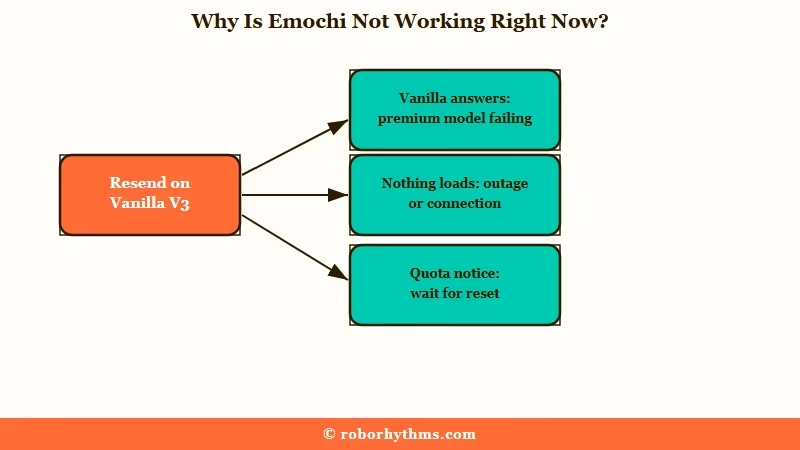
Emochi is not working right now because its premium models are failing on the server side.
Since around October 8 they have returned one-line replies and failed sends, while Vanilla V3, the standard free model, keeps answering.
What are premium and flagship models: Emochi’s premium models, such as Juniper and Green Apple, come with paid plans. Flagship models, such as Lychee, cost Mochi, the app’s currency, on every message.
The first reports came on October 8, when one user found Rosemary had stopped answering and Green Apple filtering even mildly suggestive chats, on the app and the website alike.
On October 11, Juniper was printing stray tokens for several users and stopping at “like 200 response letters” with the Long reply setting switched on.
Green Apple fails the same way for some people, ignoring prompts and replying short even on Long. One Plus subscriber put the failure rate at about 7 sends in every 10.
The fastest check takes one message. Switch the chat to Vanilla V3 and send the same line again, and if it answers properly, your account and connection are fine and the premium model is the problem.
Vanilla V3 is the model I switch to first when a premium one goes quiet, and Emochi’s free tier includes it.
If you would rather leave than wait, Candy AI is where I send Emochi regulars who are tired of model roulette. Its Premium plan is $13.99 a month after a $9.99 first month.
Why Does Emochi Keep Breaking?
Emochi had given no public reason for the failures by October 13, but they hit the premium models in the same stretch that two new models, Aoi and Lychee, rolled out.
The models that broke are the ones subscribers pay for.
One subreddit reply puts the timeline plainly: the old models went wrong when Aoi and Lychee arrived.
Lychee came free for a few days and then moved to 3 Mochi a message. One subscriber called the flagships, Lychee among them, the only models stable enough to use through the worst days.
That clashes with Emochi’s own membership copy. It promises “regular model updates, with the majority of new models included at no extra cost for Plus and Ultra users.” My take is that shipping a new paid model while the included ones fail is a product choice, and it tells subscribers where they rank.
Model churn is nothing new on Emochi either. The app retires models on a countdown, so a favorite can disappear even when nothing is broken.
The Play Store will not warn you about any of this. Across the 1,200 newest US Google Play reviews from October 5 to 12, one-star and two-star ratings stayed between 18 and 27 percent of each day’s reviews. None of the 97 low-star reviews since October 10 names Juniper or Green Apple.
No Android update has shipped since September 29, according to the Google Play listing, and the website breaks the same way, so the failures live on Emochi’s servers.
Subscribers fund apps like this one, and companion apps were on track to pull in $120 million from users in 2025, per TechCrunch.
To Emochi’s credit, the free model stayed up the whole time, and failed replies are not supposed to cost any Mochi.
Is Emochi Down for Everyone?
Emochi is seldom down for everyone at once.
When it stops working, the cause is more often one failing model, a used-up quota or a dropped connection, and each one looks different on screen.
Wider failures do happen. In the same week, failed to load errors hit every model for some people, after days of weak memory and odd replies.
Quotas can look like an outage too. Lite plans allow 30 premium-model messages every 8 hours, MAX allows 60 flagship messages in the same window, and Emochi shows when your premium quota resets.
I rule out a quota before blaming Emochi, since the reset time is right there on screen.
| Symptom | Likely cause | Fix |
|---|---|---|
| A premium model gives one-line or garbled replies while Vanilla V3 is fine | The premium model is failing on Emochi’s side | Switch models and use Report & Retry |
| Every model shows “failed to load” | A wider Emochi outage | Wait, then retry later |
| Messages stop sending every few turns | A stuck app session | Close and reopen the app |
| The bot forgets things after a few messages | Long replies eating into memory | Pull the length slider back a notch |
| The chat jumps back to the greeting | Deleting messages back to back | Edit the last message instead |
| Mild scenes get refused | Filtering that varies by model | Move the scene to another model |
What Do Emochi’s Error Messages Mean?
Emochi’s error messages tell you more than they seem to.
Several of them mean the failure happened on Emochi’s side, and two say outright that the failed message cost you nothing.
| Message | What it means | What to do |
|---|---|---|
| “Something went wrong. Please try again.” | A general failure on Emochi’s side, so the message did not go through | Retry once, then switch models if it repeats |
| “Something went wrong. This message is free.” | The model failed after you sent, and no Mochi was charged | Retry, or move to another model |
| “Too many concurrent requests. The system is buffering.” | Emochi’s servers are overloaded | Wait a minute, then retry |
| “Network error. Please check your connection.” | Your own connection dropped | Check Wi-Fi or mobile data, then retry |
| “Connection lost. Tap to retry” | The connection dropped mid-reply, and Emochi says the retry will not use any Mochi | Tap retry |
| “The message failed to send, please tap to retry.” | The send itself failed in the Android app | If retry does nothing, edit the message and send it again |
“Generation timed out” means the model took too long, so retry or switch, and “We are currently under maintenance” means planned downtime. “This Character Is Unavailable” usually means its creator removed the bot or made it private.
Failed generations are marked free, a habit I wish more apps copied, so a Report & Retry on a broken model costs you nothing but a few seconds.
How Do You Fix Short or Broken Replies on Emochi?
The fix for short or broken Emochi replies is to stop fighting the failing model.
Retry once, move the scene to a model that works, and tighten your instructions while Emochi repairs the premium ones.
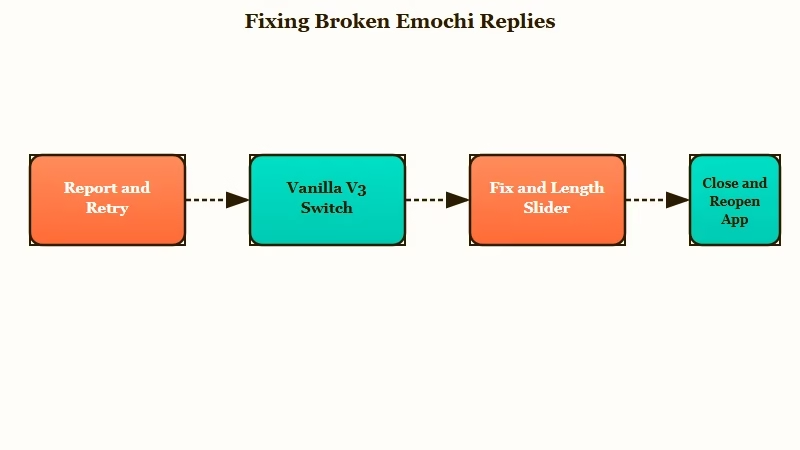
Report & Retry is where I start every time, because it costs nothing. After that, work down this list:
- Tap Report & Retry on the failed reply. Emochi marks failed generations as free, so retrying one costs no Mochi.
- Switch the chat to Vanilla V3 or a flagship model for the rest of the scene, and switch back once the premium model recovers.
- Pull the length slider back a notch if the bot starts forgetting. Emochi’s own setting text warns that “excessively long response lengths may shorten the bot’s memory.”
- Use the Fix option on a reply that writes for your character. Emochi says it repairs unclear pronouns, tone shifts and replies where the bot answers for you, and the fixed text takes the old message’s place.
- Edit your last message instead of deleting two in a row, since back-to-back deletes can jump the chat to its first message.
- Close and reopen the app when sends keep failing, which clears a stuck session that a retry will not.
- Send a bug report from the app with your email or Discord ID, and Emochi promises to tell you when the issue is fixed.
Heavily customizing Vanilla V3 is the workaround people lean on while the premium models are down. Vague instructions get ignored, so spell out reply length and who speaks for whom.
Before: “Write longer replies and don’t talk for me.”
After: “Write three to four paragraphs per reply. Describe only your character’s actions, speech and surroundings, and never write dialogue, thoughts or choices for my character. End each reply on something my character can answer, then stop. Keep names, injuries, places and promises the same unless I change them.”
Reinstalling will not help with any of this. The Android app has not changed since September 29, so a fresh install runs the same code against the same failing models.
Can You Get a Refund From Emochi?
You can ask for a refund, and where you ask depends on how you paid.
Google Play handles requests within 48 hours of a charge, and after that, or for a plan bought on the website, the request goes to Emochi’s developer.
Google Play lets you request a refund yourself within 48 hours of a purchase. After that, Google sends you to the developer, and Emochi’s listing gives info@flowgpt.com as its contact address.
On the website, Emochi bills through Stripe and says you can cancel anytime, so a refund for a web plan is a direct request to Emochi. If you subscribed in the Android app, the website tells you to manage the plan in the app, and Google’s subscription help page shows how to cancel there.
I don’t buy the idea that subscribers should quietly absorb a month of broken premium models. A short, specific request is harder to wave off than an angry one.
Before: “Your app is broken. Refund me.”
After: “I’m on Plus, billed through Google Play on October 3. From October 8, Juniper and Green Apple, the premium models in my plan, gave one-line or failed replies. Please refund this month’s charge.”
Cancelling stops the next charge but does not refund the current one, so do both if you are leaving. Before you delete the account, read how Emochi handles your data.
What Should You Use Instead of Emochi?
The right Emochi replacement depends on what broke for you.
Pick for stable models if the October failures pushed you out, or for memory if the bot keeps losing your story.
If Vanilla V3 covers what you need, staying on the free plan costs nothing while you wait for a fix. If it does not, Candy AI is my pick when stability is the point. Its free tier is only 5 messages, so treat it as a short test before paying $13.99 a month.
Nectar AI is the one I would try if memory is what Emochi keeps losing for you. The full list of apps like Emochi covers the rest, including iPhone, where the original Emochi app is gone from the App Store.
Quick Takeaways
- Emochi still loads, but the premium models in its paid plans have failed since around October 8 while the free Vanilla V3 keeps working.
- Switch the chat to Vanilla V3 to tell a model failure from a phone problem in one message.
- Failed replies are marked free, so Report & Retry costs nothing, and reinstalling changes nothing because the app has not updated since September 29.
- Ask Google Play for a refund within 48 hours of a charge, or email info@flowgpt.com after that with your plan and the dates the models failed.
- My own rule is simple: no renewal until the premium models answer properly again.
