
What’s Changed: SpicyChat lost its iOS app in 2025 and never had a Google Play app, so there is no official app store version now. The real routes are a home-screen web app, the official Android download from SpicyChat’s own site, and the safe-for-work twin app PixelChat for billing. Every app on the stores that carries the SpicyChat name is a clone.
If you search the App Store or Google Play for SpicyChat, you will find apps. Here is the part that catches people out: none of them are the real thing.
The question “does SpicyChat have an app” has a confusing answer because the official routes look nothing like a normal app download.
The short version is that SpicyChat runs as a website, not a store app. Apple pulled its iOS app in 2025, Google Play never allowed one, and the listings you see now are third-party clones that range from useless to genuinely unsafe.
I have gone through SpicyChat’s own docs, the safety audits, and the workarounds people rely on. There are three legitimate ways onto your phone, one clever billing trick, and a real privacy question you should answer before you commit.
Here is what is real, what is a trap, how to install SpicyChat properly on iPhone and Android, and when a cleaner option makes more sense.
Does SpicyChat Have an App on iPhone or Android
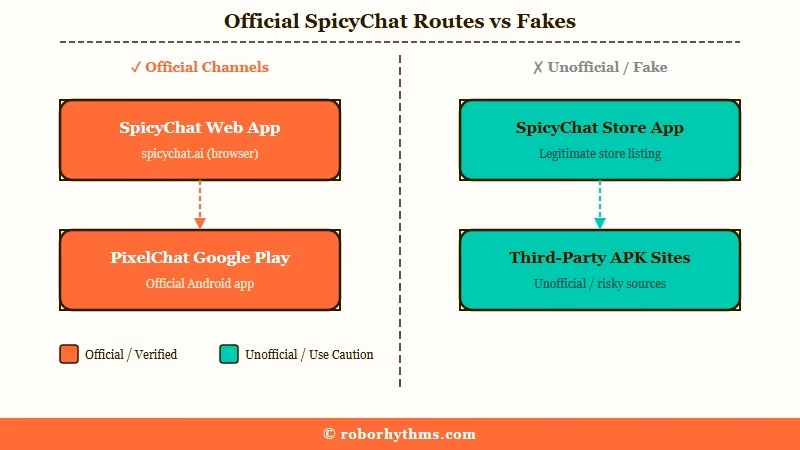
SpicyChat does not have an official app on the Apple App Store or Google Play, so the real way to use it is a home-screen web app or the official Android download. The platform is web-first by design.
What is a PWA: A Progressive Web App is a website you save to your home screen so it opens full-screen with its own icon, behaving like an installed app without going through an app store.
Apple removed the native SpicyChat iOS app on August 27, 2025, and the copies people already had stopped working on September 25, 2025. Old Apple subscriptions no longer auto-renew, so anyone who paid through Apple has to re-subscribe on the website.
Android is a little different. There is an official SpicyChat Android app, but it lives as a direct download on SpicyChat’s own site, not on Google Play, because Google’s rules block apps built around no-filter roleplay.
If the platform feels slow or unreachable rather than missing, that is a separate issue, and the SpicyChat outage checklist covers that case.
Are the SpicyChat Apps on the App Store Real
Any app named SpicyChat on the App Store or Google Play right now is a clone, not the official app, and several are adware or worse.
The real developer does not publish under those listings.
This is the trap that burns people. Because the genuine app got pulled, third-party developers flooded the stores with copies using the SpicyChat name, published under unrelated shell companies.
Real examples from the listings include “Minquan County Runyou Building Materials Co., Ltd.” and “Chengdu Qizhixu Technology Co., Ltd,” which are not names you want attached to your private chats.
What I would watch for is the behavior these clones bring. Users report heavy battery drain, phone lag, unskippable ads, and permission requests for your camera and contacts that a chat app has no reason to want.
Here is how the real routes stack up against the traps.
| Route | What It Is | Safe | Where to Get It |
|---|---|---|---|
| Home-screen web app | The official site saved to your home screen | Yes | spicychat.ai in Safari or Chrome |
| Official Android app | Direct APK from SpicyChat itself | Yes, from the real site only | spicychat.ai download page |
| PixelChat | The official safe-for-work twin and billing bridge | Yes | Google Play Store |
| Store apps named SpicyChat | Third-party clones under shell companies | No, adware and malware risk | Avoid entirely |
| Random APK sites | Repackaged installers from unknown hosts | No, high malware risk | Avoid entirely |
How Do I Install SpicyChat on My Phone
You install SpicyChat by adding its website to your home screen, which takes about four taps and gives you an app-style icon.
No store, no APK gamble for most people.
From what I have found, the home-screen web app is the route I would send almost everyone to first, because it stays current automatically and carries zero malware risk. Here is the sequence.
- Open spicychat.ai in Safari on iPhone or Chrome on Android.
- Tap the Share icon on iPhone, or the three-dot menu on Android.
- Choose “Add to Home Screen.”
- Name the icon and confirm, and it now launches full-screen like an app.
- If you specifically want the Android app file, download it only from the spicychat.ai download page, never from a third-party APK site.
One warning about the mobile web experience while you are in there. The bot creation screen has a rough drag-to-refresh bug that can wipe a long character profile if your thumb pulls the page down mid-edit.
Before: you spend ten minutes writing a detailed character bio on mobile web, your thumb drags the page while scrolling, and the refresh gesture erases the whole draft.
After: you write the bio in your phone’s notes app, copy it, and paste it into SpicyChat in one shot, so a stray swipe never costs you the work.
Here is a quick reference for the mobile problems people hit most and how to clear each one.
| Symptom | Likely cause | Fix |
|---|---|---|
| No app in the App Store | iOS app pulled in 2025 | Add the site to your home screen as a web app |
| A “SpicyChat” app looks official | It is a clone listing | Delete it and use the web app or official APK |
| Cannot pay on mobile | Store billing is blocked | Subscribe through PixelChat or on the website |
| Bot creation keeps refreshing | Mobile web drag gesture | Draft bots in a notes app and paste them in |
| Deleted chats still remembered | Semantic Memory keeps summaries | Clear the separate Memory Manager |
What Is PixelChat and How Does the Billing Bridge Work
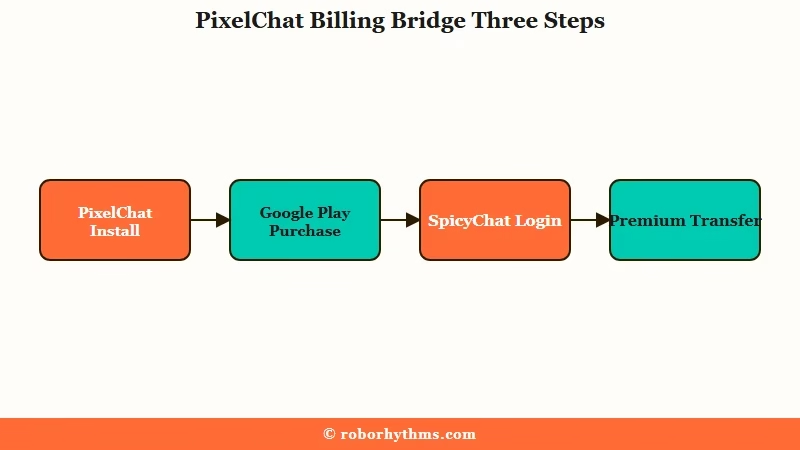
PixelChat is SpicyChat’s official safe-for-work twin app on Google Play, and a subscription bought there transfers straight to your SpicyChat account. It is the sanctioned way to pay on mobile.
The same team builds both. PixelChat carries the identical layout but only shows characters that are not tagged, which is exactly why Google Play allows it when the main app is banned. That opens a billing path most people miss.
The trick is simple once you see it. You install PixelChat, buy the plan there with Google Play billing or PayPal, then log into the SpicyChat website with the same account, and the premium benefits carry over.
If you want the fully sanctioned route rather than a sketchy workaround, going through SpicyChat’s own site and PixelChat is the clean way to subscribe. It also gives you a payment option that store rules would normally block, and it keeps your SpicyChat free-tier limits from capping your longer sessions.
The way I see it, this dual-app setup is the single most useful thing to understand about SpicyChat on mobile, because it turns a dead end into a working checkout.
Is SpicyChat Safe With My Data
SpicyChat scores poorly on privacy, keeps a broad license to your chats, and does not fully delete them when you delete a conversation.
This is the part I would slow down on before you get attached.
An independent 2026 trust index handed SpicyChat a failing grade of 19 out of 100 for data privacy. The reason is in the terms: the platform reserves a nonexclusive, worldwide, transferable, sublicensable, perpetual, and irrevocable right to use your generated chats, and it does not offer end-to-end encryption.
There is also a deletion gap worth knowing. A feature called Semantic Memory 2.0 summarizes your conversations and stores those summaries on the servers, so deleting a chat does not remove them. You have to open the separate Memory Manager and clear it yourself, which most people never realize.
On top of that, mandatory age verification is rolling out for connections from the UK, France, Italy, and roughly 25 US states, usually a live selfie or an ID upload through a third party.
Trying to route around it with a VPN goes against SpicyChat’s terms, and the details keep shifting, so the state-by-state age-verification breakdown is the place to check your region.
Better Options if the Privacy Grade Worries You
If the grade-F privacy and the perpetual chat license bother you, a more polished managed platform runs the same home-screen route with a cleaner track record.
You are not stuck choosing between SpicyChat and nothing.
Here is the honest landscape. Almost every no-filter companion avoids the app stores the same way SpicyChat does, so a home-screen web app is normal across the category rather than a SpicyChat quirk. A couple of names, like Nomi, do ship a real App Store app, but they carry tighter content controls to stay compliant, which is the trade you make for a store icon.
For a smoother managed experience without SpicyChat’s privacy baggage, Candy AI installs through the same add-to-home-screen path but pairs it with better memory handling and a cleaner data posture.
If you would rather stay in the SpicyChat world and just want other engines to try, the SpicyChat alternatives roundup compares the closest matches.
What I would recommend is deciding on privacy first and features second. A companion app is one of the most personal things on your phone, so a platform that treats your chats as its permanent property is a real cost, not a footnote.
AI companion apps have pushed into the ranks of the most-used AI tools worldwide despite being locked out of the stores, per Statista’s 2026 tracking, so you have plenty of choice.
Frequently Asked Questions
Does SpicyChat have an iPhone app?
No. Apple removed the official SpicyChat app in August 2025 and it stopped working the following month. The supported route on iPhone is adding spicychat.ai to your home screen as a web app through Safari.
Does SpicyChat have an Android app?
Yes, but not on Google Play. The official Android app is a direct download from SpicyChat’s own website, because Play Store rules block apps built around no-filter roleplay. Only download it from spicychat.ai.
Are the SpicyChat apps on the App Store real?
No. Every app carrying the SpicyChat name on the App Store or Google Play is a third-party clone, often published under unrelated shell companies. Many are adware or malware, so avoid them and use the official routes.
What is PixelChat?
PixelChat is SpicyChat’s official safe-for-work twin app, made by the same team and allowed on Google Play. It shares the layout and works as a billing bridge, since a subscription bought in PixelChat transfers to your SpicyChat account.
How do I subscribe to SpicyChat on my phone?
Buy your plan inside the PixelChat app using Google Play or PayPal, then log into SpicyChat with the same account and the benefits transfer. You can also subscribe directly on the SpicyChat website. Old Apple subscriptions no longer renew.
Is SpicyChat safe with my data?
Not especially. It scored a failing 19 out of 100 in a 2026 privacy index, claims a perpetual license to your chats, and lacks end-to-end encryption. Deleting a chat also leaves stored memory summaries until you clear the Memory Manager.
Quick Takeaways
- SpicyChat has no official app store app; the iOS app was pulled in 2025 and Google Play never allowed one.
- Every “SpicyChat” app on the App Store or Google Play is a clone, and several are adware or malware, so use the web app or the official APK from spicychat.ai only.
- The home-screen web app is the safest install for most people, and PixelChat on Google Play is the official way to pay, since its subscription transfers to SpicyChat.
- SpicyChat scored a failing 19 out of 100 on privacy, keeps a perpetual license to your chats, and hides retained data in a separate Memory Manager you must clear yourself.
- If that privacy posture worries you, a cleaner managed option like Candy AI runs the same home-screen route without the baggage.
