
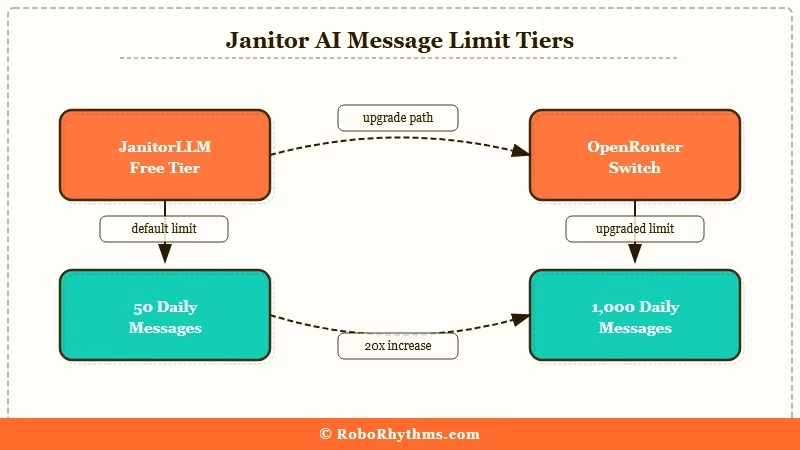
Quick Answer: Yes, Janitor AI has a message limit, but the number varies depending on which model backend you are using. The built-in JanitorLLM model gives free users roughly 50 messages per day. Switch to OpenRouter DeepSeek and that number becomes 1,000 per day after a one-time $10 deposit you never have to spend.
If you have hit a wall mid-conversation and wondered why Janitor AI stopped letting you send messages, you are not alone. The platform gets a lot of search traffic for this exact question, and the answer is more complicated than a single number.
The short version: Janitor AI does not have one universal message limit. It has several, depending on which model backend you are running your characters on.
Most users who hit limits are on JanitorLLM, the platform’s built-in model. But that is only one of five or six options available.
I have spent time mapping out how each backend handles daily limits and what the practical difference looks like in a real session.
If you are a free user trying to figure out why your messages ran out, or a more experienced user wondering whether the platform cap even applies to your setup, this is the breakdown you need.
If you are hitting limits regularly and want a companion platform where message caps are not part of the equation, Candy AI is worth checking out.
It runs on a subscription model with no per-message caps on paid plans.
What Is Happening with Janitor AI Message Limits
Janitor AI’s limit system is tied to your model choice, not to the platform itself.
The confusion starts because most users never change the default model and assume the 50-message wall they hit is Janitor AI’s limit. It is not. It is JanitorLLM’s limit.
What is JanitorLLM: Janitor AI’s built-in model that requires no API key or external account. Free to use, no setup required, but carries a daily message cap and a shorter token memory window than most external alternatives.
JanitorLLM runs about 50 messages per day for free users and works on a token budget of roughly 9,000 tokens per session.
The catch: your character’s personality card eats about 2,000 of those tokens immediately, leaving closer to 7,000 tokens for actual conversation.
When that fills, character memory degrades into what the r/JanitorAI_Official community calls “context-rot”: the bot starts forgetting plot threads, flattening character voice, and repeating itself.
When the daily cap hits, the platform stops you from sending new messages until the timer resets.
This is the experience behind most of the complaints you see in r/JanitorAI_Official. Users who set up a character, get into a good conversation, and then suddenly cannot reply.
They hit the 50-message cap and did not know it existed.
The platform itself has no per-message limit once you switch to an external model. That distinction matters more than any other thing in this article.
The Model You Pick Changes Everything
The model backend determines your daily message cap more than anything else on the platform. Janitor AI is built to let users connect third-party models through OpenRouter or direct API keys, and those models bring their own limits, context windows, and pricing structures.
One change worth noting: Chutes.AI, a widely used free proxy in the community, recently moved to a paid model with a 200-request daily global cap before charging begins.
This removed one of the most popular free alternatives from the ecosystem and sent a lot of users scrambling. Here is how the current options compare:
| Model backend | Daily messages (free) | Notes |
|---|---|---|
| JanitorLLM (built-in) | ~50 | No API key needed, auto-resets daily |
| OpenRouter DeepSeek (free tier) | 50 base, 1,000 with $10 deposit | Best free upgrade path, deposit is not spent on free models |
| Gemini 2.5 Flash (free API) | 50 to 250 | Google account required, quality is strong |
| GLM 4.5 Air (proxy) | Unlimited standard | Quality varies by session |
| Chutes.AI (community proxy) | 200 (now paid above that) | Was the top free option; now charges after 200 requests/day |
| Reverse proxy (other community) | ~250 | Reliability varies |
| DeepSeek V3 (paid) | Essentially unlimited | Around $0.001 per message, $5 lasts months |
From what I have seen, the OpenRouter path is the most underrated option for free users. The $10 deposit does not get spent on free models.
It just signals to OpenRouter that your account is verified, and that unlocks 1,000 messages per day across any free model they carry. That $10 sits in your account indefinitely.
The upgrade most users are looking for is not a Janitor AI subscription. It is switching model backends.
According to Statista’s overview of the AI companion market, engagement with AI companion platforms grew sharply through 2025 and into 2026, with session length and message frequency being the primary retention drivers.
Hitting a message cap mid-session is one of the fastest ways to lose a user permanently, which is likely why alternative model setups have become the dominant workaround in communities like r/JanitorAI_Official.
How to Get More Messages on Janitor AI
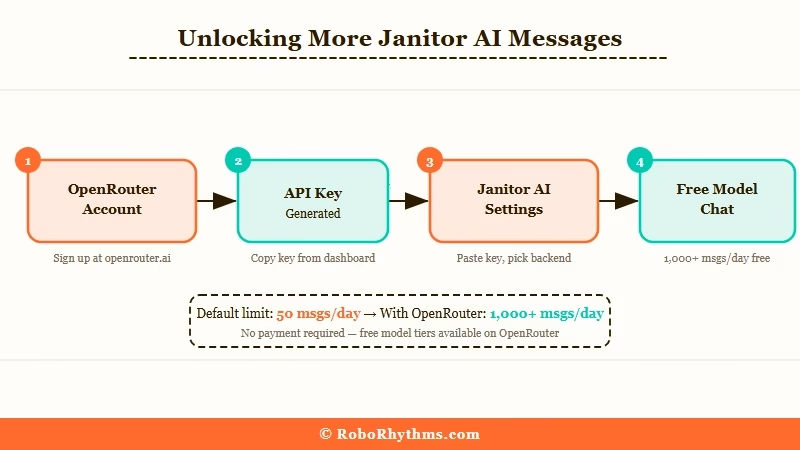
The fastest way to stop hitting the Janitor AI message limit is to switch from JanitorLLM to an OpenRouter model with a higher daily cap. Here is how to do it:
- Go to openrouter.ai and create a free account using your email
- Add $10 in credits (this is a one-time action and you do not spend these credits on free models)
- Copy your OpenRouter API key from the dashboard
- In Janitor AI, go to Settings and find the API configuration section
- Paste your OpenRouter key and select DeepSeek or another free model from the model picker
- Start a new chat session. Your daily limit is now 1,000 messages instead of 50
For a full walkthrough of connecting DeepSeek to Janitor AI including which model settings to use, the DeepSeek Janitor AI setup guide covers the step-by-step configuration in detail.
If you run into a 429 error during or after setup, that means the selected model hit its rate limit temporarily. The Janitor AI proxy error 429 fix covers the causes and how to clear it quickly.
Common limit problems and what causes them
| Symptom | Likely cause | Fix |
|---|---|---|
| Hit wall at 50 messages | JanitorLLM daily cap | Switch to OpenRouter free model |
| Character memory fades mid-session | 8,000-9,000 token window full | Start new session or use higher-context model |
| 429 error on proxy setup | Rate limit on selected model | Wait 1-2 minutes or switch models in OpenRouter |
| Messages send but replies are empty | API key expired or invalid | Re-generate key in OpenRouter or Google dashboard |
| Limit resets at wrong time | JanitorLLM reset tied to UTC | Switch to external API model to remove reset dependency |
Who Should Just Switch to a Different Platform
Janitor AI is a good pick for users comfortable with API setup, but its limit structure is a poor fit for casual users who want to open an app and chat without thinking about tokens.
If you have followed the OpenRouter setup and still find the experience frustrating, that is worth paying attention to.
In my experience, the users who end up most frustrated with Janitor AI are not the ones who are bad at tech. They are the ones who expected a companion app and got an API configuration interface instead.
That is a legitimate mismatch, not a skill issue.
The platforms that handle limits better are ones built around subscriptions rather than per-model daily resets. Candy AI runs on a monthly plan with no per-message caps on paid tiers, and the character memory system does not require managing API keys or token budgets manually.
If the issue is specifically message frequency during long sessions, the fix is a model with a much larger context window. Kimi K2 and DeepSeek V3 both handle longer sessions better than JanitorLLM.
The Janitor AI not working guide covers troubleshooting steps for session-level issues that go beyond just the message cap.
For context on what users move to when the API setup overhead becomes too much, the full list of Janitor AI alternatives covers the main platforms and what each one does differently.
Frequently Asked Questions
Does Janitor AI have a message limit for free users?
Yes. The built-in JanitorLLM model caps free users at roughly 50 messages per day. Switch to an external model through OpenRouter and the limit changes based on that model’s rules. A $10 one-time deposit on OpenRouter unlocks 1,000 messages per day on supported free models.
Why did Janitor AI stop letting me send messages?
You most likely hit the JanitorLLM daily cap of approximately 50 messages. The cap resets daily based on UTC time. Switching to OpenRouter or a direct API model removes this specific limit and puts you on a much higher daily ceiling.
How do I get unlimited messages on Janitor AI?
No backend offers truly unlimited messages for free. The closest option is GLM 4.5 Air via proxy (no stated cap for standard messages) or DeepSeek V3 at about $0.001 per message. A $10 deposit to OpenRouter also unlocks 1,000 free daily messages across supported models.
What is the token limit on Janitor AI?
JanitorLLM operates with a session token budget of roughly 8,000 to 9,000 tokens. When that fills, character memory degrades and responses become repetitive or disconnected. Switching to DeepSeek V3 or Kimi K2 gives a 128,000 token context window instead.
Does Janitor AI have a character message limit?
The character itself has no limit. The limit sits on the model backend powering the character. Different backends impose different daily caps. The character definition is just a persona sitting on top of whichever model you have connected.
Is there a Janitor AI paid plan that removes limits?
Janitor AI does not sell a paid tier that directly removes model limits. The workaround is connecting your own API key or using OpenRouter, which shifts limit control to the external model provider rather than the Janitor AI platform.
