
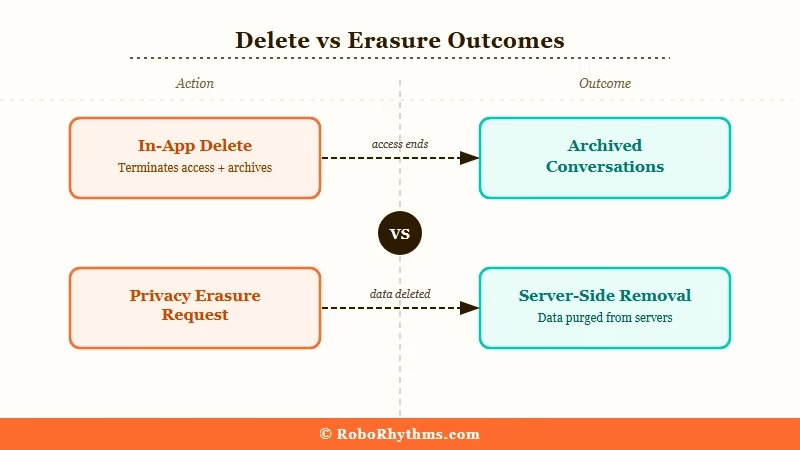
What’s Changed (October 31, 2026): Character AI is being sold in Chapter 11, so a new section below covers whether to delete your account before the sale, how long an export takes, and what the court filings say about user data. The “Delete Account” button still ends your access and removes your characters, chats and activity from your side, but nothing in it promises erasure from Character AI’s servers. Its privacy policy, effective July 1, 2026, still lets it retain information to meet legal obligations, resolve disputes and enforce its agreements, so a separate deletion request is the only formal route to removing the rest.
The delete button is there, and it works. Your login, your characters and your chats disappear from your side, and Character AI says the action cannot be undone.
Deleting your Character AI account still does not guarantee every record is erased. The privacy policy keeps information “as necessary to comply with our legal obligations, resolve disputes, and enforce our agreements”, and a character you made public can stay live after you leave.
The exact deletion steps for the website and the app come first below, then what the delete removes and how to ask Character AI to erase the rest.

If the data handling is the part that bothers you rather than the platform itself, Candy AI at least puts dated retention periods in its policy, such as a 30-day purge for debug logs, which Character AI’s policy does not, and CrushOn AI is another option worth comparing.
How Do You Delete a Character AI Account, and What Does It Remove?
You delete a Character AI account under Profile Settings, Account, Manage Account & Data on the web, or with Remove Account in the mobile app, then type your username to confirm. That ends your login and removes your characters and chats from your side, though Character AI may still retain some information.
The route is short, and the two surfaces label it differently. Character AI’s Help Center gives both, though that page was last edited on October 3, 2024.
Web
- Navigate to your Profile.
- Click on Profile Settings.
- Go to Account.
- Click Manage Account & Data.
- Select Delete account.
- Type your username in the “Enter username to confirm” box and click Delete account.
Mobile app
- Open your Profile.
- Tap the settings icon.
- Tap Remove Account (if you want a copy, request it first under Legal & Privacy, Export Data, and download it before this step, since an export can take 3 to 4 weeks).
- Type your username to confirm, then tap Remove Account.
The wording difference trips people up, because nothing in the app is labeled Delete Account. The web dialog also warns “Remember to remove your subscription before deleting your account”, so cancel any paid plan first.
If Manage Account & Data seems missing on a laptop, scroll the Account panel, because the button sits at its bottom right. One r/CharacterAI user could only see its top edge, and the app’s Remove Account is the fallback when the website will not cooperate.
Character AI’s own confirmation screens say what goes. The web dialog reads “Characters, chats, and activity associated with your account will be lost”, and the app version lists characters, chats, likes, messages and posts.
What those screens never promise is erasure from Character AI’s servers. The privacy policy keeps information “for the time necessary for the purposes for which it is processed”, and the Terms of Service say ending your account “will not terminate Character.AI’s rights to your Content.”
The Help Center article also opens with a line worth reading carefully: “Account Deletion is permanent and cannot be reversed.” That holds for your login, while the page says nothing either way about stored data.
This distinction matters most if you are concerned about privacy, have shared sensitive personal information in chats, or want to ensure your data is not used in future model training.
Does Deleting Your Character AI Account Delete Your Chats?
Yes on your side, not necessarily on Character AI’s servers. Character AI says the characters, chats and activity tied to your account “will be lost” when you delete it, while its privacy policy lets it retain information for legal obligations and disputes and keep a public character you made running.
The character part is spelled out in the policy: “If a Character you create has been made available to other users, then we reserve the right to preserve that Character’s characteristics and to keep that Character active on the Services, even if you otherwise delete your data and your account.” Keep personal details out of any character you plan to publish.
The confusion spikes whenever Character AI makes platform changes. In early 2026, users reported chats from 2022-2023 vanishing from the sidebar after an update, and many of those chats later turned up again.
That wave of confusion revealed how many users misunderstand what the delete function covers. If you delete your account expecting every chat to be gone from Character AI’s systems, nothing in the flow confirms it, and you have no visibility into what is retained.
Character AI publishes a helpfulness vote on every Help Center article, and its deletion page scores badly. I counted the public tally on 6 October 2026: 236 of 768 readers marked “How do I delete my account?” as helpful, which is 31%.
For users who shared anything personally identifying in their chats, this gap between expected and actual deletion is worth taking seriously. Character AI has over 194 million monthly website visits, which means a significant volume of personal conversation data sits in their system.
How Do You Permanently Delete All Your Data From Character AI?
Character AI has no erase-everything button. To have your personal information deleted, file a request through its Help Center form or email privacy@character.ai, the routes its privacy policy names, and expect an identity check first. Deletion applies “subject to certain exceptions”, such as legal obligations.
Here is the step-by-step process to request real data deletion:
- Export your data first: Manage Account & Data, then Export Data on the web, or Settings, Legal & Privacy, Export Data in the app. Character AI says an export can take 3 to 4 weeks.
- Open Character AI’s request form, or email privacy@character.ai, from the address tied to your account.
- Ask for deletion of the personal information Character AI holds about you, and give your username.
- Answer the identity check. The policy says that if Character AI cannot verify you, it “may be unable to respond”.
- Keep the ticket number or email thread, since it is your only record of the request.
Filing before you delete the account keeps your login available if Character AI asks you to prove the account is yours.
This is separate from the in-app delete function. Under GDPR (for EU users) and CCPA (for California users), Character AI is legally required to act on a verified erasure request inside a statutory window. GDPR Article 12(3) allows one month, extendable by two further months for complex cases, and California allows 45 calendar days plus another 45 with notice.
Neither route is unconditional. Character AI’s regional privacy disclosures let it refuse erasure where it needs data for a legal obligation or legal claims, and give US residents a right to appeal a refusal.
One category of data sits outside both paths. If you cleared Character AI’s age check, the selfie or government ID went to a third-party verifier holding it under its own retention policy, so what happens to your Character AI ID verification data is a separate question from either deletion route.
Plan for one to three months on a formal request rather than the days-to-weeks figure most guides quote. Treat the in-app confirmation as proof that your access ended, and the reply to your request as the only confirmation that speaks to stored data.
Should You Delete Your Character AI Account Before the Sale?
Export first, then decide. Character AI is selling itself in Chapter 11, the government’s bankruptcy watchdog says the assets for sale include the platform and its customer data, and the Delete button ends your access without promising erasure, so anyone who wants out should file the formal deletion request as well.
Character AI filed for Chapter 11 on October 12, 2026, to sell the company, and its Chapter 11 update says the platform remains up and its data privacy practices are “unchanged”. The U.S. Trustee, the Justice Department office that oversees bankruptcy cases, told the court on October 27 that the company is selling “the Character.AI platform and related customer data”, and that any sale of that data “cannot be approved absent the appointment of a consumer privacy ombudsman” (docket item 69).
Disney’s opening $20 million bid leaves the app and user data out, because its agreement excludes “any consumer-facing applications” and “end user data”. Your chats would change hands only if another bidder buys the platform or its data. At the October 30 hearing, Judge Brendan Shannon urged the company to bring in a privacy ombudsman but stopped short of ordering one, Quartz reported, and the docket showed no appointment as of October 31.
Deleting your account now would not, on its own, keep your data out of a sale. The privacy policy dated July 1, 2026, lets Character AI disclose information “in connection with or during negotiations or closing of any merger, sale of company assets”, and a public character you made can stay live after you leave, as the section on chats explains. The sale timeline is tracked on its own page.
Export before you press anything. Character AI’s export help article, edited October 8, 2026, says an export takes 3 to 4 weeks and the download link lasts 7 days, so a request made now would land around the end-of-November or early-December finish the company expects for the sale. Exporting your chats covers the steps and the file you get.
Do not count on an export to rescue a character its creator already deleted. In an r/CharacterAI thread from October 30, “Stop deleting your bots!”, several users say their exports still held deleted bots’ chats, while another lost a bot with “800+ messages and a full story arc” mid-export, and Character AI’s export article does not say either way.
If you want a copy, request the export, download it when the email arrives, file the deletion request from the section above, and only then press Delete. If erasure matters more to you than a copy, file the deletion request today, since waiting 3 to 4 weeks for the export would push it back to around, or past, the date the company expects the sale to close. Either way, press Delete last, because deleting first could cut you off from an export that has not arrived and from the login Character AI may ask you to verify.
What Should You Do If You See Missing Chats After Deletion?
If your chats appear missing after a Character AI update rather than a deletion request, they are more likely hidden by an interface change than deleted, since older chats have dropped out of the sidebar after past updates and later reappeared.
| Symptom | Likely Cause | Fix |
|---|---|---|
| Chats from 2022-2023 missing from sidebar | Sidebar change after an update | Search the character’s chat history from its page, or check the mobile app |
| All recent chats gone | Interface bug or update | Clear cache, reload, check mobile app |
| Account shows no characters | DMCA removal or privacy setting change | Check email for removal notice |
| Cannot access account at all | Account deleted or suspended | Contact support via support.character.ai |
| Deletion request showed “complete” but data persists | In-app delete, not privacy erasure | Submit formal data removal request |
The character deletion wave in late 2025 and early 2026 was separate from account deletion. Character AI removed many characters for copyright violations under DMCA.
If your characters were removed without your request, that was a copyright enforcement action rather than your account being deleted.
Character AI does not publish a cutoff for deleting inactive accounts. Its Terms of Service, last updated August 27, 2025, reserve “the right to terminate accounts that are inactive for an extended period of time” without naming a period.
What Are the Alternatives If You Want a Platform With Clearer Data Policies?
If Character AI’s data handling concerns you, platforms like Candy AI and CrushOn AI are worth comparing, though each still keeps some data after you leave, so read the retention section before you sign up.
Candy AI’s policy states how long it keeps account data after your last activity, which Character AI’s does not, though chat deletion there is also a request rather than a button. The feature set differs from Character AI but both cover the core use case of AI companion roleplay and conversation. If you would rather switch, our guide to the best Character AI alternatives lines up the leading options side by side.
For anyone who wants to stay on Character AI but is concerned about data, the key steps are: submit the formal privacy request, do not rely on the in-app delete button alone, and document your request with a reference number in case follow-up is needed.
You can see how Character AI’s platform changes have affected users in other ways in the Character AI models ranked guide, which tracks changes to the model lineup alongside user sentiment.

The page is very convenient for US residents, but asks for your full name if you are not, which makes no sense to me. They can still tell which set of data is it that they need to delete with the username/account ID just like with a US resident and, paradoxically, they don’t ask for that, just your email. I have never given them my full name and I don’t intend to.
Good catch, and I agree it reads backwards. The name field on the non-US flow looks like boilerplate from whatever privacy portal template they licensed, since your data sits under your email and account ID no matter where you live. A legal name does not help them find anything on a platform where almost nobody signs up with one.
GDPR does let them verify that a request genuinely comes from the account owner, but a legal name was never the required proof. Showing you control the email tied to the account is the accepted standard, and that is exactly what the US flow already relies on. If you never gave them your name, nothing in the regulation obliges you to hand it over now just to get an erasure processed.
Thanks for flagging it. I will add a note about this quirk the next time this article gets a refresh.