
What’s Changed: Character AI’s “Delete Account” function removes your access to the platform but does not erase your data from their servers. Users who expected full deletion discovered their account information and chat history remained stored. A separate data removal request through their privacy form is required for anything approaching true deletion.
The delete button is there. You click it. The account disappears from your view. And then you find out the data is still there.
This is not a secret exactly, but it is not prominently disclosed either. Multiple users on r/CharacterAI have flagged it after submitting deletion requests and then checking whether their data persisted on the platform. The short answer: it does, unless you go a step further.
This article explains what Character AI’s account deletion covers, what it does not cover, and what steps give you the closest thing to real data removal.
What Does Character AI’s Delete Account Function Do?
Deleting your Character AI account removes your login access and hides your profile, but your stored data including chat histories and character creations remains on their servers.
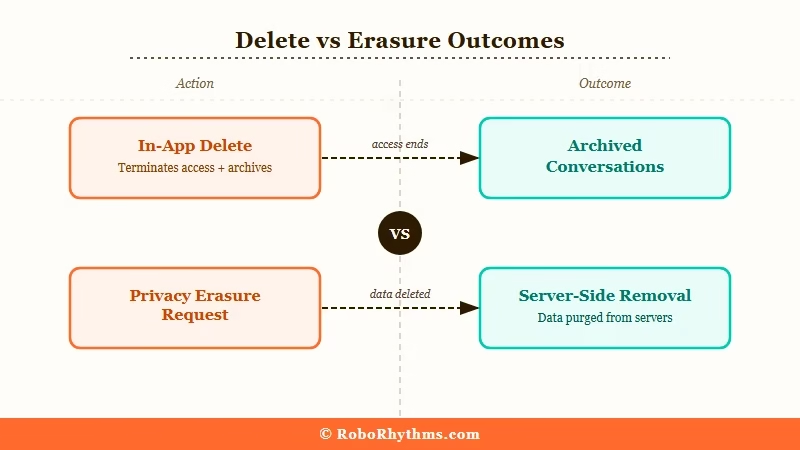
When you go through the Manage Account and Data portal and request deletion, Character AI treats it as an access termination, not a data erasure. Your username and persona become inaccessible. Your characters are removed from public view. You can no longer log in.
What does not happen: your conversation history, account information, and any character data you created are not purged from Character AI’s servers at that point. The data moves into an archived state rather than being deleted outright.
This distinction matters most if you are concerned about privacy, have shared sensitive personal information in chats, or want to ensure your data is not used in future model training.
Why Does This Matter for Character AI Users?
It matters because many users assume “Delete Account” means data erasure, and it does not. Character AI’s handling of stored data is governed by their privacy policy, not the delete function.
The confusion spikes whenever Character AI makes platform changes. In January 2026, a performance optimization update moved older chat histories to cold storage or archive-tier infrastructure. Chats from 2022-2023 became temporarily invisible in the sidebar.
Users reported their histories as “deleted” when the chats had only been hidden behind the updated interface.
That wave of confusion revealed how many users misunderstand what the delete function covers. If you delete your account expecting your chat data to be gone and it is not, you have no visibility into how that data is being stored or potentially used.
For users who shared anything personally identifying in their chats, this gap between expected and actual deletion is worth taking seriously. Character AI has over 194 million monthly website visits, which means a significant volume of personal conversation data sits in their system.
What Is the Real Process for Getting Your Data Deleted?
The actual data removal process requires submitting a formal privacy request, not just using the in-app delete function. GDPR and CCPA give users the right to request data erasure separately.
Here is the step-by-step process to request real data deletion:
- Go to Character AI’s privacy request form at character.ai/privacy
- Select “Delete My Data” or the equivalent erasure request option
- Verify your identity using the email address tied to your account
- Submit the request and save the confirmation reference number
- Wait for the confirmation email confirming deletion has been processed
This is separate from the in-app delete function. Under GDPR (for EU users) and CCPA (for California users), Character AI is legally required to process a verified erasure request within a defined timeframe.
The in-app delete gives them discretion over what to retain. The formal privacy request does not.
From what I have seen in user discussions, the formal request takes longer (days to weeks rather than instant), but it is the path that triggers server-side data removal rather than just access termination.
What Should You Do If You See Missing Chats After Deletion?
If your chats appear missing after a Character AI update rather than a deletion request, they are likely archived, not deleted. The January 2026 migration moved older chats to cold storage and made them temporarily invisible.
| Symptom | Likely Cause | Fix |
|---|---|---|
| Chats from 2022-2023 missing from sidebar | January 2026 archive migration | Check Persona menu and archive folder |
| All recent chats gone | Interface bug or update | Clear cache, reload, check mobile app |
| Account shows no characters | DMCA removal or privacy setting change | Check email for removal notice |
| Cannot access account at all | Account deleted or suspended | Contact support via character.ai/support |
| Deletion request showed “complete” but data persists | In-app delete, not privacy erasure | Submit formal data removal request |
The character deletion wave in late 2025 and early 2026 was separate from account deletion. Character AI removed many characters for copyright violations under DMCA.
If your characters were removed without your request, that was a copyright enforcement action rather than your account being deleted.
What Are the Alternatives If You Want a Platform With Clearer Data Policies?
If Character AI’s data handling concerns you, platforms like Candy AI and CrushOn AI offer clearer data deletion options and different approaches to stored conversation data.
Both alternatives let you delete your account and your chat history through the standard in-app flow with more transparency about what gets removed. The feature set differs from Character AI but both cover the core use case of AI companion roleplay and conversation.
For anyone who wants to stay on Character AI but is concerned about data, the key steps are: submit the formal privacy request, do not rely on the in-app delete button alone, and document your request with a reference number in case follow-up is needed.
You can see how Character AI’s platform changes have affected users in other ways in the Character AI models ranked guide, which tracks changes to the model lineup alongside user sentiment.
Frequently Asked Questions
The most common questions about Character AI account deletion cover what data gets removed, how long it takes, and what happens to your chats.
Does Character AI permanently delete your account?
Character AI’s in-app delete function terminates your access and hides your profile, but does not erase your stored data from their servers. For actual data deletion, you need to submit a formal erasure request through their privacy request form at character.ai/privacy.
How long does Character AI take to delete your account?
The in-app delete is immediate for access termination. A formal privacy-based data erasure request typically takes several days to a few weeks to process. Character AI is required to honor verified erasure requests under GDPR and CCPA within legally defined timeframes.
Can Character AI see your deleted chats?
After you use the in-app delete function, your chats enter an archived state on their servers rather than being removed. A formal data erasure request through their privacy form is required to trigger actual removal from their infrastructure.
What happened to my old Character AI chats in January 2026?
A performance optimization update in January 2026 moved older chat histories to cold storage or archive-tier infrastructure. Chats from 2022-2023 became temporarily invisible in the sidebar. They were not deleted, just hidden. Check the archive section of the Persona menu to locate them.
Is there a way to download your Character AI data before deleting?
Character AI allows data export requests through the same Manage Account and Data portal. Submit a data export request before deletion to download your conversation history. Once the account is deleted and data is erased, recovery is not possible.
