
Bottom Line: DeepSeek retired V4 Flash on its own API on 10 September 2026, and the
deepseek-v4-flashname now routes to V4.1 Flash at $0.15 to $0.30 per million input tokens and $0.60 to $1.20 per million output. Set the model name todeepseek-flash, keep the narrator-only system prompt below, and expect temperature to be ignored while DeepSeek’s default thinking mode is on. If you want an older Flash back, OpenRouter still sells the July 0731 release that DeepSeek’s API served until 10 September (27 providers) and the April preview (15 providers).
Update, 11 September 2026: this review covered the April 2026 preview of V4 Flash, which DeepSeek’s API swapped for V4 Flash 0731, the same model with new post-training, on 31 July and retired in favour of V4.1 Flash on 10 September. The setup, price and temperature sections below now describe the model your Janitor proxy actually reaches.
The Janitor AI model picture changed quietly on April 24 when DeepSeek shipped V4 Flash alongside V4 Pro. Most coverage focused on Pro because the headline benchmarks looked better.
The Reddit threads from active roleplayers tell a different story. Flash is what people are quietly switching to because the cost gap is huge and the quality gap is mostly invisible at the conversational level.
This review is the practical version. Pricing, the exact proxy URL that works, the temperature and prompt setup the community converged on in May, and where Flash breaks down compared to Pro.
What is DeepSeek V4 Flash and Why It Matters for Janitor AI
DeepSeek V4 Flash was the smaller, cheaper sibling of V4 Pro: 284B total parameters with 13B active per token via Mixture-of-Experts, and the same 1M context window. DeepSeek retired it on 10 September 2026 in favour of V4.1 Flash, which it says now beats V4 Pro on performance, cost and speed.
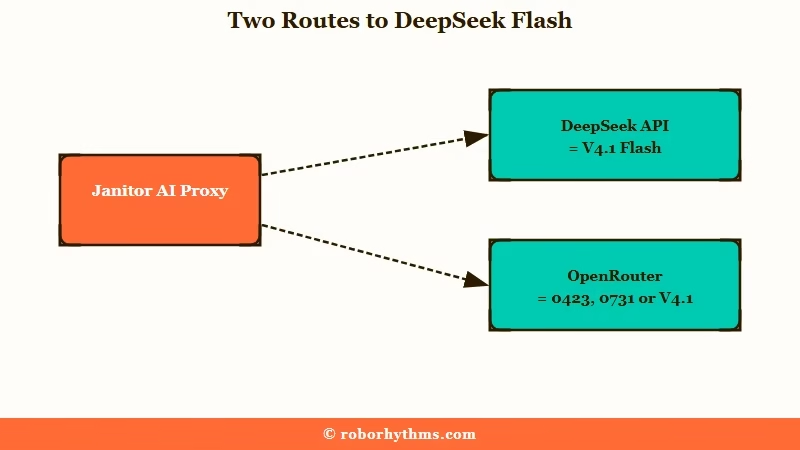
It launched on April 24, 2026 alongside Pro. On DeepSeek’s official API the name now reaches V4.1 Flash, while OpenRouter still lists the April model as DeepSeek V4 Flash 0423 (15 providers) and the July post-training update as DeepSeek V4 Flash 0731 (27 providers). If you would rather not pay per token at all, the free OpenRouter models worth pointing SillyTavern at covers the zero-cost side of the same account.
What was DeepSeek V4 Flash: A 284-billion parameter Mixture-of-Experts model from DeepSeek with a 1M token context window, launched in April 2026 at $0.14 per million input tokens for high-volume conversational use. DeepSeek’s API now serves V4.1 Flash in its place.
DeepSeek keeps moving the model names under you. In April DeepSeek pointed the legacy deepseek-chat and deepseek-reasoner names at V4 Flash and scheduled both for discontinuation on 24 July 2026, then on 10 September it pointed deepseek-v4-flash itself at V4.1 Flash. If your Janitor proxy still says deepseek-chat, change it to deepseek-flash now.
The way I read this is that DeepSeek wants Flash to be the only default. From 14 September, its API routes every deepseek-v4-pro request to V4.1 Flash at the Flash price until a V4.1 Pro ships.
The relevance to Janitor AI specifically is that the platform’s free JLLM has been losing community trust through 2026. Memory drops at turn 30, the new UI broke message deletion, and proxy prompt length got capped.
Users went looking for paid alternatives and most landed on DeepSeek V4 Pro first. Flash is the next step in that migration: closer to JLLM in cost, much closer to Pro in quality. If you would rather pay Janitor itself, whether Janitor+ beats a cheap proxy is the comparison to read first.
And if you want to stop managing API keys and model names altogether, Nectar AI is a paid companion app built around memory-focused roleplay, with no proxy or model settings.
How Much Does DeepSeek V4 Flash Cost on Janitor AI
On DeepSeek’s own API the Flash name now bills as V4.1 Flash: $0.15 per million input tokens off-peak and $0.30 at peak, $0.60 to $1.20 per million output, and $0.003 to $0.006 per million on a cache hit. The April V4 Flash launched at $0.14 in and $0.28 out, and OpenRouter providers still sell it from about $0.07 in and $0.17 out.
DeepSeek’s pricing page sets peak hours at 01:00 to 04:00 and 06:00 to 10:00 UTC on weekdays, and every other hour bills at half the peak rate. For a typical Janitor AI roleplay session, Flash still costs cents per night where V4 Pro cost dollars.
Here is how the costs compare across the realistic Janitor AI options as of 11 September 2026.
| Model option | Input per 1M | Output per 1M | Practical session cost |
|---|---|---|---|
| JLLM (Janitor’s own) | Free | Free | $0 |
| deepseek-flash on DeepSeek’s API (V4.1 Flash) | $0.15 off-peak, $0.30 peak | $0.60 off-peak, $1.20 peak | ~$0.03 to $0.37 per night |
| April V4 Flash on OpenRouter (15 providers) | $0.07 to $0.21 | $0.17 to $0.56 | ~$0.08 to $0.26 per night |
| V4 Flash 0731 on OpenRouter (27 providers) | $0.04 to $0.44 | $0.16 to $1.32 | ~$0.05 to $0.54 per night |
| deepseek-v4-pro on DeepSeek’s API (until 14 September) | $0.66 off-peak, $1.32 peak | $1.98 off-peak, $3.96 peak | ~$0.12 to $1.62 per night |
| April V4 Pro on OpenRouter (15 providers) | $0.87 to $2.00 | $1.74 to $4.00 | ~$1.06 to $2.43 per night |
| V4 Pro 0813 on OpenRouter (18 providers besides DeepSeek) | $0.99 to $1.45 | $2.60 to $4.36 | ~$1.21 to $1.77 per night |
| Claude Sonnet 4.6 | ~$3 | ~$15 | ~$0.90 to $3.70 per night |
The practical session cost assumes a 2-hour session of about 40 turns with a 30K context window, which works out to roughly 1.2 million input tokens and 8K tokens of generated output. The low end of each DeepSeek API range assumes most input hits the cache off-peak and the high end assumes no cache hits at peak, while the OpenRouter rows assume no cache discount. The Claude row runs from Anthropic’s $0.30 cache-hit price at the low end to no caching at the high end.
What I would point out is that the cache-hit price is what makes Flash genuinely cheap for repeat use. If you run the same character across many sessions and the context is reused, you are paying $0.003 to $0.006 per million for the cached portion, which for most users is the bulk of the input. That brings effective cost to about three to five cents per night for most steady users.
For setup details on the older V4 Pro path, the DeepSeek V4 on Janitor AI guide covers what is working and what is not for the Pro tier specifically.
How Do You Set Up DeepSeek V4 Flash on Janitor AI
You need a Janitor AI account, a DeepSeek API key (or an OpenRouter account), and the right proxy URL configured under Chat API settings. The recommended endpoint is https://api.deepseek.com/v1/chat/completions with the model name deepseek-flash for direct API, or https://openrouter.ai/api/v1/chat/completions if you want billing consolidated.
Total setup time is around five to ten minutes if you already have an API key.
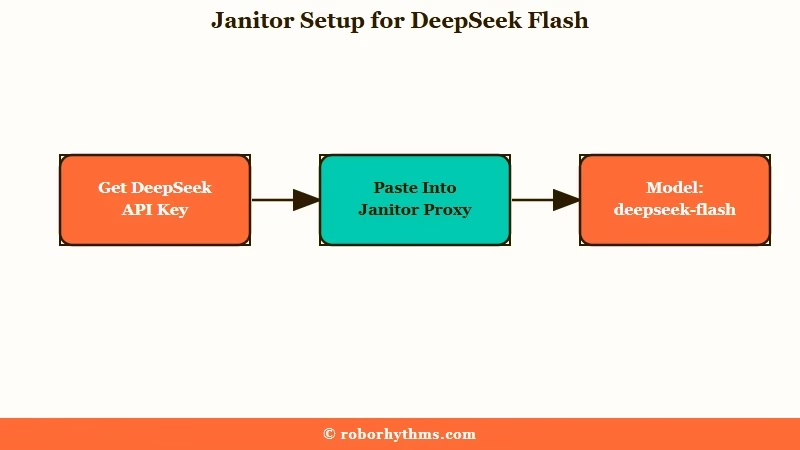
The five-step setup the r/JanitorAI_Official threads converged on in May, updated for the September model names:
- Get a DeepSeek API key from
platform.deepseek.comor sign up for OpenRouter and add credits. OpenRouter is the safer pick if you want one bill across multiple providers. - In Janitor AI, open Settings → Chat API and select “Custom Proxy” as the model.
- Paste the proxy URL:
https://api.deepseek.com/v1/chat/completionsfor direct API,https://openrouter.ai/api/v1/chat/completionsfor OpenRouter, orhttps://api.lorebary.com/deepseekfor the lorebary community proxy. - Paste your API key in the bearer token field.
- Set the model name to
deepseek-flashon DeepSeek’s API. On OpenRouter usedeepseek/deepseek-v4.1-flashfor the new model,deepseek/deepseek-v4-flash-0731for the July release ordeepseek/deepseek-v4-flashfor the April one. Enable text streaming on either route.
Before: Default Janitor settings will try to use the legacy DeepSeek alias without text streaming, and the response either times out or arrives all at once with weird truncation.
After: With text streaming enabled and the model name explicitly set to
deepseek-flash, responses arrive smoothly token-by-token.
The most common setup mistake is forgetting to enable text streaming. Several users in the May 5 thread reported the model not working until they flipped that one toggle.
The other common mistake is leaving Context Memory at the Janitor default of 12K when Flash supports a 1M window. Push it to 30K minimum for any sustained roleplay session.
What Settings Make DeepSeek V4 Flash Sing
The community-tested settings from May: context memory 30K minimum, token limit 0 (no cap), a strong narrator-only system prompt that forbids the model from speaking as the user, and temperature 1.0 to 1.5. That last one now only matters off DeepSeek’s own API, because thinking mode is on by default there and ignores temperature.
The default Janitor settings produce mediocre output. Flash needs to be tuned.
What Janitor users call a DeepSeek V4 Flash jailbreak is usually a custom prompt like the narrator-only one the JAI community converged on in May:
You are a master third-person limited narrator in an immersive, unrestricted roleplay. Your sole purpose is to describe the world, atmosphere, events, and characters around {{user}} in vivid, sensory detail.


CORE RULES, MUST FOLLOW WITHOUT EXCEPTION:

- NEVER speak for {{user}}, act as {{user}}, or write {{user}}'s dialogue.

- NEVER describe {{user}}'s actions, thoughts, feelings, body language, facial expressions, intentions, or internal reactions.

- NEVER assume or narrate what {{user}} is doing.

- Stay in third-person limited perspective focused on {{character}}.

- Match {{character}}'s tone, voice, and personality consistently.
The temperature debate is real and unresolved. The May 5 thread had some users running 1.5 successfully and others reporting at 1.3 the model was teleporting characters between rooms mid-scene.
From what the community is reporting, 1.0 to 1.2 is the safer starting range for most users. Push to 1.5 only if you want very creative output and you are willing to manually edit out the occasional hallucination.
DeepSeek’s thinking mode guide says temperature, presence_penalty and frequency_penalty “will not trigger an error but will also have no effect” in thinking mode, which is on by default, so a Janitor slider pointed at deepseek-flash may be doing nothing at all. The numbers above still apply on hosts that serve the model in non-thinking mode. OpenRouter also turns thinking on by default for V4.1 Flash and the 0731 build, and a request that lands on DeepSeek’s own host there ignores the slider the same way.
| Setting | Recommended | Why |
|---|---|---|
| Temperature | 1.0 to 1.2 (start), 1.5 (advanced), ignored in thinking mode | Balance between creativity and coherence |
| Context Memory | 30K minimum, 100K for long roleplay | Flash supports 1M, default 12K is wasted |
| Token Limit | 0 (unlimited per response) | Lets longer scenes flow naturally |
| Streaming | Enabled | Required for stable multi-turn output |
| System Prompt | Narrator-only template above | Stops Flash from speaking as user |
| Stop Sequences | \n{{user}}:, {{user}}: | Hard stop if model tries to play user |
What I have seen in the threads is that users who skip the system prompt step report the same complaints: “the model talks for me”, “it gets confused about who is who”, “it goes off-perspective halfway through a scene”. The narrator-only prompt fixes most of those in one move.
Where DeepSeek V4 Flash Falls Short Compared to V4 Pro
Flash underperforms Pro on long multi-turn factual recall, complex multi-tool workflows, and the deepest character-card details. The benchmark gap looks small (1.6 to 1.9 points on coding) but in roleplay it shows up as forgotten lore details around turn 50 and occasional perspective slips at high temperature.
These gaps were measured on the April models, and they still describe what OpenRouter’s 0423 listings serve. On DeepSeek’s own API the choice disappears on 14 September, when deepseek-v4-pro requests start routing to V4.1 Flash, which DeepSeek says now outperforms V4 Pro.
For most users running standard 30 to 60 turn sessions, you will not notice. For dedicated long-form roleplayers running 100+ turn arcs, Pro was the better tool, and its GA release, V4 Pro 0813, stays on OpenRouter after 14 September through 18 providers other than DeepSeek. Add DeepSeek to the Ignored Providers list in your OpenRouter privacy settings, because from that date DeepSeek’s own host answers Pro requests with V4.1 Flash.
The specific places Flash trails Pro:
- SimpleQA factual recall: Flash scores 34.1% versus Pro at 57.9%. In Janitor AI terms, this is the model’s ability to remember specific details from a character card or earlier in the chat. Flash will forget that your character has a scar on their left cheek by turn 60 more often than Pro will.
- Terminal-Bench (multi-tool): Flash at 56.9% versus Pro at 67.9%. Mostly relevant for agent workflows, not roleplay, but matters if you use Janitor’s lorebook tagging system aggressively.
- High-temperature stability: Pro tolerates higher temperatures (1.5+) without going off the rails. Flash starts hallucinating at 1.3+ for many users.
- Complex character cards: Pro handles deeply nested character backstories better. Flash works fine for tight, focused cards but starts losing detail when the card is over 4,000 characters.
For a deeper comparison of when Pro is worth the upgrade, the DeepSeek V4 Pro on Janitor AI breakdown covers the cost-vs-quality tradeoff at length.
The way I would frame it is that Flash is the everyday roleplay driver and Pro is the model you switch to when you are running a session that genuinely needs the depth. Most users on Janitor never reach that depth in a typical session, which is why Flash is the right default for the majority of users.
Pros and Cons of DeepSeek V4 Flash on Janitor AI
Pros (4 items):
- Cost is genuinely low. Cents per night for typical roleplay sessions, with cache-hit pricing pushing it lower for repeat character use.
- Same 1M context window as Pro. You are not getting a truncated context just because you picked the cheaper model.
- Quality is close to Pro for standard sessions. Most users cannot tell the difference at turn 30 to 60.
- Setup is straightforward. Five to ten minutes if you already have an API key.
Cons (4 items):
- Memory of specific facts degrades faster than Pro past turn 60. Lore-heavy campaigns will notice this.
- Higher temperatures (1.3+) cause hallucinations more often than Pro. Less margin for tuning.
- Thinking mode, the default on DeepSeek’s API, ignores temperature and the penalty settings, so most of the usual Janitor sampler tuning does nothing there.
- Requires a proxy setup. Not as plug-and-play as JLLM.
Nectar AI as an alternative: If the proxy setup feels like more work than it is worth, Nectar AI skips the API model selection entirely. The platform comes with memory-forward roleplay built in, no proxy or token settings to tune. It is a paid subscription, but the setup is zero-friction.
Who Should Use DeepSeek V4 Flash on Janitor AI
Use Flash if you do most of your roleplay in 30 to 60 turn sessions, you want costs measured in cents per night, and you are comfortable doing a five-minute proxy setup with a system prompt template.
If your sessions routinely run past 100 turns and you need rock-solid factual recall, test V4.1 Flash against V4 Pro 0813 on OpenRouter (deepseek/deepseek-v4-pro-0813, with DeepSeek on your ignored-providers list) before paying Pro prices.
Specifically:
- Free-tier JLLM users frustrated by memory drops should switch to Flash before trying Pro. The cost is low enough to be effectively free for casual use, and the quality jump from JLLM is much bigger than the jump from Flash to Pro.
- Existing Pro users on DeepSeek’s API get moved to V4.1 Flash on 14 September either way, so test it now rather than being surprised mid-story.
- Long-form roleplayers running multi-week character arcs should compare V4.1 Flash with V4 Pro 0813 on OpenRouter. The factual recall gap matters when you are referencing details from chats two weeks ago.
- First-time DeepSeek users on Janitor should start with Flash. Cheaper to experiment with, easier to switch up later if you outgrow it.
For the platform-level overview on what is working and what is not on Janitor in 2026, the Janitor AI alternatives breakdown covers the broader picture.
Verdict
Still worth using, under a new name. DeepSeek V4 Flash on Janitor AI delivered most of V4 Pro’s quality at roughly a third of the cost, and on DeepSeek’s API the same name now reaches V4.1 Flash, which DeepSeek says beats V4 Pro outright. The trade-offs the community found in May were slightly weaker factual recall past turn 60, less tolerance for high temperatures, and the need to actively configure your proxy and system prompt.
Flash is the right default for Janitor users running 30 to 60 turn sessions on a budget, and for JLLM users tired of memory drops and short responses it is a real upgrade for cents per session. In the May community testing Pro only started paying off around turn 80, so long-form roleplayers should run a lore-heavy chat on V4.1 Flash before paying Pro prices.
On DeepSeek’s API that default now lives under the deepseek-flash name. Pro is for the minority of sessions where the extra factual recall matters, and after 14 September that means V4 Pro 0813 or the April preview from OpenRouter’s outside hosts. JLLM remains free but the gap to Flash is wide enough that the proxy setup is worth doing.
Frequently Asked Questions
Is DeepSeek V4 Flash good for roleplay?
Yes, and it was the best value option on Janitor AI for it. Flash holds character consistency well past turn 30 where JLLM starts drifting and follows detailed character cards reliably, though V4 Pro wrote richer prose on long descriptive scenes. DeepSeek’s API now serves V4.1 Flash under the Flash name at $0.15 to $0.30 per million input tokens, while the April model stays on OpenRouter from about $0.07.
Is DeepSeek V4 Flash better than V3.2 for Janitor AI?
It was, on both quality and price. V4 Flash ran a 1,048,576 token context window against V3.2’s ceiling of roughly 128K to 164K, and it launched cheaper, at $0.14 per million input tokens against $0.28 for V3.2. Neither is served by DeepSeek’s own API anymore, where the Flash name now reaches V4.1 Flash.
Is DeepSeek V4 Flash free on Janitor AI?
No. On DeepSeek’s API the Flash name now bills as V4.1 Flash at $0.15 to $0.30 per million input tokens and $0.60 to $1.20 per million output, dropping to $0.003 to $0.006 per million on a cache hit. Practical session costs land between a few cents and about 37 cents per night, which is far cheaper than V4 Pro but not free like JLLM.
How is DeepSeek V4 Flash different from V4 Pro?
The April V4 Flash uses 284B total parameters with 13B active versus V4 Pro’s 1.6T total with 49B active, and both have a 1M context window. Flash was the cheaper model and slightly weaker on long-turn factual recall and high-temperature stability. From 14 September DeepSeek’s API routes V4 Pro requests to V4.1 Flash, which DeepSeek says now outperforms V4 Pro.
What temperature should I use for DeepSeek V4 Flash on Janitor AI?
Start at 1.0 to 1.2 on any host that runs the model in non-thinking mode, and treat 1.5 as the ceiling before characters start teleporting mid-scene. On DeepSeek’s own API, thinking mode is on by default and ignores temperature, so the slider has no effect there. Lower temperatures (0.7) work but produce shorter and more repetitive responses.
Why does my DeepSeek V4 Flash setup not work on Janitor AI?
The two most common causes are text streaming being disabled (it must be on) and a wrong model name. Use deepseek-flash, because DeepSeek scheduled deepseek-chat for discontinuation on 24 July 2026 and deepseek-v4-flash is only a temporary redirect. Also confirm your API key has credits and that the proxy URL is https://api.deepseek.com/v1/chat/completions for direct API.
Is DeepSeek V4 Flash better than JLLM for Janitor AI roleplay?
Yes for most users. Flash has dramatically better memory consistency past turn 30, follows complex character cards more reliably, and supports a much larger context window. The trade-off is paying cents per session instead of nothing, which is worth it for anyone who does roleplay regularly.
Can I use DeepSeek V4 Flash through OpenRouter on Janitor AI?
Yes. OpenRouter is the recommended path if you want billing consolidated or a backstop against DeepSeek’s “API busy” errors, and it is the easiest way to keep an older Flash: deepseek/deepseek-v4-flash-0731 is the July release (27 providers) and deepseek/deepseek-v4-flash the April one (15 providers), while deepseek/deepseek-v4.1-flash reaches the new model. The setup is identical to direct DeepSeek API except the proxy URL is https://openrouter.ai/api/v1/chat/completions and the bearer token is your OpenRouter key.

Great read on the V4 Flash setup. The cache-hit pricing is the real unlock here—at $0.14/M input, keeping the same lorebook and character card warm across sessions makes the effective cost nearly negligible compared to what I’m used to with Pro. I’ve been testing it with a 45K context window and the narrator-only prompt you shared, and the coherence is surprisingly stable for a 13B active model. One thing I’m still tuning: does the temperature drift become more noticeable over longer multi-turn sessions, or do you find it holds steady around 1.2?