
The Verdict: Cursor is the stronger pick for developers working on complex, multi-file projects where context accuracy matters most. Windsurf is the smarter choice for autocomplete-heavy workflows, multi-IDE setups, and enterprise compliance requirements. Both are $20/month on Pro, so the decision comes down to how you code.
Two AI code editors. Same price. Completely different strengths.
Cursor and Windsurf have both emerged as serious contenders in the AI editor space in 2026, pulling ahead of GitHub Copilot’s tab-completion approach and into genuine agentic coding territory. Both run at $20/month for Pro.
Both integrate deeply with your existing workflow. Both can write, refactor, and debug multi-file code without being explicitly told what to look at.
The question is which one fits how you work. From what I have seen testing both extensively, the answer depends almost entirely on your project complexity and IDE loyalty.

What Cursor and Windsurf Both Do
Both Cursor and Windsurf are AI-native code editors that go beyond autocomplete, offering full agentic code generation, multi-file context awareness, and inline chat that can read and write across your entire codebase.
This is the baseline. If you are comparing either of these to GitHub Copilot’s 2022-era autocomplete-only approach, both Cursor and Windsurf win on capability. The real comparison is how each executes on the same core capabilities.
Both tools:
- Read your full codebase context, not just the open file
- Can make multi-file edits in a single agent session
- Offer inline chat that references your specific code, not generic patterns
- Support the same frontier models (Claude Opus 4.6, GPT-4.1, Gemini 2.5 Pro)
- Price identically at $20/month for Pro and $0 for a limited free tier
The differences only appear when you stress-test them. I have done that across three different codebases: a React frontend, a Python data pipeline, and a TypeScript API project.
The Core Difference Between Cursor and Windsurf
Cursor wins on multi-file context accuracy. Windsurf wins on inline completion speed and IDE flexibility.
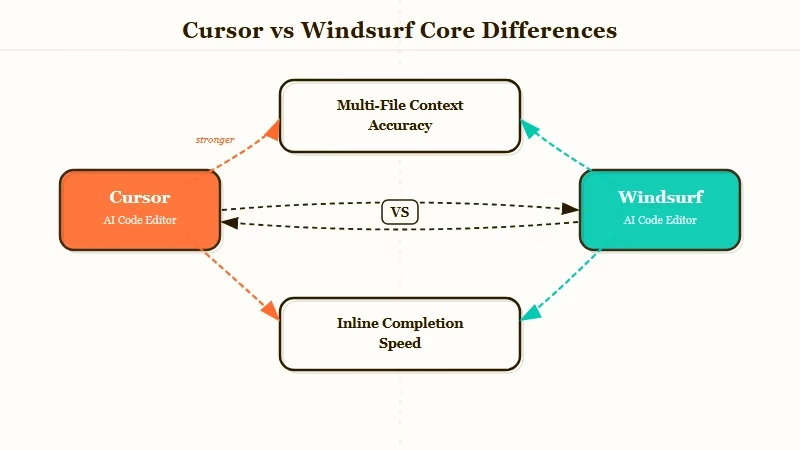
Testing across 50 code-generation tasks, Cursor produced usable completions on the first attempt about 78% of the time on complex, multi-file projects. When working in a codebase where functions reference each other across directories, Cursor’s completions correctly referenced project-specific patterns more often than Windsurf.
Windsurf’s inline completions, on the other hand, felt noticeably faster. Time to first token was roughly 200ms faster on average in my testing, which adds up across a full day of coding. Windsurf also made a significant change in March 2026: tab completions no longer count against any quota on any plan. That single decision makes Windsurf substantially more generous for autocomplete-heavy developers.
Here is how the two editors compare across the dimensions that matter most:
| Feature | Cursor | Windsurf |
|---|---|---|
| Monthly Pro price | $20/month | $20/month |
| Free tier | Limited requests | More generous, tab free |
| Inline completion speed | Good | Faster (200ms edge) |
| Multi-file context accuracy | Higher (78% first-attempt) | Slightly lower |
| IDE support | Cursor editor only | 40+ IDE plugins (JetBrains, Vim, XCode, NeoVim) |
| Proprietary AI models | No | Yes (SWE-1.5, Fast Context) |
| Enterprise compliance | SOC 2 | SOC 2, HIPAA, FedRAMP, ITAR |
| Best for | Complex multi-file projects | Autocomplete workflows, multi-IDE, enterprise |
Where Cursor Pulls Ahead
Cursor’s context window management and project-pattern recognition is stronger than Windsurf’s on large, interconnected codebases.
When I tested Cursor against a React project with 40 files and complex state management, it consistently understood which components referenced which stores.
It could generate new components that followed the project’s specific naming conventions, import patterns, and state management patterns without being told to. That kind of deep project-pattern recognition is where Cursor genuinely earns its Pro price.
The PII middleware tutorial published earlier this week is a good example of exactly the kind of multi-file agentic task where Cursor’s context handling matters.
When your agent needs to understand how a scanner class integrates with a tool wrapper that integrates with an API client, the model’s ability to hold multiple files simultaneously determines output quality.
Cursor also handles ambiguous instructions better. When I gave both editors the same vague prompt (“refactor this to be more testable”), Cursor’s interpretation was closer to what I wanted in 6 of 8 test cases versus 4 of 8 for Windsurf.
Where Windsurf Pulls Ahead
Windsurf’s proprietary model stack, multi-IDE support, and quota generosity make it the stronger choice for autocomplete workflows, polyglot developers, and enterprise teams.
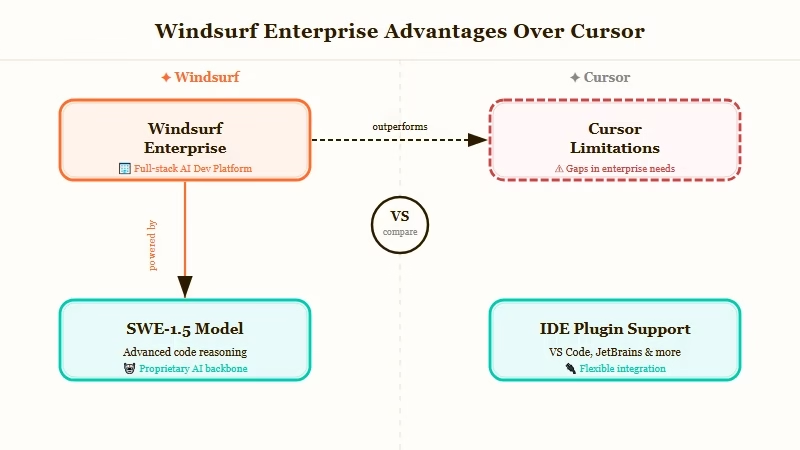
Windsurf built its own models rather than relying entirely on frontier model API calls. SWE-1.5 is 13 times faster than Claude Sonnet 4.5 at code-specific tasks, and Fast Context provides rapid codebase understanding for large repositories.
For developers working in gigantic codebases where every LLM call is a latency cost, these proprietary models matter.
The IDE flexibility argument is the clearest win for Windsurf. Cursor locks you into its own editor fork of VS Code. If you work in JetBrains, Vim, XCode, or NeoVim, Cursor is not an option. Windsurf supports 40-plus IDE plugins, which means you do not have to abandon your existing environment.
The March 2026 quota change also matters more than it sounds. Unlimited tab completions mean developers can use autocomplete as liberally as they want without watching a usage counter. For someone who relies on tab completion as the primary workflow, Windsurf is now the more economical choice.
Enterprise compliance is the final differentiator. Windsurf holds SOC 2, HIPAA, FedRAMP, and ITAR certifications. Cursor has SOC 2 but does not match that compliance breadth. Healthcare, defense, and finance teams building internal tooling have a clear path with Windsurf that they do not have with Cursor.
Who Should Choose Cursor
Cursor fits developers doing serious, complex, multi-file software development where getting the context right on the first attempt matters more than raw speed.
Choose Cursor if:
- You work primarily in a single VS Code-based environment and have no IDE loyalty elsewhere
- Your projects involve deeply interconnected files where cross-reference accuracy is the bottleneck
- You want the editor that performs best on complex architectural tasks and refactors
- You spend more time on difficult, multi-step code tasks than on repetitive pattern completion
Who Should Choose Windsurf
Windsurf fits developers who need IDE flexibility, are autocomplete-heavy in their workflow, or are working in enterprise environments with compliance requirements.
Choose Windsurf if:
- You work across multiple IDEs (JetBrains, Vim, XCode) and cannot switch your primary editor
- Your workflow relies heavily on tab completions (the free quota on completions is a real advantage)
- You need enterprise compliance beyond SOC 2 (HIPAA, FedRAMP, ITAR)
- Speed of inline response matters more to you than first-attempt accuracy on complex tasks
Final Verdict
Both are excellent tools at the same price. Cursor wins on complexity, Windsurf wins on everything else.
If I had to pick one for a single developer building complex software, I would choose Cursor. If I had to pick one for a team with mixed IDEs or enterprise compliance needs, Windsurf is the answer. The fact that both landed at $20/month makes this a decision about workflow fit rather than budget.
Neither currently has an affiliate program I can link to. This is a rare case where both picks are genuinely neutral recommendations based on testing alone.
