
Bottom Line: Cursor at $20 Pro is the sweet spot for indie builders coding 4 plus hours a day, but the credit-pool math turns ugly fast when you manually pick frontier models. Stay on Auto mode until you genuinely need a specific model, treat Agent mode output as a draft, and skip the $40 Business tier unless SOC 2 is a hard requirement.
Cursor’s annualized revenue hit $2 billion in February 2026, doubling from $1 billion three months earlier per TechCrunch’s funding-talks coverage. The fastest-growing SaaS in history depending on which definition you use. Over a million paying customers, a million daily active users, and the kind of growth curve that usually means the product is either great or the marketing is great.
After running Cursor as my primary editor for the last three months on real client projects and side bets, my read is “great enough that I keep paying, but not without the kind of friction nobody warns you about in the launch posts.”
This review is for indie builders and small teams who code more than four hours a day and care about real economics, not vibes. Most Cursor reviews on the open web read like first-week impressions written by writers who used the free tier for a weekend. I want to land somewhere closer to the truth of what the tool really costs and where it really breaks.
If you have not already, the Cursor vs Windsurf 2026 comparison is the right starting point if you are choosing between the two. This piece evaluates Cursor on its own merits, the way you would evaluate any tool you are deciding to renew.
What Cursor Does That VS Code Plus Copilot Cannot
Cursor is a standalone fork of VS Code rebuilt around AI, not an extension layered on top of it. That distinction is the entire reason it ranks above GitHub Copilot for serious multi-file work.
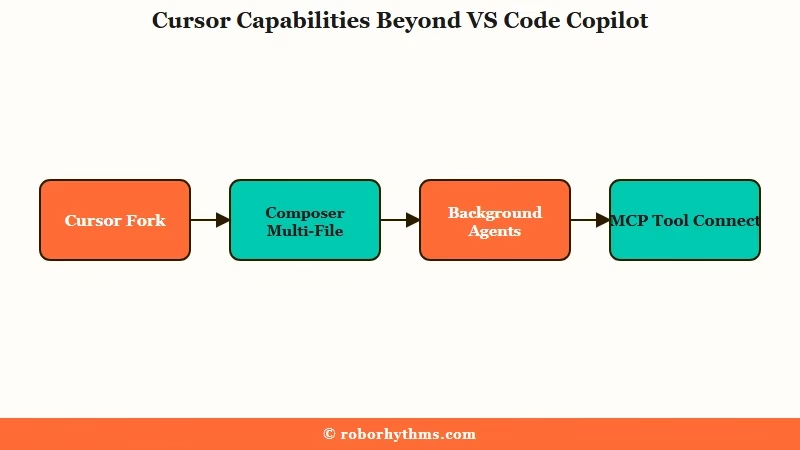
The four features that make Cursor more than a Copilot competitor are Composer, Agent mode, Background Agents, and native MCP support. Composer lets the AI edit multiple files at once based on a natural-language description and iterate until the task is done. Agent mode runs terminal commands and reads the output to decide the next step.
Background Agents clone the repo in the cloud and deliver work as pull requests, with up to eight running in parallel. MCP support lets the editor pull from external tools and documentation during inference without you copy-pasting context.
Tab completion runs on Supermaven, the engine Cursor acquired in 2024. From my testing, the Tab suggestions are noticeably ahead of Copilot for project-wide context, especially on files that reference other files in the same repo. The way I see it, Tab alone justifies the price if you write a lot of similar code across a large project.
The codebase indexing is where Cursor really separates from the pack. Cursor embeds your codebase and uses those embeddings to answer questions like “where is this function called” or “what does this module export.” The first time you ask a question about a 50,000-line codebase and the AI gives you a coherent answer with the right files cited, you understand why the company is at $2B ARR.
How Cursor’s Pricing Tiers Really Work
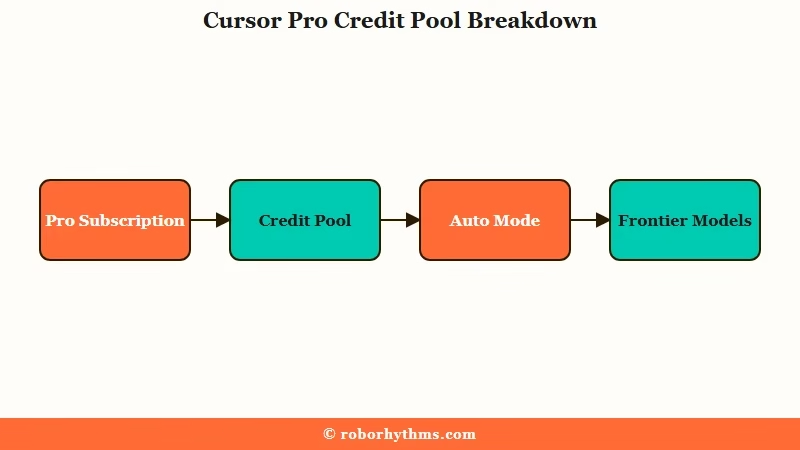
Cursor charges a base subscription plus a monthly credit pool that depletes when you manually pick frontier models. The whole pricing system changed in June 2025, and most reviews still describe the old model.
The Hobby tier is free and includes 2,000 Tab completions per month, 50 slow premium model requests, and basic chat. The 2,000 completions sound generous, but every accepted Tab suggestion counts, so the free tier exhausts within days of focused work. Use it to try the editor, not to ship anything.
The Pro tier is $20 per month (or $16 if you pay annually) and includes 500 fast premium requests, unlimited slow requests, unlimited Tab completions, and a $20 monthly credit pool. The credit pool is the part that surprises people.
Auto mode does not touch the pool. Manually selecting a frontier model like Claude Opus or GPT-5.4 deducts from the $20, and additional requests beyond the pool cost $0.04 each.
| Tier | Price | Premium requests | Credit pool | Best for |
|---|---|---|---|---|
| Hobby | Free | 50 slow | None | Try the editor |
| Pro | $20 | 500 fast plus unlimited slow | $20 | Indie devs 4 plus hours/day |
| Pro+ | $60 | Same plus 3x credits | $60 | Heavy Agent users, frontier-only |
| Ultra | $200 | Same plus 20x credits | $200 | Team leads, uninterrupted access |
| Business | $40/user | Same as Pro | $40/user | SOC 2, SSO, centralized billing |
The Business tier at $40 per user is the one most teams misread. It does not give you more AI power than Pro, it gives you SOC 2 compliance, SAML SSO, admin controls, and centralized billing. If you do not have a compliance requirement, do not pay double.
The break-even between Pro and Pro+ is roughly when your credit-pool spend exceeds about $25-30 a month on frontier models. If you manually pick Claude Opus for every Agent run, you can blow through the $20 Pro pool in a single intense day.
From my testing, the moment I started reaching for Opus and o1 by default instead of letting Auto mode pick, my bill spiked toward $60.
Where Cursor Wins on Real Builder Workflows
Cursor’s three killer scenarios are multi-file refactors, codebase Q and A, and async PRs via Background Agents. Each of those is genuinely better than any tool I have tried that does not start from the same VS Code fork architecture.
Multi-file refactors are the most repeatable win. Tell Composer “rename this hook across the app and update every call site, and also adjust the unit tests” and most of the time it does it cleanly.
Watch the proposed diff before you apply, because Composer occasionally “sprays” code across unrelated functions when the request is ambiguous. From my testing, the 70 to 80 percent reliability number you hear in coverage is accurate, which means one in four runs needs you to either reject and re-prompt or fix something it broke.
Codebase Q and A is where Cursor’s embeddings carry the day. “What does this module export and who uses it” returns a real answer with the right files cited, not a hallucination. This pattern alone replaced about 80 percent of the times I would have grepped for an export in vanilla VS Code. The reliability holds even on larger codebases as long as you give the indexer time to finish.
Background Agents are the newest feature and the one I have used least, but the workflow is genuinely different. Kick off a feature in the cloud, walk away, and come back to a pull request waiting for review.
Up to eight agents in parallel means you can run several independent feature bets at once. The catch is the same as Composer, the PR is a draft, not a deliverable, and the review work is real.
The deeper version of this build pattern lives in the GitHub PR auto-fix agent tutorial if you want to layer your own safety on top of what Cursor ships.
Where Cursor Loses and Costs You More Than You Think
The credit-pool model creates real workflow anxiety that the marketing does not mention. Most reviews skip past this.
Once you have spent two weeks watching your $20 balance drop on every Opus request, you start picking the cheaper model just to preserve the pool. That is a friction tax on the very feature you are paying for.
Here is a quick example of how the math turns:
Before credit pools (pre-June 2025): Pro plan, unlimited frontier model usage in practice, $20 covers everything.
After credit pools: Pro plan, $20 base plus $20 credit pool, but a heavy Agent day on Claude Opus easily burns $5-8 of credits. By day three of an intense sprint you are out, and overage runs at $0.04 per request which adds up faster than you expect on a multi-step Agent run.
The 70 to 80 percent Agent reliability number is the second cost most reviews skip. The remaining 20 to 30 percent of Agent runs contain subtle errors, deprecated API calls, or imports of libraries that do not exist.
The hallucinated-import failure mode is the most dangerous because the code compiles in your head until you run the install and watch pip or npm complain. From my testing, roughly one in eight Agent suggestions has at least one fabricated dependency.
There is also a real privacy footprint to consider. Even with Privacy Mode enabled, every AI feature sends 100 to 300 lines of code to whichever provider the request routes to. That is OpenAI, Anthropic, or Google depending on the model.
OpenAI retains prompts for up to 30 days for safety monitoring. If your client has strict data residency, that is the hard line nobody covers honestly in the launch posts. Read the AI coding agent data-residency angle before you wire Cursor into a client engagement that touches regulated data.
The IDE lock-in is the last friction worth naming. Cursor is a VS Code fork, so JetBrains users, Neovim users, and Emacs users are out, and Cursor’s AI features do not exist in those editors at all.
Compared to Claude Code CLI as terminal-native, Cursor’s terminal integration is also relatively shallow. Heavy command-line workflows lose something when you commit to Cursor.
Who Should Buy Cursor and Who Should Skip It
Buy Pro at $20 if you code more than four hours a day on a real project, your work is mostly in JavaScript, TypeScript, Python, Go, or Rust, and you can review AI output critically. Time savings repay the $20 within the first week if those three conditions hold.
Buy Pro+ at $60 only if you have tracked your credit-pool spend for at least a month on Pro and consistently hit the cap. Otherwise you are paying for a buffer you do not need. The $60 tier is not a flex, it is a math decision.
Buy Business at $40 per user only when SOC 2, SSO, or centralized billing is a hard requirement. Functionally the AI is identical to Pro. The premium is for the compliance surface, not the model access.
Skip Cursor entirely if any of these apply:
- You code primarily in JetBrains and refuse to fork your editor.
- Your team has strict no-code-leaves-the-network policies that Privacy Mode cannot satisfy.
- You are a junior developer without the review skill to catch the 20 to 30 percent of Agent output that is wrong.
- Your work is small scripts and one-offs where the indexer overhead and credit-pool tracking are pure friction.
Pro versus Auto trap: Use Auto mode by default. Only switch to manual frontier-model selection when you have a specific reason (a complex multi-step refactor where reasoning matters, or a debug session where Opus’s chain-of-thought is worth the credit burn). The reflex to “use the best model” on every request is what blows up your bill.
The verdict in one paragraph: Cursor is the strongest commercial AI coding editor in May 2026 for indie builders who code daily, but the pricing model rewards careful users and punishes lazy ones. Pay for Pro, stay on Auto mode, treat Agent output as a draft, and the $20 a month is the best dollar you spend on tools this year.
Editorial note: Cursor does not have a public affiliate program as of May 2026. If they launch one, the link to Cursor’s pricing page will be swapped to an affiliate URL with disclosure. For now, every link points directly to Cursor with no commission attached.
Frequently Asked Questions
Is Cursor free worth using?
Cursor’s Hobby tier is free and gets you basic Tab completions plus 50 slow premium requests per month, enough to test whether the editor fits your workflow. The 2,000 completions exhaust within days of focused work, so treat it as a trial, not a long-term option.
Is Cursor worth $20 per month?
Yes for indie builders coding more than four hours a day on real projects. The time savings repay the subscription within the first week if you use Tab completion, multi-file Composer edits, and codebase Q and A regularly.
What is the difference between Pro and Pro+?
Pro+ at $60 per month gives you a 3x credit pool ($60 instead of $20) but the same feature set. Only worth it if you have hit the Pro pool ceiling consistently for at least a month while manually picking frontier models.
Does Cursor work in JetBrains?
No. Cursor is a standalone fork of VS Code. JetBrains users cannot access Cursor’s AI features and need to either switch editors or use a different tool like GitHub Copilot in JetBrains.
Is Agent mode reliable?
Agent mode is reliable about 70 to 80 percent of the time. The remaining runs contain subtle errors, deprecated APIs, or hallucinated imports. Always review the proposed diff before accepting, especially for multi-file changes.
What models does Cursor support?
Cursor supports the current frontier lineup including Claude 4.x Sonnet and Opus, GPT-5.4, GPT-4o, o1 reasoning models, and Gemini 2.5. Auto mode routes between them automatically; manual selection deducts from your credit pool.
