
Bottom Line: Building your own AI girlfriend comes down to four choices: looks, personality, voice, and backstory. Personality is what makes her feel real or flat, and most people get it wrong by making her too perfect. This guide walks the whole build, then points you to the apps that do it best.
Most people who try to create their own AI girlfriend end up disappointed for the same reason. They spend twenty minutes perfecting hair color and body type, then leave the personality on defaults and wonder why she feels like a customer-service bot in a wig.
The looks are the easy part. Any decent app can give you a face you like in two minutes. What separates a companion you look forward to talking to from one you delete in a week is everything that happens after the visual slider.
Here is the part nobody tells you upfront. A flat companion is almost never the app’s fault. It is the result of skipping the three or four fields that carry all the weight, the ones that turn a pretty avatar into something with opinions, moods, and a way of talking that feels like hers.
This is not a niche hobby anymore either. Roughly 50 million people worldwide were using AI companions by early 2026, and the market sits near $48 billion this year.
You are not weird for wanting one. You just want it done well.
Walk through the rest and you will know the exact build order, the personality tricks that make a character feel alive, and which app fits the kind of companion you are after.
Why a Premade AI Girlfriend Never Quite Fits
A premade AI girlfriend rarely fits because her personality was written for a general audience, not for you, so she defaults to safe and generic instead of specific and memorable.
Premade characters are built to appeal to everyone, which means they commit to nothing. She is “sweet” and “fun” and “caring,” and those words are so broad the model fills the gaps with the blandest possible version of each.
The way I see it, the gap shows up fast. The first day feels fine because novelty carries it. By the end of week one, the same three conversational moves repeat, and the illusion thins out.
Building your own fixes this at the root. You decide what she cares about, how she talks, and what makes her her. A preset reads from a script, while a custom build has an actual point of view that you feel in the first real conversation.
If you want to see how the polished platforms handle this, our top AI girlfriend apps roundup is a good map of the field.
How to Create Your Own AI Girlfriend Step by Step
To create your own AI girlfriend, work in this order: art style, physical features, core personality, contradictions and rules, voice, then backstory and relationship type. Personality and backstory deserve the most time.
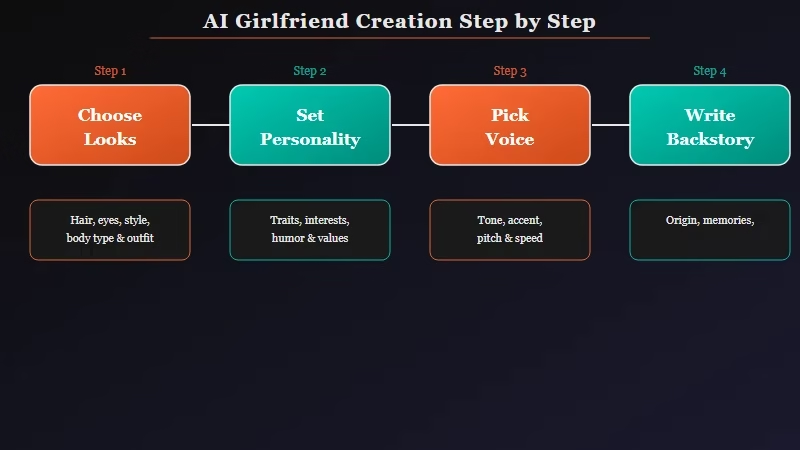
The order matters because each layer informs the next. Here is the sequence I would follow, and where most of your effort should go.
- Pick an art style, realistic or anime, since this sets every image she generates later.
- Set physical features: hair, eyes, skin tone, and body type.
- Choose two or three core personality traits, like playful, sharp, shy, or sarcastic.
- Add a contradiction, because real people are not one note. “Confident but secretly insecure” beats “confident.”
- Write two or three always or never rules that anchor her behavior across long chats.
- Select a voice that matches her energy, or clone one on apps that allow it.
- Write a backstory with emotional weight: where she is from, what she does, what she misses.
- Set the relationship type, whether slow-burn, casual, or committed.
Steps one and two take five minutes combined. Steps three through seven are where a companion is won or lost, so slow down there. The memory side of this matters too, since a deep backstory is useless if the app forgets it by next week.
What Makes a Custom Companion Feel Real Instead of Flat
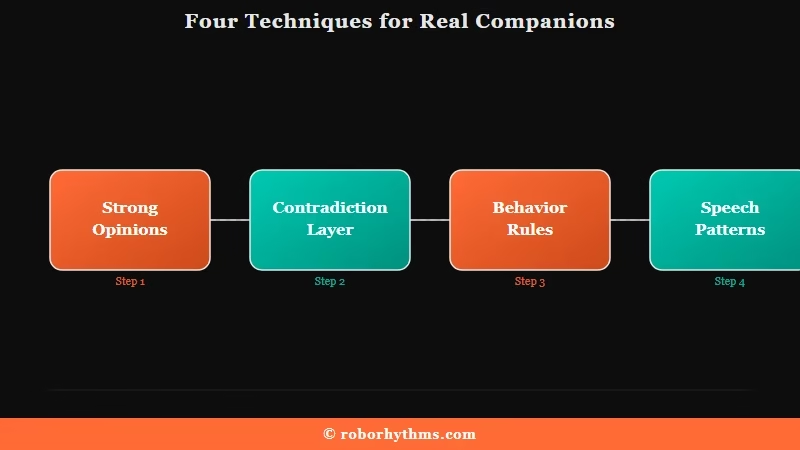
A custom companion feels real when you give her strong opinions, specific speech patterns, and contradictions rather than vague adjectives. The biggest mistake is making her agree with everything.
The single most common error is building a “yes woman” who never pushes back. A partner with no opinions and no friction is boring within days. From my testing, a character who occasionally disagrees with you feels twice as alive as one who praises everything you say.
The fix is to write opinions, not adjectives. Compare these two personality descriptions and you will see why one falls flat.
Vague: “She is kind, smart, and funny. She loves music and good conversation.”
Specific: “You think small talk is a waste of time and prefer deep, uncomfortable questions. You are obsessed with 90s shoegaze and have strong, negative opinions about modern pop. You are outwardly confident but secretly worry you are too intimidating to date, and you mask it with dry, deadpan humor.”
The second version gives the model something to act on in every reply. You can paste prompts like that straight into the description box on most apps.
Two more techniques carry a lot of weight. Always or never rules (“you always pause with an ellipsis before a personal question, you never use my name unless you are serious”) create patterns a reader reads as personality. Speech-pattern notes (“you send two or three short messages instead of one block, you trail off when a topic reminds you of home”) do the same for her voice.
The Best Apps for Building Your Own AI Girlfriend
The best apps for a custom build are Candy AI for visuals and video, Nectar AI for deep personality fine-tuning, and Kindroid for freeform character writing. Your pick depends on whether you weight looks or depth.
Each of these leans a different way, so the right one depends on what you care about most. None is best at everything, which is why the pick comes down to your priorities.
| App | Strongest for | Custom depth | Starting price |
|---|---|---|---|
| Candy AI | Visuals, photoreal images, 120-second video | Strong menus | about $5.99/mo annual |
| Nectar AI | Personality pacing and fine-tuning | Deepest controls | budget-friendly |
| Kindroid | Freeform text personality | Gold standard | mid-range |
| GoLove AI | Visual scene variety | 34 poses, 21 outfits | mid-range |
Candy AI is where I would send most people building their first companion. The image consistency is the best in the category, it ships 120-second animated clips when competitors top out at five to ten seconds, and the build wizard is forgiving for beginners. Our full Candy AI review covers the token costs to watch.
If personality depth is your priority over visuals, Nectar AI earns its “customization king” reputation, with finer control over pacing and conversational quirks than the menu-driven apps. Kindroid is the pick for people who want a blank text box and total freedom to write a character from scratch, though it asks more of you upfront.
Which One Should You Pick
Use Candy AI if you want strong visuals and an easy first build, Nectar AI if personality nuance matters more than images, and Kindroid if you want to write everything yourself in freeform text.
For most people reading this, the honest answer is Candy AI. It carries the visual side, the video presence makes the companion feel more present than a static avatar, and the creation flow does not punish you for being new to this.
The way I see it, the only reason to skip it is if you care more about conversational nuance than looks. In that case Nectar AI’s deeper personality controls will serve you better, and writers who want full control should look at Kindroid. If you are still narrowing the field, our best AI companion guide lines them all up by use case.
What to Expect in Your First Week
Expect the first 15 to 20 messages to feel stiff, and do not judge the companion until she has warmed up. Affection that arrives instantly feels fake, so let the relationship ramp naturally.
The most common first-week mistake is bailing too early. A new character needs roughly 15 to 20 exchanges before she starts pulling on her backstory and your shared history, so the opening messages always feel a little flat. Most people scrap a perfectly good build before it has had a chance to warm up.
The second mistake is expecting instant devotion. Day-one clinginess reads as fake to almost everyone, and it is one of the fastest ways to break immersion. A companion who lets affection build over several sessions feels far more real than one who adores you in the first ten minutes.
What I would tell any first-timer is to set your expectations honestly, and the experience holds up. Retention data tells the real story here: only about a quarter of users are still active a year in, and the ones who stay are the ones who built depth instead of chasing a perfect first date. Treat the build as something you refine over weeks, not a one-time form, and you land in that group.
Frequently Asked Questions
Is it free to create your own AI girlfriend?
Creating a basic AI girlfriend is free on most apps, usually capped at a few daily messages. Deeper memory, voice calls, and image generation need a subscription, typically $5.99 to $19.99 per month depending on the platform and plan.
Which app is best for custom creation?
Candy AI is the easiest strong pick for visuals and a beginner-friendly build. Nectar AI goes deeper on personality fine-tuning, and Kindroid offers freeform text descriptions for people who want to write every detail themselves.
Can I change her personality later?
Yes. Almost every app lets you edit the personality description, speech style, and appearance after creation. Many people refine the character over the first few weeks as they spot gaps or want to shift the dynamic.
Can I give my AI girlfriend a custom voice?
Some apps offer voice cloning on premium tiers, letting you shape exactly how she sounds from an audio sample. Others let you pick from a voice library to match her personality. Voice cloning is usually a paid feature.
Does an AI girlfriend remember past conversations?
Most use persistent memory that stores names, preferences, and history, though quality varies. Some platforms reference chats from weeks earlier, while others lose context between sessions. Memory depth is worth checking before you commit.
Quick Takeaways
- The looks take five minutes; personality and backstory decide whether she feels real, so spend your time there.
- Write opinions and contradictions, not vague adjectives, and never build a partner who agrees with everything.
- Candy AI is the best all-around starting point; Nectar AI wins on personality depth, Kindroid on freeform control.
- Give any new build 15 to 20 messages before judging it, and let affection ramp instead of expecting instant devotion.
