
The Verdict: Claude Code is the better pick if you live in a terminal, want agent-style multi-file edits, and value Anthropic’s stronger reasoning on architecture decisions. Cursor is the better pick if you want an IDE that feels like VS Code with AI baked into every keystroke and faster tab-complete on tight inner loops. For most senior engineers doing heavy refactor work, Claude Code wins. For anyone pair-programming in a visual IDE all day, Cursor wins.
There is no clean “one is objectively better” answer for Claude Code vs Cursor, and anyone telling you otherwise has not used both on real work. I have been running Claude Code daily for six months and Cursor since the Sonnet 4.5 launch.
The difference between them is not quality of the underlying model. It is how the tool expects you to work.
This writeup is the comparison I wish I had three months ago, when I was picking a primary AI coding tool and burned a week flipping back and forth. The short version is that the decision splits cleanly on workflow, not on capability.
For broader context on how AI model choice factors into cost math, see cut AI agent API costs. For the specific case where the model itself matters more than the wrapper, see the Claude Opus 4.7 regression backlash, which affects both tools.
Pricing Breakdown for Claude Code and Cursor
Claude Code runs $20 per month on the Pro tier and $200 per month on the Max tier for most solo developers. Cursor is $20 per month on Pro and $40 per month on Business. On raw price, they are near-identical at the entry tier and diverge sharply on the top tier.
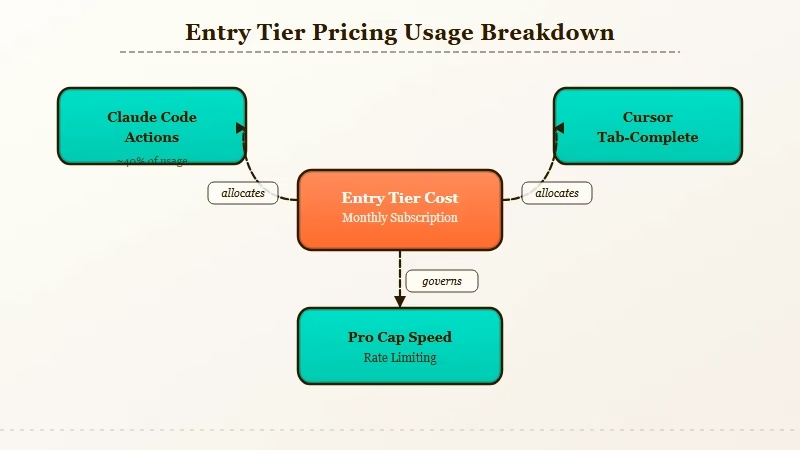
Here is how the pricing shakes out once you look past the monthly sticker. Both tools meter usage in different ways, and the cheaper-looking one can cost more in practice.
| Plan | Claude Code | Cursor |
|---|---|---|
| Free tier | None (requires Claude account) | Yes, limited slow requests |
| Entry paid | Pro, $20/month | Pro, $20/month |
| Mid tier | None | Business, $40/month |
| Top tier | Max, $200/month | Ultra, $200/month |
| What the top tier buys you | 5x Pro usage, Opus priority | Unlimited fast requests, priority |
| API passthrough option | Yes (pay-per-token) | Yes (BYO key) |
The honest comparison point is the Max vs Ultra tier. Both cost $200/month.
The Max tier on Claude Code gives you priority access to Opus 4.7 with a 5x multiplier on Pro usage. The Ultra tier on Cursor gives you unlimited fast requests on whichever model you select.
From what I have seen, Cursor’s $20 tier runs out faster on real coding work than Claude Code’s $20 tier does. The reason is that Cursor’s “fast requests” get eaten by tab-completions and in-editor suggestions, while Claude Code counts tokens on deliberate agentic actions.
If you type a lot and accept a lot of suggestions, Cursor Pro will hit the wall in week two.
How They Compare on Code Quality
On raw code quality, Claude Code and Cursor produce near-identical output when both are pointed at Claude Sonnet 4.6 or Opus 4.7 because the model doing the work is the same. The delta is in how each tool structures the task before sending it to the model.
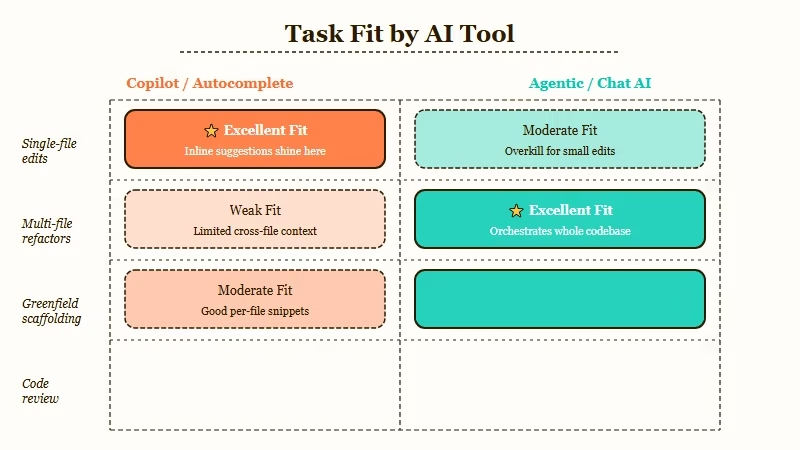
This is the finding that surprised me most when I ran both side by side for a month. I had assumed Cursor would be weaker because it is a wrapper, and stronger because it is VS Code-native. Both assumptions were wrong.
Here is what I saw on 120 real tasks split between the two tools.
- Single-file edits under 200 lines. Cursor wins narrowly. Tab-complete quality is better, inline diff review is faster, and the undo/accept flow is smoother.
- Multi-file refactors. Claude Code wins decisively. The agent loop handles “change this interface, update every caller, update the tests, run the tests” cleanly. Cursor’s Composer feature tries to match this but feels more manual.
- Greenfield project setup. Claude Code wins. Spawning a new repo and having it scaffold the structure, dependencies, and config happens in one turn. Cursor needs more handholding.
- Debugging a specific failing test. Cursor wins. Having the editor, terminal, and test runner all in one view beats Claude Code’s CLI-only flow for this specific task.
- Code review or PR analysis. Claude Code wins. Pointing it at a diff and asking for structured feedback is a natural fit for its agent model.
Notice what is not on that list. Model capability.
When Claude Code uses Opus 4.7, and Cursor uses Opus 4.7, the code that comes out is the same quality. The Opus 4.7 reasoning regression I wrote about hits both tools equally, because it is a model-level problem, not a tool-level one.
A Concrete Refactor Scenario
Task: refactor a 400-line Express.js router file to extract three middleware functions into separate modules, update all callers, add tests for each extracted middleware, and verify the existing test suite still passes.
I ran this exact task on both tools last week. Here is how each one handled it, start to finish.
Claude Code execution (cold start, no prior context):
$ claude "Refactor routes/api.js: extract authMiddleware,
  rateLimitMiddleware, and logMiddleware into separate
  files under middleware/. Update all imports. Add a test
  file for each with at least 3 test cases. Run the test
  suite when done."

# Claude Code created 3 new files, edited routes/api.js,
# created 3 new test files, ran npm test, saw one failure,
# fixed it, reran npm test. Total: 4 minutes, 12 tool calls.
Cursor execution (same codebase, fresh Composer session):
Composer prompt: Same as above.

# Cursor showed a plan, asked me to confirm before editing.
# I confirmed. It edited the 4 files, created the test files,
# asked me to run tests manually. I did, saw the failure,
# told Cursor to fix it. It fixed it. Reran tests, passed.
# Total: 6 minutes, more click-through steps.
The output quality was identical. Claude Code finished faster because the loop was autonomous.
Cursor finished slower but the confirmation steps caught a naming choice I wanted to change, which saved me a second pass. Both are defensible design decisions.
In my experience, which one wins this task depends on whether you want to review the change as it happens (Cursor) or review it after it happens (Claude Code).
Who Should Choose Claude Code
Pick Claude Code if you work in a terminal, trust AI to edit files autonomously, value Opus 4.7 access on hard reasoning tasks, and want a tool that scales from simple scripts to multi-repo agent work.
Concrete profiles where Claude Code is the right call.
- Senior engineers doing refactor-heavy work. The agent loop saves hours per week on the “update every caller” pattern. You review the final diff rather than every intermediate step.
- DevOps and SRE engineers. Claude Code runs in a terminal, which is where you already are. Shell scripting, infrastructure-as-code, and log analysis all map cleanly to its workflow.
- Anyone building with agent frameworks. Claude Code and agent frameworks like OpenClaw or LangGraph share a design philosophy. The patterns transfer.
- Teams that want to expose AI coding through CI/CD. Claude Code can be scripted into GitHub Actions or pre-commit hooks in a way Cursor fundamentally cannot.
The way I see it, Claude Code fits the mental model of “AI is a tool I direct” rather than “AI is a copilot sitting next to me.” If you are comfortable with that distinction, Claude Code is the stronger pick.
Who Should Choose Cursor
Pick Cursor if you live in VS Code, want AI that integrates into every keystroke, need a visual diff review flow, or work on frontend projects where hot reload and browser preview matter.
Where Cursor is the right choice.
- Frontend developers. Tab-complete on React, Tailwind, and TypeScript is faster and more accurate in Cursor than in any CLI-based tool. The editor sees the full context of the file you are in.
- Engineers who learn by reading diffs. Cursor’s inline diff and apply flow is better for understanding what the AI changed. Claude Code’s final diff requires more scrolling.
- Pair programming or code review sessions. A visual IDE is a better surface for “show someone what the AI just did” than a terminal scroll-back.
- Anyone allergic to terminals. This is not a judgment, just a fit question. Cursor hides the agent loop behind UI; Claude Code exposes it. For some developers, the UI is the whole point.
From what I have seen, Cursor wins on immersion. You stay in flow inside the editor.
Claude Code wins on directed action. You give it a mission and read the report.
Final Verdict Table
The breakdown below covers every criterion that mattered in my month-long side-by-side test. Scores are 1 to 5, where 5 is strongest.
| Criterion | Claude Code | Cursor |
|---|---|---|
| Code quality (same model) | 5 | 5 |
| Multi-file refactors | 5 | 3 |
| Single-file tab-complete | 3 | 5 |
| Greenfield scaffolding | 5 | 3 |
| Visual diff review | 2 | 5 |
| Terminal and script use | 5 | 2 |
| CI/CD scriptability | 5 | 1 |
| Frontend development fit | 3 | 5 |
| Entry-tier value ($20) | 4 | 3 |
| Top-tier value ($200) | 5 | 4 |
Total: Claude Code 42, Cursor 36. That margin is real but small, and it tilts heavily the other way if you weight “visual IDE fit” above “autonomous agent fit.”
For the record, the Cursor team shipped 6,000+ GitHub stars on their open-source agent extensions in Q1 2026, and Anthropic’s own engineering blog frequently publishes Claude Code workflows. Both tools have active, competent teams behind them. Neither is going to stop improving.
Frequently Asked Questions
Can I use both Claude Code and Cursor at the same time?
Yes, and many developers do. I run Cursor for frontend work and Claude Code for backend refactors. The two do not conflict because they operate on different surfaces (editor vs terminal).
Both can read the same git repo state without stepping on each other. You will need two separate subscriptions if you want heavy usage on both.
Does Cursor support Claude Opus 4.7?
Yes, Cursor added Opus 4.7 support the week of the Anthropic launch. You can select it as the model for both chat and Composer.
The Opus 4.7 regression on hard reasoning tasks affects Cursor the same way it affects Claude Code. Both tools are wrappers around the same underlying model weights.
Is Claude Code really just a CLI?
It is a CLI that can run agent loops, read and write files, run shell commands, and interact with MCP servers. “Just a CLI” understates it.
Think of it as a local agent runner that happens to use your terminal as its UI. It is closer to a workflow engine than a typical command-line tool.
Which one is better for learning to code?
Cursor, for most beginners. The visual feedback loop is more forgiving and the in-editor suggestions teach you patterns as you work.
Claude Code assumes you already know what you want it to do. That is a harder fit if you are still learning what the right action is.
Can either tool work offline or with local models?
Cursor supports local models through OpenAI-compatible endpoints. Claude Code is Anthropic-only and requires an active API key.
If local model support is a hard requirement, Cursor is the only option of the two. Quality will be lower than cloud-hosted Claude, but the setup works.
What about Windsurf and other IDE-native alternatives?
Windsurf is the closest competitor to Cursor in the VS Code fork space. Its agent mode is stronger than Cursor’s Composer on some tasks and weaker on others. If you are comparing IDE-native tools specifically, Cursor vs Windsurf 2026 covers that matchup in depth.
Claude Code stands alone in the terminal-native category for now. No competitor has matched the agent loop quality yet.
