
The Verdict: Claude Code Skills and ChatGPT Custom GPTs solve superficially similar problems but pull in opposite directions. Skills are lightweight markdown files that run inside your terminal with full tool access. Custom GPTs are hosted agents with a chat UI and limited tool reach. For developers doing real engineering work, Skills win. For non-technical users who need a chatbot with a preset system prompt, Custom GPTs still make sense.
I have been running a serious Claude Code Skills stable for about three months and keeping a handful of Custom GPTs alive out of curiosity. The two feel like they should overlap. They do not.
The short version is this. Skills live in your repo, trigger from a slash command, and have access to whatever tools Claude Code has loaded in that session. Custom GPTs live on ChatGPT’s servers, trigger by selecting one in the sidebar, and talk to the outside world through a narrow Actions API.
That one-sentence difference shapes everything downstream, pricing, capability, portability, how you debug them, and who they make sense for.
What Are the Core Differences Between Skills and Custom GPTs?
Claude Code Skills are markdown files in the .claude/skills/ folder that the main agent loads on demand. Custom GPTs are hosted chat agents built through ChatGPT’s builder UI.
The trigger mechanism is the biggest divergence.
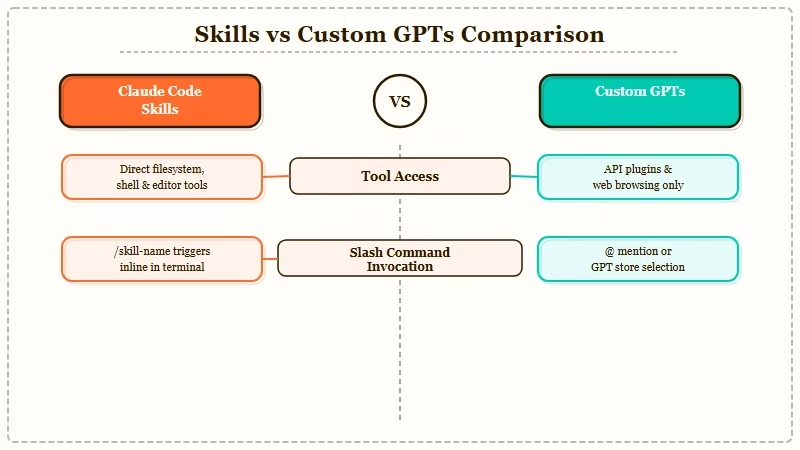
Skills fire from a slash command or from the main agent deciding the user’s prompt matches the skill’s description. Custom GPTs require the user to pick the GPT from a menu before the conversation starts.
From what I have seen in my own workflow, this changes how you use them. I invoke Skills dozens of times a day without thinking, they are part of the terminal. I open a Custom GPT maybe once a week, and only when I remember it exists.
The second divergence is tool access. Skills can use every tool Claude Code has loaded in the session: file system, git, MCP servers, browser automation, shell commands.
Custom GPTs get Code Interpreter, DALL-E, web search, and a custom Actions layer that hits external APIs through OpenAPI specs.
Which One Is Cheaper to Run?
Claude Code Skills cost whatever your Claude subscription costs, there is no per-skill markup. Custom GPTs require a ChatGPT Plus or Team seat at minimum. On paper the two look similar, but the ceiling is where it separates.
Heavy Claude Code use on the Max plan is a flat fee. You pay the subscription and run skills as often as you want. There is no surprise API bill, no per-call meter.
Custom GPTs behave similarly for the end user on Plus. But if you want to share a Custom GPT with colleagues who also need their own Plus seats, you are stacking twenty-dollar-a-month fees per user to get access to a preset prompt.
OpenAI’s own pricing page confirms the Plus tier is a prerequisite for using any Custom GPT beyond the creator. For a five-person team, that is a hundred dollars a month for the privilege of opening a preset chat window.
How Do They Compare on Real Work?
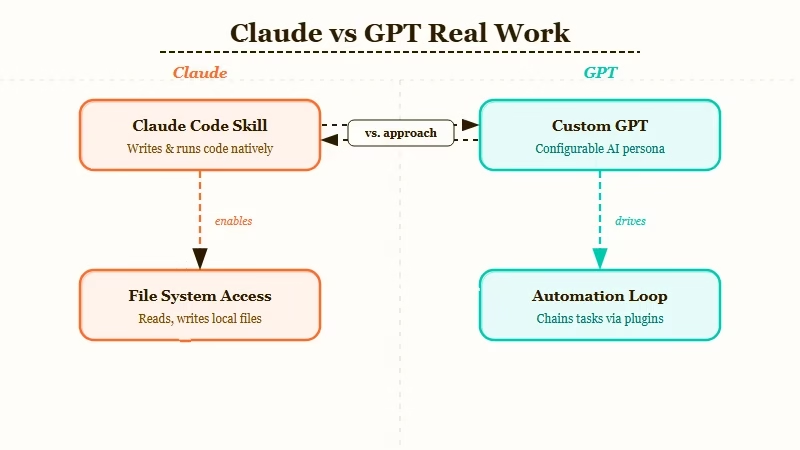
Skills win clean on anything that touches files, code, or automation. Custom GPTs win on chat-shaped workflows where the user types and reads in one window.
The gap has grown over the last six months because Anthropic has been shipping Claude Code upgrades almost weekly and OpenAI has let Custom GPTs drift.
Here is a concrete comparison scenario I ran last week. I wanted a “content auditor” that reads a draft blog post and flags weak openers, banned words, and paragraphs longer than three sentences.
The Claude Code Skill version was a twelve-line markdown file pointing at the Grep tool with a lookup pattern. It ran against a live file in my repo, produced exact line numbers, and auto-fixed what it could. Total build time: six minutes.
The Custom GPT version needed me to paste the article text into the chat window, rely on the GPT to eyeball it, and then manually copy corrections back.
No file access, no fix automation, and no way to trigger it from my editor. Build time was faster, about three minutes in the builder UI, but the loop required manual copy-paste every time.
Who Should Choose Claude Code Skills?
Pick Skills if you spend most of your day in a terminal, IDE, or repo, and you want reusable workflows that operate on real files.
Skills are the right answer when the work has file paths, commands, test runs, or git operations in it.
The specific profiles where Skills win decisively:
- Solo developers building their own automations for research, code review, or refactor workflows
- Engineering teams standardising on shared slash commands across a repo, since skills ship with the repo, every teammate gets them on clone
- Anyone already paying for Claude Code Max and wanting to get more value out of the flat fee
- Technical writers and operators who use the terminal as their primary editor
There is one edge case where Skills lose. If you need a chatbot UI that non-technical stakeholders can use without installing anything, Skills cannot serve that, they live in your terminal only. That is where a Custom GPT would still make sense, even for a developer-led team.
Who Should Choose ChatGPT Custom GPTs?
Pick Custom GPTs if your user never sees a terminal and you need a shareable chat surface with a locked-down system prompt. Custom GPTs are good when the interface itself is the deliverable.
The specific profiles where Custom GPTs still win:
- Non-technical teammates who need a chatbot pinned to their specific use case
- Customer-facing demos where a branded GPT serves as a lightweight prototype
- Content creators who want a quick “write in my voice” assistant with uploaded reference files
- Anyone who already has a ChatGPT Plus subscription and is not going to learn a CLI
Keep in mind the portability trade-off. A Custom GPT lives on OpenAI’s servers. You can export the system prompt, but the Actions configuration, uploaded files, and conversation memory are locked to that platform.
What Does the Head-to-Head Table Look Like?
Here is the scorecard I use when people ask which to pick:
| Criterion | Claude Code Skills | ChatGPT Custom GPTs |
|---|---|---|
| Trigger mechanism | Slash command or auto-dispatch | Manual selection in sidebar |
| File system access | Full (via Read/Write/Edit tools) | None |
| Custom tool integration | MCP servers + any Claude Code tool | Actions via OpenAPI |
| Shareable with teammates | Via git clone (free) | Requires Plus seat per user |
| Version control | Native (markdown in repo) | None (UI-only edits) |
| Debugging | Standard log + terminal output | Limited to chat transcript |
| Offline-capable | Yes, if model is local | No |
| Best for | Developers, ops, writers in CLI | Non-technical end users |
| Learning curve | Moderate (markdown + frontmatter) | Low (builder UI) |
The verdict lines up with the mechanical reality. Skills are a developer tool sitting on top of a developer environment. Custom GPTs are a consumer surface sitting on top of a chat interface.
Frequently Asked Questions
Can I use a Claude Code Skill outside the terminal?
No. Skills only run inside an active Claude Code session. If you need browser or mobile access, a Custom GPT or a web-hosted agent is the right tool.
Do Custom GPTs work with Claude or only GPT?
Custom GPTs are OpenAI-only. They run on the GPT model family and cannot be pointed at Anthropic or Google models.
Can I convert a Custom GPT into a Claude Code Skill?
The system prompt translates cleanly. The Actions config does not, since Claude Code uses MCP servers instead of OpenAPI Actions, so any external API calls need to be re-wired.
Which is better for a small engineering team?
Skills. They ship with the repo, cost nothing extra per user, and integrate with the tools engineers already use. Custom GPTs would require each engineer to buy a Plus seat.
Is there a way to get both?
Yes, I run both. I use Skills for anything that touches a file, and Custom GPTs for quick mobile-phone interactions when I am away from the terminal. The two solve different slices of the agent problem.
What Would I Change About My Setup Today?
If I could rebuild my agent stack from scratch, I would start with three Claude Code Skills and zero Custom GPTs. The leverage is on the terminal side.
For anything polished enough to hand to a non-technical user, I would reach for a proper web app, not a Custom GPT, because the platform trap is real.
For the companion guide on how to actually build a good Skill, my write-up on best Claude Code skills in 2026 covers the file format, the trigger-description pattern, and the rebuild-and-restart quirk that catches most people on day one.
If you are coming from the GPT side and want to understand where the two agent surfaces are converging, this piece on Claude Code vs Cursor frames the broader market context.
And for the pattern of running multiple agents in parallel, the Claude Code subagents parallel research post is the next step once you are comfortable with single skills.
The honest take, nobody loses money choosing either, but if you are a developer and you are still reaching for Custom GPTs out of habit, you are leaving leverage on the table. The terminal is where your work lives. Your agents should live there too.
