
What Happened: Claude Code’s
--dangerously-skip-permissionsflag stopped working as advertised in version 2.1.78. A new protected directory system overrides bypass settings for.git/and.claude/paths regardless of user configuration. Anthropic responded by launching a classifier-based “auto mode” on March 24, 2026 as the official replacement.
Claude Code’s bypass permissions flag has not worked properly since late February 2026, and the “fix” Anthropic shipped is not a patch. It is a replacement.
If you have been using --dangerously-skip-permissions for uninterrupted agentic workflows, you have likely noticed that it no longer does what it says. Even with bypass explicitly set in your config, Claude Code still interrupts with permission prompts on operations touching .git/ or .claude/ directories. The VS Code extension makes it worse: it ignores settings.json permissions entirely.
GitHub issue #36168 has been titled: “bypass permissions now broken in all interfaces.” From what I have tracked across the GitHub threads and developer reports, here is exactly what changed, why Anthropic made this call, and what to use instead.
What Happened to Claude Code Bypass Permissions?
Claude Code bypass permissions broke because version 2.1.78 introduced protected directory logic that fires permission prompts for .git/ and .claude/ paths regardless of whether bypass mode is active.
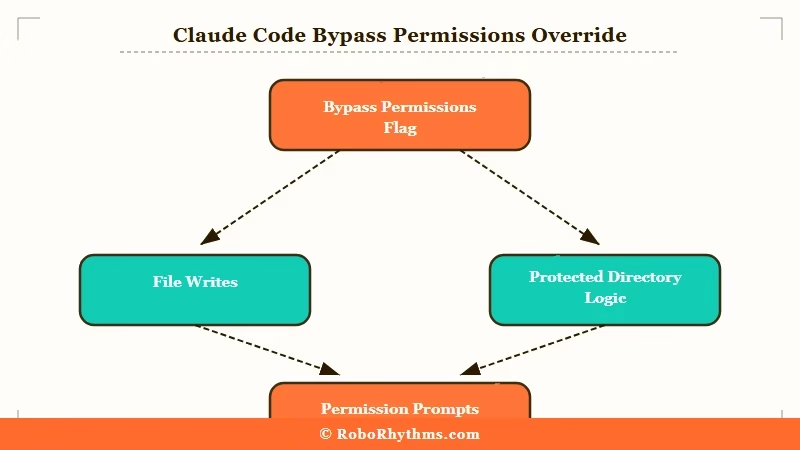
What is bypass permissions: The
--dangerously-skip-permissionsflag tells Claude Code to execute all file writes and shell commands without pausing to ask for approval. Developers use it in isolated environments for autonomous, long-running tasks.
Version 2.1.78, released in late February 2026, added logic that marks .git/ and .claude/ as protected paths. Any operation touching these directories triggers a prompt even when bypass is fully enabled. Version 2.1.81 extended the protected list to include .claude/skills/ specifically.
The problem does not stop at protected directories. Users on GitHub also report that the VS Code extension ignores settings.json permission entries entirely, and the desktop app behaves the same way.
The permission mode you configure in your settings file has no effect when working through either interface. Only the CLI honors it, and even the CLI now has the protected path carve-outs that were not there before.
Why Did Anthropic Break the Bypass Permissions Flag?
Anthropic added protected directory overrides to prevent Claude Code from modifying its own configuration or Git history in unattended sessions, citing a self-modification risk.
The stated rationale: Claude Code runs with the full privileges of the user executing it. Allowing it to freely overwrite .git/ history or modify its own .claude/ configuration in bypass mode created a category of risk Anthropic decided to block at the system level.
From my read of the GitHub threads, the decision makes some sense in theory. In practice, it breaks the only guarantee bypass mode was supposed to offer.
“Skip all permissions” does not skip all permissions anymore. It is partial bypass with undocumented exceptions baked into the version update.
The Claude Code skills workflow is directly affected. Any skill that writes to .claude/skills/ will trigger a prompt in bypass mode on v2.1.81+. For developers running Claude Code autonomously to manage their own skills, this is a complete blocker on current builds.
What Is Claude Code Auto Mode and Does It Replace Bypass Permissions?
Claude Code auto mode is a classifier-based permission system launched March 24, 2026 that decides per-action whether a prompt is needed, replacing the blanket bypass approach.
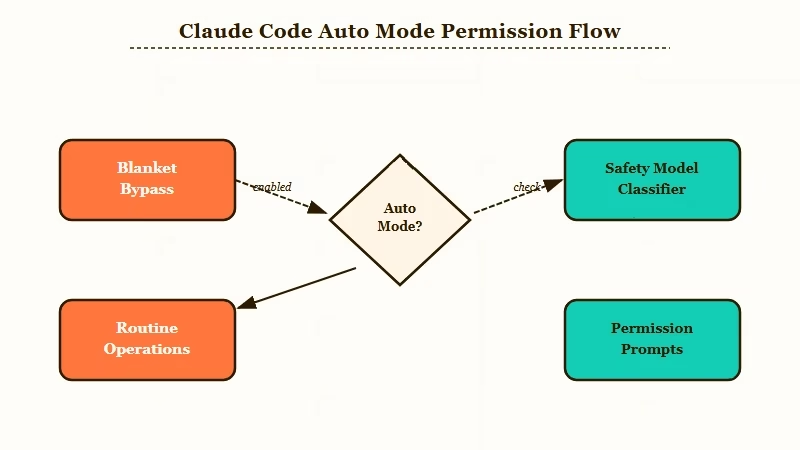
What is auto mode: A system that uses a safety classifier to evaluate each action Claude Code wants to take, approving routine operations automatically and only prompting for high-risk ones.
TechCrunch auto mode report highlighted the key internal data point: Anthropic found that 93% of permission prompts were being approved by users anyway. That number is the whole justification for auto mode.
If you approve 93% of prompts without reading them carefully, the permission system is not providing safety value. It is just friction.
Auto mode removes that friction for routine operations while preserving prompts for actions the classifier flags as risky. As 9to5Mac described in their coverage, it evaluates each action contextually rather than applying a blanket rule.
The tradeoff is that it is not guaranteed to be uninterrupted. For truly unattended containerized runs, auto mode will occasionally pause in ways bypass mode never did.
Here is how the three permission modes compare right now:
| Mode | How It Works | Protected Paths | Works in VS Code | Best Use Case |
|---|---|---|---|---|
| Default | Prompts for every file write and shell command | N/A | Yes | First-time use, unfamiliar codebases |
| Bypass | Supposed to skip all prompts, broken for .git/ and .claude/ paths | Triggers regardless | No | Isolated containers (unreliable post-v2.1.78) |
| Auto mode | Classifier decides per-action, skips routine prompts | No override | Yes | Most agentic workflows |
How Do I Fix Claude Code Bypass Permissions Not Working?
The most reliable fix for Claude Code bypass permissions not working is switching to auto mode for most workflows, or downgrading to v2.1.77 if you need complete bypass in an isolated environment.
From what I have tested and read across the community, here is the sequence I would work through:
- Switch to auto mode if you are on v2.1.78 or later. In the CLI, pass
--autoor set"permissionMode": "auto"in yoursettings.json. For most agentic tasks, auto mode interrupts rarely enough to be workable. - Downgrade to v2.1.77 if you need true bypass in a controlled environment. This is the last version before protected directory logic was added. Multiple users in GitHub issue #36168 confirmed it restores full bypass behavior. The tradeoff is losing anything shipped after that version.
- Set permission mode through the in-app UI if using VS Code or the desktop app. Settings.json permission entries are ignored by both interfaces on current builds. The config file approach does not work there.
- Avoid the “Always allow for project” button. Rather than writing proper permission rules, it pollutes your settings file with hundreds of one-off entries that are not reliably honored. It makes the problem worse over time.
- For
.claude/skills/operations specifically: Automation that modifies skills files will prompt in bypass mode on v2.1.81+. Run those operations in a containerized environment on v2.1.77, or handle the prompts manually until a patch ships.
If you have Claude Code in an n8n pipeline, this matters urgently. Any pipeline assuming uninterrupted execution via bypass mode will stall on protected directory operations. Test your specific file paths in auto mode before running anything unattended.
Before:
claude --dangerously-skip-permissions "refactor the auth module"
# Breaks on any .claude/ or .git/ write in v2.1.78+
After:
claude --auto "refactor the auth module"
# Classifier handles routine writes automatically
What Comes Next for Claude Code Permission Settings?
Auto mode is Anthropic’s stated direction for permissions, and bypass mode is unlikely to be restored to its pre-v2.1.78 behavior.
The way I read the March 24 announcement, this was not an accidental regression. The 93% approval-rate statistic was cited specifically to justify switching away from blanket bypass. Anthropic had been tracking that number and used it as the data-driven case for the architectural shift.
The Anthropic model decisions across March 2026 point consistently toward constrained autonomy rather than unconstrained access. Auto mode fits that pattern cleanly. The protected directory list is more likely to expand than to shrink.
For anyone building automation that relies on Claude Code’s permission behavior: stop designing around bypass mode and start designing around auto mode’s classifier. Test your workflows to find which operations prompt, build in handling for those cases, and treat --dangerously-skip-permissions as legacy behavior rather than a stable foundation.
