
What’s Changed (October 2026): Chub has taken crypto only since June 28, 2026, removed its $5 Mercury tier and cut free accounts to 20 messages a day. Since then, “You have neither trial credits nor an active subscription.” usually means the day’s 20 messages are used up.
If Chub AI just stopped working for you, the worst thing you can do is what most people try first. Hammering the refresh button on a blank blue page usually re-caches the broken version and keeps you stuck.
Chub AI not working almost always falls into one of a few buckets, and each has a specific fix. A blank page is a caching problem, a filtered feed is a regional block, gibberish replies are a model issue, and the trial-credits error usually means the free daily allowance ran out. If the fault is on Chub’s side, chub.ai/status usually shows it.
In this guide I walk through every common cause I have seen, the exact error wording to look for, and the precise steps to get back in. You will finish knowing which bucket your problem is in and the fastest way out of it.
Each cause and its fix is covered below. Stop hitting refresh first, it re-caches the broken version.
If Chub keeps breaking and you would rather not babysit VPNs, proxies, and API keys, Nectar AI is the alternative I point most people toward, since it remembers character details across sessions with no setup. Candy AI covers the same ground with image generation built in.
Why Chub AI Shows a Blank Blue Page
A blank blue Chub AI page is almost always a caching problem, where your browser saved a Cloudflare error page instead of the real site script after an update.
The fix is to make the browser fetch a fresh copy of the site’s files.
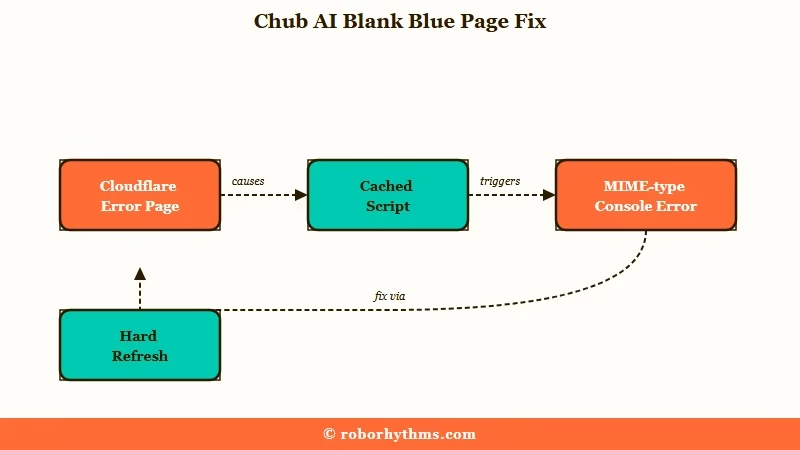
The tell is in the browser console. If you press F12 and see “Failed to load module script: Expected a JavaScript-or-Wasm module script but the server responded with a MIME type of ‘text/html’,” that is the cached-error signature.
A page headed “Unexpected Application Error!” belongs to the same family. It is the stock error screen of the routing library inside Chub’s app. The line under it names what failed, and a script or module that would not load points to the same hard-refresh fix.
Repeatedly refreshing during a site update can keep the error alive, because the browser keeps re-saving the Cloudflare error page instead of retrying the correct script. The way I see it, that single habit is behind half the “site is down” complaints I read.
Before: Blank blue page, you hit F5 ten times, and it stays broken because each refresh re-caches the Cloudflare error.
After: You load the direct script asset link once, then hard-refresh with Ctrl and F5, and the site pulls a clean copy and loads.
The fix sequence I would run, in order:
- Hard refresh. Press Ctrl and F5 together to force the browser to pull a clean copy of the page.
- Load the script directly. Visit the direct asset link Chub serves (for example a URL ending in
/assets/index-DC4OWGjM.js) to force your browser to cache the correct file, then reload the main site. - The F12 jumpstart. Open developer tools with F12, right click the failing JavaScript file, open it in a new tab, then click the small site icon in the upper left of that error page. This odd backdoor sometimes loads the site when nothing else will.
- On mobile, install 1.1.1.1. The community calls Cloudflare’s free 1.1.1.1 app a near-magic fix for Chub loading problems on phones, and it cleared up connection issues more reliably than browser tricks.
Why Chub AI Blocks Content in Your Region
Chub AI hides NSFW and NSFL content by region to comply with age-verification and online-safety laws, and a feed that turns family-friendly overnight is the usual sign. It is a policy setting, so refreshing will never fix it. Being logged out also hides NSFW results, so check that you are still signed in before reaching for a VPN.
What is geofencing: A system that changes or restricts what a website shows based on the country or state your connection appears to come from.
The clearest list comes from Chub’s own web app. The build Chub has served since June 28, 2026 turns NSFW and NSFL results off in search when its servers place you in one of eleven countries or two US states. They are the United Kingdom, Australia, Canada, New Zealand, Germany, France, Greece, the United Arab Emirates, Italy, Spain and Austria, plus Utah and Mississippi.
Chub can also filter on its servers in ways the app code does not show, so a region missing from that list may still see blocks.
If you want the legal background on why this rolled out, the breakdown of Chub AI’s regional blocks covers it in depth. The broader AI companion market is now big enough to attract this kind of regulation, with companion apps reaching $221 million in lifetime consumer spending by July 2025, per Appfigures.
How to Unblock Chub AI Safely
The reliable way to unblock a geofenced Chub AI is a VPN set to an unrestricted region like the United States, with an Android APK sideload as a backup. Both work, with a couple of catches to know first.
Here is the order I would try, fastest and safest first:
- Use a VPN. Connect to a US server, then reload Chub. This is the most consistent fix for a regional block.
- Sideload the Android APK. On Android, installing the Chub app from its APK has bypassed the geofence for some users without a VPN at all, since the app version does not always enforce the same block as the browser.
- Set up FoxyProxy on desktop. If a VPN slows your media, the FoxyProxy Firefox extension lets you route only Chub through the proxy while images load directly.
Catbox-hosted images will not load while a VPN is on, because Catbox itself blocks VPN traffic, so toggle the VPN off if avatars vanish. And iPhone users cannot use the APK trick at all, since iOS blocks sideloading, so a VPN is really the only path on Apple devices.
When Chub AI is not working on mobile, check for the regional filter first, since it reaches phones too. If the feed looks normal and pages still will not load, Cloudflare’s free 1.1.1.1 app from the blank-page fixes is the phone-side fix most users report.
How to Fix Chub AI Model Glitches and Errors
Most Chub AI model problems, like gibberish replies, sudden Chinese text, or a “subscription not active” message, are known glitches with specific toggles and waits that fix them. You rarely need to delete anything.
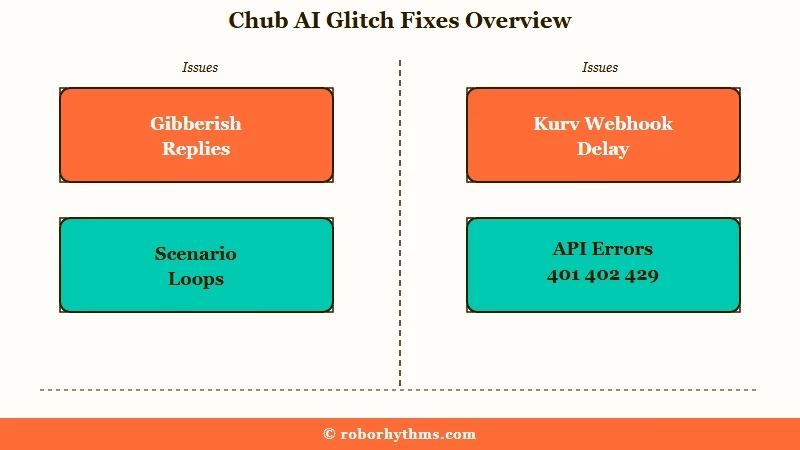
The most common model failures and their fixes line up cleanly, so here is the quick-reference table.
| Symptom | Likely cause | Fix |
|---|---|---|
| Blank blue page, console MIME error | Cached Cloudflare error after update | Hard refresh, then load the direct script link |
| Feed suddenly family-friendly while signed in | Regional geofence | VPN to the US, or Android APK sideload |
| Bot repeats its name or “Scenario:” text | Auto-summarization context bleed | Toggle off auto-summarization, clear the chat memory tab |
| Replies turn to gibberish or Chinese | Recurring model glitch, with a fresh wave of Chinese replies in September 2026 | Regenerate, add an English-only line to the pre-history instructions, or start a fresh chat |
| Paid, but the plan shows as not active | Payment not yet matched to your account | Log out and back in, then email lore@chub.ai with your transaction record |
| “You have neither trial credits nor an active subscription.” | Free daily allowance spent, or two requests at once | Wait for the reset, close other Chub tabs, or subscribe |
| Your own API key returns 401 / 402 / 429 | Wrong key, no balance, or rate limit | Recheck key, top up, or pace requests |
Chub has taken only crypto since June 28, 2026, so the old advice to wait out a slow card processor no longer applies. Crypto payments have had hiccups too, with subscribers in April 2026 reporting plans that dropped for hours before access came back.
If your plan has not appeared after an hour, keep the transaction record and email the address on Chub’s support page, lore@chub.ai. Chub’s moderators say only Lore can resolve payment problems.
For bring-your-own-key users, a dead model usually traces back to the provider. From my testing, a DeepSeek “402 Insufficient Balance” or a “429 Rate Limit” is the real culprit far more often than the Chub interface itself.
If your downloads or exports vanished, the button simply moved to the bottom of the chat settings menu rather than the top bar, and the DeepSeek model setup guide covers the connection side.
How to Fix Chub AI Error During Generation
“Error during generation” covers several different faults, and the text after the second colon names which one you have. If that tail only says the response was empty, a second pop-up starting “Error generating” usually names the real cause.
“Empty response received from API” means the reply came back with no text in it. When it appears on its own, the community-maintained unofficial Chub guide puts it down to a content filter in most cases, though a provider-side fault can produce the same blank result. Switching models in Configuration, or reworking the prompt that produced it, clears it either way.
When a second error shows up with it, that second message is the real fault. Chub’s chat code reports the cause in a pop-up starting “Error generating”, then adds the empty-response error because no text arrived. On a free account that cause is usually “You have neither trial credits nor an active subscription”, meaning the day’s messages are spent, as free users found out the day the cap arrived.
“You have neither trial credits nor an active subscription.” is the message Chub’s own app shows for any rate-limit response from its models, so it usually means the free allowance is spent. Since June 28, 2026, free accounts get 20 messages a day on the model the picker calls Mobile Flash, and the one-time trial credits for new accounts do not refill.
Chub’s subscription FAQ says concurrent requests from one account return a 429 error, which the app shows as this same message, so a second tab or a double-tapped send can trigger it early. Users report the 20 coming back either 24 hours after the 20th message or at midnight UTC, and Chub’s own pages do not say which.
While trial credits remain, chub.ai/mars shows “You have approximately N free trial messages left” when you are logged in, but nothing on the site shows how many of the daily 20 are left. Our guide to Chub AI trial credits covers what is still free and the local route that skips the cap.
“Failed to fetch” and plain network errors usually show up when you are using a Chub API as a reverse proxy somewhere else, such as Janitor AI. The proxy link needs the OpenAI-compatible path on the end, so it should finish with /chat/completions rather than stopping at the domain.
Two more failures come from the same status check as the trial-credits error. A “Please log in to continue” box means Chub’s servers do not see you as logged in, so log in or sign up to keep chatting. “Error authenticating. Please refresh the page.” means an expired login token that a page refresh replaces.
“The model does not exist” points at a mismatch between the API and the model dropdown. Open the three-line menu, choose Configuration, then Prompt structure, and confirm the API and the model belong to the same provider.
Before working through any of these, check Chub’s own status page, which color-codes the API and each in-house model from a health check that runs about every five minutes. A red Soji or Mobile row means the outage is Chub’s and worth waiting out. Reselecting your model, saving, then switching back clears the stale selection behind some of the other errors.
When to Stop Fixing and Switch
If Chub AI keeps breaking for you, or your region blocks it outright, switching to a hosted companion app removes the technical friction entirely. Not everyone wants to babysit VPNs, proxies, and API keys. If that is you, our roundup of Chub AI alternatives people actually stick with covers hosted platforms that work in the browser with no setup.
The honest tradeoff is control versus convenience. Chub gives you deep customization and bring-your-own-model freedom, but you pay for it in setup and upkeep. A hosted app handles the infrastructure, so there is no blank page, no API balance to top up, and no geofence script to dodge.
If you want strong persistent memory without the maintenance, Nectar AI is the alternative I point most people toward, since it remembers character details across sessions out of the box. For a more polished all-in-one companion with image generation built in, Candy AI is the other one I would test. Both sidestep the entire troubleshooting list above.
Quick Takeaways
- A blank blue Chub AI page is a cached error, fix it with a hard refresh or the direct script link, not endless refreshing.
- A feed that suddenly turns family-friendly while you are signed in usually means a regional geofence, which a US VPN or Android APK sideload gets around.
- Gibberish, Chinese text, and “Scenario:” loops are model bugs fixed by a regenerate, an English-only line in the pre-history instructions, a fresh chat, or turning off auto-summarization.
- “You have neither trial credits nor an active subscription.” usually means the 20 free daily messages are gone, or two chats are generating at once.
- A paid plan that has not appeared after an hour needs your transaction record and an email to lore@chub.ai.
- If the upkeep gets old, a hosted app like Nectar AI or Candy AI removes the VPN, proxy, and API hassle entirely.
