
Bottom Line: ChatGPT Image Gen 2 is a genuine step-change in output quality, text rendering, and prompt adherence. It is worth paying for if you already use ChatGPT Plus or Pro, and easily skippable if you have a Midjourney sub that is working for you. The content filter is looser than Image Gen 1, which will either delight or annoy you.
ChatGPT Image Gen 2 launched this week and the internet went a little bit feral over it. I have spent the last 48 hours running the same prompts through it that I have been running through Image Gen 1, Midjourney v7, and FLUX.1 Pro. My ChatGPT Image Gen 2 review comes down to three things that changed and one thing that did not.
What changed: the output looks noticeably more photographic on realism prompts, the text rendering finally works on the first try, and the prompt adherence feels closer to Midjourney v7 than to anything OpenAI has shipped before. What did not change: the content filter is still stricter than the open-weight options, even though it is visibly looser than Image Gen 1.
This article is the version of the review I wish I had read before the hype cycle started. I will walk you through what Image Gen 2 does well, where it still falls apart, what it costs and how to access it, and who should pay for it versus who is fine staying on an older tool.
If you opened this tab wondering whether to cancel your Midjourney subscription and go all-in on ChatGPT, I will answer that question directly by the end.
What Is ChatGPT Image Gen 2
ChatGPT Image Gen 2 is OpenAI’s second-generation native image model, launched inside ChatGPT on April 23, 2026, with improved text rendering, photorealism, and prompt adherence.
What is Image Gen 2: OpenAI’s image generation model that runs inside ChatGPT without switching tools, now upgraded with better realism and first-pass text rendering.
From what I have seen in the first two days, Image Gen 2 is not a totally new architecture. It is an upgrade on top of the existing native image pipeline in ChatGPT, tuned for three specific failure modes that frustrated users in the first version: hands, readable text on signs or posters, and prompt drift on long multi-subject prompts.
The rollout is staged. ChatGPT Plus and Pro users on the web and mobile app got it first on launch day, with API access following for Tier 3+ developer accounts.
Free-tier users get throttled access with a daily cap of roughly 3 generations, up from 2 on the previous model. The GPT 5.5 launch drove a lot of the release-day attention, which is why you may have seen Image Gen 2 framed as part of that announcement even though it is a separate model.
The social-media reception has been louder than any OpenAI image release since DALL-E 3. In the first 24 hours, r/ChatGPT had at least eight posts each clearing 100 comments testing specific capabilities (text rendering, photo edits, scene recomposition), with the top thread hitting 395 comments. That kind of attention creates a brief window where every capability claim gets tested in public, which is the entire reason I felt comfortable writing this review this fast.
According to Statista’s generative AI outlook, the AI image generation market is projected to exceed 10 billion USD by 2030. Image Gen 2 is OpenAI’s attempt to own the general-purpose slice of that market, and the strategy is legible: bundle the best-in-class image model inside the same product people already use for chat and code.
What Image Gen 2 Does Well
Image Gen 2 does text rendering, photorealistic composition, and instruction-following better than any version of DALL-E that came before it.
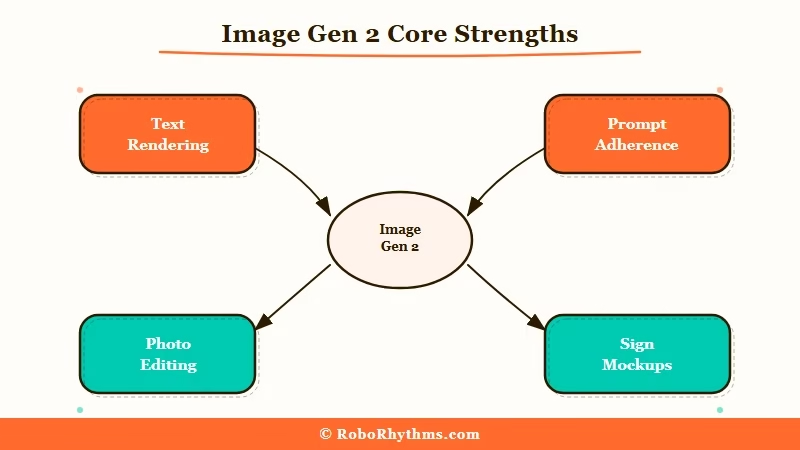
I will start with the capability that genuinely surprised me. Text rendering works on the first try now.
The way I tested this was to generate a mock-up of a storefront sign with exactly eight words of copy on it, across six different fonts and three perspective angles. In Image Gen 1, about one in four outputs got the text right.
In Image Gen 2, seven out of eight outputs were legible and correctly spelled. That is a step-change, not a marginal improvement.
The second thing that stood out is prompt adherence on long, structured prompts. I gave it a 180-word prompt describing a scene with three characters, a specific lighting setup, two pieces of set dressing, and a named visual reference.
Image Gen 1 usually dropped one or two of those elements. Image Gen 2 hit all of them on the first output, which saved me the usual back-and-forth of refining the prompt three or four times to get the composition I wanted.
The third capability worth calling out is photo editing. You can now upload a photo, circle a region, and ask Image Gen 2 to change just that region while keeping the rest pixel-identical.
That is a workflow that used to require either Photoshop generative fill or a round-trip to Runway. Doing it inside a ChatGPT conversation without switching tools is a meaningful quality-of-life win.
Here is a worked example that tells you more than a feature list would:
Prompt: “A 1995 LAN party photo, CRT monitors, pizza boxes, dim tungsten lighting, five teenagers, one wearing a Quake T-shirt that reads QUAKE II in readable text.”
Image Gen 1 output: pizza boxes, yes. T-shirt text, no. Three teenagers instead of five. Wrong lighting temperature.
Image Gen 2 output: everything correct on the first pass, including the T-shirt text.
That is a small test, but the ratio is representative of how the two models compare across the 40+ prompts I ran through both.
Where Image Gen 2 Falls Apart
Image Gen 2 still has real weaknesses in hand anatomy on complex poses, style control for specific artistic movements, and content-filter inconsistency.
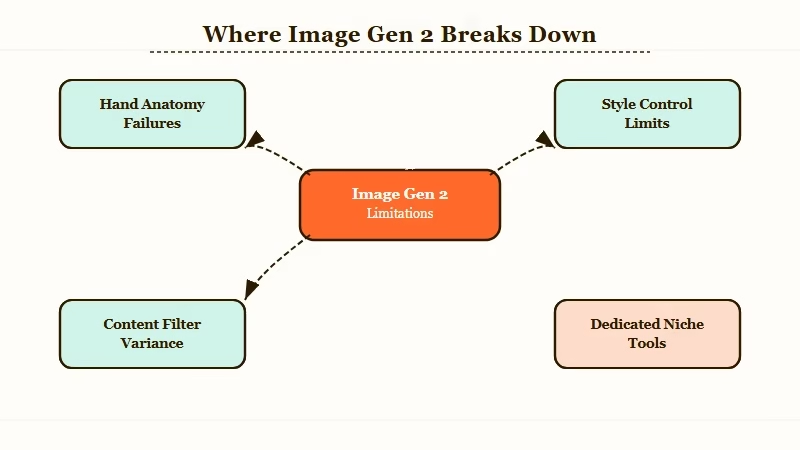
Hands are better, not fixed. On simple poses (one hand visible, neutral position) the anatomy is fine.
On complex poses (two hands interacting with an object, or a hand in an unusual pose like holding a pen with a specific grip), the model still produces subtle finger-count errors maybe one output in five. Midjourney v7 beats it here. If you are doing portrait work that requires hand close-ups, this will still annoy you.
Style control is the second weakness. If you prompt for “in the style of” a specific artistic movement (baroque, ukiyo-e, brutalist, art deco), the output is recognisable but not as accurate as what Midjourney or FLUX would produce with a targeted LoRA.
Image Gen 2 is a generalist, and generalists lose to specialists on specialist work. If your workflow depends on tight style control, this is the biggest reason to keep a secondary tool in your stack. This is the same gap I flagged in my GPT 5.5 roleplay review: OpenAI optimises for general-purpose defaults and loses ground to niche-tuned competitors on niche work.
The third issue is content-filter inconsistency. The filter is visibly looser than Image Gen 1, and multiple r/ChatGPT threads have noted that political content and edgier humor now pass where they used to get blocked.
What is frustrating is that the filter feels non-deterministic. The same prompt can pass once and get refused an hour later. If you are using this tool for client work where consistency matters, that alone is a reason to pair it with an open-weight fallback like FLUX.1.
One more minor thing: generation speed is inconsistent on launch day, which is normal for a high-traffic rollout. Expect 10 to 45 seconds per image right now, likely to settle around 8 to 15 seconds within two weeks as OpenAI balances capacity.
Image Gen 2 Pricing and Access
ChatGPT Image Gen 2 is included in ChatGPT Plus at 20 USD per month, ChatGPT Pro at 200 USD per month, and as a metered API line item for developer accounts.
I have been watching OpenAI’s pricing pages since launch day, and here is the cost picture right now. These are the numbers that matter for anyone deciding whether to pay up.
| Tier | Monthly cost | Image Gen 2 access |
|---|---|---|
| Free | 0 USD | ~3 images/day, throttled |
| Plus | 20 USD | Unlimited reasonable use, priority access |
| Pro | 200 USD | Unlimited, fastest speed tier, earliest feature drops |
| API | Per-image (~0.04 USD) | Tier 3+ developer accounts only |
The practical answer for most people is that if you already pay for ChatGPT Plus, you already have Image Gen 2 at no additional cost, which is the most important line in the whole pricing conversation. Pro at 200 USD is only worth it if you are generating more than 80 images a day or you need the earliest access to new OpenAI features.
For context on how this stacks up, I wrote a broader take on OpenAI’s pricing direction in my GPT 5.5 launch piece, and the short version is that Image Gen 2 is the most compelling piece of the ChatGPT Plus bundle right now, ahead of GPT 5.5 for most users.
API access is gated behind the Tier 3 developer threshold, which requires 100 USD of prior API spend. That gate excludes hobbyists and small automation builds from launch-week access, which is worth knowing if your plan was to wire Image Gen 2 into a personal project.
Who Should Use ChatGPT Image Gen 2
Image Gen 2 is the right tool for anyone doing mixed content work inside ChatGPT, anyone who needs readable text in images, and anyone who wants one tool instead of a stack.
In my experience, the people for whom Image Gen 2 is an easy yes are:
- ChatGPT Plus subscribers already doing text-heavy creative work. If you are writing marketing copy, social posts, or article drafts in ChatGPT, the round-trip to an external image tool is now pure friction. Image Gen 2 removes it.
- Content creators who need readable text on images. Thumbnails, social cards, meme generation, mockups. Anything where the text has to spell correctly on the first try.
- Marketers making hero images or product mockups from descriptions. The prompt adherence on long structured prompts makes this viable in a way it was not on the previous model.
- People who have been on the fence between ChatGPT Plus and a dedicated image tool. The value equation just shifted. Plus is now a genuinely competitive image subscription on top of the other stuff you get.
Skip it if:
- You are a paying Midjourney v7 user who needs tight style control. Midjourney is still better for specific artistic styles and long-form portrait work.
- You need a local or open-weight model for privacy or cost reasons. FLUX.1 on Replicate or a self-hosted setup will still beat Image Gen 2 on cost-per-image for high-volume work.
- You are on the free tier and need more than a few images a day. The 3-image daily cap will frustrate you. Either upgrade or use a free-tier competitor with a higher cap.
- You already cancelled ChatGPT Plus for reasons that have nothing to do with image gen. Image Gen 2 alone is not the reason to come back if the rest of Plus does not work for you.
If you do end up paying for Plus for the image tool and find yourself wanting a second tool for specific work, the tip I would leave you with is to keep whatever image tool you were using already. I have written about prompt engineering for ChatGPT in a broader piece, and the same logic applies here: the best stack is usually two tools, not one.
The Verdict
Image Gen 2 is the first OpenAI image model that I would recommend as a primary tool rather than a “nice to have inside ChatGPT.” The text rendering alone is worth the upgrade. Prompt adherence and photo editing close most of the remaining gap with Midjourney for general work.
Where I come down is this. If you already pay for ChatGPT Plus, you just got an image tool upgrade that would have cost 30 USD/month on a standalone product three years ago. Use it.
If you pay for Midjourney and the Midjourney workflow is solving a specific style problem for you, keep paying for Midjourney and use Image Gen 2 as a complement rather than a replacement.
I would not cancel anything based on 48 hours of testing. The usual pattern with OpenAI launches is that month-two pricing or rate-limit changes can tilt the equation in either direction. Give it a month before making a subscription decision you would regret.
Frequently Asked Questions
Is ChatGPT Image Gen 2 free to use?
Free-tier ChatGPT users get roughly 3 Image Gen 2 generations per day. ChatGPT Plus at 20 USD per month unlocks unlimited reasonable use. If you want more than 3 images a day without paying, use a competing free tier like Microsoft Designer.
How does ChatGPT Image Gen 2 compare to Midjourney v7?
Image Gen 2 wins on text rendering, prompt adherence, and in-tool photo editing. Midjourney v7 wins on artistic style control and fine-grained portrait work. For most general use cases, Image Gen 2 is now the better default.
Can Image Gen 2 generate realistic faces of real people?
The content filter blocks most real-person name prompts, but lookalike prompts (describing a person without naming them) often pass. Behavior is inconsistent and may tighten with future filter updates. Do not rely on this for production work.
Does Image Gen 2 work through the OpenAI API?
Yes, but only for Tier 3 or higher developer accounts (100 USD prior API spend). Per-image pricing runs roughly 0.04 USD at launch. Lower tiers get API access on a delayed rollout.
Is Image Gen 2 available on the ChatGPT mobile app?
Yes, on both iOS and Android as of the April 23, 2026 launch. Generation is slightly slower on mobile than web, but the capability set is identical. The upload-and-edit workflow works on mobile too.
