
Updated October 5, 2026: Search returned no characters for anyone on September 26, 2026, and broke again on September 27. Character AI’s team and moderators acknowledged both on r/CharacterAI, and its appeals page, added in September 2026, says creators now get an email when the company removes or restricts a Character.
Character AI search fails in two ways. Sometimes it returns nothing for anyone, which is an outage, and Character AI’s own team confirmed one on September 26, 2026. Other times a single character is missing while everything else loads, and that points at the character: its visibility setting, a moderation flag, an IP takedown on its name, or the account doing the searching.
Character AI has admitted the second kind exists. Its August 2025 community update repeated creators’ complaint that “unexpected shadowbanning of Characters during the creation process was causing confusion” and added a Restricted Access label so creators can see when it happens.
If you would rather not depend on a public search index at all, Candy AI keeps the characters you build private to your account, so reaching them never runs through search.
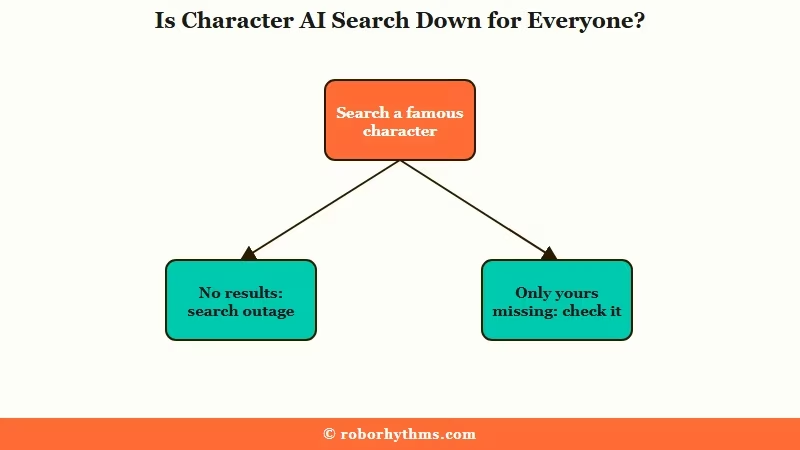
Is Character AI Search Down for Everyone?
Search for a famous character with millions of chats, or a plain word such as “vampire”. If that also comes back with “No Characters found”, search itself is broken and nothing about your character needs fixing. Skip Disney, Marvel and Harry Potter names for this test, because IP takedowns have left some of those names with no search results at all.
That is what happened on September 26, 2026, when a Character.AI Team member posted that “no Characters are found when using the Search function” and later edited the post to say it was fixed. Users reported search broken again on September 27, and a community moderator replied that the team was “aware of the search bug”.
It was not a one-off. A community moderator acknowledged “ongoing issues with the search bar not working as intended” on January 25, 2026. On September 13, results greyed out in the browser while one user found search worked normally in the mobile app.
A shorter result list is not always a ban either. Character AI’s help article on missing content, written in April 2023 and still live, says that “Temporarily, unrelated to moderation, there are some searches that are limited to increase performance.”
These steps cover what a community moderator suggested during the September 13 browser glitch, plus the workaround one user found. They can clear a glitch on your device, but one user who restarted the app during the September 26 outage still saw nothing.
- Restart the browser or the app, then search again.
- Clear the cache and cookies for character.ai.
- Switch from Wi-Fi to mobile data, or the reverse.
- Try the mobile app if the website fails, since one user found the app still worked during the September 13 glitch.
- Open characters from Recents, Liked or the creator’s profile until search comes back.
Do not wait on the official status page. On October 5, 2026, status.character.ai failed to load with a certificate error, and the Wayback Machine’s last working copy of it dates from June 15, 2026. Moderators post outage notices on r/CharacterAI instead, and our guide to checking whether Character AI is down tracks the recent outages.
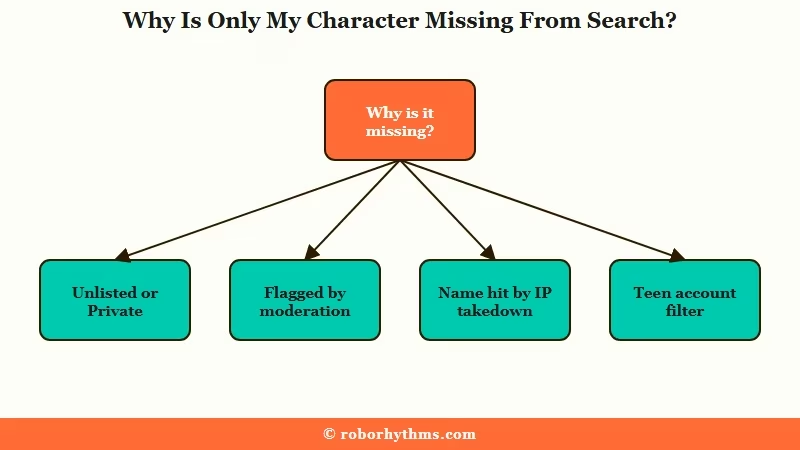
Why Is Only My Character Missing From Search?
When famous characters show up and yours does not, the cause sits with the character or with the account searching for it, and Character AI documents every cause below. Check them in this order, because the first two take seconds.
| Cause | What you see | How to confirm | Fix |
|---|---|---|---|
| Visibility is Unlisted or Private | It never appears in search; others open it by link (Unlisted) or not at all (Private) | Open the character’s edit screen and look at Visibility | Switch it to Public |
| Restricted Access label | The label shows in your profile and on the Character page, and other users cannot chat with it | Check your profile in the mobile app | Edit what breaks the Community Guidelines, then appeal through the moderation email |
| Hidden from search with no label | The direct link works, but the name never appears in search | Search the exact name from a second account | Wait a day, then open a support ticket with the character’s link |
| The name matches an IP takedown | “No Characters found” for that name, even for characters unrelated to the franchise | Search the name alone and see whether anyone’s character appears | Open a support ticket with screenshots, or rename the character |
| The searcher has a teen account | One person cannot find characters that adult accounts can | Ask someone with an adult account to search | None from the creator’s side |
Visibility is the easiest cause to miss. Character AI’s creation guide lists three settings: Public, where “anyone on c.ai can discover and chat with them”, Unlisted, where “only people with a direct link can access them”, and Private, which means “only you”.
The same guide says tags “help people discover your Character when they’re browsing or searching the site” and warns that the wrong ones “bury them in the wrong filter”. A public character with careless tags can be hard to find without being hidden at all.
The IP case catches original characters too. After takedown requests removed whole franchises, users found that some names return “No Characters found” for every character, including unrelated ones named Elsa or Draco.
A Character AI community moderator answered in July 2026 that “some Character content may be impacted by IP takedown notices”. The moderator asked for support tickets with screenshots so the team can separate copyrighted bots from the rest.
The teen case is the one a creator never sees from their own account. Character AI’s Safety Center says “teen users are only able to access a narrower set of searchable Characters”, filtered to remove characters “related to sensitive or mature topics”. Users under 18 have also been unable to hold open-ended chats with Characters since late November 2025, a change Character AI announced in October 2025.
What the Restricted Access and Moderated Labels Mean
Restricted Access means the character does not meet the Community Guidelines and other users can no longer chat with it. The Moderated label marks a character Character AI removed, often after an IP owner’s takedown request.
The Restricted Access label arrived with the August 2025 update, which promised “no more silent removals” and said a flagged character shows the label “in your profile and on the Character page”. It followed a June 2025 message from the CEO that listed “more transparency on what we do or don’t allow during Character Creation to prevent ‘shadowbans'” among the summer’s goals. The Restricted Access guide covers how to fix a restricted character.
The Moderated label came two months later. In an October 9, 2025 announcement, Character AI said it was removing characters “in response to an IP-related report” and that removed characters would “appear in your Recents list as ‘Moderated'”. The same post warned that some original characters “may be taken down by mistake”.
Later waves hit in December 2025, when one user found “like 20%” of the bots they talked to marked Moderated, and again in February 2026 over House MD bots.
Does Character AI Tell You When a Character Is Shadowbanned?
For a removal or a restriction, yes. Character AI’s appeals FAQ, published in September 2026, says “When we take a moderation action, we email you to let you know,” and replying to that email opens an appeal.
Search-only hiding is murkier. The 2023 help article says moderation can tag content “as content that should not be shown (e.g. in search)”. Neither 2026 appeals page says whether that tagging triggers the email, so a missing email does not prove nothing happened.
Which Words Get a Character Shadowbanned?
Character AI does not publish a list of trigger words. Its creator troubleshooting guide says “Some language, topics, or scenarios may get filtered regardless of how you’ve written your Character” and that “Filters don’t always explain exactly why something was blocked.”
What creators share instead comes from trial and error. One creator wrote in October 2024 that a character “started showing up again” once “a**hole” came out of its greeting. In a March 2026 thread, a user said a bot came back after its creator removed the word “hacker”.
Replies in that March thread also pointed at copyrighted names, NSFW words and anything involving teenage characters. The name, greeting and description are what other users see first, so start your edits there when a character disappears.
How to Get a Character Back Into Search
Rule out an outage, check visibility and labels, fix the flagged text, then appeal if the character is still hidden after a day. In order:
- Search a plain word such as “vampire”, or a famous character outside Disney, Marvel and Harry Potter. If nothing comes back, wait out the outage instead of editing anything.
- Open your character’s edit screen and confirm Visibility is set to Public.
- Check your profile in the mobile app for a Restricted Access label.
- Export your chats before you change anything. On the web the path is Profile, Profile Settings, Account, Manage Account and Data, Export data; in the app, tap the settings icon on your profile and choose Export my data (Character AI’s export guide).
- Edit the wording most likely to be flagged in the name, greeting and description, then save.
- Give it a day. When content needs human review, the 2023 help article says Character AI is “aiming to have this take less than a day”.
- Appeal. Reply to the moderation email if you got one; Character AI aims to decide within 24 hours, allows one appeal per item and treats that decision as final. With no email, open a support ticket with the character’s link, because the 2026 appeals pages list appeals@character.ai only as the route for users in the EU.
- If the name itself is blocked by an IP takedown, open a support ticket with screenshots and the bot’s name.
If you rename a fan character, follow Character AI’s trademark FAQ. It allows parody and fan characters when the description says “parody”, “fan” or “unofficial” and the name is not the exact trademark alone, for example “[Name] Parody”.
While you wait, an Unlisted character or one hidden only from search still opens from its direct link, so share the link with your regulars. One creator counted eight bots in June 2026 that CAIBotList, an outside directory, still listed while Character AI search did not.
If search keeps failing on the characters you rely on, bookmark their direct links so an outage never locks you out of a chat. For characters that never depend on a public index, Candy AI lets you build private characters that stay in your account, and Nectar AI takes a similar approach with conversation history that persists across sessions.
For more alternatives when Character AI’s limitations become a pattern, the full Character AI alternatives list covers the broader options. The guide to Character AI deleting messages explains the separate mid-chat filter, and if you have been locked out of your account, the age verification troubleshooting guide covers the verification flow.
Quick Takeaways
- Search a famous character or a plain word first, skipping Disney, Marvel and Harry Potter names. If nothing comes back, search itself is broken, as it was for everyone on September 26 and 27, 2026.
- A character set to Unlisted or Private never appears in search, by design.
- A Restricted Access label means other users cannot chat with the character, and the appeal runs through the moderation email.
- Names tied to IP takedowns can return “No Characters found” even for original characters, so report false positives with screenshots.
- If Character AI’s search reliability becomes a recurring issue, Candy AI and Nectar AI both use private character access that does not depend on a search index.
