
What’s Changed: Character AI replies have swung toward long, rambly walls of text that fragment into one or two sentences per line, especially after the PipSqueak 2 model rollout. Part of it is your setup, but part is a backend model swap you cannot see. You can pull replies back to a tight four or five paragraphs with the greeting, example dialogue, and the right chat style.
If your Character AI responses are too long, padded with internal monologue, and broken into one or two sentences per line, the cause is not only your prompt.
Part of it is a backend swap the app never tells you about: during busy hours or long chats, Character AI can quietly route your conversation to a smaller, cheaper model that loses your formatting and defaults to choppy, dramatic walls of text.
That single fact reframes the whole problem. People assume a rambling bot means they wrote a bad definition or that the model “forgot” how to write, so they shout at it to be shorter, which makes it worse. The real fix is a mix of locking your length at setup and knowing what to do the moment a reply fragments.
Here is what you will walk away with: why the replies bloat and break, a clear order of fixes for setup versus mid-chat, copy-paste length controls, and which chat style to pick when you just want tight back-and-forth.
None of it depends on a specific update, so it holds up as the models keep changing.
Why Are Character AI Responses Too Long
Character AI responses are too long because the current PipSqueak 2 model is tuned for narrative momentum, and your greeting plus example dialogue set the length baseline it copies forever.
Fix those two anchors and most of the bloat goes away.
If you would rather not tune any of this yourself, a companion app that holds its reply length steady is the usual shortcut. Candy AI is the one I fall back to when I want that without the setup work.
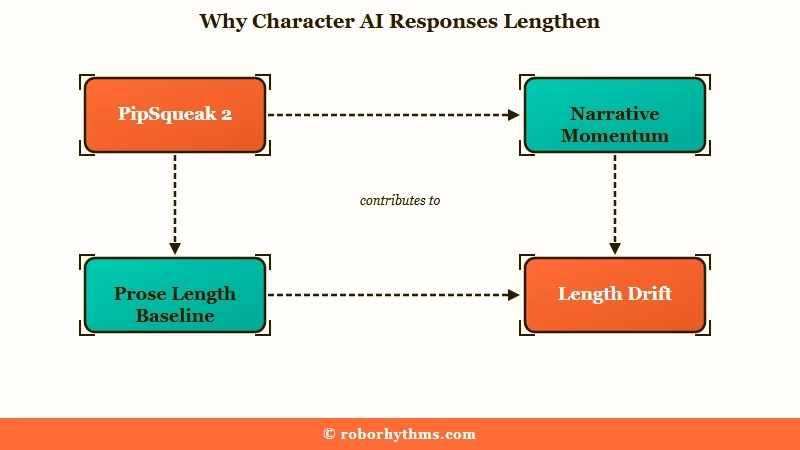
PipSqueak 2 was built to keep scenes moving on its own. When a character definition gives it room, it fills the space with flowery description, paragraphs of internal thought, and actions it writes on your behalf. That is great for cinematic worldbuilding and miserable when you wanted a quick exchange.
The way I see it, the bigger lever most people miss is the greeting. The model treats your opening message as a performance cue and locks in its tense and prose length from there, and if the greeting clashes with your example dialogue, the greeting usually wins.
A 12-paragraph greeting trains the bot to answer in 12 paragraphs no matter what your definition says.
Why the Replies Suddenly Break Into One Sentence Per Line
The sudden choppy, one-sentence-per-line formatting is usually a silent backend downgrade, not the bot forgetting how to write.
Character AI routes heavy chats to a cheaper distilled model that drops your style anchors.
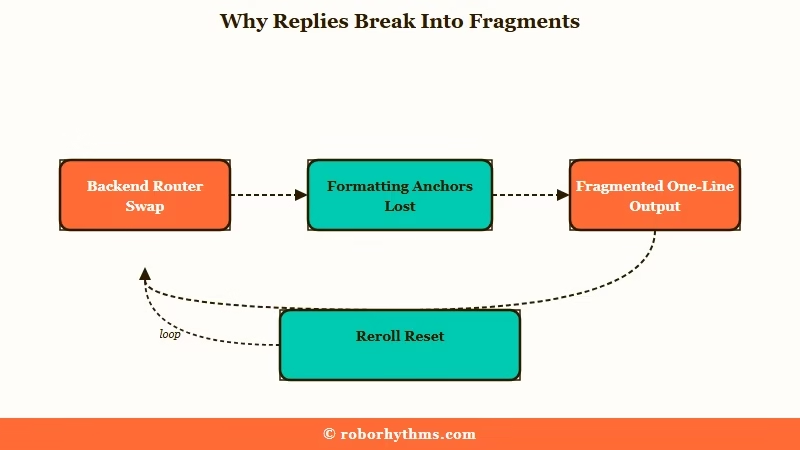
What is dynamic model routing: A backend system that quietly hands long or high-traffic chats to a smaller, cheaper model to save server cost, which loses your formatting and pacing context.
This is the part almost no prompt guide mentions. When a well-formatted bot suddenly turns into vertical, hyper-dramatic fragments halfway through a session, the platform has likely swapped your model under load.
The replies in Character AI’s daytime slowdown come from the same routing behavior, just measured by the clock instead of by formatting.
Here is the trap that keeps people stuck. If you reply to a choppy, fragmented message instead of editing or rerolling it, the cheaper model reads your acceptance as the new target and locks that broken format in for the rest of the chat. What I would do the second a reply fragments is stop, delete or edit it, and never build on top of it.
How to Fix Reply Length at Setup
The most reliable length fix is set before you chat: match your greeting length to the replies you want, then add three or four short example dialogues at the exact target length.
Models copy examples far better than they follow written rules.
Telling a bot “write short paragraphs” is weak because it is an instruction, not a demonstration. Showing it three tight exchanges in the character’s real voice teaches the target length in a way the model reliably mirrors. This is the show-don’t-tell rule, and it beats every adjective you could stack in a definition.
There is one rule worth hard-coding near the top of the definition, what some creators call an agency rule. It stops the bot from rambling to fill silence by giving it something else to do when the scene stalls. Here are the snippets I would paste in:
Near the top of the character definition:
- Keep replies to 2 to 4 short paragraphs with real dialogue.
- Never speak, act, or decide for {{user}}.
- If the scene stalls, ask {{user}} a question instead of filling in the answer.

Three example dialogues at your target length, in the character's voice:
{{char}}: "You're late." A short look, nothing more. "Sit. Talk."
Keep the example dialogues short and punchy if you want short replies, longer if you want description. The bot reads them as the pattern to follow.
A tighter character definition format does more for length control than any mid-chat command.
How to Fix It Mid-Chat When the Walls of Text Start
Mid-chat, do not argue with the bot to be shorter, because repeating the bad pattern in your message only feeds it back in.
Edit, reroll cleanly, or send one short out-of-character reset instead.
Telling a looping bot to “stop rambling” adds those very tokens to its recent context, a problem the community calls context pollution, and it usually doubles down. The fix that I would reach for, in order, is mechanical rather than conversational:
- Hit the edit pencil and cut the reply down to the length and format you want. This one act resets the pattern fastest.
- If a reply fragments, delete it rather than swiping on top of it, then generate fresh.
- Send a short technical out-of-character note, for example
(OOC: Reset phrasing. Reply in 2 short paragraphs with dialogue.) - If it is looping the same phrase, nudge the temperature up rather than down, since loops come from the model playing too safe.
That last point catches people off guard. A bot stuck repeating a phrase is not too chaotic, it is too cautious, locked onto a high-probability word, so a little more creativity breaks it.
The repetition side of this is covered in the Character AI repetition fixes guide. Here is the quick reference:
| Symptom | Likely cause | Fix |
|---|---|---|
| Replies are 10+ rambly paragraphs | Long greeting set the baseline | Shorten greeting, add short example dialogue |
| Sudden one-sentence-per-line fragments | Backend model downgrade under load | Delete the reply, reroll, never build on it |
| Bot writes your character to fill space | PipSqueak 2 narrative momentum | Add the agency rule, ask-a-question fallback |
| Same phrase loops every reply | Token probability lock, too safe | Nudge temperature up, edit out the phrase |
| Replies got long after an update | Model retuned for narration | Switch chat style, re-anchor with examples |
Which Chat Style Gives Shorter Replies
If you want concise replies, switch the chat style to PipSqueak 2 Rawr, which leans on dialogue instead of narration.
Character AI’s own rollout post on 29 May 2026 said Rawr was starting to roll out to everyone, replacing the PipSqueak 2 Yap test in the picker, and warned that it “isn’t a default style, so you’ll need to select it each time you start a new chat”.
Character AI now splits behavior across chat styles, and most length complaints come from people stuck on the default. What surprised me testing them is how much the style alone changes reply length before you touch a single prompt. Match the style to what you really want:
| Chat style | Reply length | Best for |
|---|---|---|
| PipSqueak 2 Rawr | Shortest, dialogue-led | Tight back-and-forth on any account, select it per chat |
| PipSqueak 2 | Medium, narration-leaning | The free default, workable once the greeting is short |
| DeepSqueak | Long, descriptive | c.ai+ internal monologue and emotional detail, not brevity |
| LongSqueak | Longest, novel-style | c.ai+ long-form storytelling, the opposite of brevity |
Soft Launch is the fifth style currently available on c.ai+, and it is left out of the table because what sets it apart is how often it interrupts a scene rather than how long its replies run. The Character AI chat styles breakdown covers the retired styles in full.
Roar is the style most length guides still name, and Character AI pulled it on 28 April 2026, then finished retiring the rest of the old roster, Pawly, Goro, Dynamic, Meow and Nyan, by 8 May 2026. Any advice that still sends you to one of those is out of date.
For pure length control now, PipSqueak 2 Rawr plus a short greeting is the combination I would start with.
How to Make Character AI Responses Longer
If your problem is the opposite one and you want longer replies, the same two levers run in reverse: write a longer greeting and longer example dialogue, then on c.ai+ pick LongSqueak. The Style Control dials, which work on LongSqueak and on PipSqueak 2, run Long, Looong and Loooooong, with a second dial that tilts replies toward dialogue or narration.
Nothing in that picker goes below Long, which is why anyone chasing genuinely short replies gets further with the greeting than with the dials.
Where the Advice Conflicts and What Holds Up
The guides genuinely contradict each other on length control, and the resolution is that positive limits work while negative scolding backfires.
Telling a bot what length to hit beats telling it to stop.
On wording, one camp swears by hard caps like “reply in 20 to 40 words” or “use SMS-style short messages,” and that does work because it is a concrete target. The opposite camp is right too: “do not ramble” and “stop repeating” backfire, since the model often skips the word “not” and just sees the behavior you named. The safe default is to state the length you want, never the one you do not.
The temperature debate splits the same way until you separate the symptoms. Lower the response length and temperature when a bot rambles on at length, but raise temperature when it loops the same phrase, because those are two different failures. Here is the length fix in practice:
Before: Definition says “Aria is a witty, dramatic, deeply emotional bard who loves long flowery speeches.” Result: eight-paragraph monologues every turn.
After: Definition says “Keep replies to 2 to 4 short paragraphs. Aria speaks in clipped, witty lines. If the scene stalls, she asks a question.” Result: tight, in-character exchanges.
When Character AI Stops Being Worth the Fight
If you have re-anchored the greeting, switched to PipSqueak 2 Rawr, and still fight walls of text every session, the backend routing is the ceiling, not your setup.
That is the point to consider a platform built for consistent pacing.
Character AI runs around 20 million monthly users by Business of Apps estimates, so the server load that triggers those silent downgrades is not going away. You can manage it, but you cannot turn it off.
If you would rather not babysit length on every reply, a guided companion app holds pacing more consistently because it is not shedding you onto a cheaper model mid-scene.
I keep Candy AI in rotation for that reason, since its replies stay steady in length and tone instead of swinging between one line and a wall of text. The trade is a smaller cast of characters than Character AI’s massive library.
For people who mainly want replies that stay consistent across long sessions, Nectar AI is the other one I would point to, since its memory keeps the pacing and voice stable as the chat grows.
Keep Character AI for its variety, and treat these as the option for when steady, well-paced replies matter more than the size of the catalog.
Frequently Asked Questions
Why are my Character AI responses suddenly so long and rambly?
Character AI responses ramble because the PipSqueak 2 model is tuned to keep scenes moving, so it fills space with narration and internal monologue. A long greeting makes it worse by setting a long baseline the bot copies every turn.
How do I make Character AI give shorter replies?
Shorten your greeting to the length you want, add three or four short example dialogues in the character’s voice, and switch the chat style to PipSqueak 2 Rawr. The model mirrors your examples far more reliably than it follows a “be brief” instruction.
Why do replies break into one sentence per line?
That fragmented formatting is usually a silent backend downgrade, where the platform routes your busy or long chat to a cheaper model that loses your style. Delete the choppy reply and regenerate rather than replying to it, or it locks in.
Does telling the bot to stop rambling work?
No, negative commands like “stop rambling” usually backfire because the model reads the named behavior and repeats it. State the length you want instead, such as “reply in two short paragraphs with dialogue.”
Should I raise or lower the temperature?
Lower the response length or temperature when the bot rambles on too long. Raise the temperature when it loops the same phrase, since looping comes from the model playing it too safe, not from too much creativity.
Is the PipSqueak 2 update to blame for the walls of text?
Partly. PipSqueak 2 favors heavy narration, but a tight definition, short greeting, and example dialogue still rein it in. Blaming the update alone skips the setup fixes that genuinely control length.
Quick Takeaways
- Character AI responses run too long because PipSqueak 2 favors narration and your greeting sets the length baseline the bot copies every turn.
- The sudden one-sentence-per-line formatting is a silent backend model downgrade, so delete and reroll that reply instead of building on it.
- Lock length at setup with a short greeting and three or four example dialogues, since the model mirrors examples better than instructions.
- Mid-chat, edit the reply or send one short out-of-character reset, and never scold the bot to be shorter.
- Switch the chat style to PipSqueak 2 Rawr for concise replies, and move to a steadier companion app if the backend swings keep beating your setup.
