
What’s Changed: PipSqueak 3 became the default chat style for new Character AI chats on 28 September, alongside a new short-reply style called ShortSqueak. PipSqueak 2 and Rawr moved into a Legacy menu, where you can still pick them, and chats you already had keep their style. Free accounts are getting the new styles in a staged rollout over a few days.
PipSqueak 3 is now the chat style every new Character AI chat starts on, and PipSqueak 2 has moved into a menu labelled Legacy. That menu has a track record.
In April, Character AI put three styles in it and scheduled their retirement for about ten days later.
This time nobody has named a date. A Character AI moderator wrote in the Team announcement thread that “nothing is being removed right now”, while the company’s Legacy Menu page says those styles “will be retired over time”. I treat anything in that menu as borrowed time, even when the clock has no numbers on it yet.
TechCrunch, citing Sensor Tower, reported that people spent more than 950 minutes a month on Character AI in the first half of 2026.
That is a lot of hours to hand to a model you did not pick. This guide covers what PipSqueak 3 is, how to get PipSqueak 2 or Rawr back, and what the Legacy menu means for chats you care about.
What Is PipSqueak 3 on Character AI?
PipSqueak 3 is Character AI’s new free default chat style for general roleplay, launched on 28 September 2026 to replace PipSqueak 2 as the style every new chat starts on.
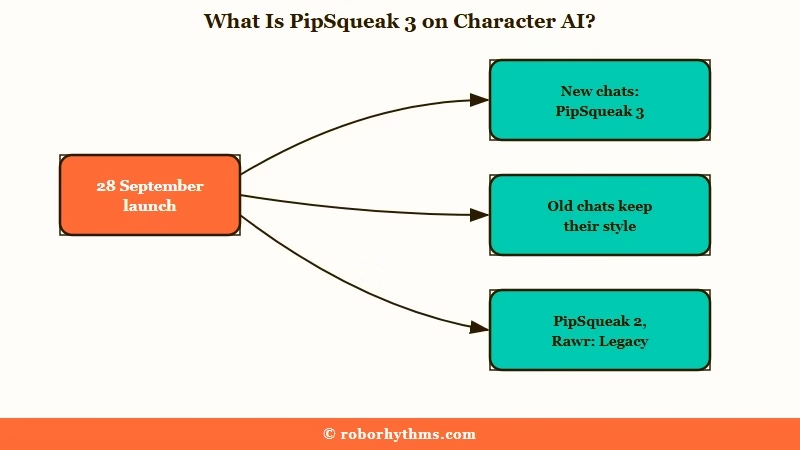
Character AI’s launch post says it is “noticeably smarter” than PipSqueak 2, writes more interesting replies, keeps better track of the chat and makes fewer formatting slip-ups. It is free on every plan, with “no special limits once they’re rolled out”.
The name suggests a tune-up of PipSqueak 2. A Character AI community moderator said otherwise in the fan launch thread, calling it “ground up a completely different model” that shares little beyond the name.
I like that the switch leaves old chats alone. Only new chats start on PipSqueak 3, so every chat you already have stays on the style it was using.
The launch takes the roster from five chat styles to seven, counting the two now in Legacy, and every Character AI chat style covers the full list.
How Do I Switch Back to PipSqueak 2 or Rawr?
You switch back in the Chat Style Picker, where PipSqueak 2 and PipSqueak 2 Rawr now sit in the Legacy menu, still free on every account.
Chats already running on either style stay on it without you doing anything.
The launch post says you “can find PipSqueak 2 and Rawr in the Legacy menu if you’d like to switch to them”. The steps below follow the path Character AI published for the app when Rawr launched in May, with the Legacy menu as the new last stop.
- Open the chat you want to change.
- Tap your Persona image at the bottom left to open the chat menu.
- Select Chat Style Picker.
- Scroll to the Legacy menu.
- Pick PipSqueak 2 or PipSqueak 2 Rawr, then send a fresh message.
Some people who are tired of relearning a new model every few months move their long-running companion chats to Candy AI instead. If a story took weeks to build, I leave it on the style it was built on and start new stories on PipSqueak 3.
Rawr has one catch. When it launched, Character AI said it “isn’t a default style, so you’ll need to select it each time you start a new chat”.
Character AI hasn’t said whether a Legacy style can be set as your default for new chats. Until it does, plan on picking PipSqueak 2 or Rawr again every time you open a fresh chat. If you are unsure which of the two to go back to, PipSqueak 2 vs Rawr breaks down the difference.
Why Don’t I Have PipSqueak 3 Yet?
You probably don’t have PipSqueak 3 yet because free accounts get it in a staged rollout, which Character AI says will reach everyone “within the next few days” of the 28 September launch.
Paying accounts came first. The launch post put both new styles in the picker on launch day for subscribers to c.ai+, Character AI’s paid plan, and to the cheaper (c.ai) lite.
A moderator confirmed in the Team announcement thread that the free rollout “started today”.
An app update is unlikely to be the missing piece. The newest Character AI build on the App Store, version 1.17.3, came out on 8 September, three weeks before the launch.
The new styles are being switched on from Character AI’s side, so keep the app updated but don’t expect an update to unlock anything on its own.
On the web, one launch-night thread turned up a quicker route. Switching a setting to Preview under Settings and then Preferences made PipSqueak 3 appear for the thread’s author, and a second web user in that thread confirmed it worked.
Character AI’s Help Center has no article on the Preview setting, so switch it back if something else starts misbehaving. The order I’d work through, cheapest step first:
- Fully close the app and reopen it, which is what a moderator suggested for missing styles.
- Scroll the whole Chat Style Picker before deciding the style isn’t there.
- On the web, check Settings, then Preferences, for the Preview option.
- Check the app and the website separately, because a style can show up on one before the other.
- Give it the few days Character AI promised before assuming something is wrong.
What Is ShortSqueak and Who Is It For?
ShortSqueak is the second new free chat style, built for quick casual chats, with what Character AI calls “texting energy” and “no five-paragraph monologues when all you said was hey”.
It sits next to PipSqueak 3 in the style list and replaces nothing. Character AI pitches it at people who miss the feel of its early chat styles, when a short message got a short answer.
The name showed up on Reddit first. On 5 August, about an hour after LongSqueak launched, a user posted a ShortSqueak style request describing almost the same style, down to Style Control settings named Short, Shorter and All Dialogue.
A Character AI Team member replied within half an hour that the team was “working on that”, and a style with that name shipped 54 days later.
ShortSqueak is the style I’m most curious about, because the team answered that August request by acknowledging “requests for shorter and more dialogue”. One reply says you can get it to drop narration “like the old models”, while a commenter in the fan launch thread already finds it “not detailed enough”.
Pick it for banter and quick check-ins, and keep PipSqueak 3 for scenes that need description. On c.ai+, both new styles come with Style Control, the dials for reply length and narration that arrived with LongSqueak in August.
Is PipSqueak 3 Better Than PipSqueak 2?
PipSqueak 3 looks better than PipSqueak 2 on the complaint that dogged its predecessor, dialogue, but its first days also brought grammar slips, clipped replies and lines that make little sense.
The praise so far is about character and dialogue. One early verdict calls it the first model in a long time that “stays phenomenally in character”, and another review lists “lots of dialogues” and “story progress” as its strengths.
The same review says the dialogue doesn’t “make sense 50% of the time”, and a commenter in the fan launch thread already sees “a lot of grammatical errors”. Even the punctuation changed, with a launch-night screenshot in that thread showing replies that skip em dashes entirely.
I don’t buy a verdict from launch week, and PipSqueak 2 is the reason. I judge any new style at month three, when the launch polish has worn off and the repeated phrases start to show.
Has Character AI Promised This Before?
Character AI made nearly the same promises for PipSqueak 2 five months earlier.
When PipSqueak 2 reached free users on 28 April, the April Team post promised “stronger in-character consistency”, “better memory and context” and “fewer loops”.
On 8 May, Character AI admitted in a follow-up that PipSqueak 2’s “replies are leaning too heavily into narration, with not enough dialogue”. The complaint was still running in September, with one thread asking where the dialogue had gone.
One thing is better this time, and it counts in Character AI’s favour. PipSqueak 2 went to paying members on 14 April and reached free users two weeks later, while PipSqueak 3 is promised to free accounts within days.
How Do You Get Longer Replies From PipSqueak 3?
PipSqueak 3 tends to follow the length of what you send, so longer, more detailed messages get longer replies back.
One early review warns that “if you let them be short, it’ll keep being short”.
Not everyone sees it that way, and a reply under that review says its replies land at about a paragraph and a half no matter what. Still, the cheapest test is to give the model more to work with:
Before:
heyAfter:
I drop my bag by the door and sit across from you, still out of breath. "You won't believe who I ran into at the station. Tell me you've heard the rumor about the lighthouse."
The second message hands the model an action, a hook and a question, which leaves it far less room to answer with one flat line. I rewrite my opener this way whenever a new chat starts too thin, and I swipe past any reply that comes back short.
Which Character AI Chat Style Should You Use Now?
PipSqueak 3 is the sensible default for most free chats, ShortSqueak suits quick banter, and the Legacy styles are for finishing stories you already started.
| Chat style | Who gets it | Best for | Where it sits |
|---|---|---|---|
| PipSqueak 3 | Everyone, free | General roleplay, and the default for new chats | Main style list |
| ShortSqueak | Everyone, free | Short, texting-style chats | Main style list |
| PipSqueak 2 | Everyone, free | Finishing chats already built on it | Legacy menu |
| PipSqueak 2 Rawr | Everyone, free | Dramatic scenes, picked again for each new chat | Legacy menu |
| DeepSqueak and LongSqueak | c.ai+, plus a daily taste on (c.ai) lite | Longer replies, with LongSqueak adding more memory | Premium |
| Soft Launch | c.ai+ | Fans of the older style | Premium |
My own new chats start on PipSqueak 3 now, with PipSqueak 2 kept for the stories already running on it. For how the paid styles compare with the free ones, see every model ranked.
Will Character AI Remove PipSqueak 2 From the Legacy Menu?
Character AI will retire PipSqueak 2 and Rawr eventually, according to its own Legacy Menu page, but it has set no date and says it will warn users before a style they use is removed.
The page went up on 23 September, five days before the launch, and it is blunt. Legacy styles “will be retired over time as newer Chat Styles take their place”, and the newest styles are the ones built for features like Lorebooks and advanced memory.
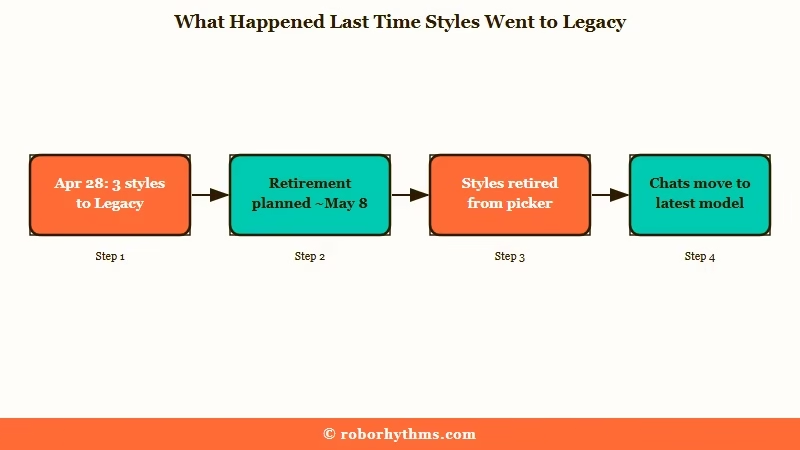
The last time styles went into Legacy, things moved fast. On 28 April, an April Team post moved Meow, Soft Launch and Nyan into Legacy with retirement planned for “around May 8th”, and four other styles, Roar among them, were retired that same day.
Retirement did not delete anyone’s chats. In April, chats on retired styles switched automatically to “the latest PipSqueak” for free users and to DeepSqueak for c.ai+ members, so each story carried on under a different model.
Promises of permanence have not held here before. The August 2025 community update made Soft Launch “a permanent chat style” for adults, yet it went to Legacy in April and came back in May only for c.ai+ members, “for a limited time”.
Character AI does deserve credit for keeping PipSqueak 2 free and one menu away. My read is that “for now” is carrying the whole moderator answer, so keep playing the chats you love on PipSqueak 2 and start new long stories somewhere with a future.
What Does PipSqueak 3 Change for (c.ai) lite and c.ai+?
On (c.ai) lite, PipSqueak 3 is the style your chat falls back to when the daily premium allowance runs out, and on c.ai+ both new styles come with Style Control.
(c.ai) lite launched officially alongside the new styles at $4.99 a month or $2.49 a week in the US. It adds a daily amount of DeepSqueak and LongSqueak messages, doubles memory pins from 15 to 30, and the launch post says that “when you use them up, your chat switches back to PipSqueak 3”.
Character AI’s own About (c.ai) lite page still says the chat continues “on the free chat styles, such as PipSqueak 2”. Its plan table still lists PipSqueak 2 and Rawr as the free styles, and the page was last edited on 22 September, six days before the launch.
That mismatch bothers me, because the help page is what people read before paying. Treat the launch post as current until the help page catches up, and check the (c.ai) lite plan breakdown for what the daily allowance covers.
What Should You Do If PipSqueak 3 Doesn’t Suit Your Chats?
If PipSqueak 3 doesn’t suit a chat, move that chat to a Legacy style, change how you write to it, or take the story to another app, in that order.
Most first-week problems have a quick fix.
Launch night had rough edges. Chats on PipSqueak 3 failed with errors for a while in a thread of failed chats, and a reply in the Team announcement thread shows bot messages wrapped in raw tags like <|beginningofmessage|> and <|endofmessage|>.
| Symptom | Likely cause | Fix |
|---|---|---|
| No PipSqueak 3 in the picker | The free rollout hasn’t reached your account | Wait a few days, restart the app, and check the Preview setting on the web |
| An old chat still runs on PipSqueak 2 | Existing chats keep the style they started with | Switch it in the Chat Style Picker or start a new chat |
| Rawr keeps reverting | Rawr isn’t a default style | Pick it again each time you start a new chat |
| Chat errors on PipSqueak 3 | Launch load and early bugs | Move that chat to PipSqueak 2 for now and retry later |
| Raw tags in replies | An output formatting bug | Regenerate the reply and flag it with the thumbs-down |
| Short, flat replies | The style follows short messages | Write longer messages and swipe past short replies |
Some chats won’t survive a model swap, and that is where I’d stop fighting the app. If you mostly chat for free, stay on Character AI, because PipSqueak 3 costs nothing and the Legacy styles still work.
If you would pay to stop relearning models every few months, Candy AI is built around one-to-one companion chat with a character you create. Its free tier is five messages in total across all characters, per its help center, so plan on paying if you switch.
For anime-style character roleplay, Nectar AI is the closer fit.
Quick Takeaways
- PipSqueak 3 is the free default for every new Character AI chat from 28 September, and old chats keep their style.
- PipSqueak 2 and Rawr are still free in the Legacy menu of the Chat Style Picker, with no removal date set.
- The last styles moved to Legacy were scheduled for retirement about ten days later, so don’t start a long story on PipSqueak 2 or Rawr.
- If PipSqueak 3 is missing, the staged rollout hasn’t reached you yet, and on the web the Preview setting under Preferences can bring it early.
- ShortSqueak is the new free style for short, texting-style replies.
