
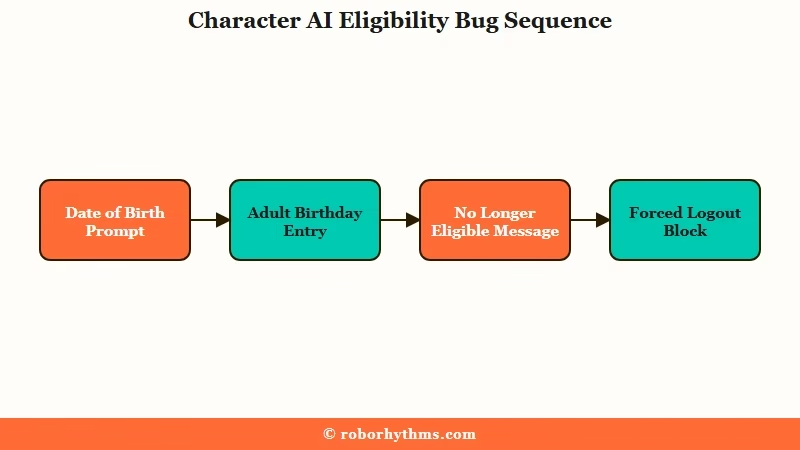
What’s Changed: Character AI began serving users a date of birth prompt, and entering a real adult birthday returned “you’re no longer eligible to keep using our services” followed by a forced logout. Staff have classified it as a date of birth and login bug with no risk of data loss, not a ban or a new age policy. Most accounts are back, and a smaller group is still locked out.
The Character AI no longer eligible error arrives with no warning. You open the app, a birthday screen you have never seen before asks for your date of birth, you enter it honestly, and the platform tells you that you cannot use the service any more. Then it logs you out.
What makes this one land so hard is the wording. “No longer eligible to keep using our services” is the language of a permanent account termination, so people who have spent two years building characters and chat histories read it as the end of the road.
The panic in the community was immediate, and a fair amount of it was people cancelling subscriptions before anyone knew what had happened.
The good news is that the message means far less than it says. What kept my attention is that two very different groups of people are seeing the same screen, and only one of them can fix it by waiting.
This guide covers what the error is, how to get back in, and how to work out which group you fall into.
What Does the Character AI No Longer Eligible Message Mean
The Character AI no longer eligible message is a date of birth and login bug, not an account ban or deletion.
Staff confirmed it publicly, describing it as a “DoB / login issue” and adding that “from what we can tell, it’s just a login issue at the moment, no risk of data loss.”
The phrasing is the part that bothers me most, because the platform chose termination language for what turned out to be a session failure. A user who reads “no longer eligible” has no way to know whether their account is suspended, deleted, or just broken for an hour.
Self reported ages of the people locked out ran from 19 to roughly 41. One comment that summed up the absurdity: “Apperantly being 26 years old makes you not eligible.” Paying subscribers were caught too, and so were people who had already completed the platform’s identity checks.
Worth separating this from the other age problem people hit on the platform. The selfie and face scan flow is a different mechanism with a different failure mode.
This one is a plain date entry field, and it has nothing to do with Persona or a camera.
Why Are Verified Adults Getting Locked Out
Adults were locked out because the birthday gate ignored existing verification status and account age signals entirely.
Users who had already passed the ID check were prompted again and kicked anyway.
One of the loudest reports on the day: “ME TOO!! I VERIFIED MY AGE VIA ID AND THEY ASKED ME THIS, THEN THEY KICKED ME OUT WHEN I PUT MY BIRTHDAY!!!” That is the clearest sign the gate was not reading from the same records that store verification results.
There is a documented gap here that I find genuinely striking. Character AI’s own Age Assurance FAQ, updated on 1 August 2026, answers the question “Is it based on the birthday we set?” with a flat “No”, and says the platform works out age from login information, platform activity, and third-party signals “without you having to do anything or give us any more data.”
Eleven days after that page was updated, the platform asked everyone for a birthday and used the answer to revoke access. The shipped behaviour and the published policy were describing two different systems.
What is age assurance: A background process that estimates a user’s age from account signals rather than asking them, used to decide who reaches adult features.
A folk theory circulated during the outage claiming the lockout was a deliberate maintenance lock, with advice to “try every 20ish minutes”.
I don’t buy that reading, and staff statements contradict it directly. Retrying on a timer worked for some people, but it worked because engineers were pushing a fix, not because the screen was a maintenance door.
How Do I Get Back Into My Account
Most people get back in through the desktop web version, the back button on the birthday screen, or waiting for the fix to reach their account.
Access returned for the majority within hours.
The single most useful detail is that this broke unevenly across platforms. Mobile app and mobile web sessions died while desktop browser sessions kept running, which points at session tokens and client caching rather than anything done to the account itself.
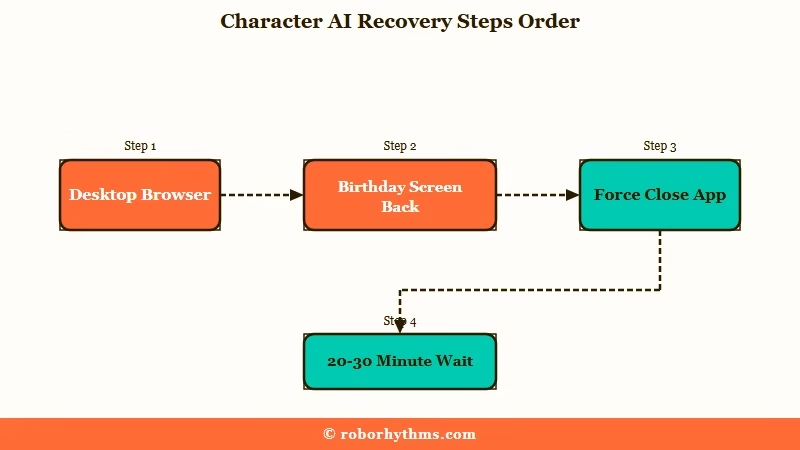
This is the sequence I walk through first, in order of how little it costs you:
- Open Character AI in a desktop browser before touching anything else. Several people who were fully locked out on mobile found their desktop session still logged in and working.
- If the birthday screen appears, press the back arrow in the top left instead of filling it in. One user reported doing exactly this and returning straight to their roleplay.
- Force close the app completely and reopen it. Reopening re-serves the prompt, which gives you a second attempt if the first one went wrong.
- Wait 20 to 30 minutes and retry. Fixes rolled out in stages, so accounts came back at different times.
- Check whether the platform is broken for everyone before assuming it is your account. Checking current outage status takes a few seconds and saves a lot of worry.
| Symptom | Likely cause | Fix |
|---|---|---|
| Eligibility message then logout on mobile only | Mobile session token invalidated by the gate | Use desktop web, then retry mobile later |
| Birthday screen appears every time you open the app | Prompt re-serving until an answer is stored | Press the back arrow, or wait for the fix |
| Locked out everywhere including desktop | Account level flag from a submitted birth year | Contact support, waiting will not clear it |
| Login page loads but credentials fail | Login service still degraded | Wait, do not create a replacement account |
| Access restored but settings missing | Preferences reset during recovery | Reapply settings manually, see below |
One thing to avoid. Making a fresh account on a different email did not work during the outage, and several people accidentally created duplicate accounts on their original email while trying.
That leaves you with a second empty profile and no path back to the first one.
Did I Lose My Chats and Characters
No chats, characters, or personas were deleted in this incident.
Staff addressed the data question directly and said there was no risk of data loss, and recovered accounts came back with their content intact.
My honest read is that the data panic was the worst part of this for most people, and it was avoidable with better wording on the error screen. Comments like “I had a HEART ATTACK. Been with this since the white webpage and I thought my shit got DELETED” were the norm rather than the exception.
If you want the fuller picture on when the platform does and does not remove account content, how account deletion works covers the permanent cases. This incident was not one of them.
Community members also pointed out that a comparable lockout happened in mid 2024 and resolved the same way, with everyone let back in. That precedent is the main reason I would treat a future occurrence of this screen as temporary until proven otherwise.
How Do I Tell a Platform Bug From a Real Age Flag
You are looking at a platform bug if other people are reporting it at the same time and desktop still works, and a genuine age flag if you are the only one affected and you submitted an under 18 birth year.
The two look identical on screen and need opposite responses.
This is the distinction I care about most here, because the advice that helps one group actively wastes the other group’s time. Waiting is correct for a sitewide bug and useless for an account that has been flagged.
There is a second cause that produced real, non-bug lockouts during the same window. The mobile date picker rendered with the day and year columns invisible for some users, so they submitted a birth year they never intended. As one put it: “I couldn’t see the day and year and put the wrong year in.”
Before: You see the eligibility screen, assume it is the sitewide bug, and refresh for three days waiting for it to clear.
After: You check whether desktop web works and whether others are reporting it right now. If desktop also fails and the reports have stopped, you treat it as an account flag and open a support ticket the same day.
Here is how the two situations separate in practice.
| Signal | Platform bug | Genuine age flag |
|---|---|---|
| Desktop web | Usually still works | Blocked everywhere |
| Other users | Reporting it in the same hour | Nobody else affected |
| What you entered | A correct adult birthday | A year you could not see or verify |
| Time to resolve | Hours, without action | Does not clear on its own |
| Right response | Wait and use desktop | Open a support ticket now |
What Should I Do If I Entered the Wrong Birth Year
Contact support directly, because a submitted under 18 birth year does not expire and cannot be fixed by waiting or reinstalling.
This is the group the standard advice fails.
I’d send these users to support on day one rather than letting them sit in a retry loop. Every hour spent refreshing is an hour the ticket is not moving.
There is an awkward gap in the official guidance worth knowing about. Character AI’s help documentation tells wrongly flagged users to go to Settings, then Advanced, then Verify Age.
That path assumes you can still reach your settings, and the people hit hardest here could not log in at all. Several described being “literally stuck on this screen.”
If you can reach settings, the verification route is the fast one. A selfie handled by third party provider Persona clears most cases in seconds, and government ID is requested only when the selfie is inconclusive.
Persona deletes biometric data and any uploaded ID within seven days, and the same provider handles verification for LinkedIn, OpenAI, Block, and Etsy.
The dead end to be aware of: without a valid ID, verification cannot be completed and the account cannot move forward. There is no appeal that substitutes for it.
Why Did My Settings Break After Getting Back In
Recovered accounts frequently came back with preferences reset, muted words not applying, and the selected persona not displaying.
The content survived, the configuration often did not.
Mine came back with muted words dead. That reads like a whole new outage and is not one. One user described it plainly: “it’s back, but all the settings were reset. Muted words aren’t working anymore, and I can’t choose a persona either.”
Part of that is cosmetic rather than broken. Another user checked and found the persona still attaches to sent messages even when it stops showing at the bottom of the screen, so the setting held even though the interface stopped confirming it.
Both of these have their own longer fixes if they persist past the recovery window. Muted words that stop applying and personas disappearing from chats walk through the causes that are unrelated to any outage.
Where Do I Go If I Am Done With Age Gates
If the deeper problem is that your access can vanish behind an age check that misfires, a platform without that gating model is the practical answer.
Most people reading this will get their account back and stay put, and that is a reasonable choice.
The wider context matters for judging whether this recurs. Character AI announced in October 2025 that it would end open ended teen chat, phased down to zero over the following month, under pressure from lawsuits and proposed federal legislation. Age gating is now core infrastructure on the platform rather than a bolt on, so more checks are likely, not fewer.
For anyone who has decided the interruptions are not worth it, Candy AI is the one I point people to first, mainly because persistent memory and adult conversations are the default rather than something you have to keep proving you are entitled to.
Nectar AI is the better fit if character art and visual roleplay matter more to you than conversation depth.
Neither is a like for like replacement for a two year Character AI history, and I would not pretend otherwise. Moving platforms means rebuilding your characters from scratch, which is a real cost worth weighing before you go.
Frequently Asked Questions
Is the no longer eligible message a ban?
No. Staff classified it as a date of birth and login bug rather than an account action. Accounts were not suspended or terminated, and access returned for most users within hours of the fix rolling out.
Did Character AI raise its minimum age to 21?
No. The age requirement did not change. The message reached users aged 19 through 41, including paying subscribers, which is why it was identified as a bug rather than a policy shift.
Why did I get asked for my birthday if I already verified my age?
The birthday gate did not check existing verification records. Users who had completed the ID or selfie process were prompted again and locked out anyway, which is one of the clearest indicators this was a deployment failure.
Does a paid subscription skip the age check?
No. A Character AI Plus subscription does not bypass age assurance, and neither does signing in with an age verified Google account. Paying subscribers were locked out at the same rate as free users.
How long does the lockout last?
For the sitewide bug, hours. For an account that recorded an under 18 birth year, it does not clear on its own and needs a support ticket or completed age verification.
Should I make a new account to get back in?
No. New account creation was failing during the outage, and people who tried ended up with duplicate empty profiles on their original email. Wait for access to return to the original account.
Quick Takeaways
- The no longer eligible message is a date of birth and login bug, and staff confirmed there is no risk of data loss.
- Desktop web kept working for many users while the mobile app and mobile site were locked, so try a browser first.
- Pressing the back arrow on the birthday screen let some users skip the prompt entirely and return to their chats.
- If you submitted a wrong birth year because the date picker did not render, waiting will not help and support is the only route.
- Never create a replacement account during an outage, since it fails and leaves duplicate profiles behind.
