
What’s Changed: On May 20, 2026, Character.AI added Imagine Animate, a one-tap feature that turns existing Imagine images into short animated clips for 20 Charms each. The platform also cut Imagine image generation cost from 20 Charms to 10 Charms in the same update. Community reaction has been overwhelmingly negative, with users calling it a misallocation of resources while core PipSqueak 2 chat issues remain unfixed.
The Character.AI mod team posted the Imagine Animate launch on r/CharacterAI on May 20, 2026. The top comment on the announcement thread has 263 upvotes and reads “no one really uses this feature.” The next two responses point to the CEO’s 6-year-old daughter as the apparent target user.
Once the thread crossed 192 comments, the consensus was clear: this is the feature nobody asked for, shipped while the chat quality complaints from the April PipSqueak 2 rollout still have no fix.
If you opened your Character.AI app in the last two days and noticed a new Animate button on your Imagine images, this is what that button does, what it costs, and what it tells you about where the platform’s priorities sit in May 2026. Spoiler: nothing about the chat experience changed in this update.
The piece on the PipSqueak 2 Yap variant and the gibberish bug Character.AI shipped earlier this month covers the chat-side problems that users wanted addressed before Imagine Animate landed. The piece on Character.AI’s 1.5 star app rating covers how the broader sentiment got this bad.
What Changed in the Character AI App
Imagine Animate is a new one-tap feature that converts any existing Imagine image into a short animated clip for 20 Charms per generation, and Imagine image cost was simultaneously reduced from 20 to 10 Charms.
The feature lives inside the existing Imagine Gallery (the in-conversation image generator c.ai+ subscribers got in March 2026). When you tap an existing image, an Animate button now appears. Tapping it spends 20 Charms and produces a short animated clip from that image.
The animated clips show up in your Gallery alongside the original images and can be shared to the Community Feed, downloaded, or sent outside the app. There is no separate Animate tab; the feature is woven into the Imagine workflow.
The Charm economics underneath are the part most users missed in the announcement. Before May 20, generating an image from a character message cost 20 Charms. After May 20, the same image costs 10 Charms, a 50% reduction.
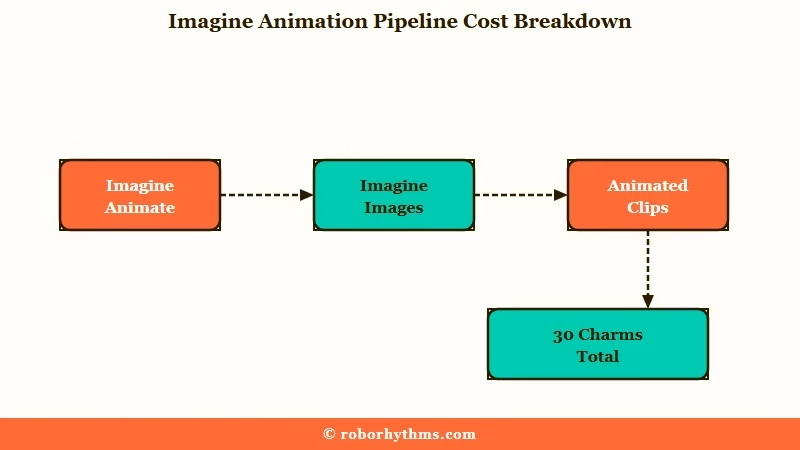
The reduction looks generous on its own, but in context it is the platform pricing image generation down to make Animate’s 20-Charm cost feel proportional. You generate the image at 10 Charms, then animate it for another 20 Charms, total 30 Charms per clip.
| What you get | Cost in Charms | Where it lives |
|---|---|---|
| Imagine image (from character message) | 10 Charms (was 20) | Imagine Gallery |
| Imagine Animate clip (from existing image) | 20 Charms | Imagine Gallery |
| Full new image + clip pipeline | 30 Charms total | Imagine Gallery |
For context on how Charms are earned: daily quests, weekly multi-bot quests, and microtransaction purchases. Heavy Imagine Animate use will push you toward buying Charm packs rather than waiting for quest rewards.
Why This Update Is Generating Backlash
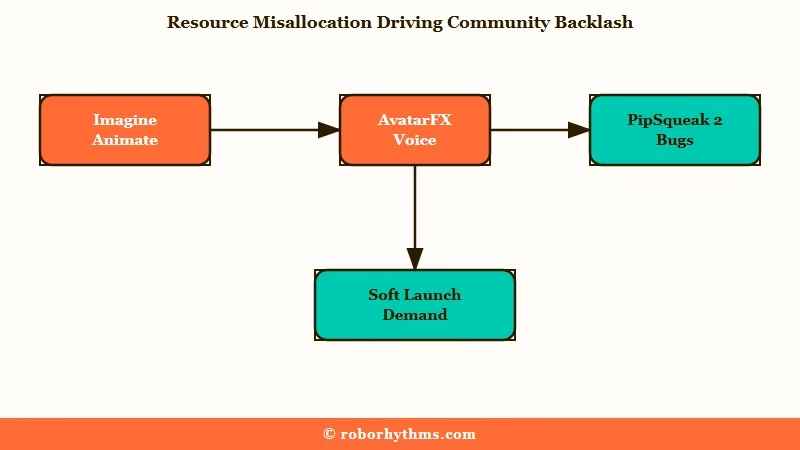
The community sees Imagine Animate as Character.AI spending engineering time on a visual feature few users want while the post-PipSqueak 2 chat quality complaints from April remain unaddressed.
Read the top-rated comments on the announcement thread and a pattern shows up. The 225-upvote comment lists what users wanted: bring back Soft Launch, Roar, and the other retired chat styles, or fix PipSqueak 2.
Make it usable. Stop the dashes, stop using muted words, stop having the model speak for the user. Not one of those requests is about images; all of them are about the chat layer.
The 92-upvote comment frames it bluntly: “Genuinely what is the point? Isn’t this just a waste of money and resources that could go on improving the chats?” Multiple users in the thread point out the same disconnect.
The platform shipped Imagine Gallery in March, Animated avatars (AvatarFX) for voice chat, and now Imagine Animate, all in two months. The chat-quality complaints from the April PipSqueak 2 rollout have been answered with new visual features instead of model fixes.
The user-feedback miss matters more than usual because Character.AI is in a sentiment trough. The app’s store rating sits at 1.5 stars, the original founders have left for Google, and ads now interrupt free-tier conversations.
Shipping a video feature in this context reads to the community as proof that the leadership is solving for the wrong problems. The 167-upvote comment (“maybe the CEO’s 6-year-old”) is harsher than it looks; it is the community accusing the CEO of building for a hypothetical user base that does not match the real users paying for c.ai+.
Per Statista’s user-base estimates for Character.AI, the platform’s active user base skews 18-24 (roughly 65% of users). The 18-24 demographic is not the audience that needs a one-tap animation feature on an existing AI image; it is the audience that joined the platform for character roleplay and chat quality. Imagine Animate optimizes for the wrong user.
What to Do About It
If you are a Character.AI user frustrated by the Imagine Animate launch, the practical options are: ignore the feature and let it sit unused, use it sparingly given the 20-Charm cost, or move to a platform that ships video as a real feature rather than a microtransaction.
The honest answer is that Imagine Animate is not a workaround target because it is not a bug. It is a feature that exists and costs Charms to use.
The community’s complaint is about resource allocation, not about a broken product. There is no “fix Imagine Animate” recipe; there is only “decide what to do with it.”
Here is the practical decision framework:
- If you mostly want chat and never use Imagine: Imagine Animate does not affect your free Charm balance unless you choose to use it. Ignore the button. Your Charms continue to apply to skipping ads, faster responses, and the other features that existed before.
- If you already use Imagine images and want to try animation: The 10-Charm image cost reduction means you can experiment for less than before. 30 Charms for image + clip is roughly the same as 20 Charms for image alone was last week. Try it with daily-quest Charms before buying a pack.
- If you generate images frequently and the Animate workflow appeals: A Charm pack at the cheapest tier is the lowest-friction option. The c.ai+ subscription does not include extra Charms automatically; it gates priority access and Imagine Gallery itself, not animation generations.
- If you are tired of paying microtransactions for features Character.AI ships instead of fixing chat: Move to a platform where video is a core feature rather than a Charm sink. Candy AI’s Live Action produces 120-second animated clips as part of the subscription rather than per-clip. The Candy AI vs DreamGF comparison walks through the video-feature side of the two main alternative platforms.
Candy AI’s Live Action feature is the closest parallel to what Imagine Animate is doing, except Live Action clips are 120 seconds long, included in the subscription beyond a base token allocation, and produced by a platform that built around the video feature rather than retrofitting it onto an image gallery. If you signed up for Character.AI for chat and now find yourself paying Charms for visual content, Candy AI is the platform whose pricing model matches what you are doing better than Character.AI’s does.
Nectar AI Alternative Callout: If neither Character.AI nor Candy AI feels right and you want a third option focused on character-driven roleplay over visual generation, Nectar AI is the platform I would point to. Nectar leans further into chat depth than either Character.AI or Candy AI, and the May 2026 launch has been less feature-creep, more user-complaint-driven roadmap.
How the New Charm Math Lands for Heavy Users
The Charm reduction on Imagine images and the new Imagine Animate cost change the math for users who generate visual content regularly. Here is the Symptom, Cause, Fix table for the most common reactions in the announcement thread:
| Symptom | Likely cause | Fix |
|---|---|---|
| Animate button does not appear on Imagine images | Feature still rolling out by region, or you are not on the latest app version | Update the app to the May 20 build, restart, check Imagine Gallery |
| Charms balance drops faster than before | Heavy use of new Animate workflow at 20 Charms per clip | Skip animation and keep Charms for ad-skipping or priority access |
| Image generation costs feel different | The 50% price cut on Imagine images was real (20 to 10 Charms), the Animate cost is what makes total spend feel similar | Use Imagine images standalone; only animate when worth 20 Charms |
| Frustrated by the feature direction | Character.AI is prioritizing visual additions over chat-layer fixes | Move to a platform whose pricing model matches your actual usage pattern |
For the longest-standing chat-layer complaints, the PipSqueak 2 Yap variant analysis is the best summary of where the model still needs work and which legacy chat styles users wanted preserved.
Frequently Asked Questions
What is Character AI Imagine Animate?
Imagine Animate is a feature added on May 20, 2026 that turns an existing Imagine image into a short animated clip. The Animate button appears on any image in your Imagine Gallery, and tapping it generates a clip for 20 Charms. The animation lives in your Gallery alongside the original image and can be shared to the Community Feed or downloaded.
How much do Imagine Animate clips cost?
Each Imagine Animate clip costs 20 Charms. In the same update, Character.AI reduced the cost of generating an Imagine image from 20 Charms to 10 Charms, so a full image-plus-animation pipeline costs 30 Charms total. Charms come from daily and weekly quests or from microtransaction purchases.
Do I need c.ai+ to use Imagine Animate?
Imagine Animate lives inside the Imagine Gallery, which was originally a c.ai+ subscriber feature when it launched in March 2026. As of May 20, 2026, the gating is the same: c.ai+ subscribers have full Imagine Gallery access including the Animate button. Free-tier access is limited and the rollout is still being adjusted.
Why is the community upset about Imagine Animate?
The Imagine Animate launch landed while Character.AI users were still asking for chat-quality fixes from the April PipSqueak 2 rollout. Top comments on the announcement thread argued that engineering time spent on visual features should have gone to chat-layer issues instead: muted words, the model speaking for users, the loss of legacy chat styles like Soft Launch and Roar.
Can I get a video feature on a different platform?
Yes. Candy AI’s Live Action feature produces animated clips up to 120 seconds long, included as part of the subscription beyond a base token allocation.
DreamGF does not have a comparable video feature as of May 2026. Other companion platforms vary; the Candy AI vs DreamGF comparison covers the two main video-capable alternatives in detail.
Will Character AI fix PipSqueak 2 chat issues?
Character.AI has not publicly announced a fix timeline for the PipSqueak 2 chat-quality complaints as of May 22, 2026. The platform’s communication since April has focused on new features (Imagine Gallery, Imagine Animate, AvatarFX for voice) rather than model improvements. The community’s reaction to Imagine Animate suggests this gap will continue to fuel sentiment loss on the app’s store rating.
