
What’s Changed: Updated 24 September 2026 after Character AI’s moderators confirmed that Go-ons, swipes and voice memos all reset at 00:00 UTC. Screenshots of the limit pop-up also put the free cap at 100 Go-ons a day.
You are deep in a roleplay scene on Character AI when the bot’s reply stops at a natural pause. You tap Go on for the continuation and get a c.ai+ upgrade screen instead, and the scene stops cold.
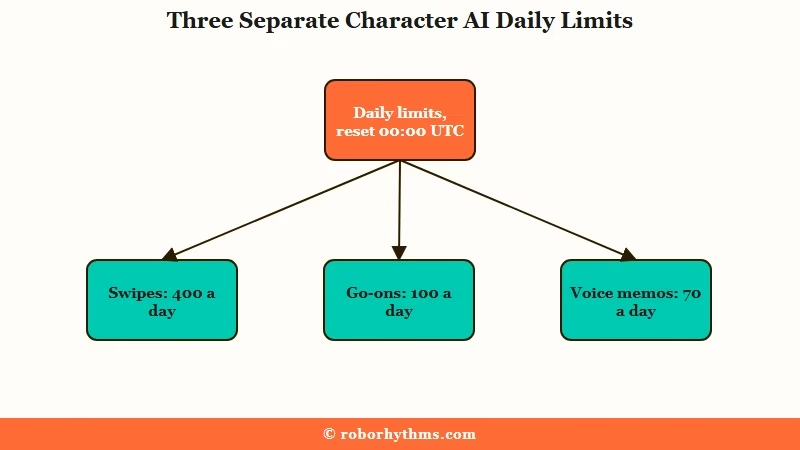
The Go on limit is 100 Go-ons a day on a free account, and it resets for everyone at 00:00 UTC. Typing any message of your own, even a single period, keeps the scene moving, because only the empty continue counts against the cap.
It is a separate counter from the swipe limit, which stops at 400 a day, and from the message limits people often confuse it with.
If long scenes keep running you into the cap, a common move is rebuilding your character on Nectar AI, which is set up for people leaving Character AI.
What the Go on Limit Is
The Go on limit is a daily cap on Go-ons, the continue or fast forward action that makes the bot write again without a new message from you.
Character AI’s team announced the cap on 10 March 2026, alongside limits on swipes and voice memos, and said the metering would help “manage infrastructure costs while keeping core chat access free for everyone”.
The limit exists because each Go on tap triggers another model inference on the same conversation context. From Character AI’s perspective, that is expensive compute on an action that started as “free” in early versions of the app.
Users date the rollout to that same month, and by May the pop-up that ended a scene named the number outright.
Free accounts get 100 Go-ons a day. Character AI’s help pages do not list the figure, but the limit pop-up did, reading “Woah! You hit 100 Go-on today” in screenshots users collected in May 2026, next to matching screens for 400 swipes and 70 voice memos.
A few users say they run out well before 100, and the app shows no counter to check against, which is why threads asking for one keep appearing.
Why the Go on Button Matters
The Go on button is how you get the bot to keep writing without typing anything, which matters most when a reply stops mid-action.
If you roleplay on Character AI beyond casual scenes, you know the loop: the bot starts a dramatic action, the reply stops, you tap Go on and it resumes. On a good session that happens two or three times every ten replies.
What surprised me about the current limit is how quickly it builds up during emotional or descriptive scenes. A single detailed action beat can need two or three continues to finish.
At that rate a long evening scene can burn through 100 Go-ons before it ends. My read is that the cap was sized for casual chat, and long roleplay is where it runs out first.
When the Go on Limit Resets
The Go on limit resets at 00:00 UTC every day, at the same moment as swipes and voice memos.
Character AI’s community moderators have said so in plain terms. One told a user that “your daily limits for Swipes, Go-ons, and Voice Memos reset every day at 12:00 AM UTC” (9 September 2026), and another answered someone who had run out with “Metering resets every 12AM UTC” (13 September 2026).
In local time that is 8pm on the US East Coast and 5pm on the West Coast while daylight saving lasts, an hour earlier once the clocks change in November, and 5:30am in India. Because the reset is a fixed clock time, running out at 11pm Eastern during daylight saving means a 21 hour wait, while running out at 7pm means one hour.
Time heavy scenes around that clock. Start a long session an hour or so before the reset, and a fresh 100 arrives partway through it instead of the next evening.
Users also report that the countdown which used to show the time left has disappeared from the pop-up, so the fixed reset time is now the only reliable guide.
What You See When You Hit the Limit
What the cap looks like in the app: You tap Go on after a reply stops short, and a c.ai+ upgrade screen opens instead of the continuation. Until late August it read “Woah! You hit 100 Go-on today” above a reset countdown, and screenshots since then show the plain subscribe screen with neither. Close it and you can type a normal message, swipe if you still have swipes left, or wait for 00:00 UTC.
The swipe cap used the same wording, “Woah! You hit 400 Swipes today”, so a number on the screen tells you which limit you hit.
c.ai+ raises the cap the furthest. Character AI’s plan comparison in its help centre lists its feature limits as “Unlimited”, though the subscribe screen only says “Highest”. The cheaper c.ai lite tier keeps a cap, and both pages label it “Limited”, the same word they use for free accounts.
Three Workarounds That Still Work
The workaround that always works is typing a message yourself, because only the empty continue counts as a Go-on.
Swiping and switching bots help less, but none of the three needs c.ai+, and the first is what Character AI’s own moderators tell stuck users to do.
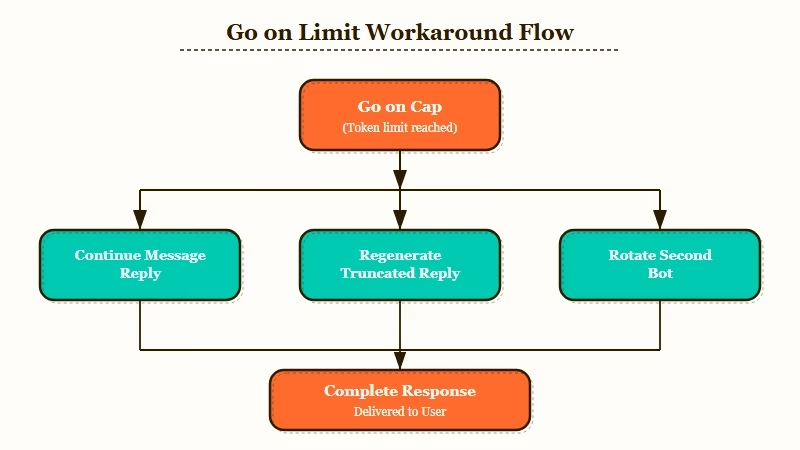
Here is the sequence I walk through when I hit the cap in the middle of a scene and cannot stop playing.
- Send “Continue from where you left off”, a short action like “He paused, then continued,” or even a single period as a regular message. It is a normal message turn, so it never touches the Go-on counter, and messaging stays unlimited on every plan, free included.
- Swipe the truncated reply to the right. Swipes regenerate the bot response and sometimes produce a longer version that does not need a continue. The swipe limit is its own quota of 400 a day on free, so it usually has room when Go-ons run out.
- Switch to a second bot mid-session for a parallel scene, then come back to the original. The Go on cap is per-account, not per-bot, so this does not reset the counter. But the variety can fill the time until the 00:00 UTC reset.
From my testing, the first workaround is the most reliable. Writing a one-line continuation prompt as a regular message almost always gets the bot to resume the scene the way a Go on would.
Typed messages are not metered the way Go-ons are, although free accounts can still hit slow mode, which c.ai+ removes.
Symptom and Fix Reference
| Symptom | Likely cause | Fix |
|---|---|---|
| “Woah! You hit 100 Go-on today” or a c.ai+ screen | Free cap of 100 Go-ons used up for the day | Type a message or a single period instead |
| Go on works but reply stays truncated | Model output token limit on that bot | Swipe to regenerate, or rewrite the prompt |
| Cap seems to reset at the wrong time | The reset is 00:00 UTC, not your local midnight | Convert 00:00 UTC to your time zone (8pm US Eastern during daylight saving time, 7pm otherwise) |
| c.ai lite account still hitting the cap | Lite still has a cap, labelled “Limited” just like free | Type messages instead, or move to c.ai+, which has the highest limits |
| Pop-up names a number | 100 means Go-ons, 400 means swipes | Switch to the action that still has room |
When to Leave Character AI for This Specific Problem
If you are hitting the Go on cap during every long session and the workarounds no longer feel worth it, switching platforms for heavy-roleplay use is the real fix.
Nomi AI and Candy AI both handle long replies differently. For the wider set of options, our guide to uncensored websites like Character AI compares platforms with no message gate.
Nomi AI does not have a separate continue action at all because its model produces longer replies by default. The memory system also tracks what got cut off in a way that the next reply tends to reference, so the need to manually continue shows up less often. My full take is in the Nomi AI review.
Candy AI’s paid plan includes unlimited chatting, according to its help centre, so there is no daily continue quota to run into, although its free tier stops at 5 messages in total. For users comparing the two as Character AI alternatives, the Candy AI vs Nomi AI breakdown covers the memory and response-length differences in full.
For users who want to stay on Character AI, c.ai+ is the direct answer at $9.99 a month in the US, since it carries the highest Go-on allowance Character AI sells. The cheaper c.ai lite tier, at $4.99 a month, still keeps a cap. The Character AI restricted access piece covers the broader platform restrictions that came with the 2026 pricing changes.
Nectar AI is the one I would try first if you would rather rebuild a Character AI character somewhere else. Check Nectar AI’s main page to see how its replies compare.
