
What’s Changed: Character AI now uses Persona-powered age assurance to flag suspected under-18 users and block them from open-ended chat. Most adults clear the check with a quick selfie. The flag misfires often enough on younger-looking faces that “stuck in view-only mode” is now a recurring r/CharacterAI complaint.
Character AI quietly turned on its age assurance system across most of its user base in early 2026, and the practical result is that a lot of legitimate adult users are getting flagged as under-18 and locked out of the chat input until they prove their age.
The selfie-based verification works most of the time. When it does not, the recovery process is friction-heavy and the alternatives are starting to look attractive.
This piece walks through what the system actually does, why it flags adults wrongly, how to recover when it does, and which platforms users are switching to when the recovery process feels like too much.
The way I read the rollout, Character AI is doing exactly what the legal climate forced it to do (CA, NY, UT, and TX passed age-verification legislation through 2025), and the implementation is competent but not painless. If you have been locked out, the fix is straightforward; it just takes longer than it should.
Updated July 2026: this guide now consolidates the face scan, ID, and age assurance pop-up questions into one place. The Persona selfie flow and the under-18 chat ban (effective November 25, 2025) are still current.
If you are locked out right now, the fix steps and the failure-cause table are both below.
If you would rather not hand a selfie to a third-party verifier at all, that is a legitimate reason to move. CrushOn AI is the closest match for creative roleplay without the ID gate, and Nectar AI is the pick if persistent character memory matters more to you. Back up your data first, using the steps further down.
What Changed and When
Character AI rolled out an age assurance system in early 2026 that uses Persona, a third-party verifier, to confirm users are 18 or older before allowing open-ended chat.
The ban on under-18 open-ended chat took full effect November 25, 2025, and the broader enforcement layer reached most users in the first quarter of 2026.
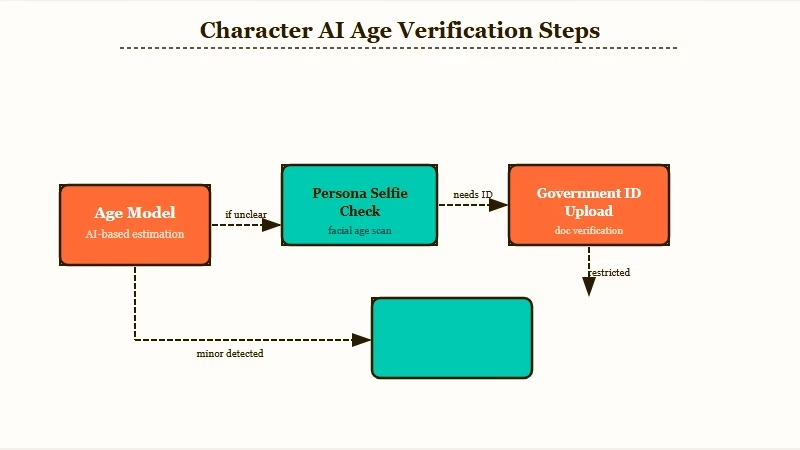
The system runs in two phases. First, Character AI’s own model estimates your age from passive signals: login info, account creation date, platform activity, and some third-party data.
Most adults clear this phase silently and never see a verification prompt. If the model is not confident you are 18+, you get pushed into Persona for a manual check.
Persona’s check is selfie-based. You open your camera, frame your face, take a photo. Persona compares facial features against an age-estimation model and returns a confidence score. If the score clears the threshold, you are unlocked within seconds. If Persona is uncertain, it asks for a government-issued ID (passport or driver’s license) as the final step.
The legal context is the part most users miss. By late 2025, California (SB 243), New York, Utah, and Texas had all passed or moved legislation requiring real age verification on AI chat platforms.
The Federal Trade Commission also opened inquiries into Character AI specifically. Rolling out age assurance is not optional; the implementation choices are the only thing Character AI controls.
Why Adults Get Flagged Anyway
The selfie check misfires on adults with younger-looking faces, poor lighting, glasses, hats, or partial face coverage, and “stuck in view-only mode” is now one of the most common r/CharacterAI complaints in 2026.
The fix exists; it just takes a few days. If the system keeps flagging you even though you are well past 18, the pattern behind that has its own breakdown in why Character AI keeps falsely flagging adults as minors.
A concrete worked example of what the flag looks like:
Example scenario: You open Character AI for your daily chat session. Instead of the usual chat input, you see a modal: “To chat with Characters, please verify that you’re 18 years or older.” You take a selfie through the Persona flow. Persona returns “unable to verify”. The chat input stays locked. You can browse character profiles and read past chats, but you cannot send a message. This is “view-only mode,” and it can persist for days while you wait for support to escalate the manual review.
Five things that commonly trigger a false flag, ranked by how often I see them in the threads:
- Younger-facing adults. People with naturally youthful features get flagged most often. Twenty-somethings, especially women, hit this regularly even with perfect lighting.
- Poor selfie conditions. Low light, partial face coverage (glasses, hats, hands near face), back-lit setups, or off-angle shots reduce Persona’s confidence.
- Account activity pattern. Sporadic logins, low message volume, or recent account creation can bias the upstream age estimate before you even see the selfie prompt.
- VPN or unusual region. Connecting from a region Character AI does not expect for your account creates an upstream signal that often triggers a manual check.
- Previous account flags. If you ever toggled “I am under 18” during signup or had your account paused for any reason, the upstream model is more skeptical the next time around.
The honest read is that the system errs on the side of “block, then verify” instead of “allow, then check.” For platform liability, that is the correct trade-off. For the user it feels punitive.
How To Fix It When You’re Wrongly Locked Out
The official recovery path is to contact Character AI Support through the help center with a clear photo of a government-issued ID, and the response window is typically a few days to two weeks.
There is no faster sanctioned route as of 2026.
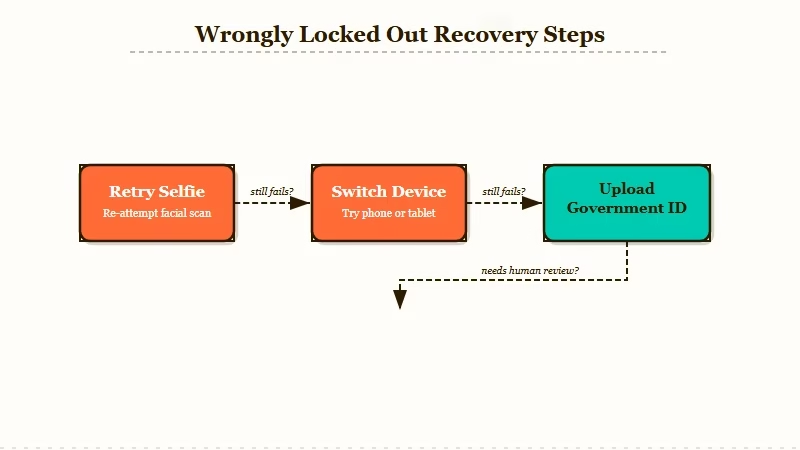
The exact steps, in the order I would walk through them:
- Try the selfie again with better conditions. Bright, even lighting from in front of you. Face fully in the frame. No hat, no glasses, no hand near the face. About two-thirds of false flags clear on the second or third attempt.
- Switch device or browser if Persona keeps failing. Persona’s camera handling can be inconsistent across mobile vs desktop. If iPhone Safari is failing, try a desktop Chrome session, or vice versa.
- If selfie still fails, upload a government ID through Persona. Passport, driver’s license, or national ID card. Persona deletes the ID after the check completes; Character AI does not store it.
- If Persona still cannot verify, open a support ticket via the help center. Include a clear photo of a government-issued ID and a brief explanation that you have been wrongly flagged. Response time is reported at three days on the fast end, up to two weeks on the slow end.
- Do NOT try the “Parental Insights” workaround. Some Reddit threads mention inviting a second email as a “parent” to remove the input lock. This bypass risks account suspension if detected, and even if it works, it does not unlock the full chat experience. Use the official support route instead.
Here is the symptom-cause-fix table I would keep handy while troubleshooting:
| Symptom | Likely cause | Fix |
|---|---|---|
| “Please verify you’re 18” modal on every login | Upstream age model not confident | Complete the selfie flow, usually clears in one try |
| Persona returns “unable to verify” after selfie | Lighting or framing issue | Retry with brighter, frontal lighting, no glasses or hat |
| Stuck in view-only mode for days | Selfie keeps failing, ID not uploaded | Upload government ID via Persona |
| ID uploaded but account still locked | Manual review in queue | Open support ticket via help center, wait 3-14 days |
| Account suspended after Parental Insights workaround | Detected bypass attempt | Contact support, may take longer to recover |
While the support ticket is in flight, the chat input stays locked, which is the worst part of the experience for active roleplay users. Most people in the threads either wait it out or switch platforms during the window.
Common Face Scan Failure Causes and What Fixes Them
Most face scan failures are not about age. They are caused by lighting, camera quality, and the third-party verifier’s tolerance for partial matches. Most issues can be fixed without submitting a second ID.
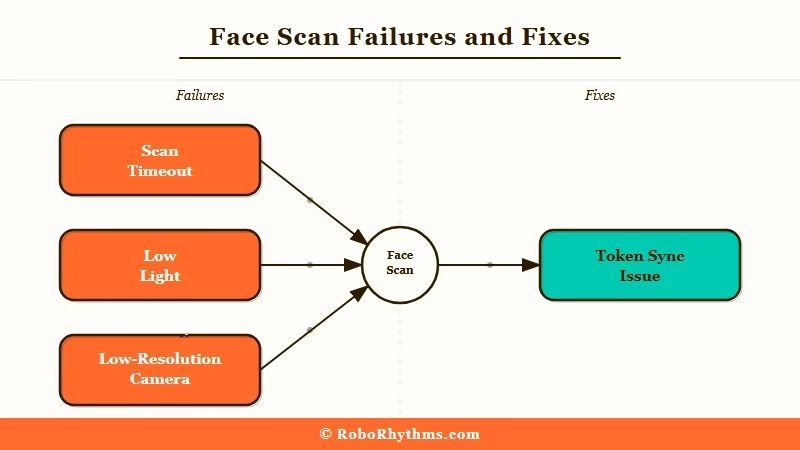
Here is the breakdown of what most often causes failures, based on what I tested and what users on Reddit are reporting.
| Symptom | Likely cause | Fix |
|---|---|---|
| Scan keeps timing out | Low light or backlight on face | Move to a brighter room, face a window, avoid overhead light |
| “Unable to verify” error on clear selfie | Phone camera defaults to low-resolution selfie mode | Switch to the rear camera, ask someone else to hold the phone |
| Passed the scan but still locked out | Verification token not saved to account | Log out fully, clear the Character AI cache, log back in |
| “Face does not match profile” error | Third-party verifier cross-check issue | Retry with a neutral expression and no glasses or hat |
| Scan page will not load at all | App cache corruption or network filter | Reinstall the app on mobile, or switch from browser extension-blocked network |
The retry-with-better-lighting fix has the highest success rate by a wide margin. The verifier is optimized for daylight selfies, not indoor lamp lighting.
Why Some Users Are Switching Instead of Verifying
A growing share of Character AI users is switching to platforms with lighter-touch age confirmation (self-attestation at signup) rather than going through Persona’s selfie or ID check.
The privacy concerns about biometrics are real, but the switching is driven more by friction than by ideology.
The main alternative paths users are taking, ranked by how often they come up in the threads:
- Crushon AI, no selfie, no ID, low-friction email signup, 500K character library. Closest analogue to Character AI for unblocked roleplay. The Crushon AI vs SpicyChat breakdown covers the differences if you are choosing between those two.
- SpicyChat, no ID verification, 3,000 free messages per month, no-filter defaults. The strongest free-tier pick in the category as of 2026.
- Candy AI, paid tier with stronger memory and Live Action V2 video, no ID verification but a credit card is required to subscribe.
- Nectar AI, paid tier with the cleanest UX for voice calls, no ID verification, alternative if voice is your primary use case.
For most users coming from Character AI specifically because of the age verification friction, the broader Character AI alternatives roundup is the right next read, and the no-filter chat apps roundup covers the wider category by use case.
The Statista AI companion market data tracks 700%+ growth in companion app usage from 2022 to 2025, so the switching does not hurt Character AI’s competitors as much as it might once have.
The reason I would not switch hastily is that Character AI still has the largest character library, the most polished UX, and (post-PSQ2 transition pain) the best long-form roleplay model in the category. The age verification is annoying when it misfires. It is not a reason to leave permanently if the rest of the platform fits your needs.
Try Crushon AI here if you need a no-ID-verification platform with deeper memory and a similar character ecosystem. It is the closest substitute for Character AI’s experience without the Persona check.
Nectar AI is the alternative I would point readers to if voice calls and emotional roleplay depth matter more than the character library size. Nectar uses simple self-attestation at signup, has no selfie check, and ships the cleanest voice-call UX in the category at $19.99/month.
How to Back Up Your Character AI Data Before Switching
You cannot export chat history or character definitions from Character AI directly, so backup is manual. Copy the character description, backstory, and any important chat passages into a text file before you decide to leave. This takes an hour for a moderate user and is the only way to carry your work to another platform.
Here is the minimum viable backup process.
- Open each character profile and screenshot the character description, greeting, and example chats
- Scroll through your important chats and copy the best exchanges into a text document
- Export character cards using the unofficial Tavern card format if you want them to work on Chub AI or Janitor AI, which accept standard character cards
- Save all of the above to a cloud folder before the face scan gate blocks your account
If you skip this and get locked out, the data is effectively gone. Character AI does not offer a user data portability option at the time of writing.
Is the Age Check a Face Scan, and What Happens to Your Data?
Yes, the Persona step is a facial age-estimation scan: you take a selfie and the verifier estimates whether you read as 18 or older, falling back to a government ID only when the selfie is inconclusive.
The biometric side is where users have the most questions. Persona reportedly deletes the selfie or ID after the check completes, but the full retention policy is not published in detail, and deleting the Character AI app from your phone does not itself purge anything the verifier holds. That retention sits under the verifier’s own policy, not Character AI’s.
If the friction has you thinking about leaving, back up your data first. Character AI does not let you export chat history or character definitions directly, so copy each character’s description, greeting, and any important chat passages into a text file before you go. For a moderate user that is about an hour of work, and it is the only reliable way to carry your characters to another platform.
TechCrunch’s AI coverage has tracked the wider regulatory push behind these checks.
Frequently Asked Questions
Is Character AI requiring ID for everyone in 2026?
No. Most users are cleared automatically by Character AI’s upstream age model based on login signals and account activity. Only users flagged as potentially under 18 see the Persona prompt, and most of those clear the check with a selfie. Government IDs are only requested as a final step when Persona cannot verify from the selfie.
Does Character AI store my ID after verification?
No. Character AI uses Persona, a third-party verifier, to handle the age check. Persona reportedly deletes the ID after the check is complete, and Character AI never receives or stores the ID itself. The selfie used for verification is handled the same way.
Why does Character AI keep flagging me as under 18 when I’m an adult?
The selfie-based age estimation misfires on adults with younger-looking faces, in poor lighting, or with partial face coverage (glasses, hats, hands near face). Try a brighter, frontal selfie with no obstructions. If that fails, upload a government ID through Persona. If both fail, open a support ticket with an ID photo attached.
How long does Character AI support take to unlock a wrongly flagged account?
Response times range from three days on the fast end to two weeks on the slow end as of 2026. The chat input stays locked during the review window, which is the most frustrating part of the experience for active roleplay users. Most users wait it out; some switch platforms temporarily.
What happens if I’m under 18 on Character AI now?
The platform removed open-ended chat for under-18 users effective November 25, 2025. Verified-under-18 accounts can still use a more limited set of features, but the main chat experience is no longer available. The rollout is gradual and currently focused on the US market.
Are there alternatives to Character AI that don’t require age verification?
Yes. Crushon AI, SpicyChat, Candy AI, and Nectar AI all use simpler self-attestation at signup rather than selfie or ID-based age verification. None of them are as polished as Character AI’s UX, but they avoid the Persona check entirely. Crushon AI is the closest functional substitute for Character AI’s character-library-driven roleplay experience.
Is the Character AI age check a face scan?
Yes. When the upstream model is not confident you are 18 or older, Character AI sends you to Persona for a selfie-based facial age estimation. If the selfie is inconclusive, Persona asks for a government ID as the final step.
Why am I not seeing the Character AI age assurance pop-up?
The Verify Age prompt sometimes appears on one platform before the other. If you do not see it on mobile, sign in at character.ai on a desktop browser and check Settings, then Advanced, and make sure the mobile app is updated and fully restarted. Character AI’s official help article lists the same steps.
Will deleting the Character AI app remove my biometric data?
No. Deleting the app from your device does not delete the biometric data held by the third-party verifier, since that retention is controlled by the verifier’s own policy rather than Character AI. Persona reportedly deletes the selfie or ID after the check, but the detailed retention terms are not fully published.
