
What’s Changed: Character AI Drafts automatically saves the message you were typing if you leave a chat, switch apps, or the app crashes, then shows a “Drafted:” tag in your recent chats. It is mobile-app only for now, free for everyone, and there is no button to turn it off. Players also found it doubles as a way to escape the app’s unskippable ads.
If you have ever typed a long roleplay reply on Character AI and lost the whole thing to a crash, an ad, or an accidental swipe, the new Character AI Drafts feature is aimed straight at you. It quietly saves what you were typing so it is still there when you come back.
The twist I did not expect: the same players who begged for this feature turned it into an ad-escape hatch within days. When an unskippable ad drops, they close the app, reopen it, and their message is waiting, ad gone.
This guide covers what Character AI Drafts really does, how the “Drafted:” tag works, why web users are locked out, and the two catches nobody mentions in the announcement.
The two catches near the end are the ones that trip people up, so do not skip them.
What Is Character AI Drafts?
Character AI Drafts is a feature that automatically saves your unfinished, unsent message so you do not lose it when you leave a chat, switch to another app, or the app crashes.
There is no save button; it happens on its own.
The pain it solves is old and specific. Before this, if you were mid-way through a detailed paragraph and got a phone call, swiped back by accident, or the app refreshed, the text vanished for good. The standard survival trick was to select all and copy your message to your clipboard or a notes app before daring to leave.
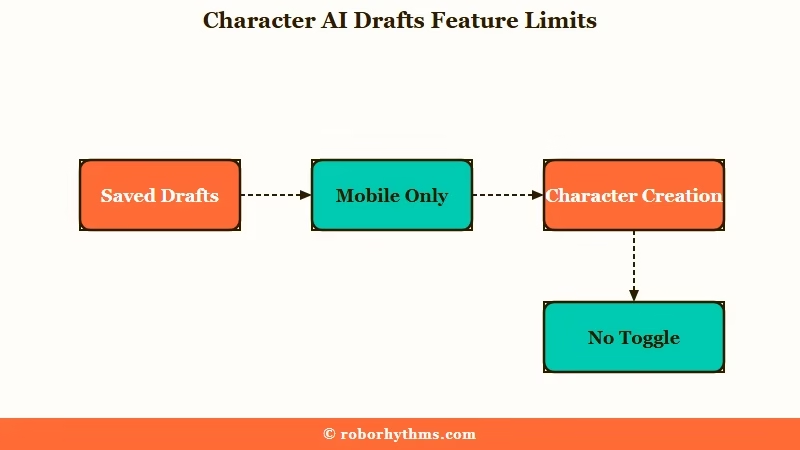
One thing worth clearing up early: this saves chat messages, not character creation. If you are building a character, persona, or scene and the app closes, that progress is still gone. I will come back to that gap later because it trips people up.
What is Drafts: A mobile feature that stores the message you were typing in a chat so it reappears in the text box when you return, with no manual saving required.
How Does the Character AI Drafts Feature Work?
You do not do anything to use Character AI Drafts; you type a message, leave the chat, and the text stays in the box, while a “Drafted:” label shows up next to that character in your Recent Chats list.
The whole thing is automatic.
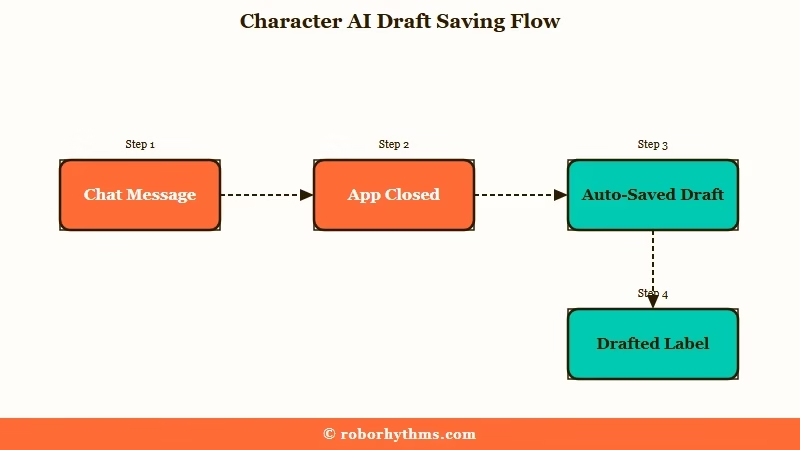
From what I can tell, the flow is genuinely hands-off, which is the point. In practice it plays out like this:
- Start typing a reply to a character on the mobile app.
- Leave the chat, switch apps, or close the app before hitting send.
- Reopen Character AI and check your Recent Chats list.
- Look for the “Drafted:” tag with a preview of your unsent text.
- Tap back in and your message is still in the text box, ready to finish.
There is a clever second use people stumbled into. Because the draft box holds whatever you leave in it, some writers drop a quick note to themselves about where they want the story to go next, then exit. The draft list becomes a lightweight roadmap for a long roleplay.
The way I see it, that emergent notepad habit says more about the feature than the announcement did. A plain auto-save became a planning tool because writers needed one and the platform never gave them a proper one.
Can Character AI Drafts Skip Unskippable Ads?
Yes, players use Drafts to get around Character AI’s unskippable video ads by closing the app when an ad starts and reopening it, since the draft keeps their typed message safe.
It was never advertised as an ad workaround, but that is how a lot of people now treat it.
The logic is simple once you see it. Force-closing the app used to mean losing your message, so nobody did it mid-reply. Now that the text is preserved, closing and reopening to dodge a long ad carries no cost, and the app reloads without the ad.
I would not call it an official feature, and Character AI could patch it. Still, it is a real reason the update got so much love from heavy users, who are already fed up with the ad load. If ads are your main gripe, the breakdown of Character AI ad blocker options covers the more durable fixes.
Before: An unskippable ad plays, you wait it out or close the app and lose the 300 words you just wrote.
After: The ad plays, you close the app, reopen it a second later, and your message is still sitting in the box with a “Drafted:” tag.
Why Isn’t Character AI Drafts on the Web Version?
Character AI Drafts launched as a mobile-app exclusive, so web users do not have it yet, though a developer has said the plan is to bring app features to the web eventually. No date has been given.
This is a sore spot, and I understand why. Web users point out that they get the ads and the banners but miss the quality-of-life wins like memory and drafts, which lands as the platform prioritizing the app while the site stagnates. That resentment shows up under almost every announcement now.
If you are on a computer and want a stopgap, the old habits still work. A clipboard manager that keeps a history, or a browser that restores form text on reload, gets you part of the way there. It is not elegant, but it beats losing a long message while the web rollout sits with no timeline.
Why Did My Draft Disappear and What Drafts Won’t Save
Drafts usually holds your message, but some users report a bug where the saved draft vanishes after closing the app or switching bots, and the feature never saves character-creation progress at all.
Knowing its limits saves you a nasty surprise.
The rollout itself caused confusion. It arrived in stages, so some people had drafts for weeks before the official announcement, while others were sure it was brand new. If yours behaves oddly, my read is that a staggered launch explains most of it, not something you broke.
The quick version of what goes wrong and what to do about it looks like this.
| Symptom | Likely cause | What to do |
|---|---|---|
| Draft vanished after closing the app | Known intermittent bug on some accounts | Copy long messages as a backup until it stabilizes |
| No drafts on your computer | Feature is mobile-only right now | Use the app for long replies, or a clipboard manager on web |
| Character build progress lost | Drafts only covers chat messages | Write the bio in a notes app first, then paste it in |
| No option to turn Drafts off | There is no documented toggle | Leave the box empty when you exit if you do not want a draft |
Availability is the other thing people get wrong, so this is where the feature stands right now.
| Where | Chat message drafts | Character build drafts |
|---|---|---|
| Mobile app | Saved automatically | Not saved |
| Web version | Not available yet | Not saved |
Where Are Frustrated Character AI Users Going?
A good number of long-time users treat Drafts as a small bright spot in a rough year of filter tightening, model downgrades, and ads, and many are testing other companion apps rather than waiting for the site to catch up. The mood in the community is impatient.
The timing did the feature no favors. It landed while people were furious about the PipSqueak 2 model changes, so a genuine improvement got waved off as a distraction from the bigger problems. One respected tech outlet even framed the wider decline as an AI enshittification case study.
If the ad load and the web-versus-app gap have worn you down, the way I see it, shopping around is reasonable. Candy AI runs without the ad interruptions and keeps its experience consistent across devices, which is the exact pain a lot of Character AI users are describing.
For stronger long-term memory in particular, Nectar AI holds context across sessions without the manual workarounds.
None of that means you have to leave. Drafts is a real fix for a real problem, and if it is the feature you were missing, the mobile app is worth staying on.
The list of Character AI alternatives is there for the day the tradeoffs stop making sense.
Frequently Asked Questions
Is Character AI Drafts free?
Yes. The announcement says Drafts is available for all users on the mobile app, so free and paid accounts both get it. There is no paywall on the feature.
How do I turn off Character AI Drafts?
There is no documented way to turn Drafts off. It saves automatically, so if you do not want a draft kept, clear the text box before you leave the chat.
Does Character AI Drafts work on the web?
Not yet. It is mobile-app only at launch, though a developer has said the plan is to bring app features to the web version eventually, with no date confirmed.
Why did my Character AI draft disappear?
Some users report an intermittent bug where a saved draft vanishes after closing the app or switching bots. Until it stabilizes, copy long messages as a backup before leaving a chat.
Does Drafts save my character creation progress?
No. Drafts only covers unsent chat messages, not the character, persona, or scene builder. Write long character bios in a notes app first, then paste them in.
Quick Takeaways
- Character AI Drafts auto-saves the message you were typing so a crash, ad, or accidental swipe no longer wipes it out.
- It is mobile-only and free, shows a “Drafted:” tag in Recent Chats, and has no off switch.
- Players use it to skip unskippable ads by closing and reopening the app without losing their text.
- It does not save character-creation progress, and a few users hit a bug where the draft disappears.
- If the ads and the web gap are the last straw, apps like Candy AI run without the interruptions.
