
What’s Changed: Character AI break time is now hitting users far earlier than its stated two-hour limit, with widespread reports of cutoffs after 30 to 38 minutes. The timer counts background and idle app time, not just active chat, which means you can exhaust your daily limit before finishing a real conversation. This guide covers what break time is, why it fires early, and the fixes that work in 2026.

What Is Happening With Character AI Break Time
Character AI break time is a daily session limit built for users under 18, capping access at roughly two hours per day as part of the platform’s digital wellness push.
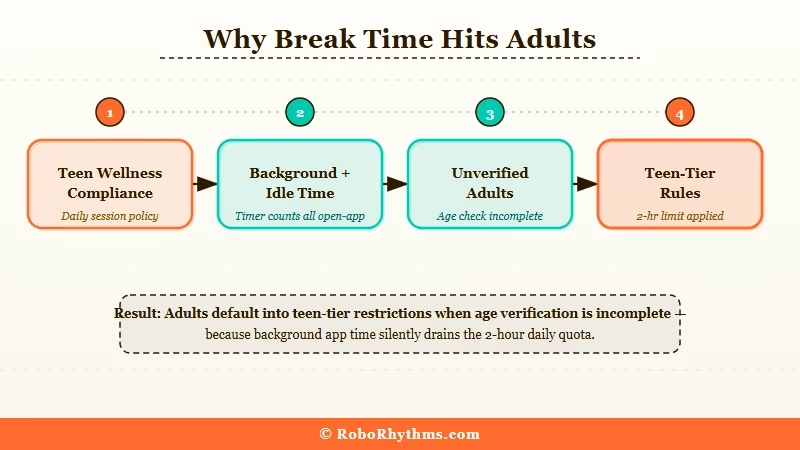
The feature rolled out as Character AI progressively restricted teen access throughout late 2025, starting with a two-hour daily cap that reduced further over time. When the timer runs out, Character AI displays a cooldown message and locks the session for 18 to 22 hours before resetting.
The problem is that adults are hitting this limit constantly, often within 30 to 40 minutes of starting a session. That is not a bug for most of them. It is a direct result of account verification status.
What is Character AI Break Time: A daily usage limit on Character.AI that suspends chat access after approximately two hours. It was introduced for teen wellness compliance but applies to any account without completed age verification.
Why Adult Accounts Get Caught
If your account has no completed age verification, Character AI defaults to teen-tier rules regardless of your actual age. This is the most common cause for adults hitting break time with no warning.
The verification option is buried in account settings and was never surfaced during onboarding for users who joined before the feature launched. Many long-term users have never completed it.
This is worth checking before assuming anything else is wrong. The Character AI age verification issue has been affecting users long before break time became a widespread complaint.
What the Break Time Message Looks Like
You will see a screen telling you to take a break, with no option to continue the chat. The countdown to reset is typically displayed alongside it.
From what I have seen in community reports, the timer resets on a rolling 24-hour window from the first time you opened the app that day, not at midnight.
Why Break Time Matters More Than It Should
Break time affects more users than the teen-focused framing implies, and the way the timer is calculated makes the stated two-hour limit misleading in practice.
The timer starts the moment you open Character AI and keeps running even when you set your phone down, switch apps, or leave the browser tab open in the background.
A user who opens the app at 8am, reads a few messages, and leaves it running while doing other things can easily hit the two-hour limit by mid-morning without having a single full conversation.
That is the core frustration. The timer is not measuring active chat time. It is measuring how long the app has been open.
| Symptom | Likely cause | Fix |
|---|---|---|
| Timer fires after 30-38 minutes | Background and idle time counted toward daily limit | Close app fully between sessions |
| Break time on an adult account | Age verification incomplete | Complete age verification in Account Settings |
| Cooldown lasts 18-22 hours | 24-hour rolling reset from first app open that day | Wait for reset or switch to browser version |
| App fires break time but browser does not | Different session tracking per client type | Use character.ai on desktop browser |
| Break time returned after an app update | New version reset verification status | Re-verify age in settings |
The Impact for Paid Subscribers
What I find most telling is that C.AI+ subscribers are also hitting break time. Many users assume the subscription overrides the teen-tier limits, but it does not.
A break timer interruption is not uncommon for paid users, and the subscription itself has no effect on the break time mechanics. Age verification is the variable that matters, not payment tier.
The declining Character AI user experience has been a recurring theme on RoboRhythms, and break time is one of the more concrete grievances driving users away from the platform.
What to Do About Character AI Break Time
The fix that works for the most users is completing age verification, which removes the teen-tier restrictions from an adult account entirely.
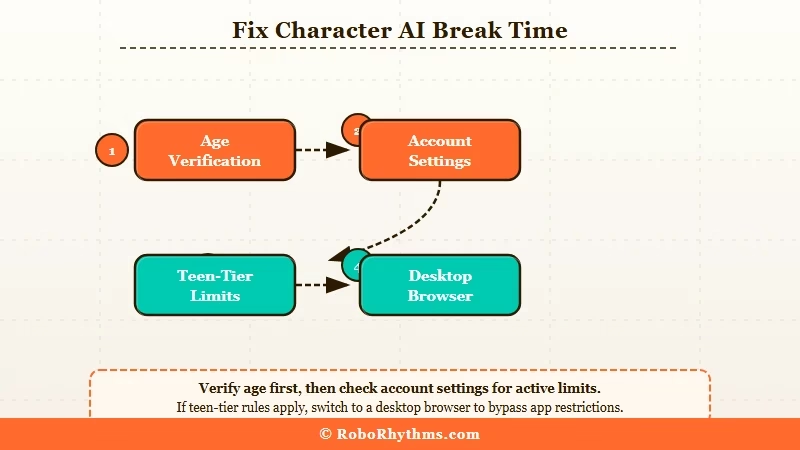
Here is the full process:
- Open the Character AI app and tap your profile icon in the bottom right corner
- Go to Settings, then select Account
- Look for “Verify your age” or “Age Verification” in the account options list
- Follow the prompts to confirm your birthdate or go through the third-party verification flow
- After completing verification, log out and back in to reset your session status
- Start a new chat and watch whether break time still fires after 30 minutes
For most users, completing these steps removes break time entirely. The teen-tier restrictions lift once adult status is confirmed on the account.
Example scenario: If you complete age verification and break time comes back the following day, check whether the app updated overnight. Several users in the r/CharacterAI community reported their verification status reset silently after a major app update in early 2026, requiring them to go through the process a second time.
If Verification Is Not Available or Does Not Help
If the verification option does not appear in your settings, switch to the desktop browser at character.ai. The web version tracks sessions differently from the mobile app, and many users report no break time triggers when using it on desktop, even on accounts that hit the limit constantly on mobile.
If both the verification fix and the browser switch fail, the next practical step is to look at alternatives. Candy AI has no daily session limits and lets you start conversations at any time with no cooldown mechanics. Nectar AI works the same way, and its memory system means you do not lose context when you come back hours later.
Both are worth trying if break time has become a recurring disruption to how you use Character AI. For a broader view of how Character AI stacks up against its own models, the best Character AI model breakdown covers whether the platform itself is still worth the friction.
Frequently Asked Questions
The most common questions about Character AI break time cover why it fires early, whether subscriptions override it, and how long the cooldown lasts.
Why does Character AI break time fire after 30 minutes instead of 2 hours?
The timer counts all open-app time including idle and background, not active chat time only. If your app sits open in the background throughout the day, the timer runs continuously. Close the app fully between sessions to keep your daily limit intact.
Does C.AI+ subscription remove break time?
C.AI+ does not automatically disable break time. Age-verified adult accounts avoid the limit regardless of subscription tier. Completing age verification in Account Settings is the fix, not upgrading your plan.
How long does the Character AI break time cooldown last?
The cooldown typically runs 18 to 22 hours from when the timer was triggered. It resets on a rolling 24-hour window from the first time you opened the app that day, not at midnight.
Can I use Character AI on browser to get around break time?
Switching to the desktop browser at character.ai is a reliable workaround for many accounts. The web version tracks sessions differently from the mobile app and fires break time less consistently, with some users reporting no timer triggers on desktop at all.
What is the best alternative if Character AI break time keeps firing?
Candy AI and Nectar AI are the two platforms most frequently recommended by users leaving Character AI over break time frustrations. Neither platform uses daily session limits or cooldown mechanics.
Quick Takeaways
- Character AI break time is a 2-hour daily limit built for under-18 users that also fires on adult accounts with incomplete age verification
- The timer counts all open-app time including idle and background, causing cutoffs far earlier than the stated limit
- The fix is completing age verification in Account Settings, which removes teen-tier limits from adult accounts
- Switching to the desktop browser at character.ai bypasses the timer for many users as a secondary workaround
- If break time persists, Candy AI and Nectar AI offer the same companion experience with no session limits or cooldowns
