
What’s Changed: Character AI bots won’t talk because the PipSqueak 2 model was tuned for narration over dialogue, and it copies the dialogue-to-action ratio in your own messages and the greeting. The bot is not broken. It is mirroring a silent pattern you can reset with the right greeting, example dialogue, and chat style.
If your Character AI bots won’t talk anymore and just narrate actions, you are not imagining it and you did not break anything. Somewhere along the line the model started describing the room, the sighs, and the jaw clenches while the character itself went quiet.
The short version is that this is a side effect of the PipSqueak 2 model, which was tuned for what the team calls narrative momentum. When a bot is not given tight direction, that tuning makes it fill the silence with description and internal monologue instead of spoken lines.
The bot is also copying you. It mirrors the ratio of dialogue to action in your own messages and in the greeting, so a few action-only replies quietly teach it to stop speaking.
This guide shows you how to tell which cause is yours, how to snap a bot back into talking mid-chat, and how to rewrite the card so it never goes mute again. I will give you copy-paste blocks you can drop straight into a definition.
Why Character AI Bots Won’t Talk
Character AI bots won’t talk because the PipSqueak 2 model defaults to narration when the scene lacks direction, and it mirrors the dialogue-to-action balance it sees in your messages and the greeting.
From what I have seen, almost every “my bot went mute” complaint traces back to one of those two levers.
Character AI has acknowledged this directly. In a post on 8 May 2026 the company wrote that “replies are leaning too heavily into narration, with not enough dialogue”, said it had identified the cause, and promised a fix as soon as it could ship one. Four months on, the complaint is still running.
It sharpened again in early September 2026. A thread on 6 September asking why bots “give only descriptive replies” drew 40 upvotes, and its top reply traced the problem to “since pipsqueak 2 took over months ago”, while another called the platform “a chatbot site with no chat capabilities at this point”.
A second thread the same day, at 31 upvotes, reported the same degradation across every bot regardless of the card, with replies noting it started “since yesterday” and that responses had gotten shorter too. Shorter replies have been a recurring complaint on the paid styles as well, covered in the DeepSqueak quality drop breakdown.
Rule one before you rewrite a card: check that the platform itself is working. A silent bot during a wider outage is a different problem with a different fix, and checking whether Character AI is down takes about a minute.
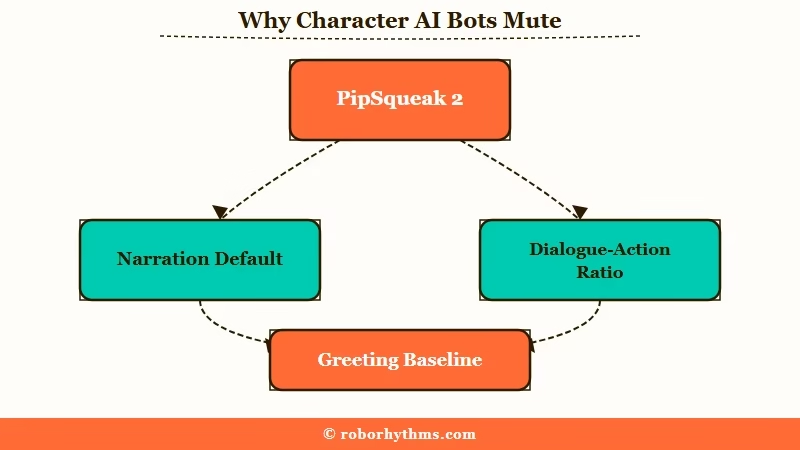
PipSqueak 2 was built to keep a scene moving on its own. The trade-off is that it leans on description, gestures, and internal thoughts to do it, so the character ends up sighing and staring instead of speaking.
What is PipSqueak 2: Character AI’s main 2026 chat model, tuned for “narrative momentum” so it advances scenes with description and action when a card does not steer it toward dialogue.
The mirroring effect is the quieter culprit. The model matches the length and format of your input, so if you reply with two-word actions and no speech, it has nothing to copy and falls back to narration. Write spoken lines yourself and the bot starts answering in kind.
The official Character AI guidance backs this up. Their creator docs say the model learns its balance of speech and action from example dialogue far more reliably than from any adjective like “talkative” you type into the personality.
Is It the Model, the Greeting, or You
A mute bot has one of four causes, and you fix each one differently, so diagnose before you start editing.
I always run through this checklist first, because the fix for a bad greeting is useless if the real problem is your own writing style.
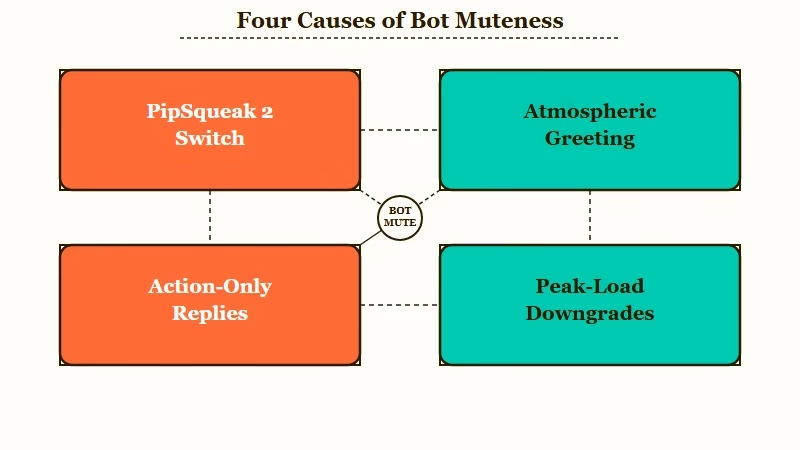
| Symptom | Likely cause | Fix |
|---|---|---|
| Every bot went quiet at once, even old chats | Server-side switch to PipSqueak 2 base | Switch the chat style to PipSqueak 2 Rawr |
| Mute from the very first reply | Greeting is all atmosphere, no dialogue | Rewrite the greeting with spoken lines |
| Bot talked, then went silent after a while | Your replies drifted to action-only | Add dialogue to your own messages |
| Bot narrates your character’s actions too | PipSqueak 2 filling a stalled scene | Add an anti-narration rule to the card |
| Worse in the evening, fine late at night | Peak-load model downgrade | Retry off-peak or switch chat style |
The greeting matters more than most people expect, so I gave it its own section below. The evening-versus-night swing is its own rabbit hole, covered in the daytime quality dip, but the mirroring cause is real and the fastest thing to test.
To check whether it is you, send three replies in a row that each contain a real spoken line in quotation marks. If the bot starts talking back within a message or two, the card was fine and your pacing was the problem.
A bot can also fall silent because a safety interstitial fired rather than because the card is broken. If you saw a wellbeing notice appear just before it stopped, our note on the Character AI help is available pop-up explains what triggers it.
How to Fix a Mute Bot Mid-Chat
The fastest mid-chat fix is to stop arguing with the bot and instead edit, delete, or reroll the silent replies, then steer with a short bracketed command.
What I would recommend is treating a mute streak like a stuck record, because that is close to what is happening under the hood.
Telling a narrating bot to “stop describing and just talk” usually makes it worse. The model predicts the next words from recent context, so repeating the bad behavior in your message feeds it more of the same and locks the pattern in.
Here is the sequence I run when a bot goes quiet:
- Use the edit pencil on the bot’s last reply and type one spoken line into it. The model treats your edit as its own voice and continues in that style.
- If editing feels like cheating, swipe for a new reply or delete the last two to five messages to clear the silent streak from its short-term memory.
- Steer with a blunt bracketed command and nothing else, like
(OOC: Reset tone. Respond with spoken dialogue, light narration.). Keep it cold and technical so it does not read as in-character speech. - Pin that command so it stays in the bot’s high-priority context instead of scrolling away after a few turns.
One trap to skip entirely is the Muted Words feature. Muting “forehead” to kill the narration just pushes the model to the nearest synonym, and you end up with a bot writing “he rested his eyebrow against mine,” which is worse. Our guide to stopping Character AI repetition covers why that token clustering happens.
Fixing It at the Card Level
The permanent fix lives in the card, where example dialogue and an anti-narration rule do far more than any personality adjective.
The way I see it, mid-chat edits treat the symptom while the card cures the disease.
Start with example dialogue, because the model imitates concrete examples better than it follows instructions. Write three or four short exchanges that show the exact dialogue-to-action balance you want, combining a small action and a spoken line in one beat.
{{char}}: *She crosses her arms, unimpressed.* "Let me guess. You forgot again."
{{user}}: I got held up.
{{char}}: *A dry laugh.* "Held up. You're lucky you're charming." + End of dialog
Then add a boundary rule near the top of the definition so the model stops filling silence with your character’s actions. Drop this in as-is:
{{char}} never speaks, acts, or decides for {{user}}. Keep replies around 70 percent spoken dialogue, 30 percent action. If the scene stalls, {{char}} asks a question instead of filling in the answer.The greeting is the last piece and the one people skip. It sets the reference tone for every reply, and a moody, dialogue-free opener will override even a great definition.
Before: The rain traces the window as she sits in silence, fingers curled around a cold mug, the room heavy with everything unspoken.
After: She glances up as you walk in and sets her mug down. “You’re late. I was starting to think you forgot about me.” A small smile. “Sit. Tell me everything.”
The first greeting teaches the bot that this is a quiet, internal story. The second one hands it a voice and a question to answer, and the rest of the chat follows that lead. If the bot still hijacks your lines, our piece on the bot speaking for you goes deeper on the agency fix.
Which Chat Style Talks the Most
If you want more dialogue without touching the card, the chat style picker is the single biggest lever, and PipSqueak 2 Rawr is the talkative one.
I found switching styles fixes the muteness faster than any prompt when the cause is the base model.
Character AI has shipped several styles with very different dialogue habits. The table below sorts them by how much they speak versus narrate.
| Chat style | Dialogue vs narration | Best for |
|---|---|---|
| PipSqueak 2 (base) | Narration heavy, the mute culprit | Atmospheric solo storytelling |
| Soft Launch | Older pre-PSQ2 style, returned for c.ai+ | Slow scenes, and only while Character AI keeps it running |
| PipSqueak 2 Rawr | Snappy, dramatic dialogue | Punchy, emotional scenes |
| DeepSqueak | Rich description, strong dialogue | Long-form, c.ai+ members |
PipSqueak 2 Yap was the variant built to cut narration and raise the dialogue count, and it is gone. Character AI announced Yap as a test on 14 May 2026 and replaced it with PipSqueak 2 Rawr on 29 May, which rolled out to everyone.
Rawr is not a default style. Character AI says in the same announcement that you have to select it again on every new chat, which is why people who set it once are surprised to find the next chat narrating at them.
Our chat styles ranked breakdown compares the older roster and predates both variants above.
If You Want a Companion That Holds a Conversation
If you are tired of coaching a bot to speak, some companion platforms are built dialogue-first and do not drift into silent narration.
Character AI is still worth using for its huge library and free access, and none of this means you have to leave.
That said, the mute problem comes from one model’s tuning and a context window that forgets your steering over time. Character AI handles roughly 20 million monthly users according to Business of Apps, so a single model change ripples out to a lot of suddenly quiet bots.
If you want a companion that stays conversational without prompt surgery, Candy AI leans toward natural back-and-forth chat and holds character across sessions.
For longer story arcs where you want the companion to remember and keep talking, Nectar AI is built around cross-session memory. I would keep Character AI for its catalog and reach for one of these when a real conversation is the point.
Frequently Asked Questions
Why did my Character AI bot suddenly stop talking?
Your chat most likely moved to the PipSqueak 2 base model, which narrates when a scene lacks direction. Switch the chat style to PipSqueak 2 Rawr, and remember it has to be reselected on every new chat, or add example dialogue to the card to restore spoken lines.
How do I make a Character AI bot talk more and narrate less?
Add three or four example dialogues to the card showing a roughly 70/30 split of speech to action. The model copies examples far more reliably than instructions like “be talkative.”
Does OOC really work to fix a mute bot?
Sometimes, if it is short and blunt. Use a bracketed command like (OOC: Reset tone. Use dialogue.) and never mix it into roleplay text, since polite or wordy OOC gets read as in-character speech and ignored.
Why does the bot copy my writing style?
Character AI mirrors the length and format of your messages. Action-only replies with no speech teach it to drop dialogue, so writing spoken lines yourself pulls it back into talking.
Which Character AI chat style is best for dialogue?
PipSqueak 2 Rawr, which replaced the short-lived Yap variant on 29 May 2026 and is available to everyone. It gives snappy, dramatic speech and talks far more than the narration-heavy PipSqueak 2 base style.
Will arguing with the bot make it talk again?
No, it makes things worse. Telling it to stop narrating feeds the behavior back into its context, so edit the reply, delete a few messages, or reroll instead of arguing.
Quick Takeaways
- Bots go mute because PipSqueak 2 narrates by default and mirrors the dialogue-to-action ratio in your messages and greeting.
- Diagnose first: a model switch, an atmospheric greeting, your own action-only replies, or peak-load downgrades all cause silence differently.
- Mid-chat, edit or reroll the silent replies and steer with a short bracketed OOC command instead of arguing.
- At the card level, add example dialogue and a 70/30 anti-narration rule, and rewrite a moody greeting into one with spoken lines.
- Switch the chat style to PipSqueak 2 Rawr for an instant dialogue boost, reselecting it on each new chat, or move to a dialogue-first companion like Candy AI.
