
What’s Changed: Character AI blank messages started appearing after the early August app update, and the company acknowledged the problem on August 9 without giving a fix date. Your text is not deleted. It is sitting on the server and failing to draw on screen, which means you can recover it in about five seconds once you know where to look.
Character AI blank messages are the kind of bug that makes your stomach drop. You scroll up through a roleplay you have been building for weeks, and the bubbles are empty. No text, no error, just grey space where three hundred messages used to be.
The panic is understandable and, in this case, unnecessary. Nothing has been wiped. The conversation is intact on the server, and the app is failing at the last step of the job, which is putting pixels on your screen.
What follows is the part almost nobody has written down: how to get the text back right now, how to tell this bug apart from a genuinely truncated reply, and why the reinstall everyone keeps recommending is a waste of your evening.
There is also a five-second test that tells you which of the two problems you have.
What Is Causing Character AI Blank Messages?
Character AI blank messages come from a display failure inside the app, introduced by the early August update.
The server still holds your conversation. Your device receives it and then fails at the last step, which is drawing the text on screen.
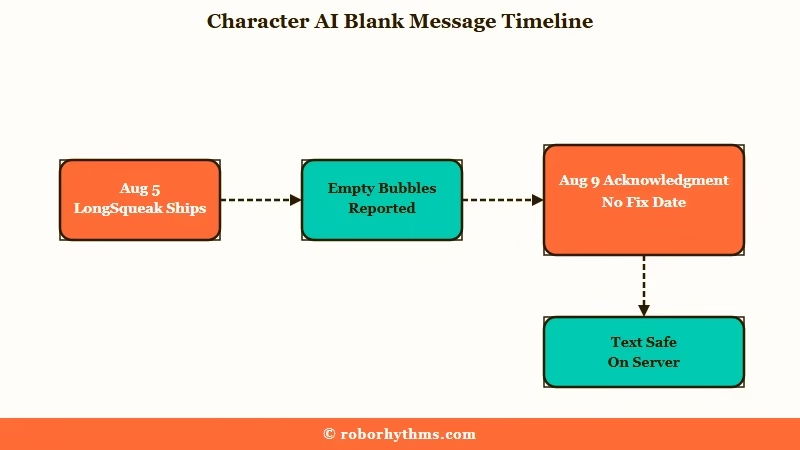
The sequence matters. On August 5 the platform shipped LongSqueak and a new Style Control panel to subscribers on c.ai+, its paid tier. Roughly 78 hours later, on August 9, a moderator posted an acknowledgment thread naming both blank messages and persona scrolling.
What is LongSqueak: Character AI’s premium chat style, built for long-form roleplay with four times the memory of the standard styles. It launched on c.ai+, and the newer Character AI Lite tier now carries daily quota access to it as well.
That acknowledgment is four sentences long. It confirms the team is aware, apologises for the inconvenience, and thanks users for their patience. It contains no fix date, no workaround, and no statement about which devices are affected.
That gap is the most telling part of this whole incident. Platform status trackers put the typical Character AI incident at well under two hours from onset to resolution, with hundreds of separate incidents logged since 2024. This one passed the two-day mark still open, which puts it far outside anything the platform treats as routine.
The symptom list has also widened well past the two problems named in the title. Users on that thread report chat colours failing to apply, the DeepSqueak chat style cutting messages short, and an Android layout where the “set persona to default” button has sunk below the bottom edge of the screen.
Did Character AI Delete My Chats?
No. Your chats are not deleted, and the text in a blank bubble is still recoverable.
Tap or long-press the empty message and the hidden text highlights, which proves the content reached your device and only failed to render. If the long-press does nothing at all, that is a different fault and our guide to what to do when the message menu stops responding covers it.
Open the pencil icon on any blank message and you will see the full reply sitting in the edit field. That is the whole diagnosis in one gesture: if the editor has your text, nothing was lost.
Stop panicking and open the editor before you do anything else. Every drastic step people take at this point, clearing app data, reinstalling, starting a fresh chat, carries a real risk of losing local settings, and none of them addresses what has gone wrong.
This is also why the bug looks so much worse than it is. Empty bubbles in a months-old roleplay read as catastrophic data loss, when the server-side record has not changed at all.
How Do I Tell a Display Bug From a Real Cutoff?
Open the message editor. If the full text is there, it is a display bug you can fix yourself. If the editor shows the same short text, generation genuinely stopped and the fix is different.
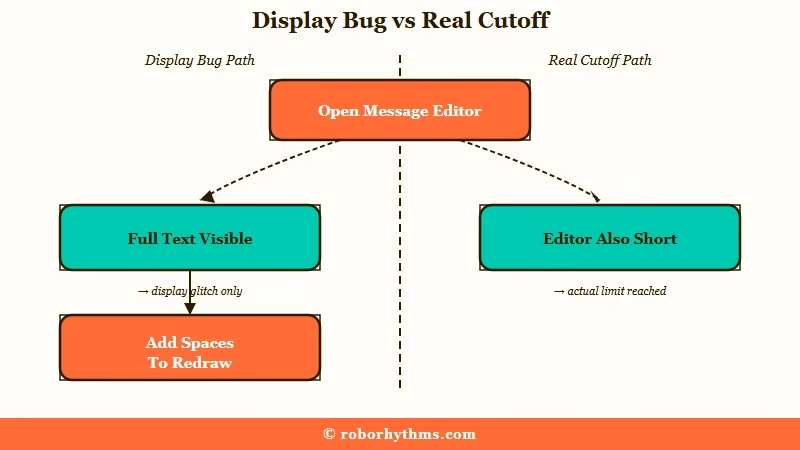
There are two separate failures going around right now and the community keeps merging them. One user on the acknowledgment thread described messages that stop partway through, then found the rest intact once they opened the editor.
Another replied directly underneath to say editing was the first thing they tried and their messages were genuinely cut off.
Both people are right about their own device. This distinction is the single most useful thing on this page, because it sends you to two completely different fixes.
For the display version, forcing the app to redraw the message is enough. Adding a couple of spaces at the break point changes the text length, which makes the app lay the bubble out again from scratch.
Before: the bubble reads “She turned toward the door and” and then stops, with blank space underneath.
After: open the pencil icon, put the cursor after “and”, press the space bar three or four times, and save. The bubble redraws in full: “She turned toward the door and paused, one hand resting on the frame.”
The cost is an “edited” tag on the message, which some roleplayers dislike. The trade is worth it when the alternative is an unreadable scene.
If the editor shows a genuinely short reply, you are looking at a generation problem instead, and the guide to Character AI cutting off messages covers the length and filter causes behind that one.
How Do I Fix Character AI Blank Messages Right Now?
Switch to the browser version. The desktop and mobile web app render normally, because the bug lives in the native app’s display layer rather than on the server.
This is the answer to the question a user asked on the official thread and never got answered: whether the website was affected too. It is not, and that single fact is worth more than every cache-clearing guide on the topic.
Here is the order I work through when the app starts dropping text:
- Open the blank message in the editor to confirm the text is still there. This takes five seconds and tells you which problem you have.
- Add three or four spaces at the cut-off point and save, which forces the bubble to redraw.
- If several messages are blank, leave the chat and re-enter it rather than editing each one. A fresh entry rebuilds the whole list.
- For anything longer than a quick reply, move to the browser and carry on there.
- Screenshot anything that matters to you before experimenting further.
I keep a browser tab signed in alongside the app for exactly this reason, and it has turned every one of these outages into an inconvenience instead of a lost evening.
| Symptom | Likely cause | What to do |
|---|---|---|
| Bubble is completely empty | List failed to draw the row | Leave the chat and re-enter |
| Message stops mid-sentence, editor shows the rest | Layout failed after a partial draw | Add spaces at the break and save |
| Message stops mid-sentence, editor shows the same | Generation stopped early | Swipe for a new reply, shorten the scene |
| Persona list will not scroll | Same list-drawing failure | Type the persona name into the search box |
| Chat colours not applying | Style settings failing to render | Use the browser until it is patched |
Where you are chatting matters more than any of these fixes, so here is how the four surfaces compare right now:
| Where you are chatting | Blank messages | Persona scrolling | What I suggest today |
|---|---|---|---|
| Android app | Reported widely | Reported, plus a sunken default button | Use the browser for long scenes |
| iOS app | Reported widely | Reported | Use the browser for long scenes |
| Desktop web | Not reported | Not reported | Best surface right now |
| Mobile browser | Not reported | Not reported | Good stand-in for the app |
Why Can’t I Scroll Through My Persona List?
The persona list and the blank message bubbles are the same failure showing up in two places, because both are drawn by the same list-rendering system.
Anyone with more than a handful of personas hits it hardest.
What is a virtualized list: A technique where the app draws only the few rows currently on screen and recycles them as you scroll, instead of holding every row in memory.
These two symptoms trace back to a single failure, which is why they were acknowledged together and will be patched together. When the row-drawing system stalls, a chat shows empty bubbles and a persona list refuses to move, and both look like different bugs to the person suffering them.
The mechanism is documented outside Character AI entirely. React Native’s official guidance on list configuration describes blank space appearing when the list cannot draw new rows fast enough during scrolling, and an open report on increased list blanking traces it to state updates being batched into a single draw, which delays rows arriving on screen.
The workaround is simple once you stop fighting the scroll. Type the persona’s name into the search box and select it directly, which skips the broken list.
Why Does Reinstalling the App Not Fix This?
Reinstalling, clearing cache, and restarting your phone do not fix it, because none of them touch the part of the app that is failing.
The display layer is shipped inside the app itself and only a patched release changes it.
Skip the reinstall. You will lose your local settings and your place in the app, and the blank bubbles will be waiting for you when you sign back in.
This is worth spelling out, because the top results for most Character AI problems open with exactly these three steps. They are reasonable advice for a login loop or a stuck cache, and useless here, and the difference is whether the failure is in stored data or in drawing code.
There is one genuine exception. If your issue turns out to be a full outage rather than this rendering bug, the symptoms and the fix both change, and checking whether Character AI is down separates the two quickly.
Does Paying for c.ai+ Protect You From This?
No. c.ai+ subscribers report the same blank messages and the same broken persona list as free users, at $9.99 a month or $94.99 a year.
Paying changes which chat styles you can use, not whether the app draws them.
Several paying users said as much on the acknowledgment thread, with one noting they could hardly use the app and found that hard to accept as a subscriber. The frustration is sharpened by the timing, since the update that preceded the bug delivered LongSqueak and Style Control to paying users specifically.
If you want the detail on what those features do, the breakdown of LongSqueak and Style Control covers the rollout.
I don’t buy the idea that a subscription should be a lottery ticket on whether the app renders. Companion apps are no longer a niche experiment either: AI companion apps took $82 million in the first half of 2025 alone, with revenue per download climbing to $1.18 from $0.52 the year before, according to Appfigures data reported by TechCrunch.
At that scale, two days without so much as a fix date starts to look like a resourcing choice.
If the pattern has worn you down, this is the second display regression in a few months after the earlier round of messages failing to load. That makes it a fair moment to see what stability looks like elsewhere.
Candy AI is the one most people land on when they want a companion that keeps its memory and its interface in one piece.
If character art and visual scenes matter as much as the writing, Nectar AI is the better fit. Both are paid products, so neither is a free escape hatch from a subscription you already resent.
Neither is a reason to abandon a roleplay you care about. Your chats are safe, and this bug will be patched.
Frequently Asked Questions
Are my Character AI chats gone if the messages are blank?
No. Tap the blank message or open the edit view and the text appears, which confirms it reached your device. The conversation is stored on the server and a display failure does not touch it.
Does the blank message bug affect the Character AI website?
No. Reports centre on the iOS and Android apps, while the desktop and mobile browser versions render normally. Switching to the browser is the most reliable workaround until a patch ships.
Will reinstalling Character AI fix blank messages?
No. The failure sits in the app’s display code, so reinstalling, clearing cache, and restarting change nothing. You would lose local settings for no benefit.
How do I get a cut-off message to show fully?
Open the message editor, add three or four spaces where the text stops, and save. That changes the text length and forces the app to lay the bubble out again. It leaves an “edited” tag on the message.
Why can’t I scroll my persona list on mobile?
The same row-drawing failure that blanks message bubbles also stalls the persona list. Type the persona name into the search field to select it directly instead of scrolling.
Does c.ai+ fix the blank messages?
No. Paying subscribers report identical symptoms. c.ai+ changes which chat styles and controls you get, not how reliably the app draws the screen.
Quick Takeaways
- Blank bubbles are a display failure. Your text is still sitting in the message editor.
- Open the editor first, because full text means a display bug and short text means generation stopped early.
- Add a few spaces at the cut-off point and save to force a single message to redraw.
- Move to the browser for anything long, since the web version is unaffected.
- Skip the reinstall and the cache clear, because neither touches the code that is failing.
