
What’s Changed: Character AI is removing character avatars and flagging safe profile pictures as unsafe, driven by an overzealous safety classifier and a copyright takedown sweep. Original characters are getting caught as collateral. You can often recover a removed character through cached share links, and there are real workarounds for the avatar flagging.
Character AI avatar removal is the complaint filling the subreddit right now, and most people hit it with no warning. One day the profile picture is fine, the next it is rejected as unsafe or the whole character is gone.
I have watched these moderation waves roll through the platform for a while, and the pattern in 2026 is harsher than anything before it. Two separate problems are hitting at once, and the platform has mostly blamed the user.
Here is the part worth knowing before you rage-quit. Some of this is recoverable, the avatar flagging has reliable workarounds, and the cause is a documented weakness in how safety filters work, not something you did wrong. Stick with me and you will know what is happening, why, and exactly what to do about it.
What Is Happening With Character AI Avatars
Character AI is removing avatars through two overlapping forces in 2026: an overzealous image classifier that flags safe profile pictures as unsafe, and an automated copyright sweep that deletes entire characters.
The two get blamed on each other, which is why the situation feels so confusing.
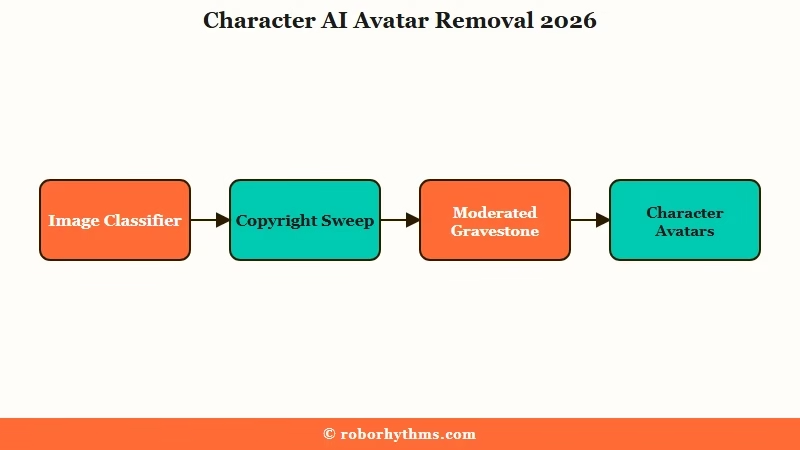
What is “Moderated” mode: When Character AI tags a bot as Moderated, it drops from public search, editing is disabled, and the chat history is sealed. Users call it “Gravestone mode.”
The first force is the avatar bug, and I would call it the more maddening of the two. Starting around April 2026, the image classifier began rejecting completely safe pictures, and the examples are almost comic.
Users reported an original character in a beach dress getting blocked, an avatar flagged for “distracting kneecaps,” and public-domain figures like Penelope from the Odyssey, Santa Claus, and Count Orlok from Nosferatu caught in what people started calling the “Disney net.”
The second force is the bigger sweep. On February 18, 2026, a scripted keyword and visual-signature purge removed thousands of bots overnight, targeting characters tied to Disney, Marvel, Star Wars, Warner Bros, Bethesda, and Mattel.
Plenty of original, non-IP characters got swept up as collateral, which is why complaints that the bots feel worse spiked at the same time.
Why Character AI Flags Safe Avatars as Unsafe
Safe avatars get flagged because automated safety classifiers have a high false-positive rate and break down on small visual differences, a problem documented in academic research. This is the part that should make you feel less crazy.
An academic analysis titled Watching the AI Watchdogs tested four major safety moderation classifiers and found that none of them held up to minimal changes in input. In their tests, 65 to 78 percent of items first marked “unsafe” were reclassified as safe after minor rewording. A system that unstable will flag a beach dress one day and pass it the next.
The way I see it, that is the real story behind the kneecaps and the dresses. The classifier is not making a considered judgment about your picture. It is pattern-matching against fuzzy visual signatures, and harmless images fall on the wrong side of the line constantly.
Character AI has acknowledged the false positives and said it is working to identify original characters caught by mistake. The catch is that copyright-based characters are unlikely to ever return, and the platform has stated its terms apply to all characters, including private ones.
Why It Matters for Your Characters
It matters because a moderated character takes your chat history with it, and there is no official export button. Losing the avatar is annoying; losing months of conversation is the real damage.
Once a bot enters Gravestone mode, you cannot edit it, and the chats sit behind a wall. For people who built detailed original characters over months, that is the equivalent of a document you wrote being locked in a drawer you no longer have a key to. I would not blame anyone for being furious about it.
There is a trust cost too. When the official response to “you deleted my private character” is “the rules apply to private characters,” users hear that the work they invested is never really theirs. That is why the case for sticking with Character AI is getting harder for some of the longtime crowd.
How to Get Your Avatar or Character Back
You can often recover a removed character through a cached share link or a browser extension, and you can usually bypass avatar flags by re-uploading a simpler image.
None of this is official, but the community methods work more often than not.
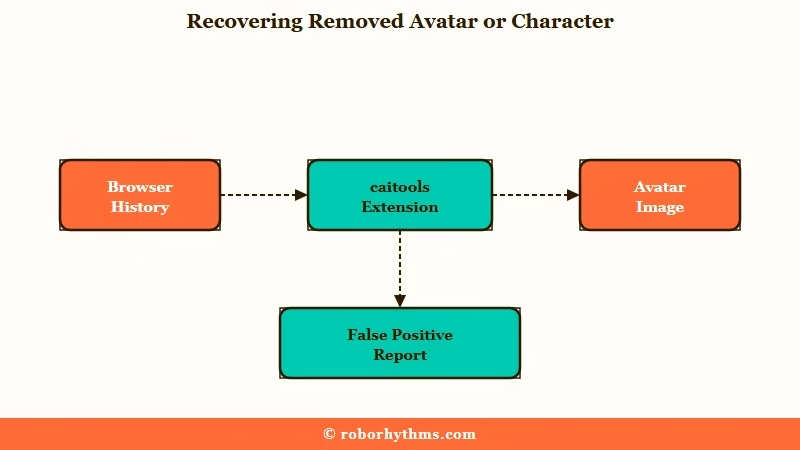
Here is the recovery sequence I would run, in order, starting with the least effort:
- Open your browser history with Ctrl+H and search the character’s name for any URL containing
/share/or?share=. These cached share links often load a read-only view of the character sheet so you can copy the personality and definition into a new private bot. - Search the bot on a community index like caibotlist. Even if it shows as unavailable, the page link often still opens.
- Use the caitools browser extension on that page to download the chat history, then import the file into a fresh private copy of the bot.
- For a flagged avatar, re-upload a cleaner, simpler image, or send it in chat with no accompanying text, which slips past the visual filter surprisingly often.
- If an original character was swept up, report it as a false positive and wait, since the platform has restored some.
For the avatar flag specifically, the fix is usually about giving the classifier less to misread. Here is the difference in practice.
Before: You upload a detailed full-body original character art with a fitted dress, and it gets rejected as unsafe with no explanation.
After: You crop to a head-and-shoulders version, or pick a plainer image, and the same character clears the filter on the first try.
Here is the quick-reference table for the most common failure points.
| Symptom | Likely cause | Fix |
|---|---|---|
| Profile picture rejected as unsafe | Overzealous image classifier false positive | Re-upload a simpler or cropped image, or leave it blank for now |
| Whole character gone, tagged Moderated | IP sweep or keyword purge | Recover the definition via a cached share link, rebuild as private |
| Chat history inaccessible | Bot sealed in Gravestone mode | Use the caitools extension to export, then import to a new bot |
| Image blocked only when sent with text | Combined text plus image flag | Send the image alone with no caption |
How to Protect Your Characters Going Forward
The only real protection is manual archiving, because Character AI has no official export and no advance warning before a sweep. Treat anything you care about as something you might lose tomorrow.
What I would recommend is copying every character definition, greeting, and persona into a plain text file the moment you finish building. Save key chat transcripts the same way. It feels paranoid until the day a wave hits, and then it is the only reason you still have your work.
If you build a lot, the making Character AI remember you approach pairs well with this habit, since a well-documented character is faster to rebuild from scratch.
Alternatives If You Are Done With the Resets
If the constant moderation has worn you out, the platforms worth a look prioritize persistent memory and fewer surprise removals.
I would not switch on a whim, but if you have lost characters more than once, it is a fair time to test the field.
For a smoother experience with strong memory and a more stable content policy, Nectar AI is the alternative I would point most people to first. It keeps conversation context across sessions without the reset whiplash.
If you want a polished companion with deep customization and reliable image handling, Candy AI is the other one I would test. For a wider list, the free Character AI alternatives roundup covers more options by use case.
Frequently Asked Questions
Why did Character AI delete my bot?
Most 2026 removals come from an automated copyright sweep that targets characters tied to studios like Disney and Marvel. Original characters often get caught as collateral. Character AI says it is working to restore false positives, but IP-based characters are unlikely to return.
How do I fix a moderated character on Character AI?
Once a bot is tagged Moderated, editing is disabled. Your best option is checking your browser history for a cached share link to the bot, which loads a read-only view of its definition so you can copy it into a new private character.
Why does Character AI keep flagging my safe profile picture?
This is an overzealous image classifier producing false positives, not a judgment about your image. Try re-uploading a simpler or cropped version, or upload the image with no accompanying text, which often clears the filter.
Can I get my deleted Character AI chat history back?
Usually not through official means, since history is sealed once a bot is moderated. If you still have a link to the bot’s page, the caitools browser extension can sometimes download the chat history for import into a new private copy.
Is Character AI removing avatars on purpose?
The full-character removals are intentional copyright enforcement. The safe-avatar flagging is a classifier bug the platform has acknowledged and said it is working to fix. The two problems are separate but landed at the same time.
What should I do before the next moderation wave?
Manually archive every character definition, greeting, and important chat into a text file. Character AI has no official export and gives no warning, so a personal backup is the only reliable protection.
Quick Takeaways
- Character AI avatar removal in 2026 comes from two forces, a buggy image classifier flagging safe pictures and an automated copyright sweep deleting whole characters.
- Safe avatars get rejected because safety classifiers have a documented high false-positive rate, not because of anything you did.
- Recover a removed character through a cached
/share/link in your browser history, then rebuild it as a private bot.
- Bypass avatar flags by re-uploading a simpler image or sending it with no text.
- Manually archive your character definitions and chats now, because there is no official export and no warning before the next wave.
