
What’s Changed: Character AI now runs age assurance on every account to flag suspected under-18 users and block them from open-ended chat, with Persona handling the selfie or ID check. Most adults are cleared in the background without a prompt, and most who are asked to verify only need a quick selfie. The flag misfires often enough on younger-looking faces that “stuck in view-only mode” is now a recurring r/CharacterAI complaint.
Character AI quietly turned on its age assurance system across most of its user base in early 2026, and the practical result is that a lot of legitimate adult users are getting flagged as under-18 and locked out of the chat input until they prove their age.
The selfie-based verification works most of the time. When it does not, the recovery process is friction-heavy and the alternatives are starting to look attractive.
This piece walks through what the system actually does, why it flags adults wrongly, how to recover when it does, and which platforms users are switching to when the recovery process feels like too much.
The way I read the rollout, Character AI is doing what lawsuits and regulators pushed it toward, and the implementation is competent but not painless. If you have been locked out, the fix is straightforward; it just takes longer than it should.
Updated October 30, 2026: the data section now sets Character AI’s 7-day deletion promise against Persona’s own retention policy, the backup steps use Character AI’s official Export Data option, and the alternatives section says which age check each rival actually runs. The Persona selfie flow and the under-18 chat ban (effective November 25, 2025) are still current.
If you are locked out right now, the fix steps and the failure-cause table are both below.
If you would rather not hand a selfie to Persona at all, that is a legitimate reason to move, though most rivals now run age checks of their own. CrushOn AI is the closest match for creative roleplay and lets you choose a different verifier, and Nectar AI is the pick if persistent character memory matters more to you. Export your data first, using the steps further down.
Character AI publishes a helpfulness vote on every help center article, and its age assurance pages are the worst-rated documentation on the site. I counted the public tallies again on October 30, 2026: “Why am I not seeing the Age Assurance pop-up?” sits at 286 helpful votes out of 2,063, and “Age Assurance Troubleshooting” at 477 out of 3,112. That is 14% and 15%.
For contrast, Character AI’s own troubleshooting article for login and verification emails scores 20,731 out of 31,796, or 65%. I pulled all 120 articles on the help center: of the 46 with more than 150 votes, those two age assurance pages are the lowest and second lowest rated of the lot.
Those pages describe the happy path accurately and stop there. Nothing in them is written for the reader whose selfie has already been rejected twice, which is who this guide is for.
What Changed and When
Character AI requires age verification because it ended open-ended chat for users under 18 on November 25, 2025, and its age assurance system is how it decides which accounts keep chat. Persona, a third-party verifier, runs the selfie or ID check for anyone the system flags.
Character AI announced the change on October 29, 2025, saying it had seen news reports and received questions from regulators about how open-ended AI chat might affect teens. The broader enforcement layer reached most users in the first quarter of 2026, and its What is Age Assurance? page now says all users are required to complete an age assurance check.
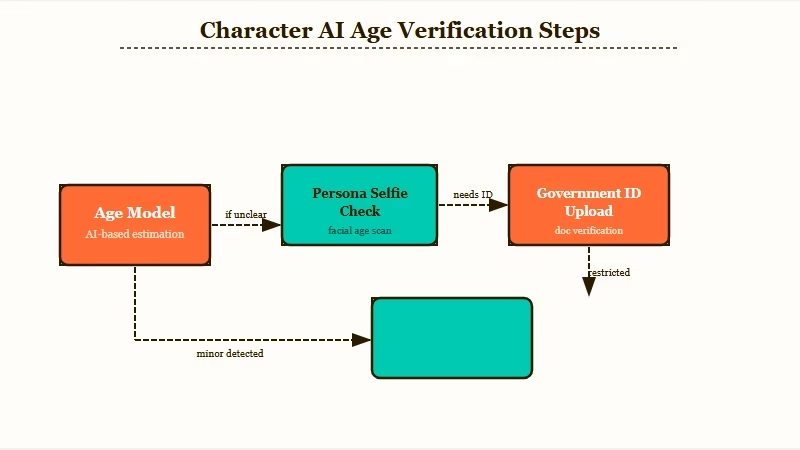
The system runs in two phases. First, Character AI’s own model estimates your age from passive signals, in its words “login info, activity on the platform, and some signals from third parties.”
Most adults clear this phase silently and never see a verification prompt. If the model is not confident you are 18+, you get pushed into Persona for a manual check.
Persona’s check is selfie-based. You open your camera, frame your face, take a photo. Persona compares facial features against an age-estimation model and returns a confidence score.
If the score clears the threshold, you are unlocked within seconds. If Persona is uncertain, it asks for a photo of a physical government-issued ID as the final step.
In September 2025 the Federal Trade Commission ordered seven companies that run companion chatbots, Character Technologies among them, to report on how they protect children, and California’s companion chatbot law (SB 243) took effect on January 1, 2026.
Character AI filed for Chapter 11 on October 12, 2026, and the pressure followed it into court. On October 14, New York Attorney General Letitia James and 39 other attorneys general asked the court, Character AI and any buyer to make sure any sale includes protections such as “effective age verification based on more than self-disclosure,” according to her office’s press release. Our Character AI Chapter 11 guide tracks the sale.
Why Adults Get Flagged Anyway
The selfie check misfires on adults with younger-looking faces, poor lighting, glasses, hats, or partial face coverage, and “stuck in view-only mode” is now one of the most common r/CharacterAI complaints in 2026.
The fix exists; it just takes a few days. If the system keeps flagging you even though you are well past 18, the pattern behind that has its own breakdown in why Character AI keeps falsely flagging adults as minors.
Passing once does not settle it for good. An April 11, 2026 r/CharacterAI thread, “Passing the Age Assurance once does not mean a user is safe from being flagged”, quotes a subreddit moderator: “We will be reviewing age assessments periodically and may update a user’s category if we receive new information or signals.” One reply reads, “I was correctly determined as an adult for the first three months, and randomly flagged overnight.”
A concrete worked example of what the flag looks like:
Example scenario: You open Character AI for your daily chat session. Instead of the usual chat input, you see a modal: “To chat with Characters, please verify that you’re 18 years or older.” You take a selfie through the Persona flow. Persona returns “unable to verify”. The chat input stays locked. You can browse character profiles and read past chats, but you cannot send a message. This is “view-only mode,” and it can persist for days while you wait for support to escalate the manual review.
Five things that commonly trigger a false flag, ranked by how often I see them in the threads:
- Younger-facing adults. People with naturally youthful features get flagged most often. Twenty-somethings, especially women, hit this regularly even with perfect lighting.
- Poor selfie conditions. Low light, partial face coverage (glasses, hats, hands near face), back-lit setups, or off-angle shots reduce Persona’s confidence.
- Account activity pattern. Sporadic logins, low message volume, or recent account creation can bias the upstream age estimate before you even see the selfie prompt.
- VPN or unusual region. Connecting from a region Character AI does not expect for your account creates an upstream signal that often triggers a manual check.
- Previous account flags. If you ever toggled “I am under 18” during signup or had your account paused for any reason, the upstream model is more skeptical the next time around.
The honest read is that the system errs on the side of “block, then verify” instead of “allow, then check.” For platform liability, that is the correct trade-off. For the user it feels punitive.
How To Fix It When You’re Wrongly Locked Out
The official recovery path is to retry the selfie, upload a government ID through Persona if it asks, and open a ticket on Character AI’s age assurance form once you run out of attempts. There is no published response time.
There is no faster sanctioned route as of 2026.
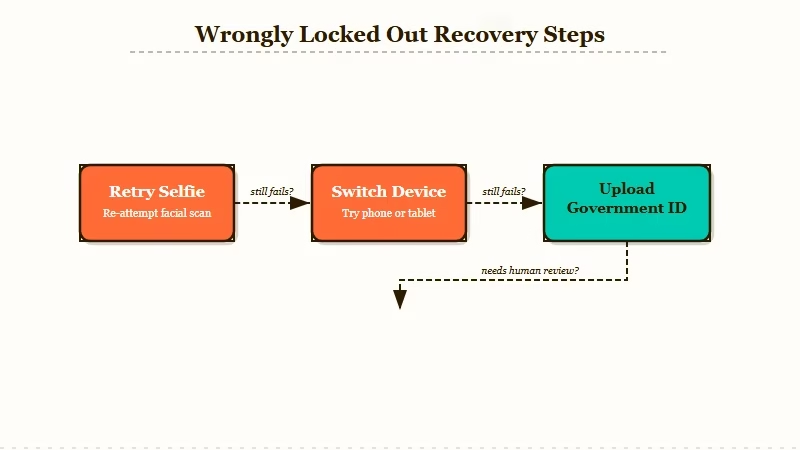
The exact steps, in the order I would walk through them:
- Try the selfie again with better conditions. Bright, even lighting from in front of you. Face fully in the frame. No hat, no glasses, no hand near the face. Character AI’s troubleshooting page, updated September 11, 2026, also asks you to shoot at eye level, look straight into the lens, stay still while the camera works, and make sure nobody else is in the frame.
- Switch device or browser if Persona keeps failing. Character AI says verification can be completed on any device: stay logged in and use the QR code shown during the age verification process. Its guidance is to use your most up-to-date device, and to pick the one with the best camera if you have an iPhone, Pixel or Android to choose from. A computer counts too, as long as it has a working camera.
- If selfie still fails, upload a government ID through Persona. Character AI lists eight accepted documents: driver’s license, passport, passport card, identification card, consular ID, certificate of citizenship, permanent residence card, and immigration visa. It has to be a photo of the physical ID, not a digital or electronic copy. Persona deletes biometric data and IDs automatically within 7 days, and Character AI says it never has access to the submission at any point.
- If Persona still cannot verify, open a support ticket via the help center. The troubleshooting page routes exhausted attempts to a dedicated age assurance ticket form. Expect an automated reply first. One user in the r/CharacterAI thread “Age verification + premium locked me out” got a human after six days who reset the check manually, and summed the process up as “Submit a ticket. It won’t unlock on its own.”
- Do NOT try the “Parental Insights” workaround. Some Reddit threads mention inviting a second email as a “parent” to remove the input lock. This bypass risks account suspension if detected, and even if it works, it does not unlock the full chat experience. Use the official support route instead.
Here is the symptom-cause-fix table I would keep handy while troubleshooting:
| Symptom | Likely cause | Fix |
|---|---|---|
| “Please verify you’re 18” modal on every login | Upstream age model not confident | Complete the selfie flow, usually clears in one try |
| Persona returns “unable to verify” after selfie | Lighting or framing issue | Retry with brighter, frontal lighting, no glasses or hat |
| Stuck in view-only mode for days | Selfie keeps failing, ID not uploaded | Upload government ID via Persona |
| ID uploaded but account still locked | Manual review in queue | Open a ticket via the age assurance form, expect an automated reply first |
| Account suspended after Parental Insights workaround | Detected bypass attempt | Contact support, may take longer to recover |
If the ticket route is where you have ended up, the full read-only recovery path is in what to do when Character AI locks your account. While the support ticket is in flight, the chat input stays locked, which is the worst part of the experience for active roleplay users. Most people in the threads either wait it out or switch platforms during the window.
How to Pass the Selfie Check Without Sending an ID
Most people never need an ID: Character AI says a selfie clears the check in seconds, and the ID step only appears when Persona cannot read your age from that selfie. Most failures are lighting, framing and camera quality rather than age, so a better retry is usually the whole fix.
One rule is worth knowing before you retry. Character AI’s troubleshooting page says the selfie “must show your real, natural appearance”, and that drawn-on facial features, filters, makeup effects or other changes that make you appear “older or different than you are” can get your verification declined. The same page is blunt about the bigger question: “there is no alternative to submitting a selfie or government ID if you are prompted to do so.”
If no prompt appears and you want to verify anyway, you can start it yourself. Character AI’s How do I verify my age? article gives the same path for the app and for character.ai: Settings, then Advanced, then Verify Age, with the app updated to its latest version first.
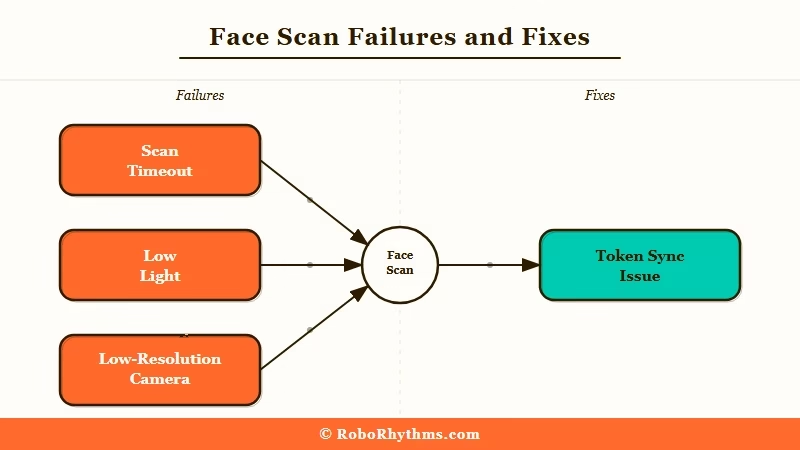
Here is the breakdown of what most often causes failures, based on what I tested and what users on Reddit are reporting.
| Symptom | Likely cause | Fix |
|---|---|---|
| Scan keeps timing out | Low light or backlight on face | Move to a brighter room, face a window, avoid overhead light |
| “Unable to verify” error on clear selfie | Phone camera defaults to low-resolution selfie mode | Switch to the rear camera on a tripod or propped surface, and keep everyone else out of frame |
| Passed the scan but still locked out | Verification token not saved to account | Log out fully, clear the Character AI cache, log back in |
| “Face does not match profile” error | Third-party verifier cross-check issue | Retry with a neutral expression and no glasses or hat |
| Scan page will not load at all | App cache corruption or network filter | Reinstall the app on mobile, or switch from browser extension-blocked network |
The retry-with-better-lighting fix has the highest success rate by a wide margin. The verifier is optimized for daylight selfies, not indoor lamp lighting.
Why Some Users Are Switching Instead of Verifying
Switching rarely gets you out of an age check, because the main alternatives now run their own before adult content, at least in some regions. The method changes: a small payment, a selfie with a different verifier, or a check that depends on where you live.
The privacy concerns about biometrics are real, and so is the friction. Here is what each of the usual picks asks for, checked against their own pages on October 30, 2026:
- Candy AI: its privacy policy says it collects the result of a third-party age estimation or ID check “as applicable based on your location”, so whether you see one depends on where you are. Free accounts get 5 messages in total, enough to test the chat before deciding.
- CrushOn AI: when it asks you to verify before mature content, there are three routes, a free selfie or ID check through Didit, a free check through AgeGo, or a $0.99 payment that adds 60 Diamonds, 300 Coins and a 5-day Standard trial. West Virginia users must use a government ID, and the Crushon AI vs SpicyChat breakdown covers the rest if you are choosing between those two.
- Nectar AI: its terms reserve NSFW mode for users 18 and over.
- SpicyChat: a video selfie, with an ID fallback, before NSFW content in France, the UK, Italy, Australia and 26 US states, per its age verification docs. Users there who skip it keep SFW chat only, and our state-by-state list names the 26 states.
For most users coming from Character AI specifically because of the age verification friction, the broader Character AI alternatives roundup is the right next read, and the no-filter chat apps roundup covers the wider category by use case.
The reason I would not switch hastily is that Character AI still has one of the largest character libraries and, with PipSqueak 3 as its default model since September 28, 2026, some of the best long-form roleplay in the category. The age verification is annoying when it misfires, and it is not a reason to leave permanently if the rest of the platform fits your needs. If you stay, the Chapter 11 sale still makes a backup worth having, and the next section covers it.
Try Crushon AI here if you want a similar character ecosystem and would rather choose your own verification route, including the free Didit selfie, than go through Persona. It is the closest substitute for Character AI’s character-library roleplay.
Nectar AI is the alternative I would point readers to if voice calls and emotional roleplay depth matter more than the character library size. Its free tier allows 15 messages a day.
How to Back Up Your Character AI Data Before Switching
Character AI has an official Export Data option, but its help center says the file can take 3 to 4 weeks to arrive, and the download link expires 7 days after the email is sent. Request it first, then copy anything you cannot wait a month for into a text file yourself.
Here is the backup order I would follow.
- Request the official export. On the web, go to Profile, Profile Settings, Account, Manage Account & Data and Export Data; in the app, go to Profile, the Settings icon, Legal & Privacy and Export Data. Character AI’s download guide lists both paths.
- Open each character profile and screenshot the character description, greeting, and example chats
- Scroll through your important chats and copy the best exchanges into a text document
- Export character cards using the unofficial Tavern card format if you want them to work on Chub AI or Janitor AI, which accept standard character cards
- Save all of the above to a cloud folder before the face scan gate blocks your account
Request it before you delete anything, and make sure you can still open the email address on your account, because that is where the download link goes. Our guide to exporting Character AI chats covers readable copies and the wait, which matters more since the company filed for Chapter 11 on October 12, 2026.
Is the Age Check a Face Scan, and What Happens to Your Data?
Yes, the Persona step is a facial age-estimation scan: you take a selfie and the verifier estimates whether you read as 18 or older, falling back to a government ID only when the selfie is inconclusive. Character AI says both are deleted within 7 days, a longer window than Persona’s own default of deleting them as soon as the check ends.
The biometric side is where users have the most questions, and Character AI has since published a number. Its data page says any biometric data or ID you submit is “automatically and permanently deleted within 7 days”, that deletion needs no request from you, and that Character AI does not have access to the submission at any point. Persona is the same verifier LinkedIn, OpenAI, Block and Etsy use.
Deleting the Character AI app from your phone does not itself purge anything, because the 7-day clock runs on Persona’s side either way.
Persona’s own default is shorter than that window. Its Processor Privacy Policy, last updated April 9, 2026, says its default for age checks is to delete the selfie scan and any ID scan “immediately as soon as processing is complete and an outcome has been determined.” A customer such as Character AI can direct Persona to keep data longer “when necessary to detect, investigate or prevent suspicious or fraudulent activity.”
Character AI’s Age Assurance FAQ says Persona processes the data “to verify your age, identify fraud, and for quality assurance” and keeps IDs “for one week.” Read together, 7 days is the figure that applies to a Character AI check, since Character AI has Persona hold data past the default, an option Persona’s policy reserves for fraud checks. Persona’s policy does mention destroying data “within three years of your last interaction”, but that line sits in its identity verification section, and Character AI’s check falls under the separate age assurance section.
Persona’s policy also says it “does not use any personal data, including biometric data, for any AI or model training” and does not sell or share personal data with third parties. Character AI’s data page rates poorly with its own readers: on October 30, 2026 it had 117 helpful votes out of 296, or 40%.
TechCrunch’s AI coverage has tracked the wider regulatory push behind these checks.
Frequently Asked Questions
Is Character AI requiring ID for everyone in 2026?
No. Most users are cleared automatically by Character AI’s upstream age model based on login signals and account activity. Only users flagged as potentially under 18 see the Persona prompt, and most of those clear the check with a selfie.
Government IDs are only requested as a final step when Persona cannot verify from the selfie.
Does Character AI store my ID after verification?
No. Character AI uses Persona, a third-party verifier, to handle the age check, and says it never receives or stores the ID itself. Persona deletes the ID automatically within 7 days, and the selfie is handled the same way.
Why does Character AI keep flagging me as under 18 when I’m an adult?
The selfie-based age estimation misfires on adults with younger-looking faces, in poor lighting, or with partial face coverage (glasses, hats, hands near face). Try a brighter, frontal selfie with no obstructions.
If that fails, upload a government ID through Persona. If both fail, open a ticket on Character AI’s age assurance form.
How long does Character AI support take to unlock a wrongly flagged account?
Character AI does not publish a response time. One r/CharacterAI user who exhausted the retries reported hearing from a human after six days, who then reset the check manually.
The chat input stays locked during the review window, which is the most frustrating part of the experience for active roleplay users. Most users wait it out; some switch platforms temporarily.
What happens if I’m under 18 on Character AI now?
The platform removed open-ended chat for under-18 users effective November 25, 2025. Character AI’s help center says accounts verified as under 18 are placed in the Under-18 experience, which includes reading mode, and chat with characters is not available. If you turn 18 later, support can reset your verification attempts so you can verify again.
Are there alternatives to Character AI that don’t require age verification?
Fewer than you would expect. Candy AI’s privacy policy makes its checks depend on where you live, CrushOn offers a Didit selfie or ID, an AgeGo check or a $0.99 payment when it asks you to verify, and SpicyChat asks for a video selfie or ID before NSFW content in France, the UK, Italy, Australia and 26 US states. Nectar AI’s terms reserve NSFW mode for users 18 and over.
Crushon AI is the closest functional substitute for Character AI’s character-library-driven roleplay experience.
Is the Character AI age check a face scan?
Yes. When the upstream model is not confident you are 18 or older, Character AI sends you to Persona for a selfie-based facial age estimation. If the selfie is inconclusive, Persona asks for a government ID as the final step.
Why am I not seeing the Character AI age assurance pop-up?
The Verify Age prompt sometimes appears on one platform before the other. If you do not see it on mobile, sign in at character.ai on a desktop browser and check Settings, then Advanced, and make sure the mobile app is updated and fully restarted. Character AI’s official help article lists the same steps.
Can you bypass Character AI age verification?
No, not on a flagged account. Character AI’s troubleshooting page states there is no alternative to a selfie or a government ID once you are prompted, and it warns that drawn-on facial features, filters, makeup effects or other changes that make you appear “older or different than you are” can get your verification declined.
The old Android workaround of installing a legacy APK was patched server-side, which r/CharacterAI users confirmed in April 2026. A fresh account goes through the same age assurance as every other account, and starting over loses every existing chat, persona and memory.
Did Character AI remove age verification?
No. Character AI’s help center still says all users are required to complete an age assurance check, and the attorneys general in its bankruptcy case want “effective age verification based on more than self-disclosure” included in any sale.
What some users see is the background detector re-scoring their account, which re-checks signals periodically, so a few people have had the lock lift without ever verifying and others have watched it come back. One r/CharacterAI user locked out in March 2026 reported chatting again in August without verifying, so treat a lift as provisional.
The separate question of what happened to reading mode has its own breakdown.
Will deleting the Character AI app remove my biometric data?
No, and it does not need to. Deleting the app does not touch anything Persona holds, but Character AI’s data page says biometric data and IDs are automatically and permanently deleted within 7 days with no request from you. Character AI states it has no access to the submission at any point.

it does not tell me but tks for the helpfulness about age verification
Glad it helped. If the app is not showing you anything at all, that is common: the Character AI age verification prompt sometimes shows up on one platform before the other.
Sign in at character.ai in a desktop browser and look under Settings, then Advanced. Also update the mobile app and fully close and reopen it. If you never get a prompt and can still chat normally, the age model most likely cleared you already and there is nothing you need to do.