
One of the biggest frustrations with Character AI has always been memory.
You spend hours building out a relationship with your favorite bot, joking, sharing your life story, crafting roleplay dynamics, only for it to forget key details in the very next chat.
Character AI memory runs on three layers. Story Memory holds the background you write yourself, Facts records details automatically while you chat, and Memory Usage shows what is currently filling the chat’s memory space.
That structure arrived on May 21, 2026, replacing a setup built around a single 400 character Chat Memories box plus hand picked pins. Plenty of memory guides still describe the old box, which is why the advice you find often does not match what is on your screen.
The underlying job stayed the same. You write down what matters most about your character or chat persona once, rather than re-explaining it at the start of every session.
You decide what gets remembered.
Here’s what you’ll learn in this article:
How Story Memory, Facts and Memory Usage work
What’s changed from previous memory systems
Tips for writing effective memory notes
What carries into a new chat and what gets left behind
What users are saying about it
One platform that’s already doing memory better
What Story Memory, Facts, and Memory Usage Do
Story Memory is where backstory, key events, and particular moments live, and every Character AI user gets it. Facts is a c.ai+ layer that captures details such as appearance, quirks, relationships, and hobbies on its own while you chat. Memory Usage is a readout of what is occupying the chat’s memory at that moment.
You reach Story Memory through the notebook icon in the chat header, or by opening Memory from the chat menu. Pinning is now the way to put an exact message into that same Story Memory: long press a message and tap Pin, and the wording is locked in as it landed rather than left for the model to paraphrase.
The gap between free and paid is narrower than it first looks. Story Memory and pinning are open to everyone, while c.ai+ doubles the number of pins, adds memory headroom, and unlocks the full Memory Usage view rather than the basic one.
Facts is the layer with no free equivalent. It also brings an editing burden, because an auto captured detail that is wrong keeps shaping replies until you open the list and correct it.
All of it rides on the newer chat models, PipSqueak 2 on the free tier and DeepSqueak for c.ai+. That is why memory behaviour shifted for people who had not changed a single setting.
What Chat Memories Were and How the Old Box Worked
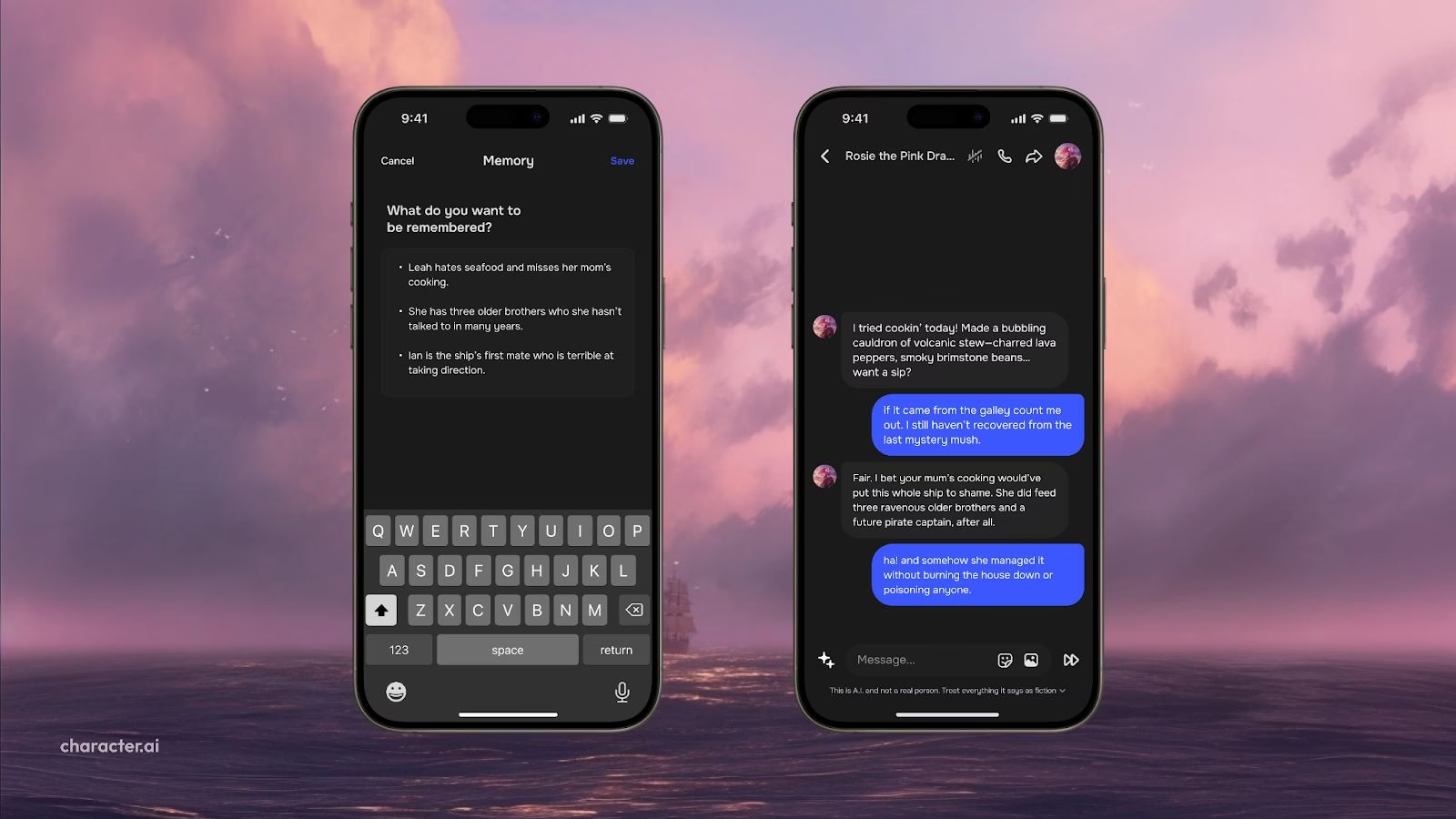
Chat Memories were a fixed input field where you wrote essential background information for your bot to draw on during chats. Story Memory replaced this box in May 2026, so the steps below describe the system as it stood until then.
Here is how it worked:
You opened a chat with any Character
You clicked the Character’s avatar (top-right corner)
You tapped the Memory section in the menu
A 400-character text box appeared
You wrote whatever details you wanted the bot to remember
You saved, and it stayed attached to the Character
That information did not reset when you left or returned to a chat. It stayed attached to the Character.
Say you were roleplaying as a vampire detective who hated mirrors and secretly loved pop music. You typed that straight into the memory field, and the bot worked it in over time.
It saved you reintroducing yourself in every new session.
The May 2025 announcement is here: Helping Characters Remember What Matters Most. The current system is documented in Character AI’s May 21, 2026 post, Smarter Memory for Smarter Chats.
How This Compares to Pinned and Auto Memories
Character AI has now shipped four memory systems. Pinned Memories and Auto Memories arrived first for c.ai+ subscribers, the 400 character Chat Memories field opened to everyone in May 2025, and the current Story Memory system landed on May 21, 2026.
Pinning is the only mechanic that survived all four rounds, though it changed job along the way. If you are following a tutorial written before mid 2026, the field names in it are the part most likely to be wrong.
Character AI has tried several forms of memory:
Pinned Memories
You highlight past messages and pin them manually. But these often show up at awkward times or get ignored by the AI entirely.Auto Memories (c.ai+ only)
The bot tries to remember key facts from your chats automatically. Some users say it’s hit-or-miss, sometimes helpful, sometimes irrelevant.Chat Memories (2025, everyone)
You enter the memory directly. No guessing. No re-explaining. Just clear, static information the bot can refer to behind the scenes.Story Memory, Facts and Memory Usage (May 2026, current)
The single box became a full Memory screen. Story Memory and pinning are free, Facts is c.ai+, and Memory Usage shows what is taking up the space.
It was not perfect, since bots still forgot or misread the notes, but it was the most direct memory control users had until the 2026 Memory screen arrived.
One user nailed it in the Reddit thread:
“It’s actually more convenient if you can manually fill in what the bot should remember… What if it automatically grabs bits and pieces from the conversation, but not the most important parts?”
It’s worth noting that tools like Candy AI already allow persistent memory with a lot more freedom, including editable traits and longer character histories, something many Character AI users still wish for.
How to Write Effective Story Memory Entries
Character AI has not published a character count for Story Memory, so treat any figure quoted elsewhere as guesswork. The space is shared with the running conversation, so keep entries tight.
If you want your character to remember what matters, follow these tips:
Be specific
Mention names, relationships, habits, or recurring themes.
Example: “I’m a shapeshifter named Quinn. I live with my twin sister Ivy in a hidden forest. I hate loud noises and prefer tea over coffee.”Keep it simple
Short, concrete entries survive better than long lore dumps, because Story Memory shares its budget with the chat.Include personality cues
If you roleplay, describe your character’s tone or attitude. This helps bots respond more consistently.Avoid vague or broad inputs
“I like nature” is less helpful than “I hike every morning and keep a nature journal.”Update it when needed
You can edit Story Memory whenever the story moves on. Think of it as a living profile.
Does Memory Carry Into a New Chat?
Starting a new chat gives you the option to copy Facts to the new chat’s memory, so details the system already picked up do not have to be rebuilt. Character AI presents it as a choice at that point rather than something that happens on its own.
That answers the complaint that ran through the whole 2025 rollout, though the carry-over covers Facts, so it lands for c.ai+ subscribers first. The old box stayed attached to the Character, but people using Start New Chat from Here found the entry did not follow them into the new conversation.
Pinning is not a separate store. Long pressing a message and tapping Pin locks that message into Story Memory itself, so pinned lines sit in the same place as the background you wrote yourself.
Saved memory shares room with the running conversation. The Memory Usage view exists because Facts, Story Memories, and recent message history draw on one shared budget, and it warns you when the space runs low. Character AI protects what you wrote into Story Memory or pinned yourself, so a long chat trims older context rather than your saved notes.
What the Community Is Saying
The Reddit thread announcing Chat Memories in May 2025 drew a flood of feedback, some excited, some frustrated. The complaints below are from that launch, and the 2026 Memory screen has since answered several of them.
Here’s a sample of what users had to say:
Positive reactions
“Thank God. I’m tired of retelling the same backstory over and over again.”
“Now my bots can stop forgetting who I am every 10 seconds.”
“👏🏻👏🏻👏🏻 This is a fantastic feature!”Common complaints
The 400-character limit is too short
“I’d rather use this than pinning, but 400 characters isn’t enough.”Memory field doesn’t carry over when starting a new chat
“Why does it reset when I click ‘Start New Chat from Here’?”Features still missing on desktop
“Can you put all the app features on the website too?”
Auto memory skepticism
Many c.ai+ users say auto memory isn’t as helpful as expected. One comment summed it up:“As a cai+ user, it’s… not great. It’s like. Actually arse.”
There’s also demand for older features to be upgraded, like longer definitions actually being recognized and the ability to edit pinned or older messages.
Where Character AI Memory Still Falls Short
The 2026 system answered the two complaints that dominated the original rollout. Facts can now be carried into a new chat, and there is a way to see what is eating the space instead of guessing at why bots forget core facts.
Facts still sits behind c.ai+, the full Memory Usage view does too, and every layer shares one finite budget with the conversation itself.
Auto captured facts inherit whatever the model misread during a chat. A detail you never said can sit in the list shaping replies until you go and delete it.
If persistent memory is the main thing you are after, other tools are worth a look.
Candy AI, for example, lets you define character relationships and histories without splitting them across free and paid layers.
Frequently Asked Questions
Does Character AI memory carry across chats?
Yes. What you save in Story Memory attaches to the Character, so those details are available every time you open a chat with that same Character. Pinning a message locks it into that same Story Memory rather than a separate store, so pinned lines sit alongside the background you wrote yourself.
What is the Character AI memory limit?
There is no single number any more. The old Chat Memories box capped you at 400 characters, while the current Story Memory system shares one budget between Facts, saved memories, and recent message history, which is what the Memory Usage view displays.
Does Character AI memory reset when you start a new chat?
Not by default. When you start a new chat, Character AI offers to copy Facts into the new chat’s memory, so you choose whether those details follow you. That replaced the older behaviour where Start New Chat from Here dropped what you had typed into the Chat Memories box.
What is the difference between Story Memory and Facts?
Story Memory is the section you fill in yourself with backstory and key events, and every user has it. Facts is a c.ai+ layer that captures details such as appearance, quirks, and relationships automatically as you chat, and you can edit or delete what it records.
Is Character AI memory free or does it need c.ai+?
Story Memory and message pinning are free for all users. A c.ai+ subscription doubles the number of pins, adds more memory headroom, and unlocks the full Memory Usage visualisation as well as the Facts layer.
How is pinning different from writing Story Memory yourself?
Pinning is how you put an exact message into Story Memory, chosen with a long press, and the wording is kept as it landed. The rest of Story Memory is what you write in your own words, so both sit in the same place, with pins preserving original phrasing and your entries carrying the background.
