
What’s Changed: Character AI updated its Privacy Policy in August 2025 to include data collection for targeted advertising. The platform does not show banner ads, but it does run tracking scripts. Ad blockers can suppress those trackers, and this guide covers exactly which tools work and what settings to change.
Character AI does not serve traditional display ads. There are no pop-ups, no banners, and no video pre-rolls. What changed is in the background: the August 2025 Privacy Policy update added explicit language about collecting user data for targeted advertising purposes.
That is why searches for “character ai ad blocker” have been climbing. Users noticed something, or read the updated terms, and started asking whether a standard ad blocker would help. The short answer is yes, partially. The full answer is below.

What Did Character AI Change in Its Privacy Policy?
Character AI updated its Privacy Policy in August 2025 to explicitly describe data collection for targeted advertising, including activity data, device information, and behavioral tracking passed to third-party ad partners.
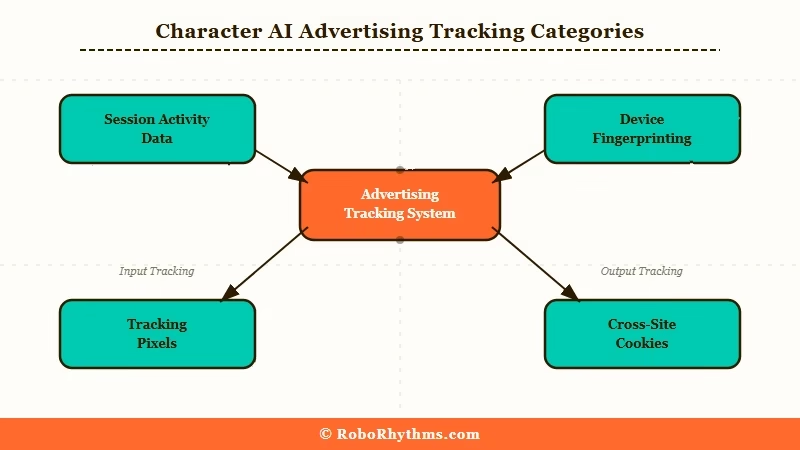
Before the update, the policy focused primarily on content moderation and basic analytics. The August 2025 revision added a category of data use that covers advertising. From what I read in the updated policy, this includes:
- Session activity data, what you do inside the app, how long you stay
- Device fingerprinting, browser type, OS, hardware identifiers
- Third-party tracking pixels, data shared with advertising partners
- Cross-site tracking cookies, behavior tracked across sessions
Character AI is not unique in doing this. Most free platforms collect this type of data to fund their operations. What changed is that it is now explicitly documented.
The issue is that Character AI handles sensitive user conversations, and behavioral data collected during those sessions is a different privacy concern than, say, browsing a news site.
Why Does This Matter for Character AI Users?
The data collection concern is elevated for Character AI because users share personal topics in conversations, making behavioral tracking more sensitive than on typical content platforms.
Most ad tracking collects surface-level behavior: pages visited, time on site, clicks. On an AI companion platform, the behavioral data overlaps with conversation content.
Session tracking on Character AI can tell advertisers what type of content you engage with, what topics you return to, and how long you spend in certain types of conversations.
| What gets tracked | Why it matters on Character AI | Risk level |
|---|---|---|
| Session duration per character | Indicates what type of companion topics interest you | Medium |
| Conversation frequency | Reveals usage patterns and dependency signals | Medium |
| Device and IP data | Standard cross-site tracking capability | Low |
| Third-party pixels | Data leaves Character AI’s servers | High |
From what I’ve seen in discussions, most users did not read the updated terms. The search traffic around “character ai ad blocker” suggests users noticed something that felt different or heard about the change and wanted to act on it.
A browser-based ad blocker with tracking protection enabled is the most practical response.
Does an Ad Blocker Actually Work on Character AI?
An ad blocker with tracker-blocking capability does suppress the third-party tracking scripts on Character AI, though it does not change what Character AI’s own servers log about your sessions.
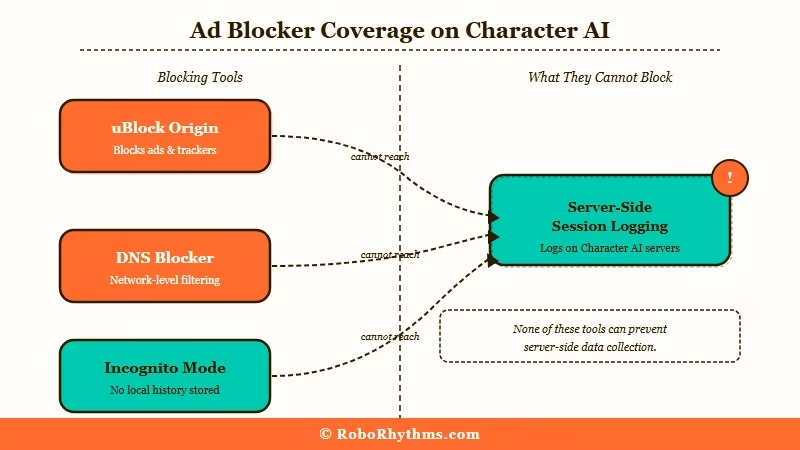
The distinction matters. An ad blocker installed in your browser intercepts outbound requests to known third-party tracking domains. Tools like uBlock Origin and AdGuard have filter lists that block the tracking pixels that Character AI sends to advertising partners. Those are blockable.
What is not blockable with a browser extension: data that Character AI’s own servers collect from your sessions. That is logged server-side and no client-side tool stops it.
Here is the setup that works for most users:
Using uBlock Origin:
- Install uBlock Origin from your browser’s extension store (Chrome, Firefox, Edge)
- Open the uBlock Origin dashboard
- Enable the “EasyPrivacy” filter list under “Privacy” section
- Enable “uBlock filters – Privacy”
- Enable “AdGuard Tracking Protection”
- Click “Apply changes” and hard-reload Character AI
Using AdGuard Browser Extension:
- Install AdGuard from the extension store
- Go to Settings > Filters > Privacy
- Enable “AdGuard Tracking Protection Filter”
- Enable “EasyPrivacy”
- Reload Character AI
Both setups block the outbound tracker requests. Neither blocks what Character AI logs server-side.
For users who want to minimize data exposure further, running sessions in a private/incognito window limits cookie persistence across sessions. Pairing that with uBlock Origin covers most of the trackable surface.
What Are Your Alternatives If Privacy Is a Core Concern?
If third-party data collection is a dealbreaker, several Character AI alternatives operate without the same advertising data model, including Candy AI and SpicyChat.
The core issue with Character AI’s model is that it is free, which means data is the revenue mechanism. Platforms built on subscription revenue have different incentives.
Candy AI runs on a subscription model without the same advertising data layer. If you are moving away from Character AI because of the tracking concerns, Candy AI is the direct comparison, AI companion with persistent memory, without the behavioral advertising infrastructure.
SpicyChat is another option if you want customizable characters with more creative control. Like Candy AI, it operates primarily on subscription rather than advertising.
For a full comparison of what each companion platform offers, my best AI companion app guide covers pricing and data practices across the main options. My Candy AI review has specific detail on how it handles user data compared to free platforms.
Frequently Asked Questions
Does Character AI have display ads in 2026?
Character AI does not display traditional banner ads, pop-ups, or video ads on the platform. The advertising concern is about third-party tracking data collection described in the August 2025 Privacy Policy update, not visible advertisements.
Will uBlock Origin break Character AI?
uBlock Origin configured with privacy filters does not break Character AI’s core functionality in most cases. If you experience loading issues, temporarily disabling the extension on the Character AI domain confirms whether it is the cause.
Does Character AI’s ad tracking happen on mobile too?
Yes. Third-party tracking scripts apply to both browser and mobile app versions. Browser ad blockers cover the web version. For the mobile app, you would need a system-level DNS blocker (like AdGuard for iOS or Android) or a privacy-focused DNS service like NextDNS or Cloudflare’s 1.1.1.1.
Can Character AI see what I do even with an ad blocker?
Yes. Character AI’s own servers log your session activity regardless of browser-side ad blockers. A blocker only intercepts requests to third-party tracking domains. Server-side logging is not affected by any client-side tool.
Is it worth switching platforms just to avoid the tracking?
It depends on how sensitive your conversations are. If you use Character AI for casual creative roleplay, the tracking risk is lower than for users who share personal topics. For users who want a companion platform with less data risk, a paid subscription service like Candy AI removes the advertising revenue model entirely.
