
What’s Changed: Chai tightened its moderation in November 2026, and some accounts are now disabled outright. A real ban shows “disabled by the administrator” when you sign in at app.chai-ai.com, while the app itself only keeps loading. Plenty of “bans” turn out to be region paywalls, deleted bots or a login on the wrong Chai website.
A Chai account banned during the November 2026 moderation sweep does not announce itself in the app.
The app logs you out, then the login screen spins forever, which looks exactly like an outage. The clearest place the ban shows in words is the browser version of Chai.
That is why so many people cannot tell what happened to them. Chai changed its bot rules on November 20, deleted a wave of bots, and started disabling some accounts in the same week, all without one clear notice. I would sort out which of those things hit you before you email anyone, because each one has a different fix.
This guide shows how to confirm a ban, why Chai bans accounts under its own terms, how to appeal without making it worse, and what happens to your subscription.
Every policy quote below comes from Chai’s own pages as they read on November 26, 2026.
Is Your Chai Account Banned or Is Something Else Wrong?
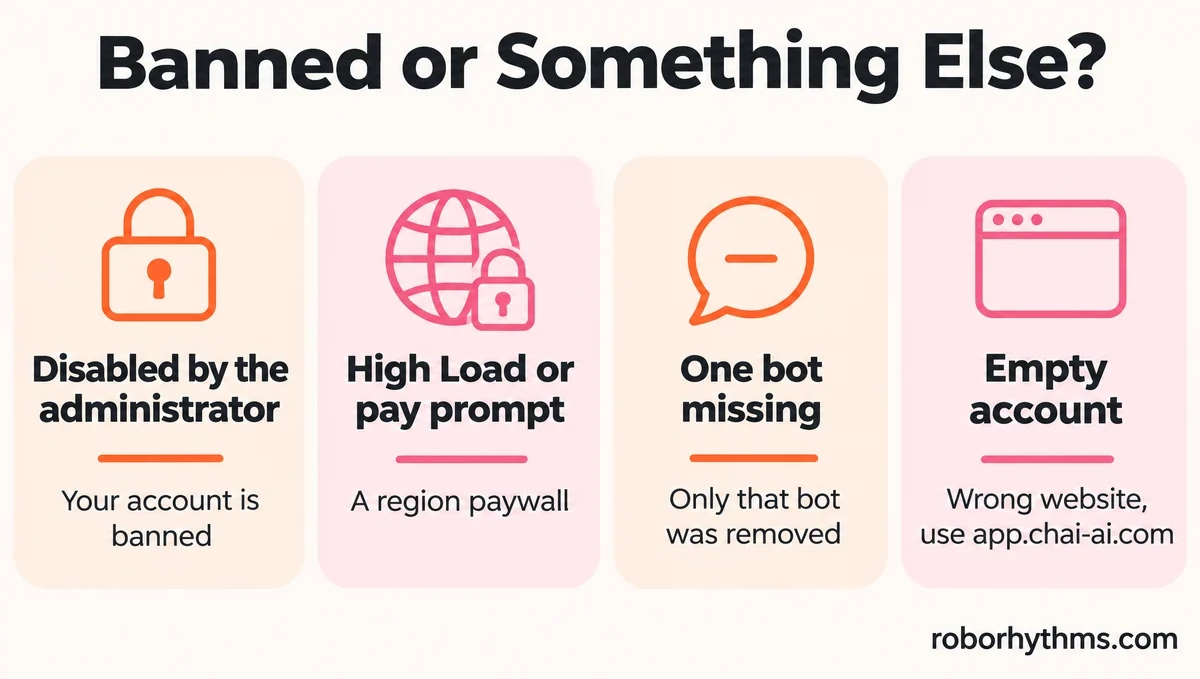
Your Chai account is banned if the web app at app.chai-ai.com says it is “disabled by the administrator”.
A spinning login, a missing bot, a paywall or an empty account on Chai’s other website all have other causes, and most of them are fixable.
The web app is the first place I look, because the phone app shows nothing useful. One Ultra subscriber’s post, from someone on a paid Chai plan, describes the pattern exactly: logged out of the app, a login that kept loading, then the words “disabled by the administrator” on app.chai-ai.com.
If the web app confirms the ban and you would rather move on than wait for an answer, Candy AI is the adults-only companion app I point most people to first.
It sets its own content rules, so read them before you start.
What is app.chai-ai.com: The browser version of the Chai app. It uses the same login, chats and subscription as your phone, so it shows your real account status.
Do not check the wrong site. Chai’s own FAQ says Chai Web Pro at chai-ai.com and the Chai app “are separate platforms with no data sharing between the two”.
Signing in there can show an empty account that looks like a wipe.
| What you see | What it usually means | What to do |
|---|---|---|
| “Disabled by the administrator” on app.chai-ai.com | Your account is banned | Appeal by email (steps below) |
| The app logs you out and the login keeps loading | Possibly a ban, possibly an outage | Sign in at app.chai-ai.com to see the real status |
| A “High Load” screen or a pay-to-chat prompt | Free chat is restricted in your country | Check the regional paywall, not support |
| One bot will not open or vanished from search | Only that bot was removed | Your other chats still work |
| An empty account with no chats or subscription | You signed in on chai-ai.com instead | Use app.chai-ai.com with the same login |
| A face scan or ID request | Chai’s age check | Finish it, it is not a ban |
Region blocks look like bans but are not. Chai’s founder listed 22 countries, including India, Pakistan, Egypt and Bangladesh, in his regional paywall thread, and Chai’s subscription paywall later spread further.
A paywall stops free chat but leaves your account intact.
Did Chai Delete Your Bot Instead of Banning You?
A missing Chai bot means only that bot was removed, and your account still works.
Chai deleted many reported bots and pulled bot images that may show minors during its November 2026 sweep, and the bot purge covers what was removed.
Chai’s founder said in a November 23 email that on Android and the web, existing conversations continue even after a bot is deleted.
iPhone users were told to use the web version until Chai can ship updates through Apple again.
Why Did Chai Ban Your Account?
Chai bans accounts that break its content rules, and it can do so without warning under its terms.
Its Terms of Service, updated October 2026, say your rights end “automatically and without notice” if you break any term. They add, “Users posting objectionable content or being abusive may be banned from the app without prior notice.”
The rules got stricter in November 2026. On November 20, founder Will posted Chai’s new bot rules for Search and Discovery.
They ban explicit romantic themes, implied or explicit sexual themes, images of real people, any depiction of minors, vulgar language, violence or self-harm themes, and drugs.
On November 23 he wrote, in an email relayed on r/Chai_Unofficial, “Due to upcoming regulations, CHAI is currently taking a stricter approach.”
| Chai document | What it says about bans | Date |
|---|---|---|
| Terms of Service | Rights end without notice on any breach; abusive users or objectionable content can be banned without prior notice | Updated October 2026 |
| App EULA (license agreement) | Adults only; bans sexually explicit images and videos and any sexual depiction of minors; some violations bring termination and possible reports to law enforcement | Updated July 28, 2026 |
| Safety Center | Real-time systems refuse sexually explicit content, self-harm content and anything that sexualises minors | Read November 26, 2026 |
Policies checked on Chai’s own Terms, EULA and Safety Center pages, November 26, 2026.
Neither of Will’s messages mentions banning accounts. The account bans in this sweep are known from the people who lost access, so treat any list of exact triggers as a guess.
The banned subscriber’s post guesses at a mix of sexual and gory roleplay plus a child character in a zombie story. Chai’s rule on minors is absolute, and any scene that sexualises a minor breaks it.
My read is that this sweep also tracks app store pressure, since Apple began requiring an 18+ rating for apps with sexual or romantic content on November 16, 2026, per TechCrunch.
How Do You Get a Banned Chai Account Back?
You get a banned Chai account back only by appealing to Chai’s support email, and Chai publishes no appeal process.
Neither its Terms, its app EULA nor its Safety Center describes a warning or appeal process, so an email is the only route.
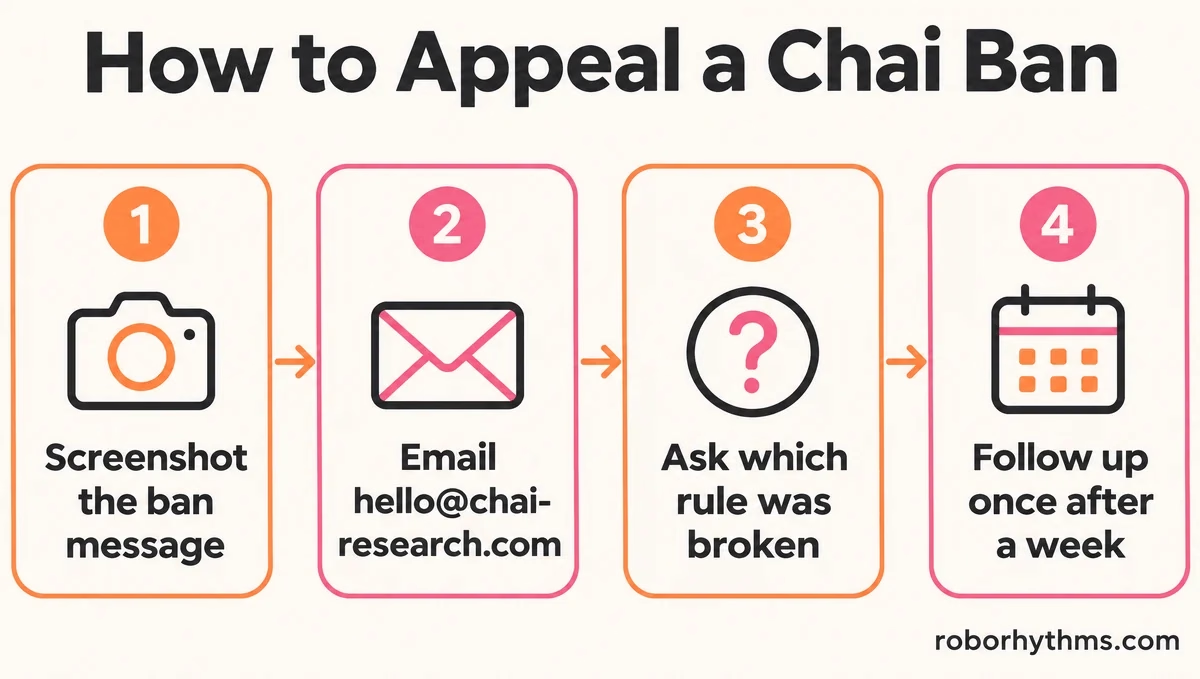
I keep an appeal short and factual, because the reviewer only needs your account and the date. Send it like this:
- Screenshot the “disabled by the administrator” message on app.chai-ai.com, with the date.
- Email hello@chai-research.com, the address in Chai’s Safety Center and app EULA, from the email on your account.
- If you pay through Chai’s website at chai-ai.com, copy support@chai-ai.com too, the address in its Terms.
- Give your account email, when the ban appeared and whether you pay for a plan.
- Ask which rule was broken and whether the decision can be reviewed.
- Wait about a week before one polite follow-up.
Before: “Why did you ban me?? I pay for Ultra. Unban me now.”
After: “Hi, my Chai account (name@example.com) shows ‘disabled by the administrator’ on app.chai-ai.com since November 22, 2026, and I am an Ultra subscriber. Could you tell me which rule this relates to and whether the decision can be reviewed? A screenshot is attached.”
The second version gives support everything it needs without arguing about the rules. Do not open a new account while you wait, since a second account can look like dodging the ban.
If no answer comes, Nectar AI suits people who mostly built their own characters on Chai.
Can Using a VPN Get Your Chai Account Banned?
Using a VPN to get around a Chai region block puts your account at risk, even though Chai’s own Terms, EULA and FAQ never mention VPNs.
Chai has published no VPN rule, so nobody outside Chai can say whether a VPN alone triggers a ban.
A VPN is not worth it to me here. The VPN and old-app workarounds from Chai’s earlier region blocks were patched, according to a summary of Chai’s changes, and a ban costs you every chat and character on the account.
If free chat is blocked where you live, the honest options are paying for a plan that Chai sells in your country or moving to another app.
Neither puts your account at risk.
What Happens to Your Chai Subscription and Chats After a Ban?
A Chai ban comes with no refund, because Chai’s terms rule out refunds for partial billing periods, so cancel the subscription yourself.
The Terms say payments are non-refundable “except where required by law”, and that cancelling a paid plan “does not by itself terminate this agreement or Your account.”
What bothers me most is that a ban comes with no reminder to cancel, and an App Store subscription renews until you stop it yourself. Cancel it where you paid:
- On iPhone, cancel in Settings under your name and Subscriptions, using Apple’s cancel steps.
- On Android, cancel in Google Play under Payments and subscriptions.
- On the web, cancel from your account settings, which Chai’s FAQ says keeps Pro until the period ends.
Your chats are out of reach once the account is disabled, and Chai offers no export tool. Its EULA says some violations bring “data preservation”, which means the data stays with Chai rather than being deleted.
Chai’s privacy record covers what else it keeps.
Quick Takeaways
- A real Chai ban shows “disabled by the administrator” at app.chai-ai.com, while the app only keeps loading.
- A paywall, a deleted bot or an empty chai-ai.com account is not a ban, and each has its own fix.
- Chai’s Terms let it ban without notice, and its November 2026 rules ban sexual themes and any depiction of minors in public bots.
- Appeal by email to hello@chai-research.com with a screenshot and your account email, and expect no published process.
- Cancel your App Store, Google Play or web subscription yourself, since Chai’s terms refund nothing for partial billing periods.
