
Summary
- The “Restricted access” label appears when a bot triggers the automated guideline filter.
- You can still use a restricted bot for private chats without any limits.
- The tag mainly blocks search visibility and prevents other people from using the bot.
A “Restricted access” tag on a Character AI bot can catch you off guard, especially when the bot is private and only meant for personal use.
The label looks severe, yet you can still open the bot and chat with it without any interruption. This creates a strange gap between what the warning implies and what actually happens when you use the bot.
The tag appears when the bot contains something that the automated system interprets as going against community guidelines. The system treats it as a mild issue.
It won’t remove the bot and it won’t block your conversations with it, but it limits visibility and access for anyone else who might try to use it. Even entirely safe bots can trigger the label through harmless descriptions, safe example messages, or certain images.
Some users fix the label by editing small things like the profile image or a single line in the description. Others leave the bots as they are since the tag doesn’t affect private use.
What c.ai Restricted Access Means
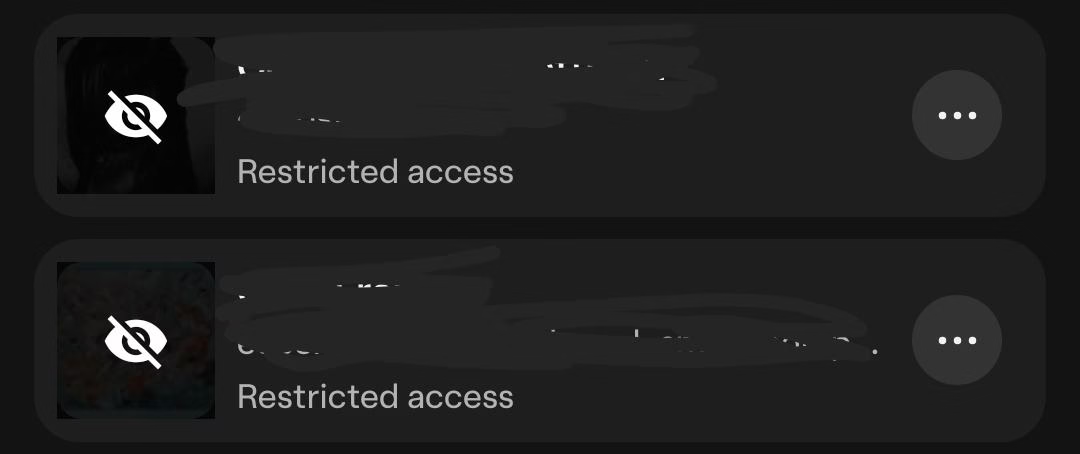
The label appears when the system detects something in the bot that does not meet community guidelines. The issue is minor.
The bot is still available to you, and nothing blocks your conversations with it. The system only limits access for everyone else.
The bot will not appear in search results, and people cannot use it unless the flagged parts are edited. Character AI spells this out in its official Community Standards: a character that breaks the guidelines gets the Restricted Access label, and other people cannot chat with it until the flagged elements are fixed.
Safe content can still trigger the label. Normal descriptions, profile images, or example messages sometimes activate the automated filters even when the bot contains no sensitive material.
This is why the restriction can feel inconsistent. You may create a simple character with a regular backstory and still see the tag appear under its name.
Private bots are not treated differently from public ones. A bot created only for personal use can still receive the same moderation signals.
The system does not check your intent. It only checks the content it sees during creation.
Why Fully Safe Bots Still Get Flagged
Many creators notice the label on bots with nothing risky in them. A regular character, a basic prompt, or a safe piece of lore can still trigger the automated scan.
The system sometimes reacts to the image alone, even if the image is a simple headshot. Swapping the image to another safe picture can clear the label instantly.
This shows that the moderation process relies heavily on automated detection. The filter may mark something as risky even when the content is harmless.
The behavior can feel random, since two safe bots with similar descriptions may receive different results.
Minor edits sometimes remove the tag. Changing one image, rewriting a short line, or adjusting a phrase in the example messages can cause the system to reevaluate the bot.
Many users keep their bots as they are when the label does not affect personal use. The restriction only matters when you want the bot to be available to others.
How Restricted Access Affects Visibility
Restricted access hides the bot from Character AI public character search and stops other accounts from opening it. Your own access stays exactly as it was, so you can open, edit, and chat with the bot normally.
You still have full access to it, and you can open it, edit it, and chat with it without any interruption. Nothing about your personal use is limited. The label only affects how the bot reaches other people.
The bot will not appear in public search results. Someone browsing for characters will never see it, even if the bot fits the search terms perfectly.
The system hides it automatically until the flagged parts are corrected. This prevents accidental engagement with content that the automated filter feels unsure about.
The bot also cannot be used by others unless you remove the elements that triggered the label. A person with the direct link may still be unable to access it.
The system behaves as if the bot is locked. This is the main impact of the restriction, and it becomes relevant only if you plan to share the bot with others.
How to Fix the Character AI Restricted Access Tag
The fix is to edit whatever tripped the automated scan, then save the bot so the system runs a fresh rescan. In most cases one small change clears the label, and the character itself stays exactly the same.
Creators who clear the label tend to change only the parts the automated filter reads closely: the avatar, the description, and the example messages. One quick change is usually enough.
Some of the adjustments people try include:
Swapping the profile image for another safe image
Rewriting a short part of the description
Editing an example message that may have triggered the scan
These edits help the system reevaluate the content. The moderation tool rescans the bot each time you save changes. A single modification can flip the status instantly.
Some creators choose not to adjust anything when the bot is private, since the label does not affect personal use. Others prefer clearing the tag so the bot can be discovered or shared normally.
When You Can Ignore the Restricted Label
The label does not interfere with your own conversations, so you can leave the bot unchanged if it is meant only for personal use.
You can open it at any time, build long chats, and refine the character without any slowdown. The system treats the restriction as a visibility filter, not a functional block.
This is why many creators choose to ignore it.
The label also has no effect on your private archive. Your prompts, stories, and saved chats stay intact even when the tag appears.
The restriction targets how the bot interacts with the wider platform, not how it behaves inside your own space. This makes the label harmless when you are not trying to publish or share the character.
The only time the label becomes relevant is when you want others to interact with the bot. The system will block discovery and external access until the flagged elements are edited.
If sharing is part of your plan, clearing the tag ensures the bot functions like any other character in the catalog.
How Chat Restrictions Work on Character AI
Character AI restricts at two levels. The character level is where a bot picks up the Restricted Access label, and the conversation level is where the filter interrupts a single reply while you chat.
The two run independently. A bot carrying no label can still hit a filtered reply mid scene, and a bot wearing the tag can run a long conversation without one interruption.
This is why the restriction feels inconsistent to creators who assume one system drives both. Clearing the visibility label changes nothing about the reply filter, which reads the conversation rather than the character sheet.
Two nearby messages are different problems. “Sorry, you have been blocked” is a connection block that usually clears by turning off a VPN, while a suspension arrives by email and affects every bot you own, as covered in Character AI deleted my account and our Character AI 18 policy guide.
A third limit sits at the account level rather than on a single character. If Character AI is restricting what your account can reach after an age check, our guide to restricted access in 2026 covers that side.
Frequently Asked Questions
Does Restricted Access mean my bot will be deleted?
No. The label limits who can find and open the character, and the bot stays in your account with its definition and chat history intact.
Why did my private bot get Restricted Access if nobody else can see it?
The automated scan reads character content at creation and save time, and it does not check whether the bot is public or private. Private characters go through the same scan as published ones.
How long does the label take to clear after I edit the bot?
The rescan runs when you save, so the status often flips immediately. If the label survives, the element you changed was probably not the trigger, and the avatar is the one creators most often overlook.
Is this the same as the restricted content warning on Tipsy Chat?
No. Character AI Restricted Access sits on the character itself and controls who can find and open it, while the Tipsy Chat notice that reads “the character or model cannot engage in restricted content” blocks a single reply and does not cost you any gems. Clearing a Character AI label does nothing on Tipsy Chat, since each app runs its own moderation.
If the Moderation Back-and-Forth Wears You Down
Some creators get tired of editing greetings and re-saving bots to satisfy a scanner, and move part of their roleplay to platforms with lighter moderation. Candy AI is a common landing spot among Character AI users who make that move, since characters there never carry a visibility flag.
That move costs money. Candy AI’s useful tier is paid, and its catalog is far smaller than Character AI’s. For a private bot that only you chat with, staying put and ignoring the label remains the cheaper answer.

Bro, you should replace AI moderation. It fucking sucks