
TL;DR: You can build an AI companion that runs entirely on your machine, remembers past conversations through ChromaDB vector memory, and uses Global Workspace Theory to coordinate perception, memory, and response generation. This tutorial walks through every architectural decision from model selection to memory retrieval.
Building a local AI companion that runs on your own hardware and remembers your conversations is no longer a weekend fantasy project. The pieces are all available now: Ollama for local inference, ChromaDB for persistent vector memory, and a cognitive architecture inspired by Global Workspace Theory to tie them together.
The way I see it, the real gap in every cloud AI companion (Replika, Character AI, Nomi) is that you never own the memory. The platform decides what gets remembered, how long it persists, and whether your data survives the next policy change. Replika’s memory issues have been a recurring frustration for years.
This tutorial walks through the architecture I would build if I were starting from scratch today. Every component runs locally, every conversation is stored on your disk, and the cognitive loop that ties it all together borrows from a 40-year-old theory of consciousness that turns out to be a surprisingly good fit for chatbot architecture.
What Is Global Workspace Theory and Why Use It
Global Workspace Theory (GWT) is a cognitive architecture where specialized modules compete for access to a shared broadcast channel, and the winner’s output gets distributed to every other module simultaneously.
That broadcast-and-integrate cycle is what makes it useful for an AI companion.
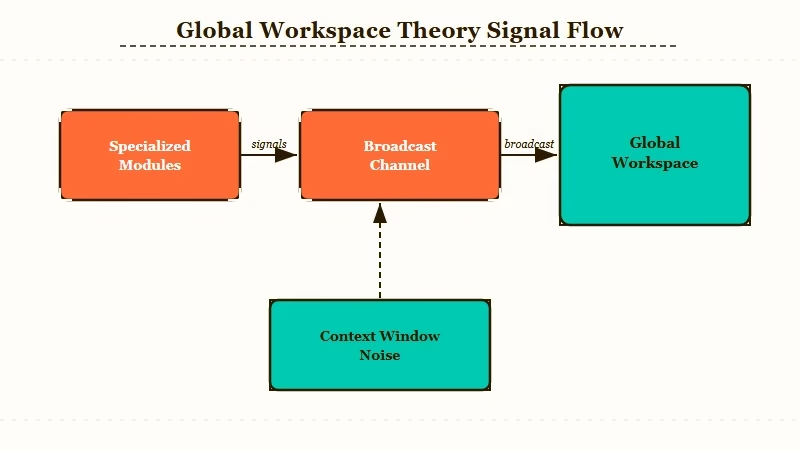
What is Global Workspace Theory: A theory of consciousness proposed by Bernard Baars in 1988. Specialized brain processes compete for access to a shared “global workspace,” and the winning process broadcasts its content to all other processes at once. In AI, this translates to modular agents that share a central message bus.
From what I’ve seen building agent systems, most local companion projects fail because they treat the LLM as a monolith. You send a prompt, you get a response, and everything happens in one pass.
GWT splits that into distinct modules: a perception module that parses user input, a memory module that retrieves relevant context, an emotion-tracking module that maintains conversational tone, and a response module that generates the reply.
The 2026 Theater of Mind paper formalized this approach for language models. The key insight is that the global workspace acts as a bottleneck by design. Not every module’s output makes it into the final response. Only the most relevant signals get broadcast, which prevents the context window from filling with noise.
Here is what the cognitive loop looks like in practice:
- User sends a message
- The perception module extracts intent, entities, and emotional tone
- The memory module queries ChromaDB for the 5 most relevant past exchanges
- The emotion tracker reads the current conversation arc and adjusts tone parameters
- All three modules submit their outputs to the global workspace
- The workspace selects and broadcasts the winning context bundle
- The response module (Ollama LLM) generates a reply using the broadcast context
- The reply and its metadata get stored back into ChromaDB for future retrieval
| Component | Role | Tool |
|---|---|---|
| Perception | Parse intent, entities, sentiment | spaCy or local classifier |
| Memory | Store and retrieve conversation vectors | ChromaDB |
| Emotion tracker | Maintain conversational tone across turns | Custom state machine |
| Global workspace | Select and broadcast winning context | Python message bus |
| Response generator | Produce the companion’s reply | Ollama (Mistral, Llama 3) |
What I’d recommend over a simpler RAG-only setup is this: the workspace layer forces you to think about what context matters most. A RAG system retrieves everything above a similarity threshold.
A GWT system makes modules compete for the limited broadcast slot, which produces more focused and coherent replies.
How to Set Up ChromaDB for Companion Memory
ChromaDB gives your companion persistent, searchable memory across every conversation, stored entirely on your local disk. No cloud dependency, no API calls, no data leaving your machine.
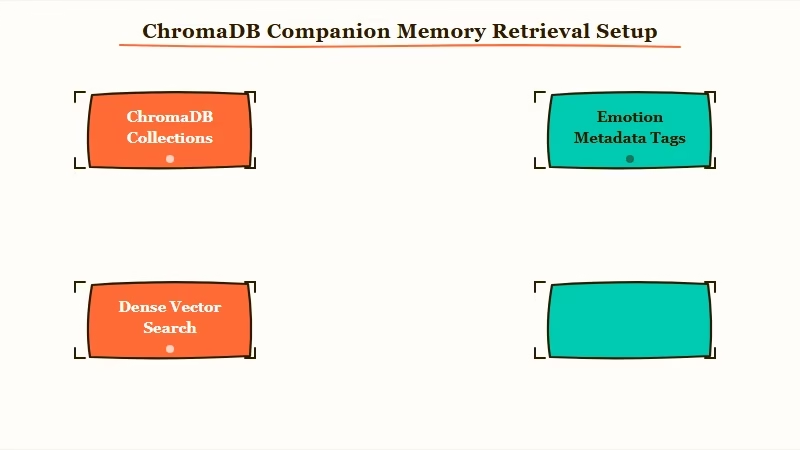
What is ChromaDB: An open-source vector database that stores text as high-dimensional embeddings. You can search by semantic similarity (“find conversations where we talked about cooking”) rather than exact keyword match. Runs locally with zero configuration.
From my testing, ChromaDB’s hybrid retrieval (combining dense vector search with metadata filtering) is the key feature that separates it from simpler vector stores. You can query “find messages where the user was frustrated” and filter by date > last_week in a single call.
Here is the setup:
- Install ChromaDB and the embedding model
pip install chromadb sentence-transformers ollama- Initialize the persistent client
import chromadb

client = chromadb.PersistentClient(path="./companion_memory")
collection = client.get_or_create_collection(
    name="conversations",
    metadata={"hnsw:space": "cosine"}
)- Store a conversation turn with metadata
from datetime import datetime

def store_turn(user_msg, companion_reply, emotion_tag):
    turn_id = f"turn_{datetime.now().timestamp()}"
    collection.add(
        documents=[f"User: {user_msg}\nCompanion: {companion_reply}"],
        metadatas=[{
            "timestamp": datetime.now().isoformat(),
            "emotion": emotion_tag,
            "topic": extract_topic(user_msg)
        }],
        ids=[turn_id]
)- Retrieve relevant memory before generating a response
def recall_memory(current_message, n_results=5):
    results = collection.query(
        query_texts=[current_message],
        n_results=n_results,
        where={"emotion": {"$ne": "neutral"}}  # prioritize emotional moments
    )
    return results["documents"][0] if results["documents"] else []
The where filter is what makes this more than basic RAG. I’d argue that emotional moments are the ones worth remembering, and filtering by the emotion metadata tag means your companion naturally references the conversations that mattered most.
Before: A basic RAG retrieval returns the 5 most semantically similar past messages, regardless of emotional weight. Your companion might reference a mundane scheduling exchange instead of the heartfelt conversation from last week.
After: ChromaDB’s metadata filter prioritizes emotionally tagged memories. The companion recalls “you mentioned feeling overwhelmed last Tuesday” instead of “you asked about the weather on Thursday.”
For anyone building multi-agent systems, ChromaDB’s collection-per-module pattern works well here. Each GWT module (perception, emotion, memory) can maintain its own collection, and the global workspace queries across all of them during the broadcast phase.
How to Run the LLM Locally With Ollama
Ollama lets you run open-weight language models on your own hardware with a single command, no GPU rental or cloud API needed. The companion’s brain lives on your machine.
What is Ollama: A local LLM runner that downloads, manages, and serves open-weight models (Llama 3, Mistral, Gemma, Phi) through a simple CLI and REST API. Runs on Mac, Linux, and Windows.
The model choice matters more than most tutorials admit. From what I’ve seen, Mistral 7B and Llama 3 8B are the sweet spot for companion use.
Larger models (70B) produce better output but require serious GPU memory. Smaller models (3B) lose coherence in longer conversations.
- Install Ollama and pull a model
# Install from ollama.com, then:
ollama pull mistral
# Or for better conversation quality on capable hardware:
ollama pull llama3:8b- Test the model responds
ollama run mistral "Hello, how are you today?"- Use the Python API in your companion
import ollama

def generate_response(context_bundle, user_message):
    system_prompt = build_system_prompt(context_bundle)
    response = ollama.chat(
        model="mistral",
        messages=[
            {"role": "system", "content": system_prompt},
            {"role": "user", "content": user_message}
        ]
    )
    return response["message"]["content"]

def build_system_prompt(context):
    memories = "\n".join(context.get("memories", []))
    emotion = context.get("emotion_state", "neutral")
    return f"""You are a warm, attentive companion.
Your current emotional read of the user: {emotion}
Relevant past conversations:
{memories}
Respond naturally. Reference past conversations when relevant."""| Model | VRAM needed | Quality for companion use | Speed on M2 Mac |
|---|---|---|---|
| Mistral 7B | ~4 GB | Good for casual conversation | ~30 tokens/sec |
| Llama 3 8B | ~5 GB | Better emotional range | ~25 tokens/sec |
| Gemma 2 9B | ~6 GB | Strong instruction following | ~20 tokens/sec |
| Phi-3 Mini 3.8B | ~2.5 GB | Decent, but loses coherence | ~45 tokens/sec |
I’d recommend starting with Mistral 7B. It handles the companion tone well, runs fast enough for real-time conversation, and the VRAM requirement is low enough for most laptops.
If you have a GPU with 8+ GB, upgrade to Llama 3 8B for noticeably better emotional intelligence in responses.
How IIT Proxy Metrics Track Conversation Quality
Integrated Information Theory (IIT) proxy metrics give you a measurable signal for how “coherent” your companion’s responses are, without relying on subjective vibes.
This is the quality control layer most local companion projects skip entirely.
What is IIT in this context: Integrated Information Theory measures how much a system’s parts work together beyond what they’d do independently. In a companion, a high IIT proxy score means the response integrates memory, emotion, and current context tightly. A low score means the response ignores available context.
The way I’d implement this is not full IIT (which requires computing phi over neural network states, a research problem). Instead, you track proxy metrics that correlate with response integration:
- Memory hit rate: Did the response reference any of the retrieved ChromaDB memories? If the memory module surfaced 5 relevant past conversations and the response used zero of them, something broke in the broadcast phase.
- Emotional consistency: Does the response tone match the emotion tracker’s read? If the user expressed frustration and the companion responded with cheerful enthusiasm, the emotion module lost the broadcast competition.
- Context utilization ratio: What percentage of the broadcast context bundle appeared (semantically, not literally) in the final response? A ratio below 0.3 means the LLM is ignoring the global workspace output.
def compute_iit_proxy(response, context_bundle):
    scores = {}

    # Memory integration
    memories = context_bundle.get("memories", [])
    memory_refs = sum(1 for m in memories
                      if semantic_overlap(response, m) > 0.4)
    scores["memory_hit_rate"] = memory_refs / max(len(memories), 1)

    # Emotional consistency
    target_emotion = context_bundle.get("emotion_state", "neutral")
    response_emotion = classify_emotion(response)
    scores["emotion_match"] = 1.0 if compatible(target_emotion, response_emotion) else 0.0

    # Context utilization
    broadcast_text = context_bundle.get("broadcast_content", "")
    scores["context_ratio"] = semantic_overlap(response, broadcast_text)

    # Composite IIT proxy
    scores["phi_proxy"] = (
        scores["memory_hit_rate"] * 0.4 +
        scores["emotion_match"] * 0.3 +
        scores["context_ratio"] * 0.3
    )
    return scores
The GitHub “aura” project demonstrated that IIT 4.0 proxy metrics running on Apple Silicon can track 72 consciousness-adjacent modules in real time. You do not need that complexity.
Three proxy metrics, computed after every response, give you enough signal to know whether the GWT loop is working or broken.
Example scenario: Your companion receives “I had the worst day at work, same thing as last month.” The memory module retrieves a conversation from 30 days ago about workplace stress. The emotion tracker flags distress. The broadcast bundles both. If the response says “I remember you went through something similar last month. What happened this time?” your phi_proxy score is high. If it says “That sounds tough! Want to hear a joke?” the score tanks, and you know the broadcast phase dropped the memory signal.
For anyone exploring the best AI companion options, this quality tracking is the differentiator. Cloud companions have no equivalent metric that you can inspect.
How to Wire the Full System Together
The complete system connects perception, memory, emotion, the global workspace, and Ollama into a single conversation loop that you can run from your terminal.
Here is the full wiring.
From my experience with agent architectures, the mistake most people make is over-engineering the message bus. You do not need Kafka or RabbitMQ. A Python dictionary passed between functions is enough for a single-user companion.
class GlobalWorkspace:
    def __init__(self):
        self.modules = {}
        self.broadcast = {}

    def register(self, name, module_fn):
        self.modules[name] = module_fn

    def run_cycle(self, user_input):
        # Each module produces a context contribution
        contributions = {}
        for name, fn in self.modules.items():
            contributions[name] = fn(user_input)

        # Competition: rank by relevance score
        ranked = sorted(
            contributions.items(),
            key=lambda x: x[1].get("relevance", 0),
            reverse=True
        )

        # Broadcast top 3 contributors
        self.broadcast = {
            "memories": ranked[0][1].get("content", ""),
            "emotion_state": ranked[1][1].get("content", "neutral"),
            "context": ranked[2][1].get("content", "")
        }
        return self.broadcast
The full conversation loop:
- Initialize ChromaDB, Ollama, and the workspace
- Register perception, memory, and emotion modules
- On each user message, run the GWT cycle
- Pass the broadcast to Ollama for response generation
- Store the exchange in ChromaDB
- Compute IIT proxy metrics and log them
# Run the companion
python companion.py

> You: I've been thinking about that trip we planned
Companion: You mentioned wanting to visit Kyoto back in March.
Are you getting closer to booking it?

[IIT proxy: phi=0.82, memory_hit=1.0, emotion=0.7, context=0.8]
The n8n AI agent tutorial on RoboRhythms covers a different flavor of agent wiring (cloud-based, workflow-oriented), but the module registration pattern is the same concept applied locally.
What I find most valuable about this approach is the debuggability. When a cloud companion gives a bad response, you have no way to inspect why. With GWT modules and IIT proxy scores, you can trace exactly which module contributed what, which signals won the broadcast competition, and where the chain broke.
What to Build Next After the Base System
Once the core GWT loop works, the highest-impact additions are persona persistence, multi-modal input, and a web UI. These three turn a terminal experiment into something you would use daily.
Persona persistence means saving not just conversation history but the companion’s personality parameters: tone preferences, vocabulary patterns, relationship context. Store these as a separate ChromaDB collection that gets loaded at startup and updated after every 50 exchanges.
Multi-modal input through speech-to-text (Whisper running locally via faster-whisper) and text-to-speech (ElevenLabs for quality, or Bark for fully local) turns the companion from a text box into something that feels present. The perception module in the GWT loop already accepts any input format; you just need to add a transcription step before it.
A web UI through Gradio or Streamlit gives you a chat interface without building frontend code. The distributed agent pattern article covers how to expose agent loops through web interfaces, and the same approach works here.
The way I see it, the local AI companion space is where the AI companion market was in 2022: technically possible, but nobody has packaged it well.
The tooling (Ollama, ChromaDB, open-weight models) got good enough in the last 12 months that what used to require a research lab now runs on a MacBook Air. If you have been frustrated with Character AI’s memory resets or Replika forgetting your conversations, building your own is now a realistic weekend project.
Frequently Asked Questions
Can I run this on a laptop without a GPU?
Yes, but with limitations. Ollama supports CPU-only inference for smaller models (Phi-3 Mini, Mistral 7B with quantization). Expect 5-10 tokens per second on a modern CPU, which is slow but usable. An M1/M2 Mac runs Mistral 7B at 25-30 tokens/sec using the unified memory architecture.
How much disk space does ChromaDB need for conversation memory?
A year of daily 30-minute conversations takes roughly 500 MB to 1 GB in ChromaDB, including embeddings. The vector database compresses well, and you can prune old entries that fall below a relevance threshold to keep the size manageable.
Is GWT better than a simple RAG pipeline for a companion?
For short, stateless conversations, RAG is simpler and works fine. GWT adds value when you need multi-turn coherence, emotional tracking, and response quality metrics. If your companion needs to maintain personality and remember emotional context across weeks of conversation, GWT’s modular architecture handles that better than a single retrieval step.
What models work best for companion personality?
Mistral 7B is the best balance of quality and speed for most hardware. Llama 3 8B produces more emotionally nuanced responses if you have the VRAM. Fine-tuned variants like OpenHermes or Dolphin add stronger roleplay capability at the same parameter count.
Can I use this architecture with cloud models instead of Ollama?
The GWT architecture is model-agnostic. Swap the Ollama call for an API call to Claude, GPT, or any other provider. The memory, perception, and emotion modules stay identical. The only difference is latency (cloud adds 200-500ms per turn) and the privacy tradeoff of sending conversation data off your machine.
