
TL;DR: This walks through the AI agent I built that takes any invoice photo, extracts vendor, date, amount, category, and invoice number with a vision model, and drops it into a Google Sheet you own. A weekly cron then reads the sheet and ships a financial insights report to Slack and Telegram. Total setup is around two minutes if you start from a no-code template.
Most small businesses I have worked with still log invoices into a spreadsheet by hand at the end of every month. The owner forgets a few, the totals never quite reconcile, and the whole exercise eats half a Sunday for no real insight at the end.
I built an AI agent invoice tracking workflow last month that runs end-to-end in the background, and the time saving has been roughly 50 hours per month for the businesses that have plugged into it. The build is small enough to copy in two minutes if you start from a template, and it does not need a third-party database or any custom backend.
This walkthrough covers the exact pipeline, the tool choices that matter, and the failure modes I would plan for before pointing it at production data.

What the Agent Does End to End
The agent ingests an invoice photo, extracts five structured fields with a vision model, writes them to a Google Sheet you own, and then runs a weekly insights report from the sheet that lands in Slack or Telegram.
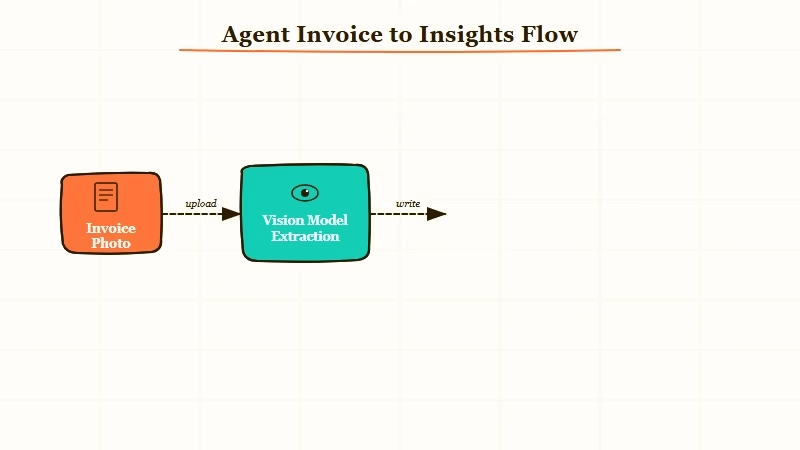
There are five concrete jobs the agent handles, and from my experience the value is in keeping each one boring and explicit rather than chaining a single mega-prompt:
- Accept an upload. A simple dashboard input that takes a photo, screenshot, or PDF.
- Extract structured fields. A vision model returns vendor, date, amount, category, and invoice number as JSON.
- Append to Google Sheets. The same row schema every time, with no third-party database in the middle.
- Run a weekly cron. Read the sheet, compute totals, top vendors, and category spend.
- Send the insights report. AI-written summary plus a couple of cost-saving suggestions, delivered to Slack and Telegram.
The pattern matters because each step is independently testable. When something drifts, and it will, you can fix the one node that broke without rewriting the chain.
If you are coming from a manual approach to back-office automation, automating service-firm work covers when AI agents are the right call versus deterministic plumbing.
How to Build It in Two Minutes
The fastest path is a no-code template that pre-wires the dashboard, vision call, Google Sheets writer, and Slack output. I would stop trying to hand-roll this and just clone the workflow.
What I would walk you through is the lowest-friction setup, not the most sophisticated one. The version that breaks the least is the one with the fewest moving parts, and most teams end up adding complexity later only when a real failure mode demands it.
Here is the sequence I followed:
- Pick the orchestration layer. Make.com is the path I would default to for this kind of cross-tool plumbing. It handles the file upload trigger, vision call, Sheets append, and Slack output natively, and the visual canvas makes the whole agent inspectable.
- Wire the vision extraction. Use any modern vision-capable model (Claude, GPT, Gemini all work). The prompt should ask for a strict JSON object with the five fields, and nothing else.
- Schema-lock the Google Sheet. Set up the sheet headers first:
vendor | date | amount | category | invoice_number | confidence. Theconfidencecolumn is what unlocks the human-in-the-loop step later. - Add the cron. Trigger every Monday morning, read the sheet, send the rows to a summarisation prompt, and post the output to Slack and Telegram.
- Add a low-confidence review step. When
confidence < 0.8, route the row to a Slack thread for human approval before it lands in the master sheet.
The whole thing took me 90 seconds to clone and another 5 minutes to point at the right Sheet and Slack channel. It is not the kind of build that needs a sprint.
Vague: “Extract data from this invoice.”
Specific: “Read this invoice image. Return ONLY a JSON object with these exact keys: vendor (string, the company that issued the invoice), date (YYYY-MM-DD), amount (number, the total in the invoice currency), category (string, one of: software, travel, office, marketing, other), invoice_number (string), confidence (number, 0.0 to 1.0, how confident you are in the extracted vendor and amount). Do not return any other text.”
The specific version is what gets you reliable structured output. The vague one wastes tokens parsing freeform replies.
| Component | What I’d use | Why |
|---|---|---|
| Orchestration | Make.com | Native Sheets, Slack, vision-model nodes, visual canvas |
| Vision model | Claude or GPT-5.5 | Strong structured-output adherence on invoice layouts |
| Storage | Google Sheets | The owner controls it, no DB to maintain, easy to inspect |
| Reporting trigger | Make.com cron | One scheduler for the whole pipeline |
| Delivery | Slack and Telegram | Two channels means you actually read it |
The reason I avoid third-party databases for this is friction. The owner of the business needs to be able to open the data and look at it without asking me, and a Google Sheet is the cheapest way to make that real.
If you want a deeper take on the cost trade-offs, cutting AI agent API costs covers the 90/10 rule that applies here too.
Where the Pipeline Falls Down
Handwritten receipts and unusual invoice layouts are where the vision model misfires most often, and silent misclassification on amounts is the most expensive failure mode.
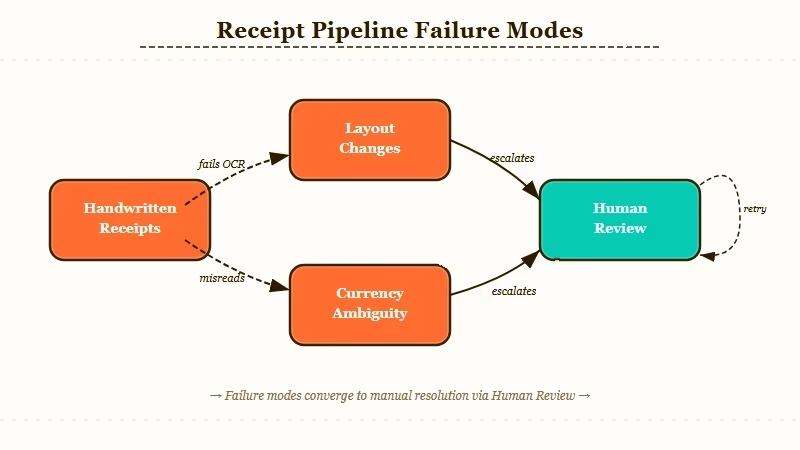
From my experience, the real risk is not the obvious failure where the model returns garbage and you notice. The dangerous failure is when the model returns a confident-looking row with the wrong amount or the wrong category, and it sits in the sheet for three months until someone reconciles against the bank statement.
Three failure modes I would plan for explicitly:
- Handwritten receipts. OCR drift on cursive amounts, fading thermal-paper print, and angled photos all cause silent misreads. The fix is the confidence-gated review step, not better prompts.
- Layout changes from the same vendor. A vendor switches their invoice template and the extraction starts grabbing the wrong field. Without the human-in-the-loop on low-confidence rows, this can run for weeks.
- Currency and decimal-format ambiguity. Comma-as-decimal vs. period-as-decimal across locales is the single most common source of wrong totals I have seen in this kind of pipeline. Lock the locale in the prompt, never trust the inference.
The Stanford AI Index 2024 reports that AI agent reliability improvements were a major theme of the year, with the agent benchmark data showing how much accuracy improves when human review is introduced for low-confidence cases. That mirrors what I saw in production: full automation is brittle, the lightweight review pass is what stabilises it.
If you want to dig into the broader pattern of how to keep agent costs and failures down once a pipeline like this is running, silent agent tool-call errors covers the rules that apply directly.
Frequently Asked Questions
How much does this AI agent cost to run?
Running the full pipeline costs around 5 to 15 USD per month for a small business processing 100 to 300 invoices. The vision model calls are the largest line item, the orchestration is on a free or starter Make.com tier, and Google Sheets is free. Slack and Telegram delivery cost nothing.
Can I build this without Make.com?
Yes. n8n, Zapier, or a hand-rolled Python script all work. I default to Make.com because the visual canvas makes the agent inspectable for a non-technical business owner. If you have engineering capacity, a Python script with a cron is cheaper at scale.
Which vision model handles invoices best?
Claude and GPT-5.5 both perform well on standard typed invoices. From my experience, Claude has slightly better structured-output adherence and GPT-5.5 is faster on bulk batches. Either is fine; pick the one your stack already uses.
How do I handle handwritten receipts?
Route low-confidence rows (where the vision model self-reports under 0.8 confidence) to a Slack thread for human approval. Do not try to fix this with better prompts; the model honestly cannot read most cursive cleanly, and the lightweight review step is faster than chasing edge cases.
Does this work for non-USD invoices?
Yes, but you must lock the locale in the extraction prompt. Specify the expected currency and decimal format explicitly. Mixed-locale processing is the single most common source of wrong totals in this kind of pipeline.
Can I extend this to expense reimbursement?
Yes. The same row schema feeds straight into a reimbursement workflow with one additional column for employee email and approval status. The hardest part is policy logic (per-diem caps, category eligibility), not the extraction itself.
