
Quick Answer: The best Character AI model for most free users in 2026 is Roar. Goro is better for emotional roleplay when available. Nyan, the paid CAI+ model, consistently scores below both free options in head-to-head community tests. If you are paying $9.99/month hoping for better AI quality, you are likely getting less than the free tier gives you.
Character AI runs six different AI models behind the scenes, and most users pick them by accident, or not at all.
The platform calls them “chat styles,” and the way I see it, Character AI’s biggest secret right now is that the paid subscription model (Nyan) regularly gets outscored by two free alternatives in back-to-back comparison tests.
That finding keeps surfacing in community discussions, and the more I dig into it, the more it holds up.
If you have been wondering why your CAI+ subscription does not feel like an upgrade, the model you are on might be why.
This guide breaks down every Character AI model in 2026, what each one does in practice, and which one to use depending on what you need.
What Character AI Models Are and How They Work
Character AI models are named AI configurations, meaning distinct versions of the platform’s underlying language model, each tuned for a specific writing style, response length, and character consistency. They are not fully separate AI systems.
Internally, Character AI calls them “chat styles.” Character AI confirmed on their official blog that they build these models by fine-tuning open-source architectures through a proprietary training pipeline.
Community network analysis further revealed that the newer models (PipSqueak and DeepSqueak) run on a model family called DEEPSYNTH, with PipSqueak using DEEPSYNTH_LITE and DeepSqueak using the full version.
Older models like Roar and Nyan run on separate configurations with different defaults for tone and length.
What matters in practice is that each style produces noticeably different output from the same character. A scene that feels sharp and tense on Roar reads as soft and dreamy on Nyan.
Switching models is one of the most underused tools on the platform, and for most users it is genuinely worth doing.
The current lineup includes: Meow, Roar, Nyan, Goro, Dynamic, PipSqueak, and DeepSqueak. Not all of them are available to every account.
Availability depends on A/B testing rollouts, subscription tier, and occasionally regional access. More on that below.
Every Character AI Model Ranked in 2026
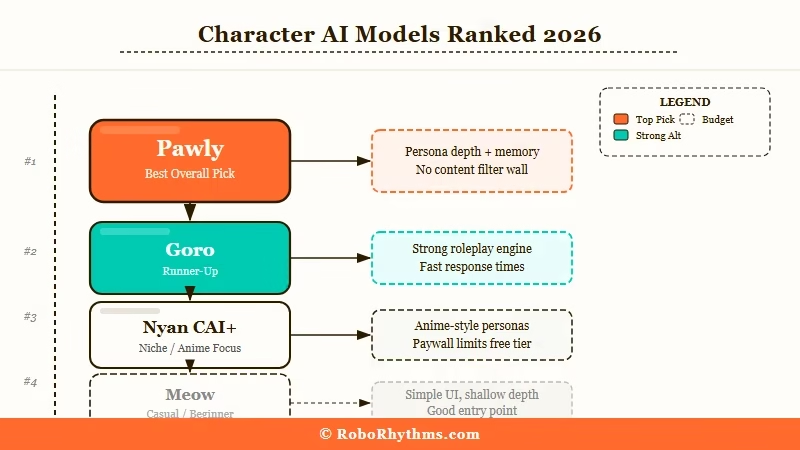
The best Character AI models for most users in 2026 are Goro and Roar, both free. The paid models Nyan and Dynamic rank below them in community testing.
A community member ran a structured test across all six models using the same roleplay scenario on a CAI+ account. Here are the results:
| Model | Access Tier | Test Score | Best For |
|---|---|---|---|
| Pawly | Beta only (inaccessible to most) | 9/10 | Best overall, but most users never had access |
| Goro | Free | 7.5/10 | Emotional depth, romance, long sessions |
| Roar | Free | 7/10 | Speed, sharp dialogue, conflict scenes |
| Nyan | CAI+ paid ($9.99/month) | 6/10 | Casual wholesome chat, simple exchanges |
| Dynamic | CAI+ paid | 5.5/10 | Short sessions only (response quality degrades fast) |
| Meow | Free | 4.5/10 | Fast responses only, lowest quality overall |
Pawly is technically the highest-rated model, but most users never got access to it. It was a limited beta that only appeared on a random slice of accounts, and even some paying CAI+ subscribers could not get it.
The frustration this caused in the community was significant.
For practical purposes, the ranking that matters is: Goro first, Roar if Goro is not available to you.
One notable data point from the testing: the community member who ran the structured comparison noted that Goro was best for romantic scenarios because “I can switch to romance when I want and the character follows suit, but it does not fall in love with my character within the first two sentences.”
That is exactly the kind of nuanced pacing Nyan tends to miss.
The Paid Nyan Model Underperforms Free Roar
Nyan underperforms Roar in roleplay quality despite being the paid CAI+ model, because it is tuned for a wholesome, conflict-averse writing style that weakens tense or dramatic scenes.
From what I keep seeing in community feedback, the issue is not that Nyan is broken. It was designed for casual, feel-good interaction.
It writes in a “wholesome and poetic” style that sounds pleasant in isolation but breaks down when you need the character to hold tension or respond sharply.
The specific problem users report: Nyan “speaks for the persona too often.” It will write lines for your character unprompted, inserting actions or dialogue that you did not initiate. It also softens conflict.
Send a message that starts an argument, and Nyan tends to deflect the scene toward resolution rather than letting the tension play out.
One comment that stuck with me from a community thread: “It’s really not worth it right now to pay for nothing. The memory is just slightly better and the auto memories do not work very well. The bot does not even use that information.”
Example scenario: You open a confrontational scene by writing a sharp message to the character. On Roar, the character fires back with matching energy. On Nyan, the character softens the exchange, and your persona “sighs quietly,” a line you never wrote.
Roar handles conflict better and maintains character voice under pressure.
That is why community testing consistently places it above the paid alternative, and why Character AI’s short response problem is more noticeable on Nyan than any other model.
PipSqueak and DeepSqueak Explained
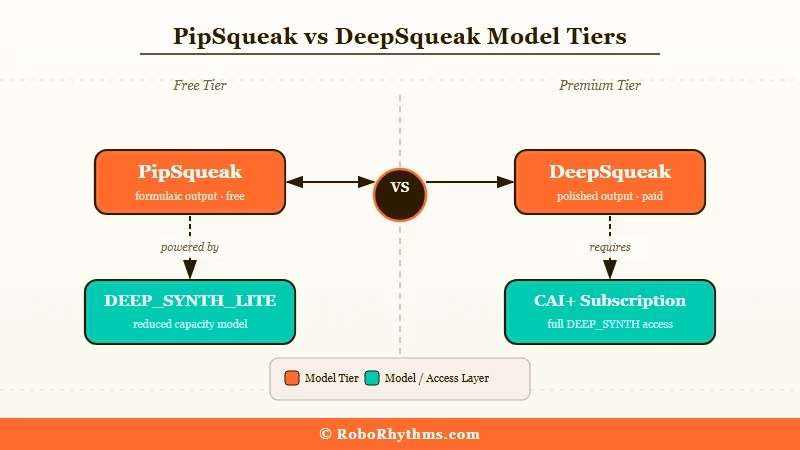
PipSqueak is Character AI’s newer free model style, and DeepSqueak is the premium counterpart. Both belong to the DEEP_SYNTH model family, with PipSqueak as the lite version and DeepSqueak as the full-quality build.
Internal network analysis from the community identified the model tags: PipSqueak runs DEEPSYNTHLITE, while DeepSqueak runs full DEEP_SYNTH.
In practice, PipSqueak gives longer responses than Roar but introduces stylistic quirks that many users find grating. DeepSqueak produces the highest-quality output on the platform when it is available.
The PipSqueak problem is its writing tics. It compulsively inserts pause beats like “A beat.” and “A pause.” into scenes. It writes in what users call “purple prose,” flowery, over-embellished sentences that feel more like a young-adult novel than actual dialogue.
It also ignores muted words more often than other models.
Here is how the same prompt plays out differently across models:
On Roar: “He does not answer. Just stares.” On PipSqueak: “A beat. He meets your eyes, and in that quiet, something shifts, a pause, a breath held too long, something unspoken threading between you like a frayed ribbon.”
Both are responding to the same message. Roar’s version is easier to build on.
DeepSqueak is a different story. Users with CAI+ who switch from Nyan to DeepSqueak report a noticeable upgrade, with better pacing, stronger character consistency across long sessions, and fewer instances of the AI writing out-of-character actions.
| Chat Style | Model Tag | Access Level | Best Use Case |
|---|---|---|---|
| DeepSqueak | DEEP_SYNTH | CAI+ subscribers | Long-form roleplay, complex narratives |
| PipSqueak | DEEPSYNTHLITE | Free users | Immersive casual chat, shorter sessions |
| Roar | Legacy | Free users | Fast, sharp responses, conflict and tension |
| Nyan | CAI+ legacy | CAI+ subscribers | Casual wholesome exchanges |
If you have CAI+, switching from Nyan to DeepSqueak is worth trying. Nyan came first in the CAI+ lineup, and DeepSqueak appears to have been built to address the quality complaints that accumulated around it.
How to Switch Your Character AI Model
Switching Character AI models takes under 30 seconds and is done directly inside a chat window. Most users never find this setting on their own.
Here is how to do it:
- Open any existing chat or start a new one
- Tap the gray profile avatar icon in the lower-left corner of the chat screen
- Select “Chat Style” from the settings menu
- Choose your preferred model (Roar, PipSqueak, DeepSqueak, or whatever is available to your account)
- Toggle “Use for all new chats” if you want this as your default going forward
- Tap Save, then start a fresh message
Starting a new message after switching gives you the cleanest results. Changing the style mid-conversation can produce inconsistent output for a few turns before the model settles in.
If responses go short or repetitive during peak hours, there is a trick the community calls the “Global Edit” method.
Star the last high-quality response you got, click the pencil (edit) icon, and add a style instruction in brackets such as `[Respond with detailed roleplay narration and dialogue]` before sending.
This pushes the model back into quality mode without restarting the whole chat.
The quality drop during peak hours is real, by the way. Users have observed that responses get longer and more creative late at night when server load is lower.
Character AI’s infrastructure switches to lower-tier inference layers during heavy traffic, which explains why the same character can feel sharp in the morning and sluggish in the afternoon. It is a server load issue, not a setting you can fix.
The Character AI short responses problem has a full breakdown if you want more detail on what causes it.
When No Character AI Model Is Good Enough
If you have cycled through every Character AI model and still find quality inconsistent, the platform’s content filter is likely the root issue rather than the model.
Every Character AI chat style runs under the same platform-wide filter. No model switch bypasses it.
A September 2025 update caused a noticeable quality regression across all models, with bots starting to repeat phrases, forget context, and show inconsistent personalities.
Character AI also logged a memory bug on December 24, 2025 where bots temporarily lost conversation history entirely.
The structural problem is that Character AI optimizes its models for a broad, general-audience product. The filters and content policies apply at a platform level, not a model level.
Users who want deeper character immersion, specific mature themes, or just fewer filter interruptions hit a ceiling regardless of which chat style they pick.
In my experience, the platforms that solve this most cleanly are Candy AI and Nectar AI.
Candy AI runs a character memory system that holds context across sessions significantly better than Character AI’s current setup, and it does not apply the same platform-level content restrictions.
Nectar AI focuses on companion customization and gives users control over character personality in ways that Character AI’s model system does not.
Neither platform has Character AI’s public character library, and that is a real tradeoff.
But if the quality ceiling is frustrating you, browsing Character AI alternatives gives you a full breakdown of what each platform does differently.
Frequently Asked Questions
What is the best Character AI model for roleplay in 2026?
For free users, Roar is the most consistent pick for roleplay. It handles conflict and tension better than the paid Nyan model and stays in character more reliably. Goro outperforms Roar for emotional depth and longer sessions, but it is not available on all accounts.
Is CAI+ worth it for better AI quality?
Not for model quality alone. Community testing consistently places the free Roar model above Nyan, the flagship paid model. CAI+ is worth paying for if you want faster response speeds and no message queue, not for a better AI experience.
What is the difference between PipSqueak and DeepSqueak?
PipSqueak (DEEPSYNTHLITE) is the free version of the newer model family, offering longer responses than Roar but with formulaic writing tics. DeepSqueak (DEEP_SYNTH) is the paid premium version with higher output quality and better character consistency for long sessions.
Why do Character AI responses suddenly get short or repetitive?
This happens when Character AI’s servers switch to a lower-tier inference layer during peak traffic. It is not permanent, and quality typically returns late at night when load drops. The “Global Edit” method (starring a good response and adding style hints in brackets) can restore quality within a session.
Does switching to a different model remove Character AI’s content filter?
No. All Character AI models run under the same platform-wide content filter. No chat style change unlocks additional content or bypasses any safety restrictions.
Why can’t I see some models in my app?
Character AI rolls out new models in stages via A/B testing, and access depends on your account’s testing group and region. Some styles appear on the web version before mobile. CAI+ subscribers sometimes get earlier access, but not always, as the Pawly beta notably excluded many paying subscribers.
