
Bottom Line: There is no single best AI face swap app, only the best one for your footage. Magic Hour and Supawork lead for clean video swaps, HeyGen wins for talking-head avatars, and HitPaw covers photo work and cleanup. Match the tool to the job and check the consent rules before you publish anything.
Most “best AI face swap” lists rank tools by how slick the marketing page looks. That is the wrong test. The tool that nails a front-facing photo swap can fall apart the second your subject turns their head or puts on sunglasses.
From my testing, the right pick depends almost entirely on two things: whether you are swapping a photo or a video, and how cooperative your source footage is. A meme on a still image is a solved problem. A dancing clip with fast head turns is where most apps quietly break.
This guide ranks the tools that hold up, by the job you are doing. You will get real pricing, the watermark traps, where each one fails, and the one section every face swap article skips: the consent and disclosure rules that can land you with real legal exposure in 2026.
None of this works without source footage that cooperates, so I will show you how to pick that too.
What Separates a Good AI Face Swap App From a Bad One
A good AI face swap app holds the face steady across video frames, handles off-angle shots, blends lighting cleanly, and tells you upfront about watermarks and resolution caps. The cheap ones fail on motion.
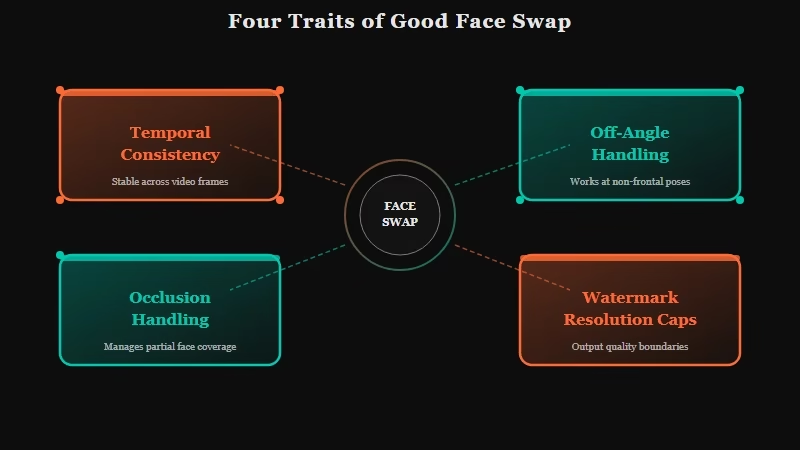
The gap between tools shows up in video, not photos. Almost anything can paste a face onto a still image. Holding that face stable across 30 frames a second without flicker is the hard part, and it is where budget tools fall apart.
Here is what I weigh before recommending any of them, in order of how much it matters:
- Temporal consistency, meaning the face stays locked across frames instead of jittering or sliding.
- Off-angle handling, since quality drops fast past 45 degrees from front-facing.
- Occlusion handling for glasses, hair, and hands crossing the face.
- Watermark and resolution caps on the free tier, which decide if the output is usable.
- Speed, because a one-minute clip should not take 40 minutes to render.
Most “top 10” lists ignore the first three and rank on price. From my testing, that is backwards.
A free swap that flickers is worth less than a paid one that holds. The same logic applies across the best AI video generators, where stability beats raw feature count every time.
The Best AI Face Swap Apps for Video and Photo
Magic Hour and Supawork are the strongest all-around video face swap tools, HeyGen leads for talking-head avatar video, HitPaw is the best all-in-one photo and cleanup suite, and DeepFaceLab wins on raw quality if you can handle the learning curve.
No tool wins everything, so the honest answer is a short list sorted by job. Here is how the main contenders compare on the things that decide the output.
| Tool | Best for | Free tier | Starting price |
|---|---|---|---|
| Magic Hour | Real video and photo blending | 400 non-expiring credits, no watermark | about $10/mo annual |
| Supawork | Long clips and side angles | 3 to 4 swaps daily, no watermark | budget tier |
| HeyGen | Talking-head avatar video | 3 watermarked videos monthly | $29/mo |
| HitPaw | Photo swaps and cleanup | limited free exports | mid-range |
| DeepFaceLab | Pro VFX raw quality | free, open source | free |
| Reface | Viral mobile memes | watermarked, ad-supported | about $7.58/mo annual |
Magic Hour is where I would start most people doing real video work. It blends motion footage cleanly, ships 400 non-expiring free credits, and skips the watermark even on the free tier, which is rare. Supawork is the one I reach for on tricky angles, since it claims a 95% success rate on side-face swaps and renders in roughly 10 seconds.
HeyGen is a different category. It is built for talking-head avatar videos and presenter localization rather than dropping a face into existing footage, so it is the pick when you want a synthetic spokesperson reading a script.
Watch the credit math, though: its premium Avatar IV tier burns 20 credits per minute, so the $29 Creator plan covers only about ten minutes of top-tier video. The full breakdown lives in our HeyGen review.
HitPaw earns its spot as the all-in-one suite. It handles photo swaps, batch processing, and the cleanup work other tools create, including watermark removal across three repair modes. For creators who want one editor instead of five browser tabs, it is the practical choice.
DeepFaceLab sits at the other extreme: free, open source, and rated highest for raw realism, but it needs a strong local GPU and hours of model training, so it is for VFX hobbyists, not quick jobs.
Which AI Face Swap App Should You Use
Use Magic Hour or Supawork for clean video swaps, HeyGen for avatar presenter videos, HitPaw for photo work and cleanup, Reface for quick phone memes, and DeepFaceLab only if you want studio-grade output and have the hardware.
The fastest way to pick is to match the tool to your footage, not your budget. Most failed swaps trace back to bad source material, not a bad app.
Before: a source clip where the subject turns past 70 degrees, wears sunglasses, and stands in patchy, mixed lighting.
After: a front-facing clip within 45 degrees of the camera, even lighting, and nothing crossing the face. The second clip will swap cleanly on almost any tool on this list, while the first will struggle on all of them.
The way I see it, that footage choice matters more than which app you pay for. Get the source right and a mid-tier tool looks great.
Get it wrong and even DeepFaceLab will fight you. If you are repurposing swaps into social posts, our AI Instagram content guide covers what formats land.
Where AI Face Swap Still Breaks Down
AI face swap still breaks on fast motion, profile angles past 45 to 70 degrees, and occlusion from glasses, hair, or hands. Video flicker and identity drift are the most common giveaways in 2026.
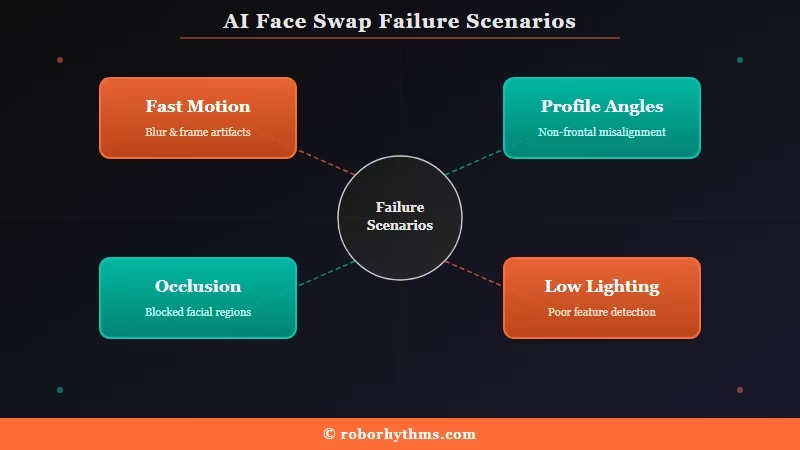
Even the best tools have a ceiling, and knowing it saves you a wasted afternoon. Temporal flicker is still the hardest problem in video, where the face can jitter or pop between frames without heavy smoothing.
Profile angles are the next wall. Quality drops sharply past 45 degrees from front-facing, and some tools give up entirely beyond 70. Sunglasses, hats, and hair sweeping across the face all create the same uncanny seam where the swap meets the real head.
What surprised me most is how badly rapid motion still trips these models. A calm interview clip swaps beautifully, but a dance video with quick head turns will show the face sliding off the head. If your goal is spotting these tells in other people’s videos, our take on deepfake detection is worth a read.
The Consent and Disclosure Rules You Cannot Skip
Face swapping a real person without consent can carry serious legal and platform consequences in 2026. Always get permission, and label synthetic content where TikTok, YouTube, and the EU now require it.
This is the section most roundups skip, and it is the one that can genuinely cost you. Swapping your own face, a licensed model, or a consenting friend is fine. Using someone’s likeness without permission is where it turns into real exposure.
The laws caught up in 2025 and 2026. The U.S. DEFIANCE Act created a federal civil claim for non-consensual intimate deepfakes, with damages of $150,000, or $250,000 in aggravated cases. The EU AI Act’s Article 50 requires that manipulated video be labeled as artificially generated, with the transparency rules applying from August 2026 and fines reaching 6% of global revenue.
Platforms moved too. TikTok and YouTube now require creators to disclose realistic synthetic media, while X leans on Community Notes instead of automated labels.
My rule is simple: get explicit permission before you use anyone’s face, and add a clear “AI-generated” label whenever a casual viewer might mistake the clip for real. That habit keeps you clear of both the law and a platform strike.
Frequently Asked Questions
Which AI face swap tool is best?
There is no single winner. Magic Hour and Supawork lead for real video swaps, HeyGen for avatar presenter videos, HitPaw for photo work, and DeepFaceLab for raw quality if you have the hardware. Match the tool to your footage and use case.
Is AI face swapping free?
Many tools offer free tiers. Magic Hour gives 400 non-expiring credits with no watermark, and DeepFaceLab is fully free but technical. HeyGen and Reface limit free use with watermarks, so check the cap before committing.
Do AI face swap tools add watermarks?
Most free plans do. Magic Hour and Supawork are notable for watermark-free output even on free tiers, while HeyGen and Reface stamp free exports. Always test the free output before you build a workflow around it.
Is AI face swapping legal?
It is legal for personal, licensed, or consenting use. It becomes illegal for fraud, impersonation, or non-consensual intimate content. The DEFIANCE Act and EU AI Act both target deceptive or harmful synthetic media with real penalties.
Do you need consent to swap someone’s face?
Yes. You should get explicit, informed permission before using anyone’s likeness. Non-consensual use can violate right-of-publicity rules and platform policies on TikTok, YouTube, and Meta, and may trigger civil liability.
How realistic is video face swap in 2026?
The best tools reach near-Hollywood realism on cooperative footage. Quality still drops on fast motion, profile angles, and occlusion. A calm front-facing clip can fool casual viewers, while a dance video usually shows seams.
Quick Takeaways
- There is no single best app; Magic Hour and Supawork lead video, HeyGen wins avatars, HitPaw covers photos and cleanup.
- Source footage decides the result more than price, so shoot front-facing, evenly lit, and free of glasses or hair across the face.
- Free tiers vary wildly on watermarks and caps; Magic Hour and Supawork skip watermarks where most tools do not.
- Get consent before using anyone’s face, and label synthetic clips where TikTok, YouTube, and the EU now require it.
