
Bottom Line: Sintra AI is the best AI employee platform for content-heavy solopreneurs, Lindy wins on multi-channel workflows, and most buyers overpay for enterprise tiers they do not need. Read the full ranking before subscribing.
The AI employees marketing wave is louder than the product under the hood. Most buyers land on a Sintra or Lindy pricing page convinced they are replacing a hire, sign up, then spend three weeks wiring it up and wondering where the autonomy went.
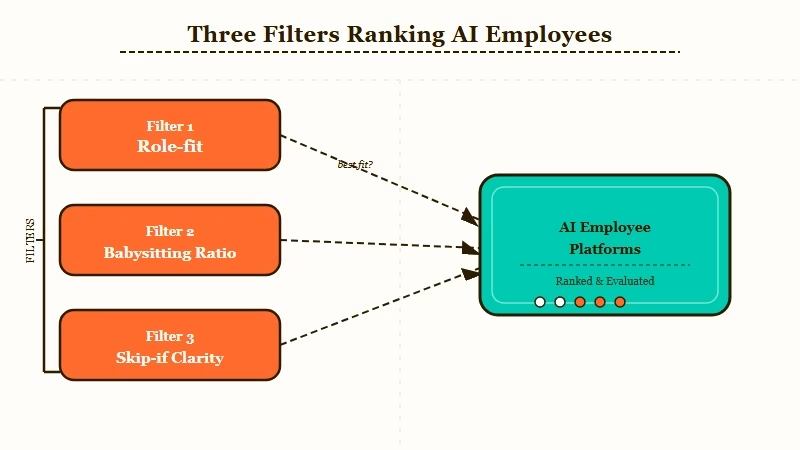
So I ranked the 8 AI employee platforms worth paying for in 2026, using three filters most roundups skip.
Role-fit: what portion of one specific human job does this tool credibly replace? Babysitting ratio: how much review does the output still need? And an explicit “skip if” for every tool so you know when to walk away.
My headline picks, before we get into the ranking. If you are a content-heavy solo operator, Sintra is the fastest way to real time savings.
If your bottleneck is email and scheduling, Lindy is the honest answer. If your bottleneck is neither, you probably do not need an AI employee yet, and the last section in this article explains why.
Two out of eight fit a true solopreneur budget. One is the fastest way to waste $200 on an enterprise tier you will never fully use. The rest are sharp at one specific job and bad at everything else.
What Counts as an AI Employee
An AI employee is a role-specific AI system that runs multi-step work on its own, stores your context between sessions, and talks to the tools you already use, unlike a plain AI assistant that answers one question at a time.
What is an AI employee: A role-branded AI platform that handles repeating business jobs (SEO, outreach, scheduling) with shared brand context and tool access, not just one-off answers.
The term has become marketing shorthand for anything more ambitious than a chatbot, which is why the category looks bigger than it is.
From what I’ve seen, most AI employees sold in 2026 are really one of three things: a persona wrapper around a general model, a workflow-automation platform with an agent layer added on top, or a point tool (calendar, support desk, sales outreach) rebranded as a role.
The distinction that matters to buyers. Does this thing run work on its own, or do I still need to copy outputs between chats? Sintra’s Helpers are persona wrappers tied together by Brain AI.
Lindy’s Lindies are agents that run cross-tool workflows. Marblism sits closer to Sintra, Motion and Reclaim are point tools with agent framing, and 11x is closer to Lindy on the autonomy side.
How I Ranked These AI Employees
I ranked each AI employee on three criteria: role-fit for a solopreneur job, babysitting ratio (hours of review needed per hour of AI output), and explicit skip-if scenarios, weighted toward the solo and small-team buyer.
From my testing, the tools that win on one criterion often fail another. Sintra has a great role roster but high babysitting.
Lindy has lower babysitting but steeper setup. Motion and Reclaim win on their specific job and miss everything outside it.
Three filters I used that most roundups skip:
- Role-fit score: what portion of one specific human job does this tool credibly replace. If the answer is under 40 percent, it is not an employee, it is an assistant.
- Babysitting ratio: how many minutes of human review does an hour of output require. Below 15 minutes per hour of output, it is close to autonomous. Above 30, it is a content machine with a supervisor.
- Skip-if clarity: can I write a one-sentence reason for who should absolutely not buy this tool. If the vendor cannot answer that honestly, the positioning is too soft.
Real-world setup is slower than marketing suggests. A reliably performing AI employee takes one to three weeks of setup, not minutes, because the knowledge base is usually the bottleneck, not the configuration. Plan for that before you subscribe.
The 8 Best AI Employees Right Now
The top 8 AI employee platforms are Sintra AI, Lindy, 11x.ai, Marblism, Reclaim.ai, Motion, Saner.ai, and Ada, ranked by fit for solopreneurs and small teams running real work.
Before the deep-dive, here is the headline comparison:
| Platform | Price | Best job | Skip if |
|---|---|---|---|
| Sintra AI | $47 to $97/mo | Content, SEO, marketing for solo operators | You need deep CRM or workflow connections |
| Lindy | Free to $199.99/mo | Inbox triage, scheduling, cross-tool workflows | You want pre-built personas out of the box |
| 11x.ai | Enterprise (mid 4 figures/yr) | B2B outbound sales at real volume | You are solo or a small team |
| Marblism | $9 to $49/mo | Cheaper entry into the Helpers concept | You need a specific Helper role not in the roster |
| Reclaim.ai | $10 to $24/mo | Calendar chaos and priority scheduling | Your bottleneck is content or outreach |
| Motion | $19 to $34/mo | Calendar plus task sequencing in one view | You already pay for Reclaim |
| Saner.ai | $19/mo | Executive-function support for ADHD operators | You do not want an AI that nudges you |
| Ada | Enterprise (quote-based) | Customer support at 50+ tickets/day | You have fewer than 50 employees |
From my testing, the list reshuffles depending on what you need to automate. Below is each tool in the order a solopreneur should evaluate them.
1. Sintra AI (Editor’s Pick)
What it is: 12 role-specific Helpers with a shared context layer called Brain AI. Best for content, SEO, and marketing-heavy solo operators.
Pricing: $47 to $97 per month. Every plan ships with 250 credits, which is the ceiling most reviews do not surface.
Role-fit: 70 percent of a fractional content marketer’s job. Babysitting ratio: 20 minutes per hour of output. Skip if: you need deep CRM or n8n-style workflow connections, or you will burn past 250 credits each month.
Sintra is the most complete employee platform if your bottleneck is content plus support plus email, and the job is structured enough to fit a recurring workflow. For the full breakdown, see my Sintra review.
You can lock in Sintra’s starter plan if your use case matches.
2. Lindy
What it is: An AI workflow builder with specialised agents called Lindies that run multi-channel work across email, phone, and document tools.
Pricing: Free tier (400 credits), $49.99 Pro, $199.99 Business.
Role-fit: 60 percent of a virtual assistant’s job once workflows are defined. Babysitting ratio: 15 to 25 minutes per hour once setup stabilises. Skip if: you want pre-built personas out of the box. Lindy rewards operators who know exactly what they want automated.
From my testing, Lindy is the strongest pick when your bottleneck is inbox triage, meeting scheduling, or outbound follow-ups. The agent-builder learning curve is real, but so is the payoff.
3. 11x.ai
What it is: Named digital workers for sales. Alice handles outbound, Jordan handles inbound, Mike does prospecting. Targets B2B revenue teams.
Pricing: Enterprise contracts, typically mid four figures annually at the low end.
Role-fit: 80 percent of an SDR’s job for defined outbound motions. Babysitting ratio: 10 to 20 minutes per hour once scripts and ICP are dialled. Skip if: you are a solopreneur. 11x is a sales-team tool priced for teams.
From what I’ve seen, 11x earns its price only once you have at least two existing SDRs to free up. Solo operators will not get to break-even on the contract minimum.
4. Marblism
What it is: A cheaper Sintra-style Helper platform with a smaller roster focused on copywriting, ops, and research.
Pricing: $9 to $49 per month.
Role-fit: 40 to 50 percent of a junior marketing coordinator’s job. Babysitting ratio: 25 to 35 minutes per hour. Skip if: you need a specific Helper that Marblism does not have. The roster is intentionally lean.
What I’d use Marblism for is a beginner on a tight budget who wants to feel out the Helpers concept before committing to Sintra.
5. Reclaim.ai
What it is: A calendar-first AI employee that schedules habits, tasks, and meetings around your priorities.
Pricing: $10 to $24 per month.
Role-fit: 90 percent of a calendar-management junior EA’s job, 0 percent of anything else. Babysitting ratio: 5 to 10 minutes per hour. Skip if: your bottleneck is content or outreach, not time. Reclaim does one job extremely well and does not pretend to do anything else.
Reclaim is a paid affiliate program I am pursuing, which does not change the recommendation here. If your week gets eaten by calendar chaos, this is the cheapest win on the list.
6. Motion
What it is: Motion combines calendar, tasks, and AI project planning into one view.
Pricing: $19 to $34 per month.
Role-fit: 80 percent of a fractional operations manager’s job for solo teams. Babysitting ratio: 15 minutes per hour. Skip if: you already use Reclaim. The overlap is 70 percent, and the price difference rarely justifies both.
From what I’ve seen, Motion beats Reclaim for project-heavy operators who need task sequencing. Reclaim beats Motion for calendar-only use cases.
7. Saner.ai
What it is: An ADHD-focused AI assistant that ties email, notes, and tasks together with executive-function support.
Pricing: $19 per month.
Role-fit: 50 to 60 percent of a personal productivity coach’s job. Babysitting ratio: 10 to 15 minutes per hour. Skip if: you do not want an AI that nudges you throughout the day. Saner is opinionated about how you work, and that is the feature.
From what I’ve seen, Saner is the one tool on this list where the target buyer is a specific operator type rather than a specific job category. If the pitch resonates, the product delivers.
8. Ada
What it is: An enterprise customer-support AI that handles high-volume inbound queries across chat and voice channels.
Pricing: Enterprise, quote-based.
Role-fit: 70 percent of a tier-1 support agent’s job at scale. Babysitting ratio: 20 to 30 minutes per hour, dropping below 15 at maturity. Skip if: your company has fewer than 50 employees. Ada is built for the buyer who already has a support team and needs to scale ticket handling.
Ada is on this list for contrast. If you are solo, it is the wrong tool. If you run a support operation at scale, it is the best-in-class pick.
How to Choose an AI Employee Without Overpaying
Pick an AI employee by matching your biggest time drain to the tool designed for that specific job, not by the one with the most marketing reach.
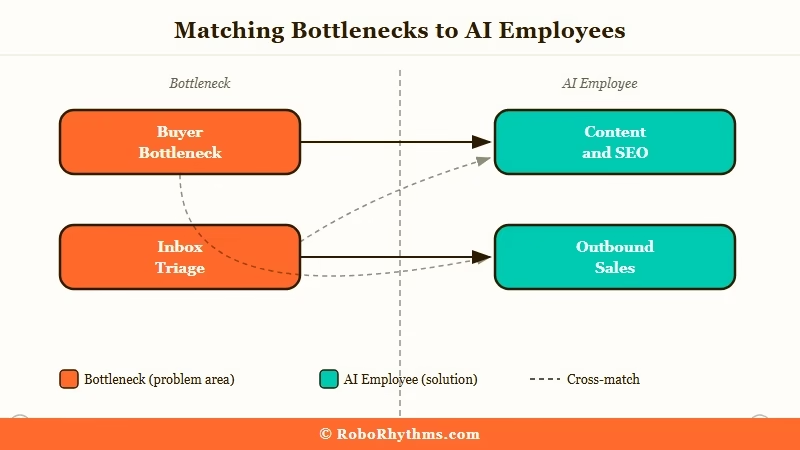
From my testing, most buyers get this backwards. They pick the platform that sounds most impressive in demos and then try to wedge it into their workflow. The better move is to start with the bottleneck and work outward.
| Your bottleneck | The AI employee to start with | Expected setup |
|---|---|---|
| Content production and SEO | Sintra AI | 1 to 2 weeks |
| Inbox triage and scheduling | Lindy or Motion | 2 to 3 weeks |
| Calendar chaos, nothing else | Reclaim.ai | Under 1 week |
| Project planning and task sequencing | Motion | 1 week |
| ADHD or executive-function support | Saner.ai | 1 week |
| Outbound sales at scale | 11x.ai | 3 to 4 weeks |
| Customer support at real volume | Ada | 4 to 6 weeks |
| Trying the concept cheaply | Marblism | 1 week |
Example scenario: If you are a solo consultant who spends 4 hours per week on content, 6 hours on calendar triage, and 2 hours on support, Sintra plus Reclaim at roughly $60 per month total replaces about 8 of those 12 hours. Trying to do all three jobs with Lindy alone costs $49.99 per month but will take three weeks of agent-building before it outperforms two specialist tools.
One thing worth naming. Year-one total cost is usually 40 to 60 percent higher than the subscription price once you factor in setup hours, per TechCrunch AI coverage of the space. Budget for the setup time, not just the monthly fee.
Who Should Skip AI Employees Entirely
Skip AI employees if your workflow is non-recurring, your volume is under 5 hours per week, or you already have a custom ChatGPT or Claude setup tuned to your brand.
From what I’ve seen, the worst AI employee purchases are made by operators whose work is genuinely one-off. If you draft a new proposal every week but the format changes every time, no Helper beats a well-prompted ChatGPT session.
Three buyer profiles that should not subscribe yet:
- Under 5 hours per week of repeatable admin work. The setup cost outruns the time savings for at least 6 months.
- Operators who enjoy prompt engineering. A Claude Pro subscription plus a handful of custom agents you build yourself covers 80 percent of what Sintra or Lindy does at a fraction of the price.
- Anyone running a custom stack. If you have already wired up n8n or built an agent on an old phone, layering Sintra on top usually adds friction, not speed.
Wait for your admin load to hit 10+ hours per week before subscribing to any platform on this list. Before that, ChatGPT Teams plus a focused custom GPT will carry you further. I walked through a similar convenience-versus-cost calculation in my Chai Ultra review for anyone wanting to see the math in detail.
Frequently Asked Questions
What is the best AI employee for solopreneurs?
Sintra AI is the best AI employee platform for solopreneurs whose bottleneck is content, SEO, or marketing. Lindy is the better pick when email and scheduling dominate the workload. Anything under $30 per month is a point tool rather than a full employee.
Do AI employees work autonomously?
Mostly no. Most AI employees in 2026 run defined workflows with human review, not end-to-end autonomy. Reasoning degrades past 4 or 5 conditional branches, and most SMB-tier platforms do not retain persistent memory across weeks, which keeps human oversight in the loop.
How much does an AI employee really cost in the first year?
Budget $2,000 to $8,000 for your first year per workflow once you account for setup hours, knowledge base prep, and 1 to 3 weeks of tuning. The $49 monthly sticker is 40 to 60 percent of the true cost, not the whole number.
Which AI employee has the most tool connections?
Zapier AI Agents leads with over 7,000 pre-built tool connections. Lindy scales from 100+ on its free plan to 6,000+ on Pro. Sintra’s connected-tool list is the shortest of the mainstream options and is the biggest reason to consider alternatives for ops-heavy work.
Can I build my own AI employee with ChatGPT Teams?
Yes, and for many solopreneurs this is the cheapest path. ChatGPT Teams plus 3 or 4 custom GPTs with uploaded knowledge files replaces about 70 percent of what Sintra’s Helpers do, at roughly half the cost once you include setup labour.
How long does it take to set up an AI employee?
One to three weeks of real calendar time. The bottleneck is rarely the platform, it is gathering and structuring your own brand documents, workflows, and tone guidelines so the AI has something to work from. Plan for that before you subscribe.
