
The Verdict: The best AI animation generator depends on which tool category you really need. For narrative animation with consistent characters across long-form video, LongStories AI is the strongest pick. For browser-based 3D animation, Krikey AI leads. For cinematic generative shots post-Sora-shutdown, PixVerse V6 is the practical replacement. Template tools like Vyond and Animaker still serve quick explainer use cases, but they are not generative AI in the way the keyword implies.
When someone searches for an AI animation generator, the first page of results almost always serves them a listicle that mixes two completely different tool categories as if they were interchangeable. Animaker sits next to PixVerse, Vyond sits next to Wonder Studio, Powtoon sits next to LongStories AI.
The article never explains that one half of the list is template-based animation and the other half is true generative AI.
The way I see it, this is the single most expensive mistake a buyer can make in this category. Template tools and generative tools solve completely different problems, cost differently, and produce completely different output. Picking the wrong one wastes the subscription and produces video that does not match the brief.
This guide splits the AI animation generator category into the two tool types it really contains: template-based tools where AI accelerates pre-built asset customization, and true generative tools where AI creates animation from scratch.
Each section names the best pick, the honest tradeoffs, and the use cases each tool genuinely fits. The verdict at the end routes you to the right tool by job.
Why AI Animation Generator Hides Two Tool Categories
An AI animation generator is either a template-based tool that accelerates customization of pre-built assets, or a true generative tool that creates animation from scratch via AI models.
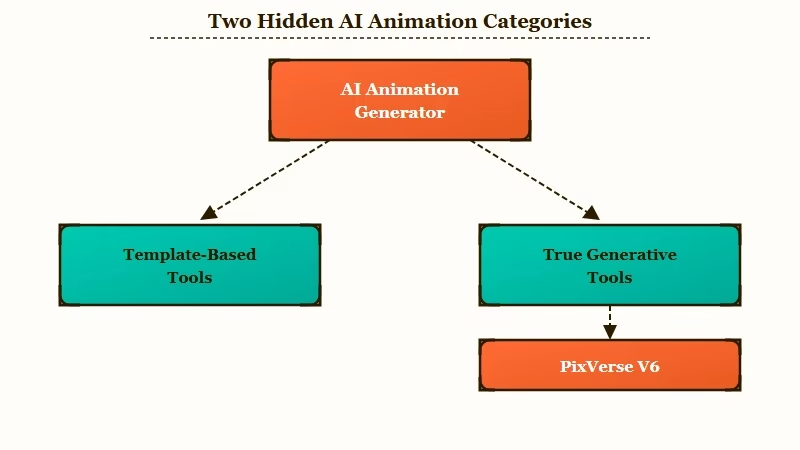
The phrase covers two structurally different products. Template-based tools like Animaker, Vyond, Powtoon, and Steve AI use pre-built character libraries, scene templates, and animation presets that AI helps you customize and assemble. The animation itself is not generative; AI accelerates the workflow.
True generative tools like Krikey AI, PixVerse V6, Wonder Studio, LongStories AI, and Veo 3.1 produce animation from text prompts or video uploads using AI models. The visual output is created by the model rather than assembled from a template library. The difference shows up immediately in output variety and in pricing structure.
In my experience, most creators who say “AI animation tools disappointed me” picked from the wrong category. A marketing manager who needs a quick explainer video will be frustrated by PixVerse V6’s 15-second clip cap.
A YouTube creator who wants a narrative animated series will be frustrated by Animaker’s template-bound output. The category match matters more than the tool match.
Best AI Animation Generator When You Need Template Speed
Vyond is the strongest template-based pick for teams with dedicated animators, while Animaker is the budget-friendly entry point and Steve AI fits quick script-to-video workflows.
Vyond leads the template-based category for one reason: the depth of character customization and scene-template variety. From my testing across the category, Vyond produces the best-looking output of any template tool when teams invest the time.
The catch is the time itself. Vyond requires 10 to 20 times the time commitment of document-to-video alternatives, even after the recent AI feature additions.
Vyond pricing starts at $49 per month, the highest entry point among template animation tools. The fit is for teams with dedicated animators or video producers who can spend the hours per video. For solo creators or marketing teams without animation specialists, Vyond is overkill.
Animaker is the gentler-learning-curve alternative at $24 per month. The auto-scene generation and voiceover features speed production for non-designers.
The honest tradeoff is template-dependent output where every Animaker video looks like it came from Animaker unless you invest significant customization time. For a single one-off explainer video, that tradeoff is acceptable.
Steve AI and Powtoon both sit at $20 per month, the lowest template-tool entry. Steve AI uses a script-to-video approach where pasted text generates matched visuals and transitions, which fits social media clips and quick internal communications.
Powtoon’s interface “feels like building a presentation” but the template library has not kept pace with modern design standards. The way I see it, Powtoon’s output looks dated next to newer tools.
Best AI Animation Generator for True Generative Output
LongStories AI is the strongest pick for narrative animation with character consistency across 10 to 15 minute videos, Krikey AI leads browser-based 3D, and PixVerse V6 is the post-Sora-shutdown cinematic-shot pick.
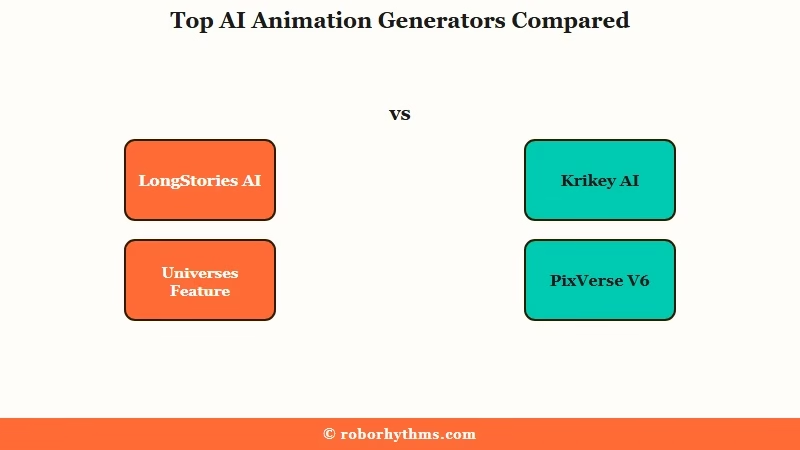
LongStories AI sits at the top of the generative category for narrative use cases. The Universes feature defines characters, visual style, voice, and world once, then references that frozen definition across every scene.
Academic research on video generative models documents character consistency as a persistent failure mode across the category, and Universes is the architectural fix. My LongStories AI review walks through the feature in detail.
Pricing on LongStories runs Free ($0, 30-second demo, 1 video lifetime), Pro ($59/mo, 10-min cap), Creator ($99/mo, API access), Creator Max ($199/mo, full 15-min cap), Studio ($299/mo, team workloads). For animated YouTube content with recurring characters, Pro at $59/mo covers a single full episode per month.
You can get started at LongStories AI.
Krikey AI is the browser-based 3D alternative. Founded in 2017 in San Francisco by sisters Jhanvi Shriram (CEO, ex-Google) and Dr. Ketaki Shriram (CTO, PhD from Stanford’s Virtual Human Interaction Lab), the platform supports text-to-animation, video-to-3D motion capture, and AI voice via ElevenLabs in 20+ languages.
The standout differentiator is FBX export for Unity and Unreal Engine workflows, making Krikey the only browser-based animation tool that integrates directly with game engine pipelines.
PixVerse V6 became the practical Sora 2 replacement after OpenAI shut down Sora 2 on March 24, 2026, citing compute costs and regulatory pressure. PixVerse V6 launched one week later (March 30, 2026) with 15 seconds at 1080p in a single pass, 20+ lens parameters, audio and motion in one generation, and a multi-shot engine that maintains shared world state across internal cuts.
Pricing runs around $4.80 per finished minute, roughly half of Veo 3.1 Fast at $9 per minute. The broader animated video generator comparison covers Runway Gen-4 documented 30-second character drift threshold and the full clip-tier landscape PixVerse competes in.
Wonder Studio rounds out the generative picks for VFX character replacement. Per The Ankler’s coverage, the platform lets filmmakers upload video of an actor, select a 3D character, and automatically replace the human with a CG model while tracking motion, lighting, and camera.
Wonder Dynamics is now owned by Autodesk (the company that powered both Avatar films), and the Russo Brothers publicly compared it to “what Industrial Light & Magic did for blockbusters.” For indie filmmakers, Wonder Studio is the closest to studio-grade VFX accessible from a laptop.
How Much These Tools Cost in 2026
Template tool entry pricing runs $20 to $49 per month, while generative tool pricing varies from free tiers to $4.80 to $9 per finished minute depending on output quality.
In my experience, monthly subscription comparison hides the real cost difference between the two categories. A template tool like Vyond at $49 per month is a flat cost, but the hidden cost is the 10-to-20x time commitment per video.
A generative tool like PixVerse V6 at $4.80 per minute is variable cost per output but the per-video time is dramatically lower.
Here is the side-by-side breakdown:
| Tool | Category | Entry tier | Premium tier | Key limit |
|---|---|---|---|---|
| Animaker | Template | Free / $24/mo | Enterprise tier | Template-dependent output |
| Vyond | Template | $49/mo | Enterprise | 10-20x time commitment per video |
| Powtoon | Template | $20/mo | Premium tier | Dated templates |
| Steve AI | Template | $20/mo | Higher tiers | Limited beyond social-clip use |
| LongStories AI | Generative narrative | Pro $59/mo | Creator Max $199/mo | 15-min cap requires Creator Max |
| Krikey AI | Generative 3D | Free tier | Pro + Enterprise | Browser-based limits |
| PixVerse V6 | Generative cinematic | ~$4.80/min | Pro tiers | 15-sec clip cap |
| Veo 3.1 | Generative cinematic | ~$9/min (Fast) | Higher quality tiers | 8-sec default duration |
| Wonder Studio | Generative VFX | Tier pricing | Enterprise | Requires actor video upload |
The way I would think about it is per-finished-output cost rather than per month. Traditional animation agencies charge $5,000 to $25,000 per video, and the AI category is described as 100x more cost-effective. The right comparison is not Vyond vs PixVerse, it is AI animation tools vs hiring an agency.
How to Pick Between Template and Generative
Pick template-based tools for quick branded explainer videos with consistent style; pick generative tools for novel visual content, narrative consistency, or production-grade VFX.
What I would recommend doing first is naming the output type honestly. Here is the decision framework I use:
- Are you making the same kind of video repeatedly? If yes (corporate explainers, training videos, social clips), template tools win. Vyond for premium output, Animaker for budget.
- Do you need novel visual content that does not exist in any template library? If yes, generative tools win. LongStories AI for narrative, Krikey AI for 3D, PixVerse V6 for cinematic shots.
- Do your animations need recurring characters that stay consistent across multiple videos? Only LongStories AI’s Universes architecture solves this properly. Template tools require manual scene-to-scene consistency. Other generative tools struggle with character drift past 30 seconds.
- What is your final video length? Under 30 seconds: any generative tool works. 1 to 3 minutes: PixVerse V6 multi-shot or assembled Veo 3.1 clips. 10 to 15 minutes: only LongStories AI handles this in a single render.
Example scenario: You want to publish a 12-episode animated children’s story series on YouTube with a recurring lead character. On Vyond, you would build each episode in their template editor, which means manually adjusting the character template every time and spending 10 to 20 hours per episode. On PixVerse V6, you would generate 15-second clips and assemble them, which means hand-drawing your way through 12 sets of clips with character drift between each. On LongStories AI Creator Max, you define the Universe once and render each full episode with consistent characters in a single workflow.
That scenario is the kind of decision where the category split shows up most concretely. The right tool depends on whether you need template speed for one-off content or generative consistency for series content.
Honest Limitations Across Both Categories
Template tools constrain you to library assets; generative tools struggle with character consistency past 30 seconds (except LongStories AI), and most have short maximum video length.
The five real limitations I would call out before subscribing:
- Template-tool output looks template-tooled. Animaker videos look like Animaker. Powtoon videos look like Powtoon. The visual signature is hard to escape without significant customization time.
- Vyond’s 10-to-20x time commitment is the honest cost most reviews skip. The output quality is real, but so is the labor.
- Generative tool character drift is documented as a persistent failure mode in academic surveys of video generative models. PixVerse V6 multi-shot helps within a generation; LongStories AI Universes is the only architectural fix across generations.
- Generative clip length caps. Most generative tools cap at 8 to 15 seconds per generation. Building a 3-minute animation requires assembling 12 to 22 separate clips in DaVinci or Premiere.
- Sora 2 shutdown changed the cinematic-shot landscape. OpenAI pulled the product on March 24, 2026. Teams that built workflows around Sora needed to migrate to PixVerse V6 or Veo 3.1.
The way I see it, every tool in this category has a real constraint. The right pick depends on which constraint you can live with for your specific project.
The Verdict on the Best AI Animation Generator
The best AI animation generator is LongStories AI for narrative animation, Vyond for premium template-based explainers, and PixVerse V6 for post-Sora cinematic shots.
What I would recommend depends entirely on which category fits your work. If you are publishing animated story content on YouTube with recurring characters, LongStories AI Pro at $59/mo handles the full narrative pipeline in one tool.
The Universes feature solves the character consistency problem that defeats every other generative tool past 60 seconds. The best AI story maker pillar covers the broader storytelling-tool category.
If you are publishing quick branded explainer videos and your team has the hours to invest, Vyond at $49/mo produces the best-looking template-based output in the category. For solo creators on a budget, Animaker at $24/mo gets the job done with template-bound visuals.
If your work needs cinematic generative shots (and you have a video editor to assemble them), PixVerse V6 at $4.80 per minute is the post-Sora-shutdown practical pick. The best AI music video generator guide covers the music-video-specific use case if your project leans that way, and the best AI video generator guide covers the broader long-form video category.
Frequently Asked Questions
What is the best AI animation generator overall?
The best pick depends on the category. For narrative animation with character consistency, LongStories AI wins, while Krikey AI leads browser-based 3D animation. For cinematic generative shots PixVerse V6 is the practical post-Sora-shutdown pick, and Vyond or Animaker cover template-based explainers.
What is the difference between template-based and generative AI animation?
Template tools (Animaker, Vyond, Powtoon, Steve AI) start from pre-built character libraries and scene templates that AI helps you customize. Generative tools (LongStories AI, Krikey AI, PixVerse V6, Wonder Studio, Veo 3.1) create animation from scratch via AI models with no template dependency.
How much does the cheapest AI animation generator cost?
Free tiers exist on Animaker, Canva, Krikey AI, Pika, and LongStories AI (with limits). The lowest paid template tools are Steve AI and Powtoon at $20 per month. Generative tools cost variable per finished minute: PixVerse V6 around $4.80 per minute, Veo 3.1 Fast around $9 per minute.
What happened to Sora 2?
OpenAI shut down Sora 2 on March 24, 2026, citing compute costs and regulatory pressure. PixVerse V6 launched one week later (March 30, 2026) as the practical replacement, with 15-second clips at 1080p and a multi-shot engine that maintains world state across internal cuts.
Can AI animation tools keep characters consistent across scenes?
Academic surveys document character consistency as a persistent failure mode across video generative models. LongStories AI’s Universes feature is the architectural solution that defines characters once and references them across every scene.
PixVerse V6’s multi-shot engine helps within a single generation, and most other generative tools struggle with drift.
Is Wonder Studio still independent?
No, Wonder Dynamics was acquired by Autodesk (the same company that powered both Avatar films). The AI character replacement workflow remains active and the Russo Brothers publicly endorsed it as comparable to Industrial Light & Magic for indie filmmakers.
Quick Takeaways
The best AI animation generator depends on whether you need template speed or generative output.
- LongStories AI leads narrative animation with the Universes feature solving character consistency across 10 to 15 minute videos
- Krikey AI is the browser-based 3D pick with FBX export for Unity and Unreal Engine
- PixVerse V6 replaced Sora 2 as the cinematic-shot generative tool after OpenAI’s March 2026 shutdown
- Vyond ($49/mo) is the premium template pick; Animaker ($24/mo) is the budget alternative
- Most listicles mix template and generative tools and confuse buyers; pick by category first, tool second
