
TL;DR: You can automate the entire content brief process with an AI agent in OpenClaw. The setup takes about 10 minutes. The trick is a structured prompt that forces real URLs and eliminates hallucinated sources. What used to take 3 hours now takes 3 minutes.
Automating content briefs with AI agents sounds straightforward until you try it and discover that the agent fills your source table with URLs that redirect to 404 pages. The output looks authoritative. None of it is real.
I spent a while getting burned by this before I figured out the fix. The problem is not the AI model. It is the prompt structure. Two changes turned the output from plausible-looking garbage into a complete research brief I could use.
I have been running this on managed OpenClaw hosting for a couple of months now. The workflow takes a topic, runs live web searches, and returns structured tables: competitors with URL and gap analysis, recent stats with working source links, headline options with hook paragraphs, social posts. Three minutes total. Every link in the output loads.
Here’s the full setup.

Why Content Brief Research Takes So Long to Do Manually
Content brief research takes so long because it requires running multiple search sessions in sequence, each needing its own filtering and judgment pass, before you have enough material to write a sentence.
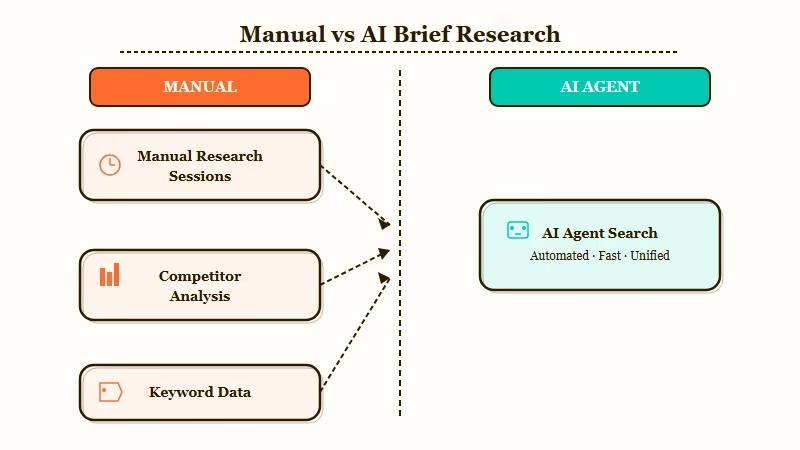
The typical workflow is eight separate searches: what articles are ranking, how old they are, what stats exist, whether those stats are credible, what angles have not been covered, what headline structures work for this topic, what the reader’s pain point is, and what social posts to write after publishing. No single search answers more than one of those.
From what I have seen, the time loss is not in the searching. It is in the context switching. You find a stat, lose the tab while following another lead, then spend five minutes trying to find the stat again.
Two hours are gone before you have a real brief, and you have not written a word yet. An AI agent with live web search runs all those passes in parallel and returns everything in a structured format you can read in three minutes.
What Makes AI Agents Produce Real Content Briefs
The two things that make AI agents produce real, usable research are structured output tables and the explicit constraint that every URL must be real.
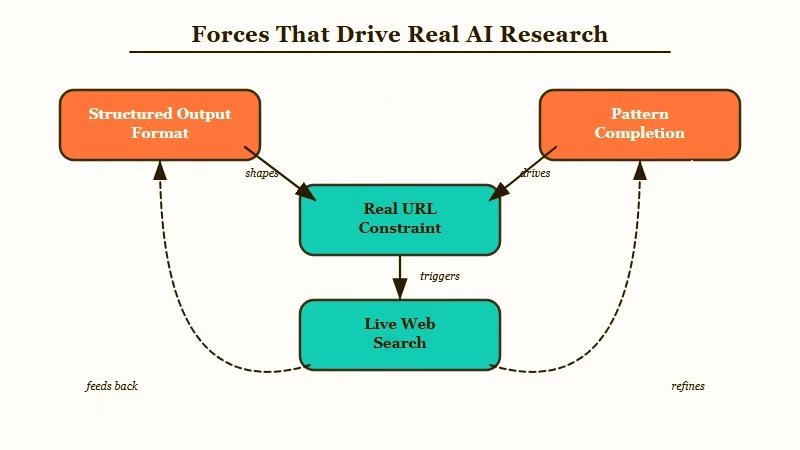
Most first attempts at this fail because the prompt asks for a content brief in prose form. The agent writes a confident summary with URLs pulled from training data, plausible-looking links that do not exist. Without a hard constraint to stop it, the agent fills in probable-looking sources the same way it fills in probable-looking words.
The fix I have seen work consistently: specify exact table columns and mandate real sources. When you define the competitor table as requiring a Title column, a URL column, an Angle column, and a Gap column, the agent cannot just summarize the competitive space. It has to find actual articles or the table does not fill in.
Here is how the two prompt approaches compare in practice:
| Prompt approach | What the agent does | Output quality |
|---|---|---|
| “Write me a content brief about X” | Pattern-matches, invents plausible sources | Looks authoritative, most URLs are broken |
| Structured tables + “every URL must be real” | Searches the live web, fills exact columns | Accurate, all sources clickable |
The phrase “every URL must be real and currently accessible” does more work than it looks like. I would recommend adding it as a standalone line in the instructions, not buried inside a paragraph. Agents treat explicit constraints differently from contextual ones.
Using the OpenClaw background tasks makes it easy to queue several topics at once and return to a full batch of completed briefs.
How to Set Up the Content Brief Agent in OpenClaw
The setup requires an OpenClaw agent with the web_search tool enabled and a structured prompt that specifies exact output tables rather than freeform text.
Before writing the prompt, verify web_search is active on your agent. Without it, the agent works from training data and the fake URL problem comes back. The OpenClaw setup guide covers tool configuration if you have not done this yet.
Here’s the setup sequence I’d walk through from zero:
- Create a new OpenClaw agent and enable the
web_searchtool in the agent settings. - Set the system prompt to: “You are a content research agent. When given a topic, search the live web and return structured output only. Every URL in your response must be real and currently accessible. Format all output as markdown tables.”
- Paste the full user prompt template below into the agent’s default user message.
- Run one test topic and click every URL in the output. If any URL returns 404, add “verify each URL is accessible before including it” to the system prompt.
- Once URLs are clean, the agent is production-ready for batching.
Full prompt template (copy this directly):
I need a content brief for a blog post about:

Topic: [YOUR TOPIC HERE]

Research the live web and deliver the brief in this exact format:

## COMPETITOR ARTICLES
| # | Title | URL | Angle | Gap |
|---|-------|-----|-------|-----|
(Find 8-10 real articles published in the last 60 days. Every URL must be real.)

## SEARCH QUERIES
| # | Query | Monthly Volume Estimate |
|---|-------|------------------------|

## TARGET AUDIENCE
- Role: ...
- Pain: ...
- Goal: ...
- Buyer stage: awareness / consideration / decision

## HEADLINE OPTIONS
| # | Headline | Hook (first 2 sentences) | Virality Score (1-10) |
|---|----------|--------------------------|----------------------|

## RECOMMENDED OUTLINE
Headline: ...
Meta description: ...
Target word count: ...

### Hook Paragraph
(Write the full first 100 words)

### Sections
| # | H2 Heading | Key Points | Anchor Stat | Words |
|---|-----------|------------|-------------|-------|

## KEY STATS
| # | Stat | Source | URL |
|---|------|--------|-----|
(5-10 real statistics published in the last 12 months with actual source links)

## SOCIAL POSTS
### Tweet 1 / Tweet 2 / Tweet 3 / LinkedIn Post

## DISTRIBUTION
| Channel | Why | Best Time |
|---------|-----|----------|
The column names in each table are load-bearing. Change “Angle” and “Gap” in the competitor table and the agent shifts what it targets.
Here’s how the main agent setups compare for this workflow:
| Setup | Web Search Source | Best For | Cost Model |
|---|---|---|---|
| OpenClaw self-hosted | Brave Search or Tavily | Solo operators running daily batches | API cost only |
| ClawTrust managed | Preconfigured | Teams needing zero infra management | Monthly subscription |
| Claude with Brave Search | Brave Search | One-off runs and template testing | Per-message API |
| ChatGPT with Bing | Bing (less recent) | Quick test if you already have Plus | API cost only |
| Make.com pipeline | Depends on connected agent | Routing brief output to Notion or Airtable | Free tier available |
Make.com is worth adding when you want the brief output routed somewhere automatically rather than copied by hand.
What the Output Looks Like in Practice
Running this prompt against a real topic returns a complete, source-verified content brief in approximately 3 minutes with every link functional.
Here’s what came back from one real run on “Why every solo founder needs an AI employee in 2026”:
The competitor table returned ten real articles from Forbes, Business Insider, NYT, Inc., and Medium, all published within the previous few weeks. Each row included the specific angle (listicle, opinion piece, case study) and a one-line gap analysis.
The stats section contained seven entries with working source links: “36.3% of new ventures in 2026 are solo-founded” (NxCode), “founders using AI complete tasks 55% faster” (Nucamp), and Medvi’s $1.8B revenue with two employees (New York Times). All seven loaded when clicked.
The hook paragraph was usable with minor edits. Not “In today’s fast-paced world.” A specific opener naming the exact problem. The social posts needed light rewrites but saved about 30 minutes.
From my experience, topics with strong recent coverage produce the best output. Niche topics with limited recent articles return thinner competitor data, and the virality scores on the headline table are relative comparisons at best.
Where Else This Prompt Pattern Works
The structured output plus real URL constraint works for any research workflow where the output needs to be accurate and shareable without a manual verification pass.
From what I have seen, most content research tasks share the same structure: a topic input, a set of information types to gather, and a delivery format. The content brief is one instance of a general pattern.
The same setup works well for:
- Competitor research reports. Swap to a profile template with pricing, positioning, and customer review columns pulled from G2 and Capterra.
- Cold email sequences. Company name input, five-email output with personalization hooks sourced from recent news.
- Client proposals. Feed a domain, get an audit table with problem, recommendation, and priority columns.
- Job descriptions. Market-rate salary tables with real LinkedIn data instead of ranges from three years ago.
- Podcast episode research. Guest brief with recent quotes, paper titles, and interview timestamps.
Each of these fails without structured output. Each works when you define exact columns and mandate real sources. The why AI agents keep failing post covers this failure mode from a different angle.
For connecting this brief output to a writing pipeline, the AI employee setup with MCP covers how to chain agent outputs into downstream tools automatically.
Frequently Asked Questions
Do I need OpenClaw specifically, or will any AI agent work?
Any agent with live web search enabled will run this prompt. The template is tool-agnostic. OpenClaw is what I have tested most, but the same setup runs on Claude with Brave Search or any agent that supports web fetching. Web search being active is the only hard requirement.
Why do AI agents produce fake URLs even when I ask for real ones?
Without structured output constraints, agents default to pattern completion rather than search. The “every URL must be real” phrase combined with mandatory table format triggers actual web search behavior. Adding “verify each URL is accessible before including it” as a system instruction catches most remaining hallucinations.
How long does a complete brief actually take to generate?
From topic input to complete output: approximately 3 minutes for topics with strong recent coverage. Niche topics with limited recent articles take 4-5 minutes and sometimes return thinner competitor data.
Can I batch multiple briefs at once?
Yes. With background tasks in OpenClaw or a managed setup like ClawTrust, you can queue several topics and return to a completed batch. Running in parallel also lets you compare angles across keyword variations before committing.
What do I do when the hook paragraph is not usable?
Add a constraint to the hook section: “Write an opening that names a specific problem in the first sentence. Do not open with a generalization about the industry.” That instruction eliminates the generic opener about 90% of the time.
Does this template work on ChatGPT or Gemini?
Yes, with the caveat that ChatGPT’s Bing search is less recent than OpenClaw’s. The structured output and real URL constraints apply the same way. I would recommend testing with a recent news topic first to verify the URLs are current before running the full template.
