
Bottom Line: AnythingLLM is the right tool if you want a free desktop chat-with-your-docs app, an open-source RAG layer for self-hosting, or an MCP bridge between Claude Desktop and your knowledge base. It’s the wrong tool if you read “local” and assume it runs models locally without help, or if you need multi-user access on the desktop version.
What surprised me about AnythingLLM is how much of its reputation is built on a misunderstanding. Most reviews describe it as a “local AI app”, which is half-true at best.
The app is local; the models it talks to are usually not. That nuance changes who the tool is a fit for.
Once I worked through the pricing, the deployment paths, and the things people search for when they hit the docs, the picture got sharper. The desktop app is one of the cleanest free RAG layers I’ve used.
The cloud tier exists for a reason most reviews skip. And the MCP support is the feature that quietly makes it useful in 2026 even if you already use Claude Desktop or ChatGPT.
This is the AnythingLLM review I would have wanted before installing it: what it really does, what it doesn’t, who should pay the $50 a month, and where the “free” claim breaks down.
What Is AnythingLLM and How Does It Work
AnythingLLM is an open-source, MIT-licensed full-stack app that gives you chat-with-your-documents (RAG), workspace isolation, and a no-code agent builder, with 30+ LLM providers and 7 vector databases plug-in-able as backends.
The mental model that helped me: AnythingLLM is the cockpit, not the engine. You point it at an LLM provider (OpenAI, Anthropic, Ollama, LM Studio, Groq, Bedrock, plus 24 more) and a vector database (LanceDB out of the box, or Pinecone, Chroma, Qdrant, Milvus, Weaviate, PGVector if you have one).
You drag in PDFs, DOCX, TXT, images, or scrape a website. AnythingLLM handles chunking, embedding, retrieval, and chat orchestration; you keep the model and storage choice.
In my experience, the “all-in-one” framing is what makes the value stand out. Setting up RAG from scratch with LangChain or LlamaIndex is a weekend project. Doing the same in AnythingLLM is a 5-minute install plus a config screen.
The project sits at over 54,000 GitHub stars on the Mintplex Labs repository, with 5,800+ forks and 400+ contributors. That is real OSS gravity, not vapor.
How Much Does AnythingLLM Cost in 2026
The desktop app and Docker self-host are free forever under MIT. The hosted cloud version starts at $50/month for the Basic tier (under 5 users, under 100 documents) and goes to $99/month for Pro with a 72-hour support SLA.
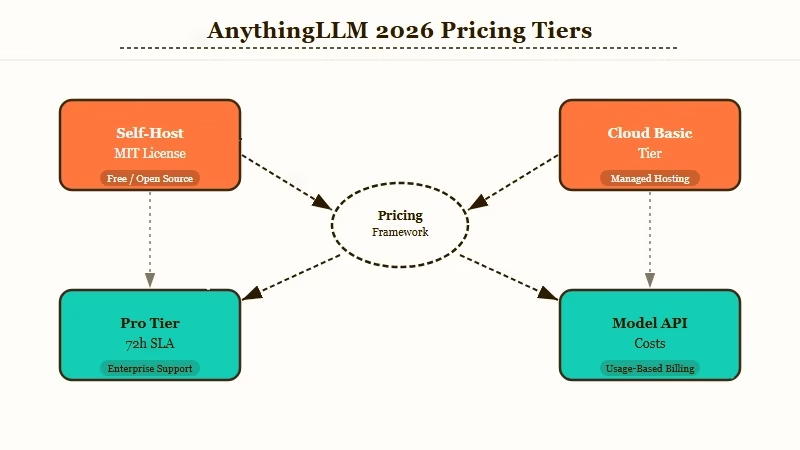
Here’s the actual pricing breakdown across the three deployment paths, since the “free” headline only covers part of the story:
| Tier | Cost | Use case | Limits |
|---|---|---|---|
| Desktop | Free | Solo user, local docs, casual RAG | Single user only, no team sharing |
| Self-host (Docker) | Free + ~$5 to $10/mo VPS | Small teams, full privacy, custom domain | You own ops, monitoring, security |
| Cloud Basic | $50/mo | Small teams who don’t want to self-host | Under 5 users, under 100 documents |
| Cloud Pro | $99/mo | Larger teams, faster instance | 72-hour support SLA, higher document caps |
| Enterprise | Custom | On-prem, white-label, integrations | Contact sales |
What I’d add: the model API costs sit on top. AnythingLLM does not bundle inference.
If you point it at OpenAI or Anthropic, you pay those per-token rates separately. The “free” tier is free for the orchestration layer; the model bill is on you.
For most solo users, the practical cost is the desktop app (free) plus a free Ollama install for fully local inference. That gets you to true zero-marginal-cost RAG, which is the workflow most people want when they search “free local AI”.
Is AnythingLLM Truly Local
AnythingLLM is local in the sense that the app runs on your machine and never phones home with your data; it is not local in the sense that the models making the answers run on your machine. To get true offline RAG, you must pair it with a separate runtime like Ollama or LM Studio.
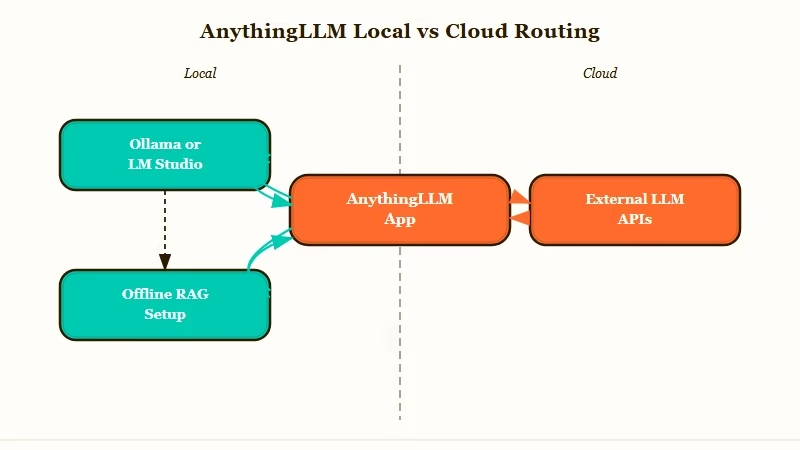
This is the single biggest gotcha in the product, and most reviews skip it. The “local” framing in the marketing means the data plane stays on your hardware; documents, embeddings, and chat history never leave your box if you configure it that way.
The control plane is also local; the app itself is just a desktop binary. None of that is misleading.
What it doesn’t do, by default, is run any model locally. The first-run wizard offers to download a small embedding model and a tiny chat model for offline experience.
For serious work, the right move is to install Ollama separately, point AnythingLLM at http://localhost:11434, and pick a model like Qwen 2.5 7B or Llama 3.1 8B. From my testing this is the configuration that delivers on the “free local AI” promise.
If you skip this step and just plug in your OpenAI API key, you have built something more accurately described as “self-hosted ChatGPT with your own docs”, not local AI. That’s still useful, but it’s a different product.
What Are the Best Use Cases for AnythingLLM
The four use cases where AnythingLLM is the strongest free option are personal-document RAG, small-team knowledge-base sharing, MCP server for Claude Desktop, and a no-code agent layer over local LLMs.
Here is how I’d think about who it’s a fit for in practice:
- Personal RAG over your own files. Drop your PDFs, notes, and meeting transcripts into a workspace. Pair with Ollama. Ask questions of your own knowledge with zero subscription cost.
- Small-team knowledge base. A 3-5 person team can self-host on a $10/mo Railway or DigitalOcean droplet, get shared workspaces, and pay nothing per user.
- MCP server for Claude Desktop or other MCP clients. AnythingLLM exposes workspaces as MCP tools, so Claude Desktop can call your knowledge base inline. This is the use case that earns its keep in 2026.
- No-code agent builder. The built-in agent UI lets you give a workspace web-browse, code-execution, and API-call powers without writing any LangChain. Solid prototyping layer for non-developers.
Where it does not work cleanly: as a multi-user team product on the desktop version (single-user only by design), as a production agent runtime for high-traffic public APIs (no built-in rate limiting), or as a SOC2-ready enterprise drop-in unless you take the contact-sales path.
Vague: “Set up RAG with AnythingLLM” (this gets you nothing useful)
Specific: “Install AnythingLLM Desktop, install Ollama with
qwen2.5:7b, point AnythingLLM athttp://localhost:11434, drop in a folder of PDFs as a workspace, and enable the workspace as an MCP server so Claude Desktop can query it”
The second prompt is what produces a working setup. The first is what most blog posts ship and explains why people install AnythingLLM and immediately bounce.
How Does AnythingLLM Compare to Ollama and LM Studio
AnythingLLM, Ollama, and LM Studio occupy different layers of the local-AI stack: Ollama and LM Studio run models, AnythingLLM runs RAG and agents over those models. Pick AnythingLLM if you want a UI and document chat; pick Ollama or LM Studio if you only want raw model inference.
| Tool | What it does | When to pick it |
|---|---|---|
| AnythingLLM | RAG + agents + chat UI + MCP server | You want chat-with-docs and a clean UI |
| Ollama | Local model runtime + REST API | You want to serve a model to other apps |
| LM Studio | Local model runtime + chat UI | You want to chat with a single local model |
| OpenWebUI | Multi-model chat with admin controls | You need user management without RAG depth |
In practice, the right stack for most solo users is AnythingLLM Desktop + Ollama. AnythingLLM brings the RAG, the workspace organization, and the MCP exposure.
Ollama brings the model. Together they cost zero dollars per month and give you the closest thing to a self-hosted ChatGPT-with-your-docs experience that exists in 2026.
For deeper context on the local-LLM stack, the OpenClaw alternatives roundup covers the agent-runtime layer, and the local-LLM TTFT guide covers the inference performance side.
Pros and Cons of AnythingLLM
The strongest reason to use AnythingLLM is the combination of zero subscription cost, MCP support, and 30+ LLM provider flexibility. The strongest reason to skip it is if you need true multi-user team features without paying for cloud or running ops.
Pros (numbered for clarity):
- Genuinely free desktop and self-host versions under MIT, no asterisk
- 30+ LLM providers and 7 vector databases, so no vendor lock-in
- Native MCP support exposes your knowledge as a tool to Claude Desktop and other MCP clients
- Built-in no-code agent builder with web-browse, code-exec, and API-call tools
- Active project: 54,000+ GitHub stars, 400+ contributors, regular releases
Cons:
- “Local” branding misleads about model inference, you still need Ollama or LM Studio
- Desktop version is single-user, so teams hit a paywall ($50/mo cloud) or DIY ops (Docker)
- No built-in API rate limiting, exposing the API publicly is a foot-gun
- Retrieval-accuracy benchmarking is missing from the docs, you cannot easily compare its chunking to a custom LangChain pipeline
- SOC2 and enterprise compliance details are gated behind contact-sales rather than published
If you are building this on top of an automation stack and need typed-payload routing between AnythingLLM and your other tools, Make.com handles that bridge with built-in JSON validators on every connection.
Verdict on AnythingLLM
For solo users and small teams, AnythingLLM is the best free chat-with-docs application I have tried in 2026, and the MCP support pushes it from “nice to have” to genuinely useful. For larger teams or anyone who needs multi-user controls without ops, the $50 to $99/month cloud tier is fair, but compare against running it on a $10/month VPS yourself before paying.
The way I see it, the biggest mistake people make is installing AnythingLLM and pointing it at OpenAI’s API, then complaining they are still paying for chat.
That is using the cockpit without the right engine. Pair it with Ollama or LM Studio and the picture changes; it becomes a genuinely free, genuinely local AI assistant for your own data.
Where I’d push back on the marketing: “local” is doing a lot of work. The accurate framing is “privacy-first” or “BYO-model”.
Truly local requires the Ollama add-on. New users keep tripping on this and it costs the project some goodwill it does not deserve.
Worth the install for anyone curious about local RAG, MCP, or agent prototyping. Skip if you only want one model and don’t care about documents; LM Studio is a cleaner pick for that. Pay the cloud tier only if your team is too small to justify a Docker VPS but too large for the desktop app.
For broader context on how this fits the agent landscape, the multi-agent distributed pattern piece covers the orchestration layer that often sits above an AnythingLLM workspace, and the API cost reduction guide covers the routing trick that pairs well with AnythingLLM’s plan-and-execute prompt patterns.
Frequently Asked Questions
Is AnythingLLM free to use?
The desktop and Docker self-hosted versions are completely free under the MIT license. Hosted cloud starts at $50/month for the Basic tier (under 5 users) and goes to $99/month for Pro. Model API costs (OpenAI, Anthropic) are separate and depend on which provider you choose.
Does AnythingLLM run AI models locally?
The app runs locally, but the AI models it queries usually do not. To run a model fully locally, install Ollama or LM Studio separately and point AnythingLLM at the local endpoint. Without that, AnythingLLM defaults to calling external APIs like OpenAI.
What file types does AnythingLLM support?
PDFs, DOCX, TXT, Markdown, CSV, common image formats (for multi-modal models), and full website scraping. The default per-file size limit is around 100MB and is configurable in the Docker version.
Is AnythingLLM safe for confidential documents?
If you self-host with the Docker version and pair it with a local model via Ollama, your documents and embeddings never leave your machine. If you use the desktop app with an external LLM API like OpenAI, your queries (not your raw documents) get sent to that provider per their privacy policy.
Can AnythingLLM act as an MCP server?
Yes. As of 2026, AnythingLLM has native Model Context Protocol support and can expose workspaces as MCP tools. Claude Desktop and other MCP-aware clients can query your AnythingLLM knowledge base directly, which is one of the strongest reasons to install it in 2026.
What is the difference between AnythingLLM and LangChain?
LangChain is a Python library you assemble RAG pipelines in. AnythingLLM is a finished application that wraps LangChain-equivalent capabilities behind a UI. Pick AnythingLLM if you want a working app in 5 minutes; pick LangChain if you want full programmatic control and don’t mind a weekend of setup.
