
What’s Changed: Auto-Cards sits at the top of AI Dungeon’s featured scripts, yet it still ships switched off. Cards only appear once you flip “Enable Auto-Cards” to true and turn on the Memory Bank plus your account’s script toggles. Then wait out a 22-turn cooldown or type /ac.
AI Dungeon Auto-Cards is a free script that writes story cards for you as an adventure goes on, and it is the closest thing the game has to a fix for its memory problem.
A fresh install that seems to do nothing is rarely broken. The script starts turned off and leans on two settings that live outside it.
Long adventures are where this pays off. One long-adventure player plays about 2,000 actions per story and puts “at least 25-30%” of play time into keeping cards and memory current.
I like the script far more once it is set up the way its own creator plays, with automatic cards paused and the /ac command doing the work.
You’ll get the install steps, the fix for missing cards, the settings worth changing and a straight answer on Inner Self.
What Does AI Dungeon Auto-Cards Do?
AI Dungeon Auto-Cards is a free, open-source script that spots named characters, places and things in your story, writes story cards for them, and keeps each card’s memory updated as the adventure goes on.
Story cards are notes for the AI, and they only reach the model when one of their trigger words shows up, per AI Dungeon’s story card guide. Auto-Cards takes over the writing, which is the slow part.
The script comes from a community developer, LewdLeah, and AI Dungeon’s help center lists it first among its featured scripts. Its GitHub repository carries an MIT licence, and its code has sat unchanged since January 2026.
AI Dungeon itself dates to 2019, when Latitude launched it, per TechCrunch’s coverage of Latitude. The script answers the problem that still bothers me most about the game: the AI forgets whatever scrolls out of its context.
Why Is AI Dungeon Auto-Cards Not Making Any Cards?
Auto-Cards makes no cards until the script is switched on, your account allows scripts and the Memory Bank is on. Even with all three fixed, the first automatic card can take 22 turns.
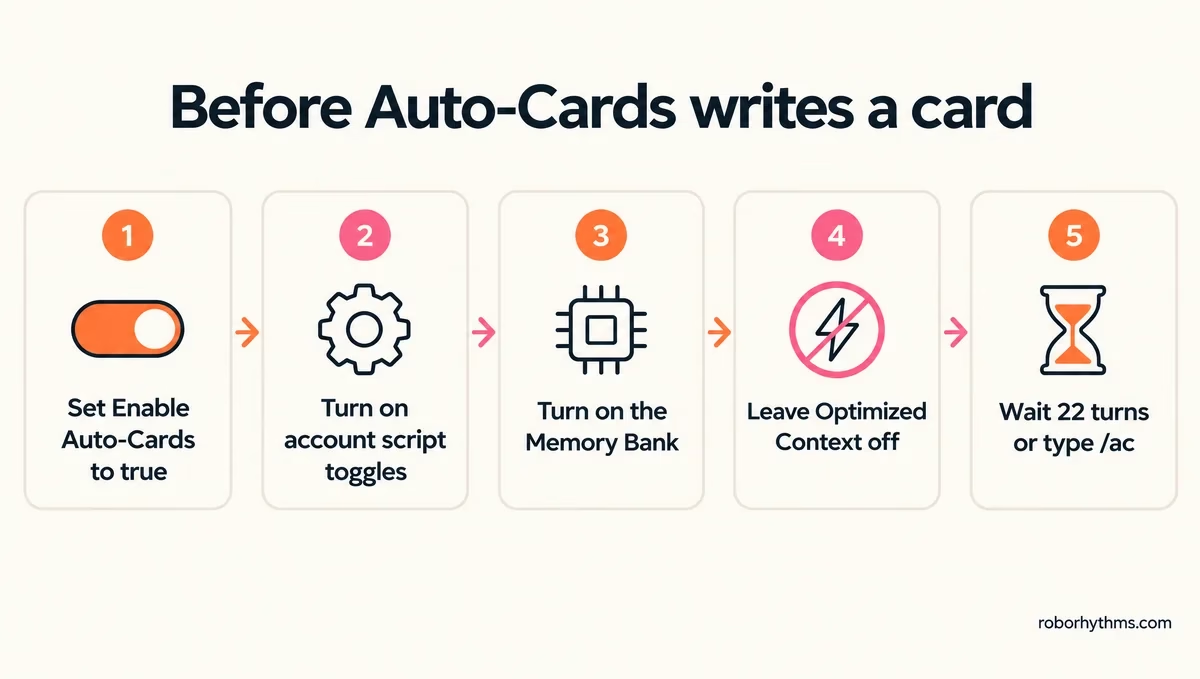
The off switch is the easiest one to miss, because nothing announces it until you open your story cards. Its control card reads “Enable Auto-Cards: false” until you change it, per the code on AI Dungeon’s scripts page.
I check these in this order, since the first two take seconds:
- Open your story cards, find “Edit to enable Auto-Cards”, change “false” to “true”, then take any Do, Say, Story or Continue action.
- Go to Account Settings, then Gameplay, and turn on both script toggles, as the script’s creator advises.
- Turn on the Memory Bank, AI Dungeon’s built-in memory system, under Gameplay, AI Models, Memory System, which is also the suggested fix when the control card is missing.
- Leave Optimized Context, a setting that buys extra context, off on models that offer it, because AI Dungeon’s model guide says it “disables certain Scripting features”.
- Type /ac in a Do, Say or Story action if you do not want to wait out the 22-turn cooldown.
If keeping cards current is the part of AI Dungeon you are tired of, Nectar AI is the character-chat app I’d try instead.
| Symptom | Likely cause | Fix |
|---|---|---|
| An “Edit to enable Auto-Cards” card in your list | Script still off | Change false to true, then take a turn |
| No control card and no new cards | Memory Bank off | Turn the Memory Bank on |
| No script does anything | Account script toggles off | Account Settings, Gameplay, both toggles on |
| One card every 22 turns, none before | Default cooldown | Type /ac or lower the cooldown |
| The same unwanted card keeps coming back | The model misreading the story | Switch models for a while, ban the title |
| Repeated text after pressing Retry | Retry during card writing | Press Continue instead of Retry |
The last two rows come from the script’s creator. When cards run wild, the creator suggests switching models for a while, since some models, Muse in particular, trip it up, and warns that Retry during card work produces “repetitive entries”.
If cards still misbehave, switch off AI Dungeon’s “Improve the AI” setting, which the creator says makes each script hook run twice.
How Do You Install Auto-Cards in AI Dungeon?
You install Auto-Cards by editing a scenario you own on the AI Dungeon website, turning on Scripts Enabled in its Details tab, and pasting the script’s code into the Library, Input, Context and Output tabs.
I keep a spare scenario just for scripts, so a bad paste never touches a story I care about. The steps from the official install guide are:
- Open the AI Dungeon website on a computer, or switch your phone’s browser to desktop view.
- Create a scenario or open one of your own, then go to its DETAILS tab.
- Scroll to Scripting, turn on Scripts Enabled, and select EDIT SCRIPTS.
- In the Input, Context and Output tabs, delete the existing code and paste the short block for each tab.
- In the Library tab, delete everything and paste the full library code from the repository.
- Click SAVE, start an adventure from the scenario, and switch the script on with its “Edit to enable Auto-Cards” card.
Your Input tab should end up looking like this, with the Context and Output tabs following the same pattern:
const modifier = (text) => {
  text = AutoCards("input", text);
  return {text};
};
modifier(text);
Can You Install Auto-Cards on a Phone?
You can, but only through a browser in desktop view, because the script editor does not show anywhere else. Once installed, the script runs wherever you play.
The script’s creator recommends turning the phone sideways if Edit Scripts still hides, and says it works “anywhere” once installed.
The free tier is fine too, since the creator built it while using “free models and 2000 context”.
Can You Add Auto-Cards to an Adventure You Already Started?
Not to the adventure itself, since scripts belong to scenarios. Add it to the scenario you own, and the adventures already created from it pick it up.
The install guide says adventures played from your scenario include Auto-Cards “retroactively”. For someone else’s scenario, copy its plot, story cards and instructions into a scenario of your own, as one player suggests.
Can You Play With Auto-Cards Without Installing It?
Yes. The script’s official demo scenario and many community scenarios bundle it, so you only need to switch it on with its control card.
While it writes a card, the script can post a short “please select continue” note. Pressing Continue lets it finish the job.
Which AI Dungeon Auto-Cards Settings Should You Change?
Change two settings first. Lower the 750-character card limit if you play on a 4K context, and either raise the 22-turn cooldown or set it to 9999 and make cards on demand with /ac.
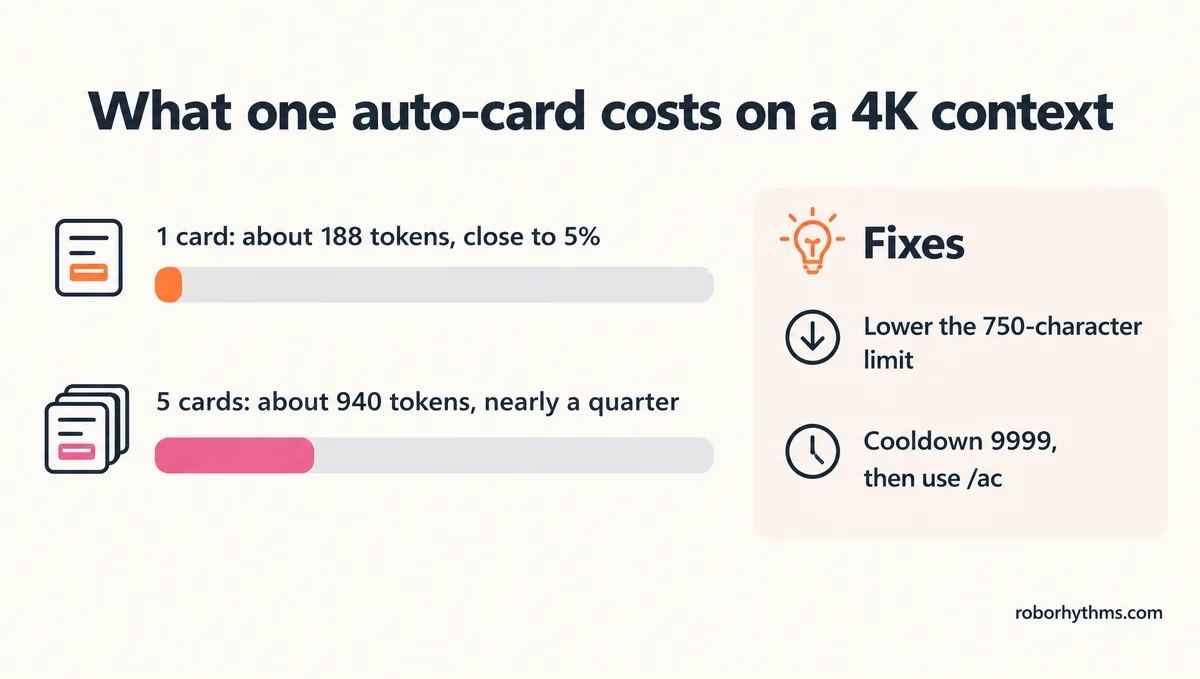
On a 4K context the card limit is the first setting I change. AI Dungeon’s context guide estimates one token for every four characters.
At that rate one 750-character card costs about 188 tokens, close to 5% of a 4K window, and five active cards take about 940 tokens, nearly a quarter of it.
Free players get 4K on most free models, and players on the Journey plan get 4K on the large ones such as Nova and Wayfarer Large, per AI Dungeon’s model guide.
Plans and the models behind each tier are covered in the full AI Dungeon review. The defaults below come from the script’s code:
| Setting | Default | Allowed range | When to change it |
|---|---|---|---|
| Card creation cooldown | 22 turns | 0 to 9,999 | Raise it if cards pile up; 9999 pauses automatic cards |
| Card length limit | 750 characters | 200 to 2,000 | Lower it on a 2K or 4K context |
| Memory updates on new cards | On | On or off | Turn it off if card summaries drift from your story |
| Memory size before summary | 2,750 characters | 1,750 to 9,900 | Raise it for main characters on a big context |
| Summary compression | 25, about 2.5 times shorter | 20 to 1,250 | Lower it to keep more detail in each summary |
| Look-back for new names | 5 actions | 2 to 88 | Raise it if names get missed |
My pick is the creator’s own setup, with the cooldown at 9999 and cards made by hand, which the creator says is how they prefer to play. The commands go into any Do, Say or Story action:
/acmakes a card now for the most relevant unused name in the story./ac Leahmakes a card for the name you type./ac Leah / runs the docks and owes the player moneyadds your own details to the prompt./ac redo Leahrewrites an existing card from the story, its old entry and its memories.
Before: a new character walks in and you wait up to 22 turns for the script to notice her.
After: you type
/ac Leah / runs the docks and owes the player moneyand her card arrives with your detail in it.
Two smaller tricks live in the config card. Add a word to its banned titles list when it keeps getting a card, and write “{title:}” in a hand-written card to let Auto-Cards maintain it.
How Do You Open the Full Auto-Cards Guide in the Game?
Set “show detailed guide” to true in the Configure Auto-Cards card and take a turn, and the script prints its full manual into your story.
The script strips that guide out of what it sends to the AI, so reading it costs you no context. The creator points players to that switch when they ask where the full instructions live.
When Are Hand-Written AI Dungeon Story Cards Better?
Hand-written story cards are better for anything your plot depends on, because you choose the triggers and the wording. Auto-Cards earns its keep on minor names you would never write up yourself.
A story card reaches the AI only when a trigger word appears, and the AI sees just the entry text, labelled “World Lore:”. That works the same way as lorebooks in SillyTavern, so the same habits apply: short entries and specific triggers.
Auto-Cards writes from what it reads in the story, so it can lock in a detail you meant to change. One player finds its cards “throw in details that clash with my ongoing rp”, which is why I keep the core cast hand-written.
Two built-in tools cover part of the job without a script. The Story Card Generator writes a card when you ask, and since AI Dungeon’s October 12, 2026 update you can pin a memory so it is sent every turn.
Is Inner Self Better Than Auto-Cards in AI Dungeon?
Inner Self does a different job. It gives characters their own running thoughts, while Auto-Cards writes world notes, and Inner Self ships with a copy of Auto-Cards that starts switched off.
Inner Self comes from the same developer and dates to January 3, 2026, per the code on AI Dungeon’s scripts page.
Its bundled Auto-Cards uses different defaults from the standalone script: 600-character cards instead of 750, a 3200-character memory limit, and memory updates off.
You switch the bundled copy on in the “Configure Inner Self” card, where “Install Auto-Cards” starts as false. In a thread comparing the two, one player finds Inner Self “eats up a lot of context”, while another uses /ac for backstories and Inner Self to play the characters.
On a 4K context I would run Auto-Cards alone. Inner Self is worth its context cost once you have 8K or more to spend.
Is There an Easier Option Than AI Dungeon Auto-Cards?
Yes, if you would rather not maintain a world at all. Character-chat apps keep a companion’s memory without scripts, and other story apps handle lore their own way.
Nectar AI suits roleplay with anime-style characters you build yourself.
Candy AI suits one-on-one companionship. Its free tier stops at 5 messages in total, so plan on $9.99 for the first month and $13.99 a month after that.
For story-first tools, the AI Dungeon alternatives guide compares memory and price, and what NovelAI is covers the closest writing-focused option.
For most AI Dungeon players I still think the script beats switching apps, because the adventure stays where it is.
Quick Takeaways
- Auto-Cards ships switched off, so change “Enable Auto-Cards” to true and take a turn.
- Turn on the Memory Bank and both script toggles in Account Settings, or no cards appear.
- A default card costs about 188 tokens, close to 5% of a 4K context, so lower the 750-character limit on small contexts.
- Set the cooldown to 9999 and make cards with /ac if automatic cards clash with your story.
- Inner Self includes Auto-Cards, but its copy starts off with memory updates disabled.
