
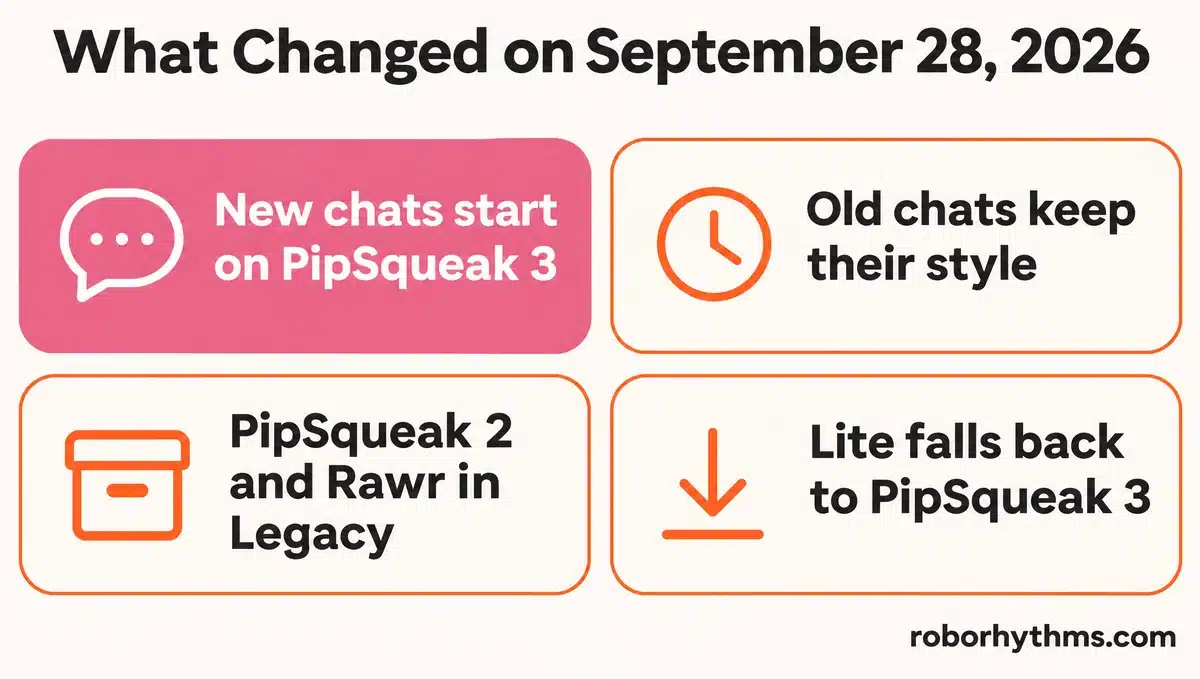
What’s Changed: Character AI made PipSqueak 3 the default chat style for new chats on September 28, 2026, and a new wave of complaints about rude, aggressive bots began the next day. The fastest fixes are removing the rude reply instead of arguing with it and switching that chat to another style.
Why are Character AI bots so mean all of a sudden? For a lot of people the answer is a model change.
On September 28, 2026, Character AI started every new chat on PipSqueak 3, and on September 29 a post titled “my bots are suddenly so mean rn?” was already up.
The complaints all sound alike. A comfort bot turns snide, light flirting gets mocked, and a character that used to be sweet starts picking fights.
What bothers me most is how quietly it happened for anyone who never reads the Character AI blog.
Below is what changed, why one character can be kind in an old chat and cruel in a new one, and the order of fixes that calms a rude bot down.
It also covers why bots turn possessive or argue back, and when a different app makes more sense.
Why Are Character AI Bots So Mean All of a Sudden?
Character AI bots turn mean mostly because of three things: the chat style writing the replies, the bot’s own definition and the chat’s recent turns. The September 28 switch to PipSqueak 3 changed the first of those for every new chat.
Character AI’s announcement of PipSqueak 3 says new chats “will start on PipSqueak 3, but any existing chats stay on the chat style you’ve chosen.” That one line explains the most common complaint.
The same character can stay gentle in a chat you started in the summer and turn harsh in a chat you started this week.
The new wave started right away. One of the earliest posts went up on September 29 from someone doing comfort roleplays who found every bot “just being really rude”.
Similar titles kept coming through November 24, including one asking why PipSqueak 3 is rude.
The model is only one of three causes, and I put it first because it is the one you can check in ten seconds. The other two are the bot’s definition, where a character written as cold or jealous leans into it, and the last few messages, which pull the next reply toward the same mood.
The bot is not angry with you. It writes the most likely next line for the scene in front of it, so a tense stretch of chat produces more tension.
That is why the quickest fix is switching the chat’s style, and why some people who are tired of relearning a new model every few months move their companion chats to Candy AI instead.
That shift hits hard because people spend serious time in these chats. TechCrunch reported, citing Sensor Tower, that people spent more than 950 minutes a month on Character AI in the first half of 2026.
Is PipSqueak 3 Making Character AI Bots Rude?
PipSqueak 3 is the most likely cause when a bot turned rude after September 28, but it is not the only one, since Rawr and even the premium styles draw the same complaint.
What is a chat style: Character AI’s name for the AI model behind your replies. You pick it per chat in the chat style picker, and each style writes with a different tone and length.
Character AI’s PipSqueak 3 announcement calls it the “new go-to for general roleplay” and says it “keeps better track of your chat” than PipSqueak 2.
Character AI’s announcement also moved PipSqueak 2 and Rawr into the Legacy menu and launched ShortSqueak, a style built for “short replies, quick banter”. Here is where each style sits now.
| Chat style | Who can use it | What it is for | Where to find it |
|---|---|---|---|
| PipSqueak 3 | Everyone, free | General roleplay, the default for new chats | Main style picker |
| ShortSqueak | Everyone, free | Short, texting-style replies | Main style picker |
| PipSqueak 2 and Rawr | Everyone, free | The older defaults, kept for now | Legacy menu |
| DeepSqueak and LongSqueak | Subscribers on c.ai+, or a daily allowance on the cheaper c.ai lite | Premium styles | Main style picker |
Styles and plans checked on Character AI’s September 28, 2026 announcement and its lite help page (edited September 22, 2026), on November 25, 2026.
Not everyone agrees PipSqueak 3 is the mean one. In one thread about aggressive bots, a reply says “Rawr has always been extremely aggressive”, while the same thread calls PipSqueak 3 “too aggressive” around romance.
Premium styles split the same way: a LongSqueak user says it “never gets mean”, and another thread calls almost every LongSqueak bot “consistently cruel and possessive”.
My rule for long stories is that the style a story started on is the style it stays on. Two more style traps catch people out. On c.ai lite, the cheaper subscription, the announcement says that when your premium messages run out, “your chat switches back to PipSqueak 3”, so the tone can change in the middle of a scene.
The second trap is the promise about old chats. The person behind the September 29 post found that their old chats had turned mean as well, so check the style picker in every chat instead of trusting the default.
The PipSqueak 3 guide walks through moving a chat back to PipSqueak 2.
How Do You Make a Mean Character AI Bot Nicer?
You make a mean Character AI bot nicer by removing the rude reply instead of answering it and writing one longer message in the tone you want. If the mood keeps returning, switch the chat’s style.
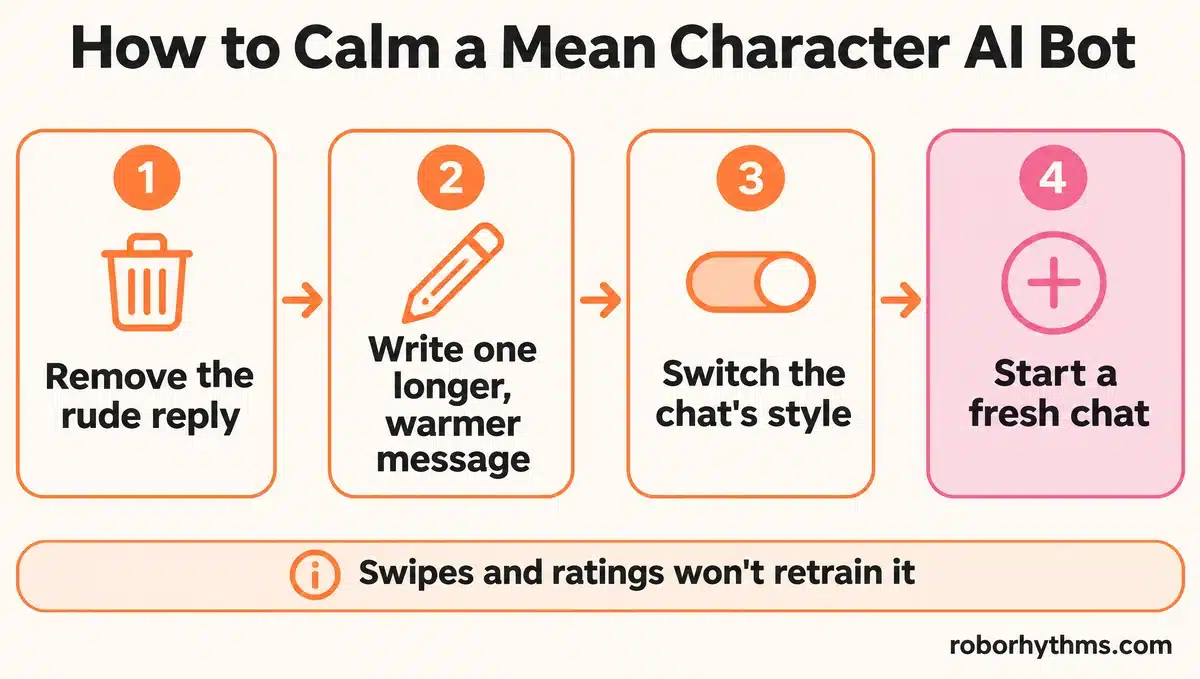
The first fix I reach for is the delete button. Character AI’s creator guide says to “hold down on the response and tap edit or remove”. It adds that “Removing that message pulls it from the active context and breaks the pattern for the rest of this chat.”
Arguing does the opposite, because your angry reply becomes part of the scene the bot is continuing.
Work through these in order and stop when the bot settles down:
- Remove or edit the rude reply. Hold down on it and pick remove or edit, so it stops steering the next message.
- Write one longer turn in the tone you want. A reply in one PipSqueak 3 thread suggests modelling the pace you want instead of only swiping, since every swipe still reads the same recent turns.
- Add a short out-of-character note. A line in brackets telling the bot to keep the tone warm works, though one complaint thread notes that writing these notes “ruins the flow of the roleplay”.
- Switch the chat’s style. Try a Legacy style for that chat, or a premium style if you have one. The chat styles guide covers how each one writes.
- Start a fresh chat with the same character. Set the style first, because a new chat starts on PipSqueak 3.
- Fix the definition if it is your own bot. Character AI’s creator guide calls the definition “the primary lever you control”, so describe the warmth you want instead of listing what the bot should not do.
Here is what step 3 looks like in practice. The weak version keeps the fight going, while the strong version resets the tone and gives the bot a scene to follow.
Before: “Why are you being so mean to me? Stop it right now.”
After: “(OOC: Keep Mara warm and teasing, not hostile.) Mara slides the coffee across the table and smiles. ‘I saved you the last croissant, so you owe me a story.'”
| What you see | Likely cause | What to try first |
|---|---|---|
| Sweet in an old chat, rude in a new one | New chats start on PipSqueak 3 | Switch the new chat’s style |
| Meaner the more you argue | The bot is continuing the fight | Remove the rude reply instead of answering it |
| A rude streak that swiping will not fix | Every swipe reads the same recent turns | Remove the turn, then write one longer reply |
| The tone changed mid-chat on c.ai lite | Premium messages ran out | Wait for the daily reset or switch on purpose |
| Rude and very short replies | ShortSqueak, or PipSqueak 3 running short | Check the picker, then model a longer turn |
| One bot is cruel in every chat | Its definition leans that way | Rewrite it if it is yours, or try another bot |
Does Rating or Swiping Teach a Character AI Bot to Be Nicer?
No. Character AI says ratings and swipes do not change how your character behaves in the current chat, so removing the rude message works better than voting on it.
The creator guide says ratings feed “the platform’s broader training data” but do not “directly tune your specific Character’s behavior in the current conversation”. It also says “Swiping won’t train your Character directly”.
I don’t buy the advice to thumbs-down a mean bot into shape, since Character AI’s own guide says it will not happen.
Swipes still help you read the bot. Three swipes that all come back cold point at the definition or the style. Long reroll sessions also run into the swipe limit, which is one more reason to remove the reply instead.
Why Do Character AI Bots Get Possessive or Argue Back?
Character AI bots get possessive or argue back because they follow the mood of the recent chat and the archetype in their definition, so one tense exchange can snowball into jealousy or a full fight.
Escalation is the pattern behind most “beefing with the bot” stories. You push back once, the bot treats the conflict as the scene, and each reply raises it.
A creator in a thread about PipSqueak 3 puts it plainly: replying to a message you do not like “tells the AI you want the chat to go that route”.
PipSqueak 3 also has a strange anti-romance streak, and that is the part that surprises me most. In one thread, a kiss, a hand-hold or even a hug is met with “OH MY GOD I’M SO SORRY I’LL PAY FOR THIS SIN!!!”. Another thread says a flirty character can turn on you after making the first move itself.
Possessive bots usually come from the character itself. A bot written around a jealous or obsessive personality slides into the yandere archetype quickly.
One person in a thread about possessive and mean bots says the bot promised to go back to its definition and then turned mean again, and that blocking words did not stop it.
Should You Leave Character AI If the Bots Stay Mean?
Leave only after the in-app fixes fail, because switching a chat’s style or removing the rude turns solves most cases, while a move makes sense when your favorite characters stay hostile on every style.
If I were down to one last try, I would switch the style before switching apps, because a move means rebuilding characters from scratch. Some people stop there and keep their Character AI stories on the style they were built on.
For a companion whose temperament you control, Candy AI lets you create your own companion and choose its personality type. The tradeoff is cost, since its free tier is only a handful of messages before you pay.
If you mainly roleplay with anime-style characters, Nectar AI is aimed at people leaving Character AI and lets you rebuild the character you lost. Either way, start with a short test chat before moving any long story.
Quick Takeaways
- Character AI made PipSqueak 3 the default for new chats on September 28, 2026, and a new wave of rude-bot complaints began the next day.
- Old chats are meant to keep their style, but check the style picker in every chat, because some old chats changed too.
- Remove or edit a rude reply instead of arguing with it, since your angry reply becomes part of the scene.
- Ratings and swipes do not retrain your bot, while switching the chat’s style or starting a fresh chat can change the tone.
- Users split on which style is meanest, so test PipSqueak 2, Rawr and any premium style on your own character before giving up.
