
What’s Changed: SpicyChat started rolling out Story Mode by November 18, 2026, to a random group of subscribers. In it, your messages become hidden directions and the bot narrates the story, with three suggested directions one tap away. If you do not have it yet, a narrator persona gets you most of the way today.
SpicyChat Story Mode changes the job your messages do. Turn it on and your replies become hidden directions for the plot, and the bot writes the scene around them.
The catch is access. SpicyChat is giving it to a random set of subscribers first, so some members on I’m All In, the top plan, are still waiting while some on True Supporter, the middle plan, already have it. Its help docs do not have a page for it yet either.
Below is what Story Mode does, how it differs from /cmd, why it stalls on some bots and how to get close to it without waiting.
The workaround matters to me as much as the feature, because the rollout has no end date.
What Is SpicyChat Story Mode?
SpicyChat Story Mode is a chat mode where your messages become hidden directions for the story and the bot narrates the scene, with a button that suggests three possible next directions.
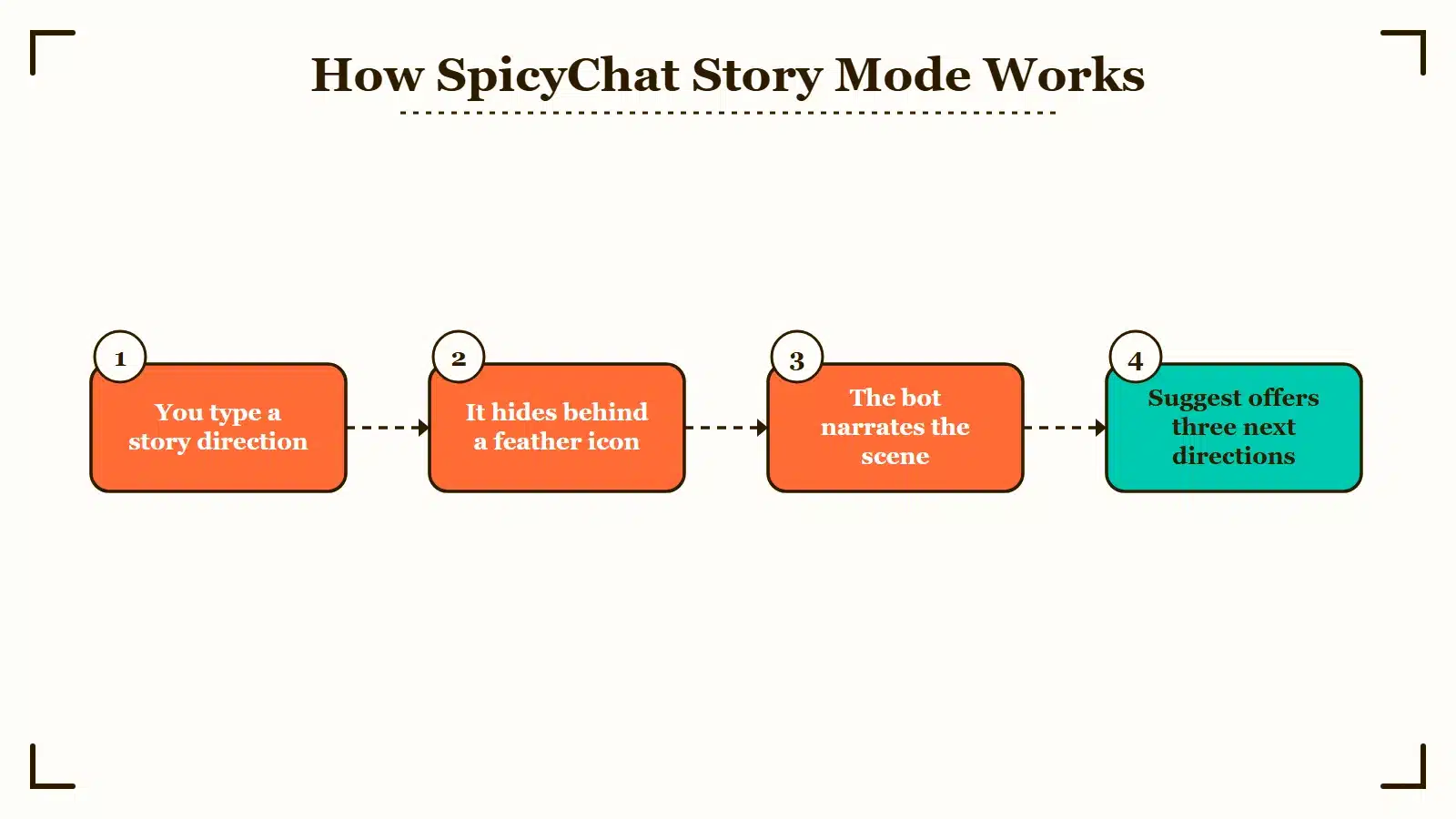
SpicyChat’s support account described it in the first r/SpicyChatAI thread asking about it. In Story Mode, “the prompt is adjusted so that your replies are now guides to the story, and will be hidden by default.”
The suggest button then shows “three specific suggestions on how the story will go, generated by an LLM.”
Your directions do not vanish for good. A subscriber who has the feature explains in one True Supporter’s comment that a small feather icon marks each one, and tapping it shows what you sent. You can also skip the direction and let the bot continue the story on its own.
If you mainly want character roleplay while the rollout crawls along, Nectar AI is the app I point people to first, because you build the character yourself and steer the story from the first message.
Two details catch people out. You can switch back to normal chat mode, but the same True Supporter notes that your story directions then show up as ordinary messages rather than /cmd lines. Bot and persona avatars also disappear in Story Mode, which one subscriber says makes new text harder to spot at max settings.
I like Story Mode most for the moments when your own character steps out of the scene.
Why Don’t I Have SpicyChat Story Mode Yet?
You probably don’t have SpicyChat Story Mode because SpicyChat is releasing it to a random group of subscribers first. Your plan tier does not decide who gets it.
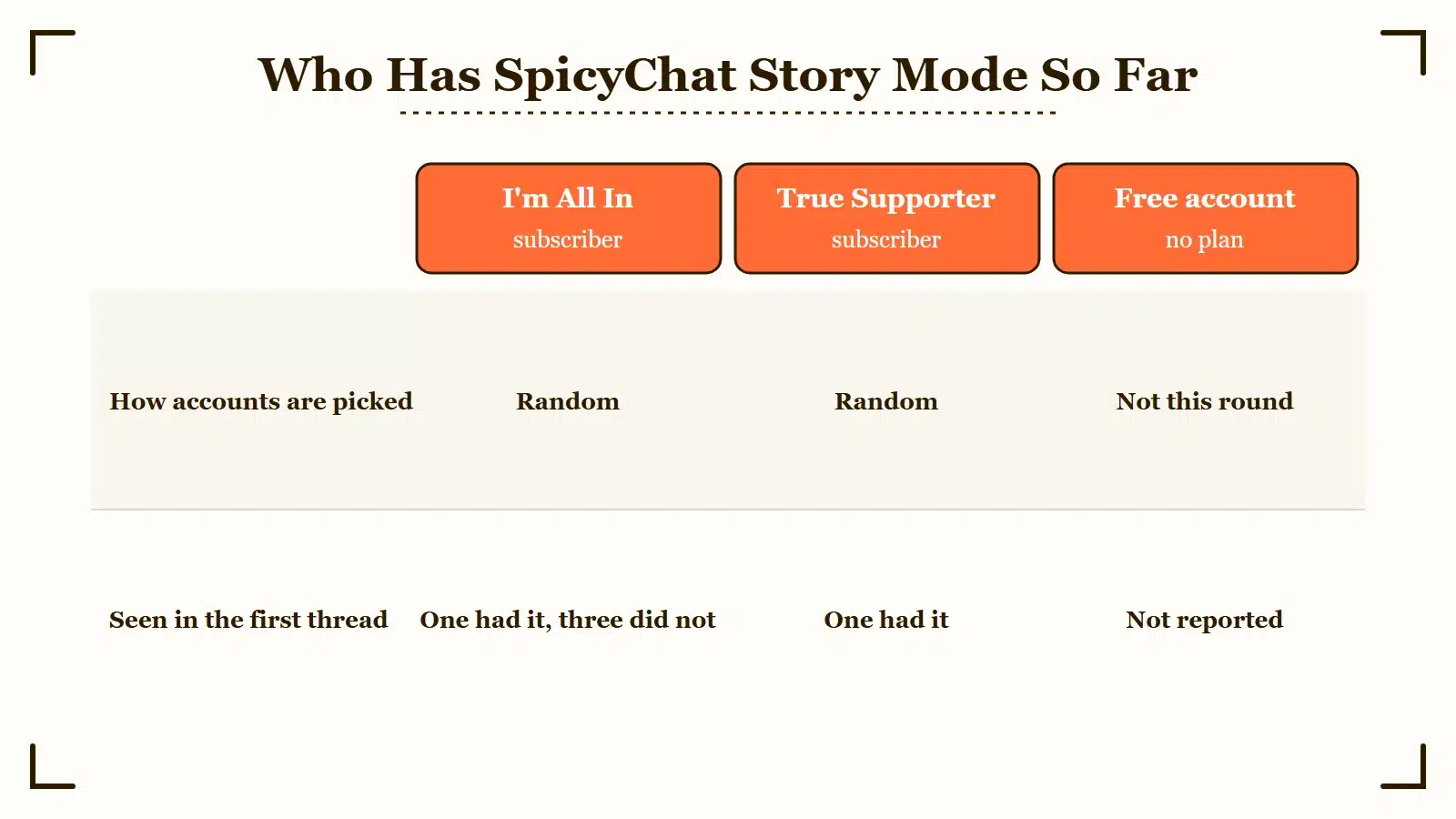
The support reply in the original Story Mode thread is plain about it: “The selection is also random among subscribers.” SpicyChat says the slow rollout is there “to ensure a smooth transition, help the team see early numbers, and flag any bugs that might appear.”
The same thread shows the randomness in action. One I’m All In subscriber had Story Mode while three others did not, and a True Supporter subscriber had it without knowing why.
Free accounts sit outside this round, since the selection covers subscribers only.
SpicyChat has no help page for Story Mode yet. Its documentation index on November 23, 2026 lists Director Mode, the Search command and Rulebooks, with nothing for Story Mode. The only description of the switch comes from one subscriber’s comment, which places it in the bot settings as a toggle with a small book icon.
There is no opt-in. One reply guesses that Discord members were picked first, but the staff answer says the selection is random. Another reply there notes the new memory manager reached accounts in waves a couple of weeks earlier.
My read is that the early numbers matter because keeping subscribers is hard for AI apps.
TechCrunch’s report on RevenueCat’s data found AI app subscribers cancel annual plans 30% faster than non-AI apps, so a feature like this gets measured on a slice of paying users before everyone sees it.
How Is SpicyChat Story Mode Different From Director Mode?
SpicyChat Story Mode treats every message as a hidden story direction for the whole chat. Director Mode adds a single /cmd instruction under a normal message, and the lightbulb writes your next reply for you.
What is Director Mode: SpicyChat’s /cmd command, typed on a new line after your message, which the model reads as an instruction instead of part of the conversation.SpicyChat’s Director Mode guide says a /cmd line is “read directly by the LLM” and is “not considered a part of the message,” and that some models follow it better than others. Story Mode makes that the default for everything you type.
| Tool | What your input becomes | Where it fits best |
|---|---|---|
| Story Mode | A hidden direction, marked by a feather icon | Steering the plot, adding events, scenes your character is not in |
Director Mode (/cmd) | An instruction under a normal message | One correction, such as breaking a loop or shifting a mood |
| Lightbulb | A reply written for your persona that you can send or edit | Keeping a normal chat moving when you are stuck |
The lightbulb is the part people disagree on most. In one r/SpicyChatAI discussion, one subscriber calls it better than Story Mode for writing their persona, while another says it “generates horrible responses” and changes details like clothing or location.
I keep Director Mode for single fixes, and a /cmd line is still my first move to stop SpicyChat repeating itself. Story Mode earns its place when you want to direct several turns in a row without typing a /cmd line each time.
How Do You Get Better Stories From SpicyChat Story Mode?
You get better SpicyChat Story Mode stories by using a bot that is allowed to narrate your character, ending each direction with the format you want, and pinning a formatting rule in memory.
Early opinions split hard. One subscriber calls it a snooze fest where the bot monologues about itself, while another enjoys it for events, throwing in obstacles and letting them play out.
Most of the gap comes down to the bot and the model, and these are the fixes I would try in order:
- Pick a bot that may speak for you. Bots with a hidden rule never to speak for {{user}}, the placeholder for your persona, clash with Story Mode, and one tester found that it works only on some bots for this reason.
- End each direction with the format. Adding “(narration in asterisks, dialogue in quotes)” at the end works because the model copies the format of the last thing it reads, per a reply on formatting.
- Pin a formatting rule in memory. The poster of that formatting thread found this the most reliable fix on DeepSeek V4. SpicyChat’s Memory guide says pinned memories are never removed by the automatic updates and reach the character before automatic memories start.
- Use it when your character leaves the scene. Story Mode is strongest when the bot’s side of the story runs on its own for a while.
- Switch models if the narration goes flat. The snooze-fest complaint came from Qwen+ and Glam 5.1, and the subscriber who likes it moves between models such as DeepSeek and Qwen during a story. SpicyChat’s models explained covers how each one writes.
A short, specific direction does more than a vague one, as this example shows.
Before: “make something interesting happen”
After: “A stranger knocks with a sealed letter for Elena. Mara stays silent by the window. (narration in asterisks, dialogue in quotes)”
| Symptom | Likely cause | Fix |
|---|---|---|
| The bot narrates only itself | The bot’s rules forbid speaking for you | Use another bot, or a narrator persona |
| Narration loses its asterisks | The model copies your plain-text direction | End directions with the format, or pin a rule |
| New text is hard to find | Avatars are hidden in Story Mode | Look for the feather icon of your last direction |
How Can You Get SpicyChat Story Mode Without Waiting?
You can get close to SpicyChat Story Mode today with a narrator persona that tells the bot you only move the story forward. A group chat where your own character is a separate bot works too.
The narrator persona is the quickest route, and I would set it up before anything else. Two versions were shared in the first Story Mode thread:
I am the narrator of the world, not a character. I cannot be talked to, addressed or otherwise interacted with. I merely move the story forward.You are a third-person narrator. Generate scenes in 3rd for {{char}}, 2nd for {{user}}. Only describe {{char}}'s side.- Open My Personas and create a new persona.
- Paste one of the two texts above into its description.
- Start or switch the chat to that persona and write your turns as directions.
The group chat route takes longer to set up. In one r/SpicyChatAI discussion, a subscriber turns their own character into a chatbot and adds it to a group chat with the bot.
A persona called “Audience” then treats them as the audience and director.
Our SpicyChat persona tips cover how to write the persona side well.
If the rollout never reaches you and you want a companion built around scenes rather than one-line replies, Candy AI is the other app I reach for.
SpicyChat’s narrator persona still costs nothing extra, so start there first.
Quick Takeaways
- SpicyChat Story Mode turns your messages into hidden story directions, and a button suggests three ways the story could go next.
- Access is random among subscribers, so a higher tier does not guarantee it, and free accounts are outside this round.
- Bots with a “never speak for {{user}}” rule stall in Story Mode, so pick bots that may narrate your character.
- End directions with “(narration in asterisks, dialogue in quotes)” or pin a formatting rule in memory to stop the format slipping.
- A narrator persona gets you most of the way today without waiting for the rollout.
