
What’s Changed: Since the second week of November 2026, the chat menu on the new grok.com shows Archive where Delete used to be for some accounts. The history page at grok.com/history still offers a trash button, and xAI’s FAQ lists a long press in the Grok app as the other route. Delete All Conversations in Settings, under Data Controls, is the full wipe, and xAI says deleted chats leave its systems within 30 days.
How to delete Grok conversations got confusing in November 2026. The new grok.com put Archive in the chat menu where Delete used to sit, and posts like this one on r/grok asked whether Archive is now the only option.
On the new interface, the trash button sits on the conversation history page. That is the page xAI, the company behind Grok, points to in its FAQ for deleting chats, and the FAQ page carries a May 12, 2025 date.
It is easy to miss when the chat menu itself only offers Archive.
When I delete a chat, I want it gone, so the check at the end matters as much as the button. A commenter on r/grok says their “deleted” chats ended up under the Archived filter.
This guide covers single chats on the web and in the app, wiping everything at once, Grok on X, and how to confirm a chat was deleted instead of archived.

How Do You Delete Grok Conversations on the New Grok Website?
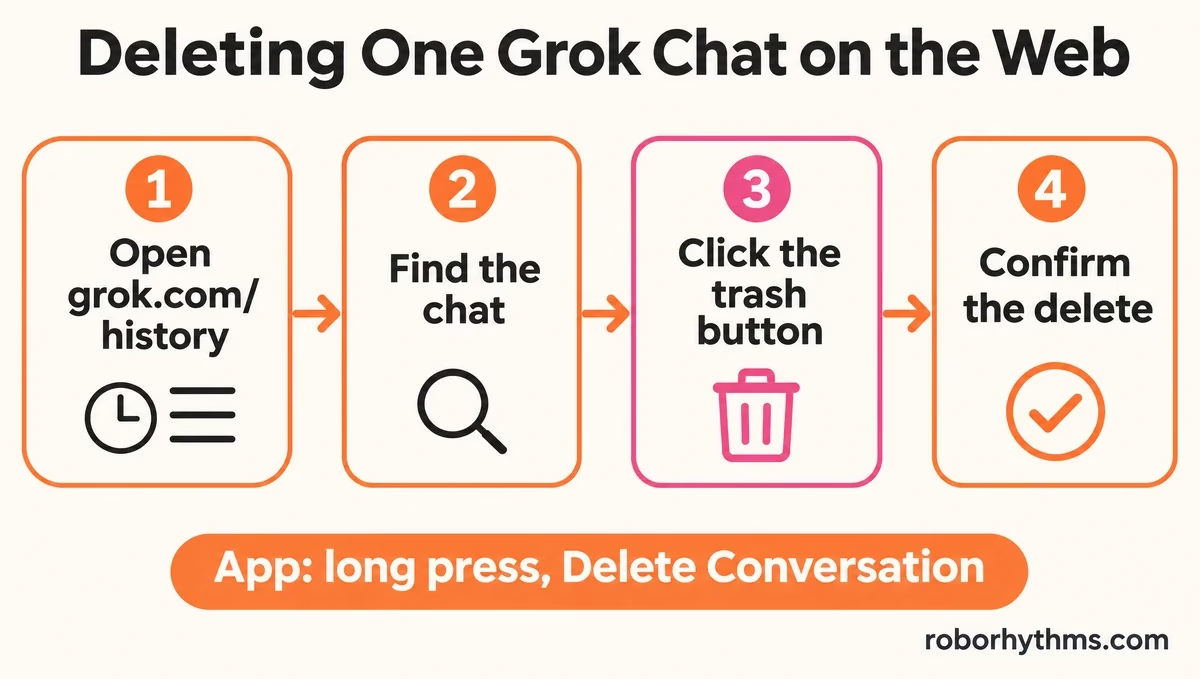
You delete a single Grok conversation on the new website from the history page at grok.com/history, using the trash button next to the chat.
xAI’s Consumer FAQs describe the same route: “go to the conversation history page and select the trash button next to it.”
If you mostly used Grok for companion chats, Candy AI is the app I point people to for that. Its monthly plan is $9.99 for the first month and $13.99 after that (checked November 16, 2026).
The menu that opens on a chat in the main list is where the change shows up. In one thread, the poster found no trash icon on desktop, on an iPhone or in the browser, only an option to delete every conversation.
The order I use on the web is short:
- Open grok.com and sign in.
- Go to grok.com/history, or click the history icon in the top right corner, which xAI’s FAQ describes as three lines and a magnifying glass.
- Find the chat and click the trash button next to it.
- Confirm the delete.
A reply in that thread describes the newer flow as two steps: archive the chat first, then delete it at grok.com/history.
In the Grok app, xAI’s FAQ says to tap your profile picture to open your history, press and hold the chat, then choose Delete Conversation. In another thread, one reply says Delete is still there in the app.
Other routes turned up the same week. In this r/grok thread, clearing cookies brought Delete back for a commenter, though it signs you out, and a support ticket did it for someone else.
| What you see | What it means | What to do |
|---|---|---|
| Archive in the chat menu, no Delete | Your account has the new web menu | Open grok.com/history and use the trash button |
| No trash button on the history page | Reports differ by account | Try the app’s long press, or clear cookies (this signs you out) |
| Delete still in the chat menu | Your account still has the old menu | Delete from the menu as before |
| A “deleted” chat shows under Archived | The delete only archived the chat | Delete it again from the app or contact support |
Does Archiving a Grok Chat Delete It?
Archiving a Grok chat hides it from the main chat list, and none of xAI’s help pages say Archive deletes anything.
The Consumer FAQs describe deletion only through the trash button, Delete Conversation and Delete All Conversations.
People disagree about what Archive does underneath. In one thread, deleted conversations “show up in archive but can’t be edited or removed”, while a commenter in the cannot-delete thread says a chat they archived turned up in their deleted list.
I treat Archive as a way to tidy the list and never as a way to get rid of a chat.
How Do You Delete All Your Grok Conversations at Once?
You delete all your Grok conversations in Settings, under Data Controls, with Delete All Conversations.
xAI’s FAQ gives that exact path for the Grok app and points website users to the matching button in Settings.
Save anything you want to keep before you press it. xAI’s Consumer FAQs say you can download your data from Settings, under Data Controls, on the app or the website.
I always download first, even when I think nothing in there matters, because xAI documents no undo for this button. Then the wipe takes four steps:
- Download your data from Settings, under Data Controls.
- Open Settings again and go to Data Controls.
- Choose Delete All Conversations and confirm.
- Open grok.com/history afterwards and check the Archived filter too.
Grok on X keeps its own history with its own delete button, covered further down. The Grok cancellation guide covers deleting the account itself and stopping a subscription, which are separate steps.
Are Deleted Grok Conversations Gone for Good?
Deleted Grok conversations leave xAI’s systems within 30 days, unless xAI keeps them for safety, security or legal reasons, or they have been de-identified and separated from your account.
That is the rule in xAI’s Consumer FAQs and its privacy policy.
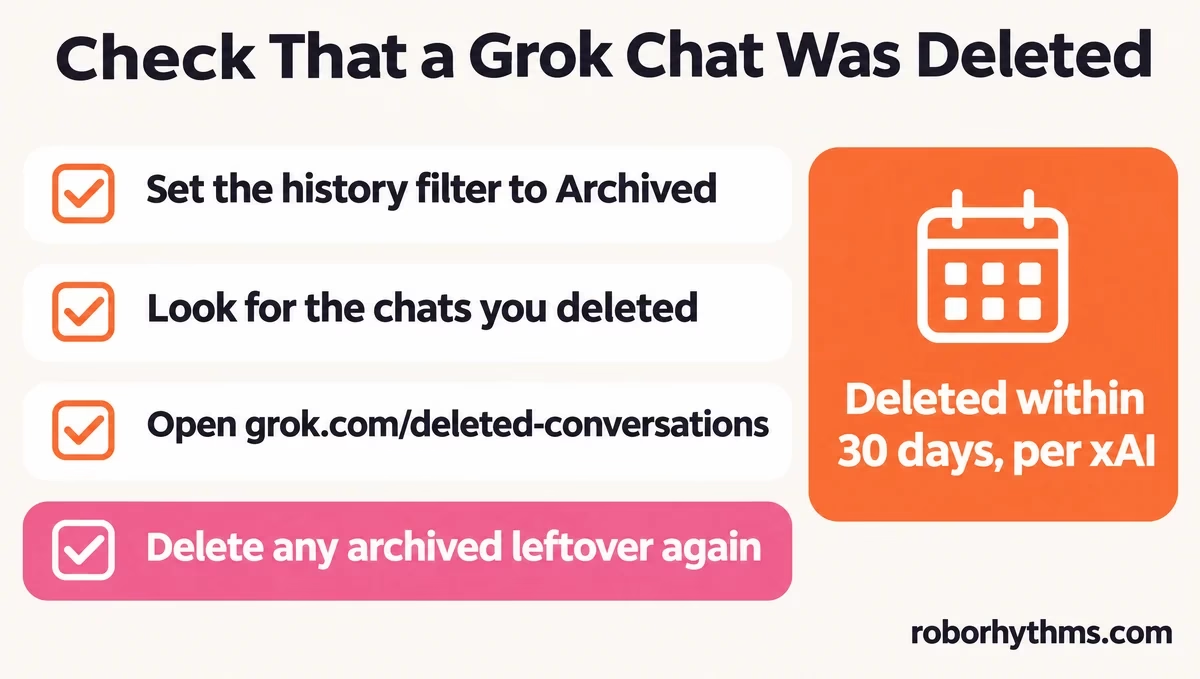
Check that a delete went through before you trust it. In the cannot-delete thread, a commenter says the history page delete did not work for them, the “deleted” chats sat under the Archived status filter, and Delete All Conversations archived everything too. Another commenter in the same thread says the history page worked.
I check the Archived filter after every delete now, because a chat that only got archived is still stored in your account. The check takes a minute:
- Open grok.com/history and set the status filter to Archived.
- Look for the chats you deleted.
- Open grok.com/deleted-conversations to see what is waiting out the 30 days.
- Delete any archived leftover again from the app, or contact support.
Before: You click delete on the history page, the chat leaves the list, and you assume it is gone.
After: You click delete, switch the history filter to Archived to make sure the chat is not hiding there, then look for it on the Deleted Conversations page.
Shared chats need their own cleanup. xAI’s FAQ handles public share links separately: you remove them at grok.com/share-links with the Remove button.
TechCrunch reported in August 2025 that shared Grok chats were being indexed by Google, Bing and DuckDuckGo.
For chats you never want saved, the FAQ’s answer is Private Chat, the ghost icon in the top right, which keeps the conversation out of your history and deletes it within 30 days.
What xAI keeps after deletion covers training and retention in more depth.
If this much cleanup is enough to put you off Grok for companion chats, Candy AI is the swap I suggest.
How Do You Delete Grok History on X?
You delete Grok history on X all at once in X’s settings, under Privacy & Safety, Data sharing and personalization, then Grok, with Delete Conversation History.
X’s help page describes only that full wipe.
- Open your X settings.
- Select Privacy & Safety, then Data sharing and personalization, then Grok.
- Select Delete Conversation History.
- Confirm “Delete your interactions, inputs, and results”.
xAI’s FAQ sends Grok on X users to the X Help Center to delete that history. I clear both histories whenever someone asks me how to wipe Grok, because the two delete buttons sit in different places and xAI documents them separately.
Linking the two accounts can bring old items back. In one r/grok thread, images deleted more than six months earlier reappeared after the poster clicked something about syncing their account, and a commenter says they came back again after a second delete.
Do Grok’s Uploaded Files Get Deleted With Your Chats?
Grok’s uploaded files live on their own page, grok.com/files, which xAI’s Grok FAQ names as the place to delete content and free up space.
xAI’s help pages do not say that deleting a chat removes its files, so treat them as a separate cleanup.
Images and videos made with Grok Imagine have their own rules, covered in where Imagine creations went. My rule for a clean slate is three stops: the chats, grok.com/files and any share links.
Quick Takeaways
- On the new grok.com, delete single chats with the trash button at grok.com/history, since the chat menu now shows Archive.
- xAI’s FAQ lists Delete Conversation on a long press in the Grok app, which still works for some people.
- Delete All Conversations sits in Settings under Data Controls, and you can download your data there first.
- Check the Archived filter after deleting, because some deletes have landed there.
- Grok on X, uploaded files and share links each need their own delete.
