
What’s Changed: As of November 7, 2026, Zeta’s iPhone app is gone from Apple’s App Store in the US, the UK, Canada and at least five other countries, while the Android app and the zeta-ai.io website still work. Most other Zeta failures trace to an outage, an ad that crashes the app, a sign-in mix-up or a glitchy long chat, and each one has its own fix below.
Why is Zeta AI not working? This week the biggest answer is on iPhone, where the app no longer shows up in the App Store at all.
A wave of people found that out overnight when they tried to reinstall it and got a message that it was not available in their region.
Android users have a different set of problems. The app is still on Google Play, but recent Google Play reviews complain about constant ads, replies with a period after every word, and chats that forget what happened three messages ago.
The first thing I check is whether the fault sits with Zeta or with my own phone, and this guide follows that order.
You will know within a few minutes which problem you have and what fixes it, from the App Store gap to a chat room that suddenly vanished.
Why Is Zeta AI Not Working on iPhone?
Zeta cannot be downloaded on iPhone right now because its App Store listing is gone, while the service itself keeps running.
The website still works in Safari, and your account works there too. Neither Apple nor Zeta has said why the listing disappeared.
As of November 7, Apple’s own store lookup returns nothing for Zeta in the US, UK, Canada, Australia, Norway, South Korea, Japan and Germany. The store page itself returns a “not found” error.
The last time the US listing loaded in the Internet Archive was October 24, so it went away some time in the two weeks since.
The reports piled up overnight. Between midnight and 2:30 AM UTC on November 7, StatusGator’s Zeta page filled with “Unable to download” reports from at least ten US states, plus Alberta, Norway and Saudi Arabia. One New York report says the app “completely disappeared” after they deleted it and tried to download it again.
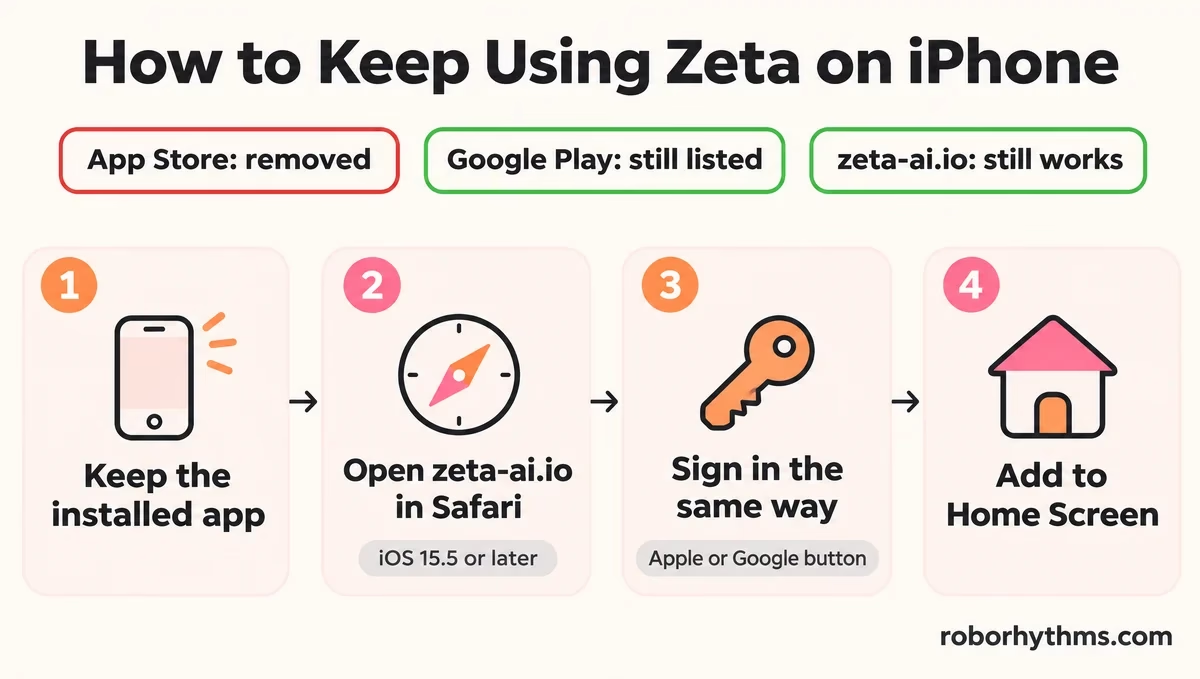
Deleting it is the one move I would not make right now. With no listing, the App Store has nothing to reinstall from, so the copy on your phone is the only app version you can still open. Here is how to stay in your stories either way:
- Keep the Zeta app installed if it is still on your iPhone, and do not offload it in Settings.
- Open zeta-ai.io in Safari. Zeta’s own site code blocks iPhones below iOS 15.5 and asks you to update in Settings, General, Software Update.
- Sign in with the same button you used in the app. The web login offers Continue with Apple and Continue with Google, and picking the other one opens a different, empty account.
- Tap Share, then Add to Home Screen, so the website opens like an app.
If Zeta’s iPhone limbo is the last straw, Candy AI is the app a lot of people in this spot try next. It runs in the browser, so an App Store change cannot take it off your phone.
Zeta is not the first companion app to leave the iPhone store this autumn. Chai left in October, covered in our guide to whether Chai is safe, and Zeta’s own App Store rating had already dropped from 17+ to 13+ in August, as our Zeta safety guide explains.
TechCrunch reported on November 3 that Apple is pushing AI companions with romantic content to an 18+ rating.
That rule only takes effect on November 16, after Zeta’s listing was already gone, so it does not explain the removal on its own.
Is Zeta Down for Everyone or Only on Your Phone?
Zeta is down for everyone when the website fails on a second device too.
If zeta-ai.io loads and chats normally on a laptop or another phone while your app does not, the problem is on your phone. That one test settles the question faster than any status site.
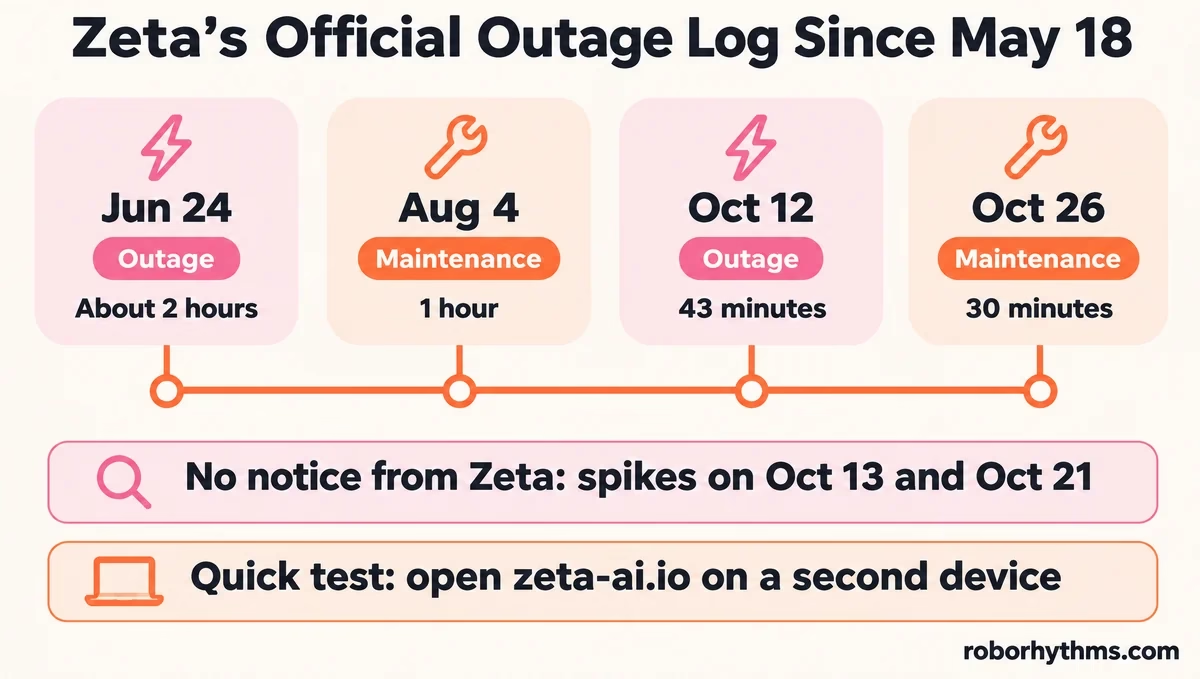
I always open the website on a second device first, because it gives a yes or no in under a minute. Zeta posts outages and maintenance on the Announcements tab of its support site at support.zeta-ai.io.
Its English board lists only four disruptions since the app went worldwide on May 18:
- June 24: a server outage starting around 8:25 PM Korea time that lasted about two hours.
- August 4: one hour of planned maintenance, 4:00 to 5:00 AM Korea time.
- October 12: an outage from 8:28 to 9:11 PM Korea time, which was 7:28 to 8:11 AM Eastern.
- October 26: planned maintenance from 20:00 to 20:30 UTC, posted the same day it happened.
That board misses things. Instatus’s Zeta page, which logs user reports, shows two more October spikes on the 13th and the 21st, an hour each, and Zeta posted nothing about either.
For October 12, Zeta’s notice gives 43 minutes, while Instatus logged complaints for about five hours, peaking at 96 reports an hour.
Status sites can lag the other way too. During the October 12 outage, one person watching a status website saw “100% working” while others in the same thread were getting a “zeta is offline” pop-up.
On a phone, a Google search for Zeta status can also surface a status page for Zeta Global, a marketing company that shares the name and has nothing to do with the chat app.
| Symptom | Likely cause | Fix |
|---|---|---|
| Zeta missing from the App Store | Listing removed (iPhone only) | Keep the installed app, use zeta-ai.io in Safari |
| “zeta is offline” or “unknown error occurred” | Server outage or maintenance | Check the Announcements tab, test the website, wait |
| App closes right after an ad | Ad crash | Force stop, reopen, update the app |
| Blank or “too old” page on zeta-ai.io | Old browser engine or iOS below 15.5 | Update Android System WebView and Chrome, or iOS |
| Periods after every word | Long or glitched chat | Delete the broken replies, restart the chat |
| Account looks empty | Different sign-in method or language version | Sign in the original way, set the phone language back |
Why Does Zeta Keep Crashing?
Zeta crashes mostly when an ad opens or closes.
In the newest 435 Google Play reviews rated one to three stars, posted from late October to November 6, only 10 describe the app crashing, and 8 of those also complain about ads. Four say the crash comes right as an ad opens or closes.
Ads are behind more of these crashes than anything else, and they are the part of this app I like least. Ads come up in 242 of those 435 reviews.
Some of those ads have no close button, and a crash mid-ad can wipe out the reward you watched it for.
Zeta’s help center says its ads come from an outside ad network, and it asks you to report a bad one with a screenshot of the ad’s app screen.
Older phones hit a second problem. Zeta’s website carries its own compatibility check, and on Android any browser engine older than Chrome 87 gets a full-screen warning telling you to update Android System WebView and Chrome from the Play Store.
Work through these in order on Android:
- Update Zeta in Google Play. Version 3.51.63 started showing up in reviews on November 4.
- Update Android System WebView and Chrome from the Play Store. Zeta’s website asks for this on older phones, and it costs nothing to try.
- Force stop Zeta in your phone’s app settings, then clear its cache. Leave storage alone, because clearing storage signs you out.
- If it dies during an ad, reopen it and carry on, and report any lost reward to support with a screenshot.
- Reinstall only after you are sure which sign-in method your account uses.
Why Won’t Zeta AI Send Messages?
Zeta AI won’t send messages when its servers are struggling, and the error can blame your network even when your connection is fine.
During the October 12 outage, the app showed “unknown error occurred” and “unstable network connection” while the problem sat on Zeta’s side. If the website fails to send too, waiting is the only fix.
When only one chat refuses to send while the rest work, I treat it as a restriction before I treat it as a bug. Zeta’s Korean notice board described staged limits in October, where repeated blocked replies lock a single chat for up to 24 hours, with the time left shown in the message box.
Zeta’s English board has no matching notice yet, so English accounts may not use the same limit, but it fits a chat that freezes while your others work.
A frozen chat is worth leaving alone. The same Korean notice says repeated blocks can end with that chat reset to its opening scene, and the pop-up that appears has a button to report a block you think was a mistake. Your other chats keep working in the meantime.
Why Are Zeta AI Replies Glitching?
Zeta AI replies tend to glitch in long chats and after model updates.
The current wave puts a period after every word, loops “…” over and over, or misspells words it used correctly earlier. Deleting the broken replies, and restarting the chat if that fails, is the fix to try first.
The period glitch is the bug that frustrates me most, because it ruins a story you spent hours on.
Zeta’s own help center admits that model updates can cause “memory, context recognition, name mistakes, foreign-language outputs.”
That lines up with the replies that went strange in early November.
How Do You Stop Zeta From Putting a Period After Every Word?
You stop it by removing the broken replies before you send anything else.
The model copies its own recent writing, so every glitched reply you leave in place pushes it to glitch again. Edit or delete them, then continue.
If that does not hold, restart the conversation. In one thread on the glitch, one person saw it start at about 150 messages in one chat and stop after a break, with 30 minutes as their suggested wait.
One fix shared on r/playzeta adds a calm narrator line to the character bio and erases any ALL CAPS word the moment it appears.
Why Does Zeta Keep Forgetting Your Story?
Zeta forgets your story because each reply only sees the recent part of the chat.
Older events fall out of view as a chat grows, so the bot contradicts itself or drifts out of character. A short note to the narrator can bring the key facts back for a while.
The narrator-note method works like this: tag the narrator with @, then send a short out-of-character note that names the facts that matter. Vague notes can get ignored, so spell it out:
Before: (OOC: stop changing her personality)
After: @Narrator (OOC: Mara is calm and dry-humored, never aggressive. She owns the bookshop and just locked up for the night. Continue from there and keep her voice consistent.)
When a reply goes wrong, report it so the team sees it. Tap the siren button under the reply, or press and hold an older reply and choose Report an issue.
Zeta’s help center is clear that a report does not earn Piece refunds or compensation.
Why Does Zeta Keep Logging You Out?
Zeta keeps logging you out because its sign-in can drop on its own, and a forced app update can sign you out too.
Zeta’s help center says so in plain words. Signing back in with the same Google or Apple button you first used brings your account back.
The wrong sign-in button is the costliest mistake here, and it is the one I warn friends about first. Zeta’s help center says there may be cases where “your login state is cleared while using the service,” and that a forced update can require a fresh sign-in. It also says the sign-in method you set up can never be changed later.
Delete the Google or Apple account linked to Zeta and you cannot sign back in at all. A new Zeta account cannot carry over your Pieces or chat history.
Some Android users now get pushed to sign in with Google before they can play, so check which account you used before you tap anything.
Why Does Your Zeta Account Look Reset?
Your Zeta account looks reset when you signed in a different way or opened a different language version.
Zeta keeps accounts separate by language, so a phone set to another language or region can open an empty version of the app. Switch back and sign in the original way.
Zeta’s fix for the language case is to set your phone’s language back to the one you used, then delete and reinstall the app.
On iPhone, skip the reinstall for now and use the website instead, since the App Store cannot give the app back.
Why Did a Zeta Chat Room Disappear?
A Zeta chat room disappears when the story or character it runs on gets deleted.
Zeta says deleted chat rooms cannot be restored.
What is a plot on Zeta: Zeta’s name for a character or story setup that a creator publishes. Every chat you start on Zeta runs on a plot.
Either the creator removed the plot, or Zeta removed it for breaking the rules, and a rules removal deletes every chat built on that plot at once.
You can protect a favorite from the creator side. Open the chat, tap the three lines in the top right, and choose Make private. That copies the plot to your own slot, so a creator deleting it later does not take your chat with it.
How Do You Appeal a Zeta Ban?
You appeal a Zeta ban through Zeta’s customer support, with the plot name or link.
Zeta removes plots using automated filtering, and its August 18 safety update says a creator who thinks a removal was a mistake should appeal there. Two-week bans on flagged plots surfaced on November 6.
In a two-week ban thread, a creator was told to appeal and said they had already sent one. Zeta’s help center says it will review a penalty you think is unfair and explain it in more detail.
What Should You Send Zeta Support?
Send Zeta support your @zeta ID, your sign-in method and email, and an order number if you ever paid.
Those let support match your account. Add the exact titles of any plots you made and a screenshot of the error.
Apple order numbers start with M and Google ones start with GPA. Refunds for anything bought inside the app go through Apple or Google, not Zeta.
Payments made on Zeta’s website run through a payment company called CODASHOP, which handles those refunds and errors.
Is Zeta AI Broken for Good?
Zeta AI is not broken for good.
It still runs on Android and the web, and every outage on its notice board was fixed the same day. The open question is iPhone, where nobody has given a reason for the missing listing or a date for its return.
Zeta still writes longer story replies than most free chat apps, and I get why people wait it out. My take is that waiting makes sense for an outage or announced maintenance, since every one on Zeta’s board has cleared the same day.
Paying will not fix the memory problems, because Zeta’s help center says zeta pass “does not improve the performance of the AI model itself.”
What is zeta pass: Zeta’s monthly subscription that removes ads and adds 200 Pieces a month, plus faster replies. Our Zeta review covers what the pass costs.
Switching makes sense if the missing iPhone app leaves you uneasy, or the ads and the forgetting keep killing your stories.
Candy AI runs in a phone browser with no outside ad network, though it pushes its own upgrade offers, and its five free messages are enough to see whether it suits you.
For the full field, these Zeta alternatives are sorted by what each one fixes.
Quick Takeaways
- Zeta’s iPhone app is gone from the App Store as of November 7, so keep the installed copy and use zeta-ai.io in Safari.
- Test the website on a second device first, since Zeta’s notice board missed two October outage spikes.
- Most crashes come with ads, so update the app, then update Android System WebView and Chrome.
- Delete glitched replies before you continue, and restart any chat that keeps putting periods after every word.
- Always sign in with your original Google or Apple button, because a second account starts empty.
