
What’s Changed: Yes, Character AI generates images with Imagine Chat, Imagine Message and Comics, and it can turn them into short clips. Every tool is capped: Character AI’s event terms list 5 Imagine Chat images a day free and 20 on c.ai+, and a Character AI moderator says Imagine Message gives c.ai+ only 10 a month. Past those limits, images, animations and comic pages cost Charms, Character AI’s in-app currency.
Can Character AI generate images? Yes, with five built-in tools: Imagine Chat, Imagine Message, Comics, Imagine Animate and talking intro videos.
Every one of them is metered, and paying does not switch the meter off.
The limit on c.ai+, Character AI’s $9.99-a-month subscription, is the one that catches people. Character AI’s own plan comparison lists the paid tier’s feature limits as “Unlimited.”
Yet a CAI Community Moderator told a subscriber on October 24, 2026 that “The Imagine Message feature has 10 generations per month for c.ai+ users.” That subscriber had hit the limit on their third image after paying for the month.
The gap between that table and the real limit bothers me more than the limit itself, because $9.99 a month reads like it buys you out of counters.
Below is every visual tool with its cap and Charms price, the steps for making an image inside a chat, and the fixes for when an image stalls at 0% or gets refused.
Can Character AI Generate Images?
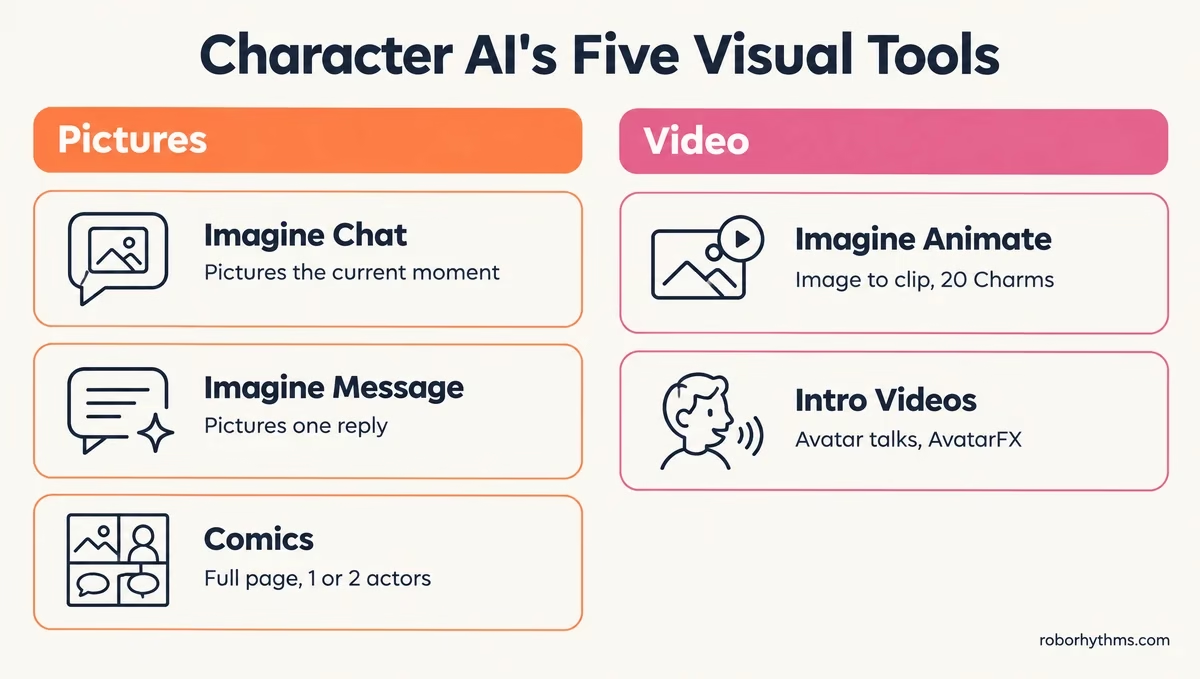
Character AI can generate images with five built-in tools: Imagine Chat, Imagine Message, Comics, Imagine Animate and intro videos.
Its own CAI-Image models draw the pictures and comic pages, and sending your own photo into a chat is a separate feature with its own daily cap.
Five Imagine Chat images a day runs out fast if pictures are the main reason you open the app. People in that spot often try Nectar AI, whose free plan allows 10 image generations a day.
CAI-Image is a model family Character AI post-trained from the open-source Qwen-Image to keep one Character recognizable across styles, scenes and comic pages.
The company says the models handle 245 camera positions and include a dedicated manga model for comics.
Keeping a Character’s face consistent is the strongest part of the setup, and it is the one point I’ll hand Character AI before getting to the limits.
| Tool | What it makes | Where to find it | Cap or price |
|---|---|---|---|
| Imagine Chat | A picture of the current moment in your conversation | Chat menu (tap your Persona photo) | 5 a day free, 20 a day on c.ai+, reset at midnight UTC; extra images cost Charms |
| Imagine Message | A picture of one specific Character reply | Image icon on the message | 10 a month on c.ai+; 10 Charms each since May 2026 |
| Imagine Gallery | Storage for every Imagine image you have made | Chats page, Gallery tab (mobile app) | No cap; using an image as a chat background is c.ai+ only |
| Comics | A full illustrated page with panels and dialogue, starring one or two actors | The + button, then Comic (mobile app) | 20 Charms a page at the August 2026 launch price; a Re-gen costs the same |
| Imagine Animate | A short moving clip made from an Imagine image | Animate button on an Imagine image | 20 Charms a clip |
| Intro videos (AvatarFX) | A talking clip of a Character’s avatar or of a photo | The + button, then Video | 5 a day for every user when it opened up in June 2025 |
| Image attachments | Your own photo, sent for the Character to react to | The message bar | 5 a day free, unlimited on c.ai+ (Character AI’s April 2025 announcement) |
How Do You Make an Image in a Character AI Chat?
You make an image in a Character AI chat with Imagine Chat from the chat menu, which pictures the current scene, or with Imagine Message, which pictures one reply you tap.
Both save to Imagine Gallery in the mobile app.
I reach for Imagine Chat first, because it reads the whole scene and its allowance resets every day instead of every month. Character AI’s own steps for it, from its DokiDoki event instructions, work in any chat:
- Open a chat with any Character.
- Tap your Persona photo at the bottom left of the screen to open the chat menu. On the older chat layout, tap the sparkle icon at the bottom left instead.
- Select Imagine Chat, and the app turns the current moment of your conversation into a picture.
- Open the finished image to download it, post it to the Feed or save it as a favorite.
Imagine Message is the tool for one line you want to see. Character AI added it in March 2026 alongside the Imagine Gallery launch:
- Find the Character reply you want pictured.
- Tap the image icon on that message.
- Swipe through the variations, then open the one you like to save, share or post it. On c.ai+ you can also set it as the chat wallpaper.
Everything you make lands in Imagine Gallery. Tap the chat bubble in the bottom bar to reach your Chats page, then tap Gallery at the top, where you can filter by Persona.
Comics come from a different door, laid out in Character AI’s comics guide. Tap the + button and choose Comic, pick one or two actors and a style (Japanese, American, Black and White or Chibi), and generate a page.
Each page and each Re-gen costs Charms, and the current price shows on the Generate button.
How Many Images Does Character AI Let You Make?
Character AI lets free accounts make 5 Imagine Chat images a day and c.ai+ members 20, according to its own event terms, while Imagine Message gives c.ai+ 10 a month.
The daily counters reset at midnight UTC, and anything past a cap costs Charms.
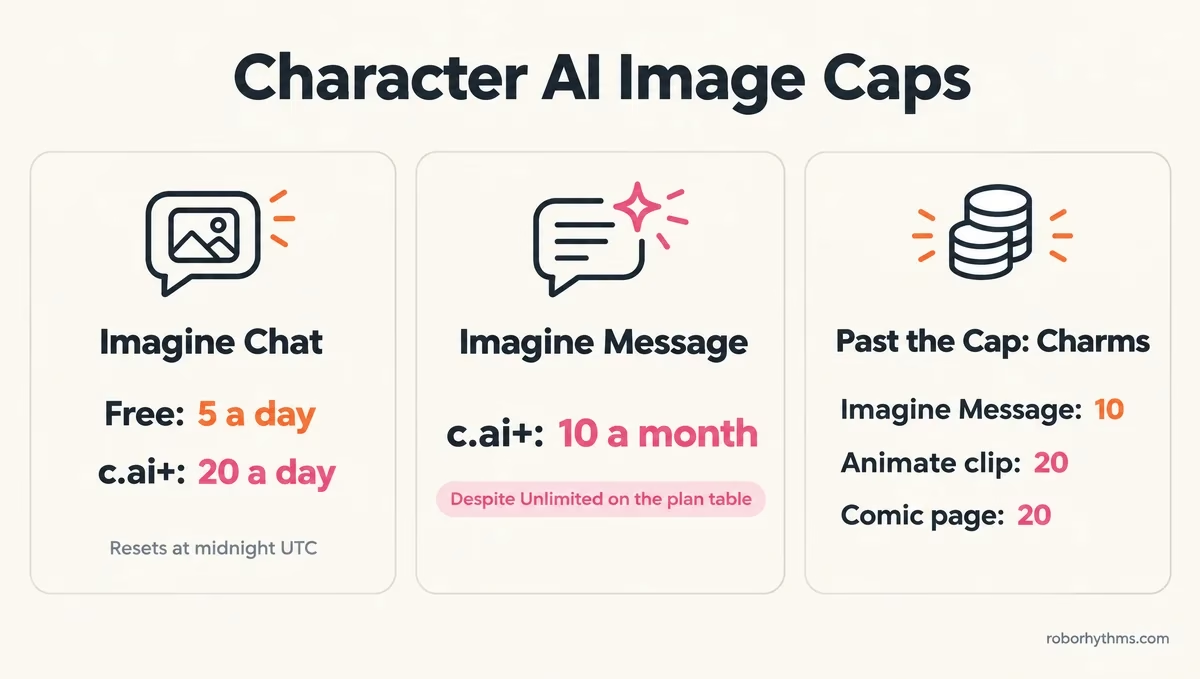
Those daily numbers come from Character AI’s February 2026 DokiDoki terms, which list 5 regular Imagine Chat images a day for all users and 20 for c.ai+ members.
The plan comparison Character AI published in September prints no image figure at all, only “Limited” for free and “Unlimited” for c.ai+.
The free figure is the least certain number on this page, because it comes from February terms and Character AI’s metering changes followed in April.
Your app’s own limit message is the final word on what your account gets today.
The c.ai+ side has the sharper problem. My read is that “Unlimited” on that table covers metered chat actions such as swipes and voice memos, and the moderator’s 20-a-day and 10-a-month answer suggests pictures were never part of it.
Before paying for c.ai+ mainly for pictures, count on those two numbers rather than the word on the table.
What Do Charms Buy When You Hit the Character AI Image Cap?
Charms buy extra Imagine images, Imagine Message pictures at 10 Charms each, Imagine Animate clips at 20 Charms and comic pages at an introductory 20 Charms.
You earn them from quests or buy them in packs.
Charms are Character AI’s in-app currency, tied to your account and never redeemable for money. The Charms FAQ lists the quests that pay them: a daily log-in, turning on notifications, making a persona, making an intro video, imagining a chat image and posting to the Feed.
That FAQ still says Charms will be purchasable “In the future,” while the US App Store listing already sells Charms packs starting at $0.99. Character AI’s plan comparison adds a 20% Charms bonus for c.ai+ members.
The per-action prices come from Character AI’s May 2026 announcement, which cut Imagine Messages to 10 Charms and set Animate at 20 a clip.
Comics opened to everyone in August 2026 at an introductory 20 Charms a page, a price Character AI labeled as limited time.
Character AI is also in a court-supervised sale after its October 2026 Chapter 11 filing. Treat every cap and Charms price here as open to change while that sale plays out.
Why Is Character AI Image Generation Not Working?
Character AI image generation usually stops for one of four reasons: you hit a cap, the image filter refused the scene, the chat itself is blocked, or the generation stalled.
The table matches each symptom to its fix.
| Symptom | Likely cause | Fix |
|---|---|---|
| A limit message after a few images | The daily Imagine Chat cap or the monthly Imagine Message cap | Wait for the midnight UTC reset, switch tools, or spend Charms |
| The image sits at 0% | A stalled generation | Close and reopen the app, then try Imagine Message on a reply |
| “Failed to generate image” in one chat only | A chat-level block, after a warning or after a comic in that chat | Start a new chat with the same Character and report the old one |
| A harmless scene gets refused | An over-sensitive image filter | Describe the scene in plain words, retry later, and report the false flag |
| Your Character’s avatar gets flagged | The upload scan misreading a safe image | Re-download the image and set it again |
| The Character cannot respond to your photo | The attachment scan flagged it | Send a different image |
My order when an image fails is cheap fixes first, before anything that costs Charms or a chat:
- Read the limit message. If it names a cap, wait for midnight UTC.
- Close and reopen the app.
- Try the other tool, Imagine Message on a reply or Imagine Chat from the menu.
- Start a new chat with the same Character.
- Report it in the app under Settings, Support, then Report an issue.
Character AI has admitted the filter misfired. Its December 2025 community update said “Some uploads and images were temporarily flagged too aggressively” and that the team had adjusted the filters.
A refused image can also shut Imagine off for the rest of that chat, which the one-warning Imagine ban covers in detail. Comics can trigger the same dead end: in one bug report, every Imagine attempt failed after a comic was made in a chat, copies of the chat inherited the failure, and a fresh chat worked.
For an image stuck at 0%, restarting the app is the first fix to try. If Imagine Chat stays stuck, the image icon under a reply can still work, though with weaker results, per one thread on the stall.
Flagged avatars are their own problem, and the avatar removal guide walks through recovery.
Under-18 accounts kept Imagine Chat and AvatarFX after Character AI ended open-ended chat for minors in November 2025, per its help page on the change.
Can You Send Your Own Pictures to a Character AI Bot?
You can send your own pictures to a Character AI bot with image attachments, and the Character reads the photo and replies to it.
Character AI’s April 2025 announcement capped free accounts at five attachments a day and gave c.ai+ an unlimited number.
Take a photo or pick one from your gallery, and it appears in the message bar so you can type a message to go with it, per Character AI’s image attachments announcement.
You can remove a message with an image or edit its text, the same as any other message.
Every upload passes a safety scan, and a flagged photo returns an error saying the Character cannot respond to it.
Sending a picture creates nothing new, so I don’t count it as image generation even though it sits in the same menus.
Can Character AI Turn an Image Into a Video?
Character AI turns images into video two ways: Imagine Animate makes a short clip from an Imagine image for 20 Charms, and intro videos built on AvatarFX make a Character’s avatar or a photo talk.
Intro videos carry a one-strike ban for impersonation and deepfakes.
Imagine Animate arrived on May 20, 2026. Any Imagine image can become a clip for 20 Charms, and the clip sits in your Gallery right alongside the original image. The Imagine Animate launch covers how that rollout went.
Intro videos start from the + button and the Video option, or from Create intro video on a Character’s page. You pick a voice and write a short script, and the subject can be your Character, a public Character or a photo from your library, per Character AI’s intro video guide.
When AvatarFX opened to everyone, TechCrunch reported on June 2, 2025 that all users could make up to five videos a day and that each video carries a watermark.
Character AI’s intro video guide calls its content policy strict: impersonation, deepfakes, bullying and protected IP are banned, and one violation means an immediate ban.
I point people to that one-strike rule before they upload a real person’s photo.
Can a Character AI Bot Send You Images on Its Own?
Character AI’s 2026 creator guide lists no setting that makes a bot send pictures by itself, so images come from the Imagine tools you trigger.
Bots named Image Generator are Characters made by other users.
Some third-party guides still describe a legacy Image Generation switch in a bot’s advanced settings. The creator guide Character AI updated in June 2026 does not mention one.
What the guide does stress is the avatar. Its profile and presentation chapter says avatars “influence image and video generation across features like Imagine and Streams,” which is why the avatar matters more to me than any setting a creator could look for.
What Can You Use When the Character AI Image Cap Is Too Low?
When the Character AI image cap is too low, fix your Character’s avatar first, because it steers every Imagine image, then look at an app built around pictures.
Nectar AI and Candy AI are the two that people in this spot usually try.
Character AI’s creator guide says “A clear, high-quality avatar produces better results,” and you can upload one or describe it to the built-in generator.
Its intro video guide adds that a clear, front-facing avatar with an expressive face animates better, so the description is the part worth slowing down on:
Vague: “a cute anime boy”
Specific: “anime-style portrait of a tall young man with messy silver hair and green eyes, black hooded coat, faint scar on his left cheek, front-facing, calm half-smile, soft studio light, plain dark background”
That only helps the Characters and Personas you own, since a public Character’s avatar belongs to its creator. If the counter is still the dealbreaker, the numbers favor Nectar AI.
Nectar’s Premium plan, currently $9.99, allows 100 image generations a day plus 600 photo messages a month, against 20 Imagine Chat images a day on $9.99 c.ai+.
That comparison is the one I put in front of anyone paying for c.ai+ mainly for pictures. For realistic characters, Candy AI builds its paid plan around images and video: Premium is $9.99 for the first month, then $13.99 a month, with 100 tokens a month that images and videos draw from.
Candy’s free account allows one image, so its free tier works as a preview of the art style. Either way, you rebuild your Character there from its description.
Quick Takeaways
- Character AI makes images with Imagine Chat, Imagine Message and Comics, and turns them into video with Imagine Animate and intro videos.
- Its event terms list 5 Imagine Chat images a day free and 20 on c.ai+, and Imagine Message gives c.ai+ 10 a month despite the plan table’s “Unlimited.”
- Past the caps, Imagine Messages cost 10 Charms, Animate clips 20 and comic pages an introductory 20.
- When an image fails, restart the app, switch tools, then start a new chat and report it.
- If pictures are the main reason you are there, Nectar AI’s free plan allows 10 image generations a day and its Premium plan 100.
